Most legal CRMs are glorified spreadsheets. They function as static repositories for client data that is often incomplete, inconsistent, and manually entered with zero validation. The popular pitch is that automation will “streamline” this mess. That is a fundamental misunderstanding of the technology. The primary function of automation in a legal CRM is not convenience, it is to enforce discipline on data entry and operational workflows that attorneys and staff will otherwise ignore.
Automation acts as a system of constraints, forcing data into a structured format from the instant it is created. It bypasses the fallible human element of manual entry and replaces it with machine-driven processes. This creates a foundation of clean, reliable data which is the prerequisite for any meaningful business intelligence, from calculating client acquisition costs to analyzing attorney workloads.
Bypassing the Keyboard: Direct Data Ingestion
The single greatest point of failure in any CRM is the user. Manual data entry introduces typos, abbreviations, and empty required fields. An automation strategy begins by systematically identifying and eliminating every possible instance of a human typing information into the CRM. The goal is to have the CRM populated exclusively through system-to-system communication.
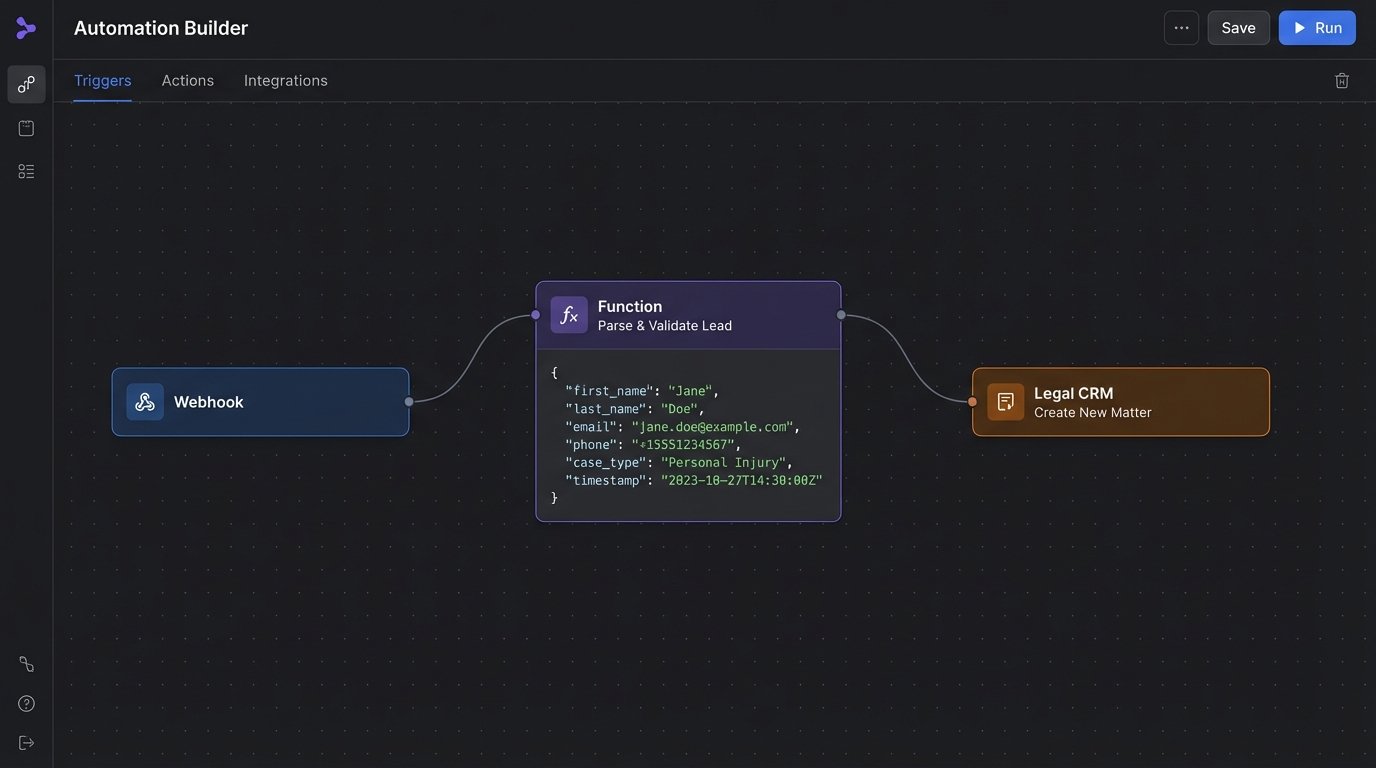
This starts at the point of origin, typically a website contact form. Instead of that form sending a notification email that a paralegal then re-keys into the CRM, the form should submit its payload directly to a webhook listener. This listener is a dedicated API endpoint waiting for an HTTP POST request. The request body contains the prospective client’s information in a structured format like JSON. A server-side script then takes this clean data and injects it into the CRM via its API, mapping each piece of data to a specific field.
The Intake-to-API Bridge
Building this bridge requires mapping form fields to CRM fields with absolute precision. A common point of failure is mismatching data types, like trying to force a string containing “five days” into an integer field. The script must contain logic to sanitize and validate the incoming data before attempting the API call. If validation fails, the script should not discard the lead. It should shunt the raw data and the error message to a specific person or system for manual review.
Consider a simple JSON payload from a web form:
{

  "firstName": "Jane",

  "lastName": "Doe",

  "email": "jane.doe@example.com",

  "phone": "555-867-5309",

  "caseType": "PI-Auto",

  "description": "Rear-ended on the freeway, other driver was cited."

}
A script, whether it’s a serverless function on AWS Lambda or a workflow in a tool like Zapier, will parse this object. It then authenticates with the CRM’s API and constructs a new contact and matter record. This process removes the paralegal as a data entry clerk and re-purposes them for higher-value review and client contact. The friction here is the loss of nuance. A form cannot capture the tone of a panicked client, but it will capture their phone number correctly every single time. You are choosing data integrity over qualitative, unstructured observation.
The same principle applies to other data sources. Email parsing can extract key information from templated emails sent by lead generation services. Integration with call tracking software can automatically log inbound calls, their duration, and their source, creating a record in the CRM without anyone lifting a finger. Trying to run analytics on manually entered CRM data is like trying to assemble a car engine from a bucket of miscellaneous bolts. The pieces are there, but none of them are standardized or trustworthy.
State-Based Communication Triggers
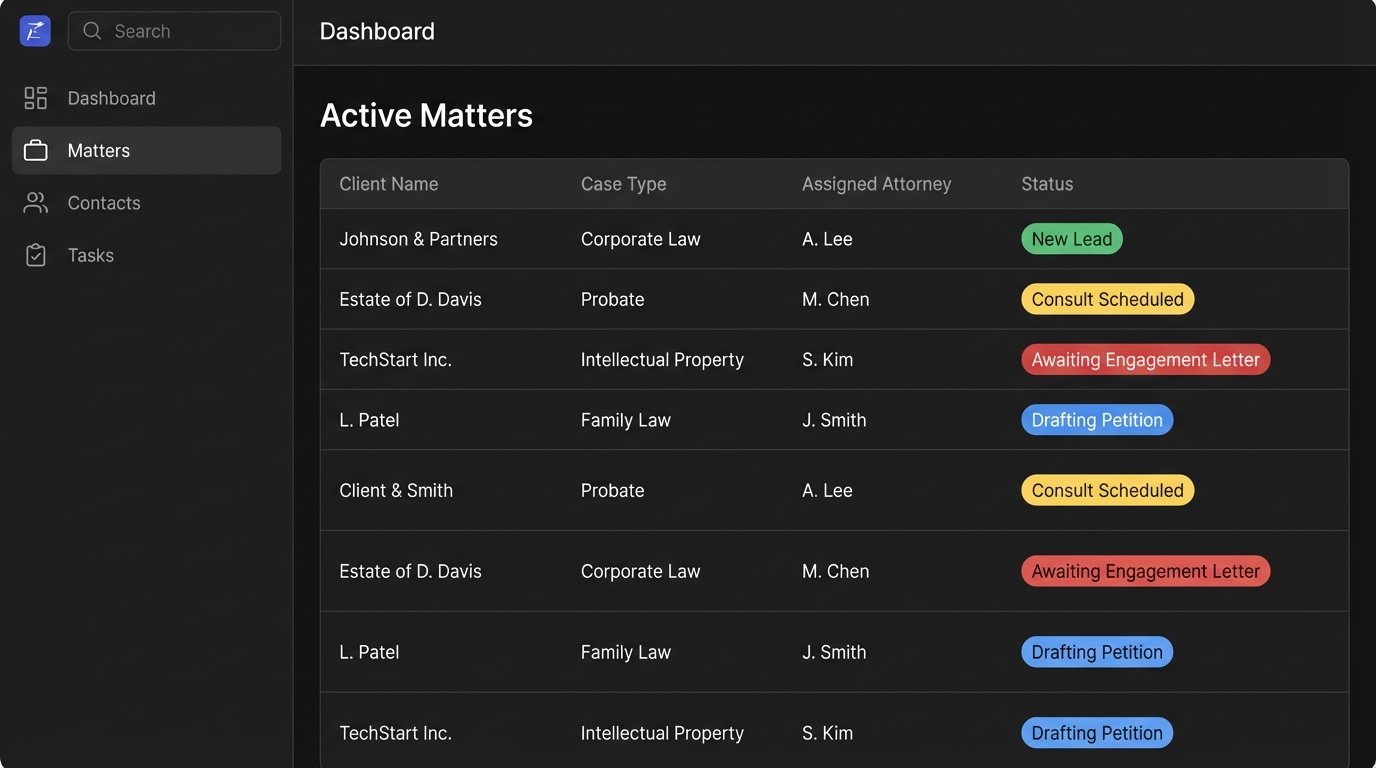
Client communication fails because it relies on an attorney’s memory. Automation fixes this by linking communication to a change in the client or matter’s status within the CRM. This is a state-based model. Each step in the client lifecycle, from “New Lead” to “Conflict Check” to “Engagement Sent” to “Matter Closed,” is a defined state. A change from one state to another acts as a trigger for a pre-defined communication sequence.
When a new lead is created via the API bridge mentioned earlier, its initial status is set to “New Lead.” This status change is the event that kicks off the workflow. The automation engine, which could be native to the CRM or an external platform, detects this change. It then executes a series of actions. For example, it might send a carefully worded text message acknowledging receipt and promising a call within a specific timeframe. It simultaneously creates a task for the intake specialist to make that call.
This is superior to a generic auto-responder. The communication is contextual. When the status changes to “Consult Scheduled,” the system can automatically send an email with the appointment details, a calendar invite, and a link to a secure portal for uploading initial documents. When the status becomes “Awaiting Engagement Letter,” the system can send polite, automated reminders every 48 hours until the document is signed. This prevents leads from going cold due to simple human oversight.
Building a Resilient Workflow
The architecture for this requires careful planning. You must define every possible state a matter can be in and map out the exact sequence of communications and internal tasks for each state transition. The system must also account for exceptions. What happens if a lead does not respond after three automated follow-ups? The workflow should not loop forever. It should transition the matter to a “Stale Lead” status and notify a human to make a final decision.
The weakness of this system is that it depends entirely on staff updating the matter status field accurately. If an attorney conducts a consultation but forgets to change the status from “Consult Scheduled” to “Awaiting Decision,” the automation sequence stalls. Therefore, the implementation must include monitoring and reporting. A dashboard showing all matters that have been in the same state for more than X days becomes a critical management tool. The automation forces a process, and the reporting enforces compliance with that process.
Automated Task Generation and Delegation
Organizing a legal matter involves a cascade of interdependent tasks. Many of these are predictable and repetitive. Automating task generation removes the mental overhead of remembering these steps and ensures nothing is missed, particularly during the chaotic transition from lead to active client.
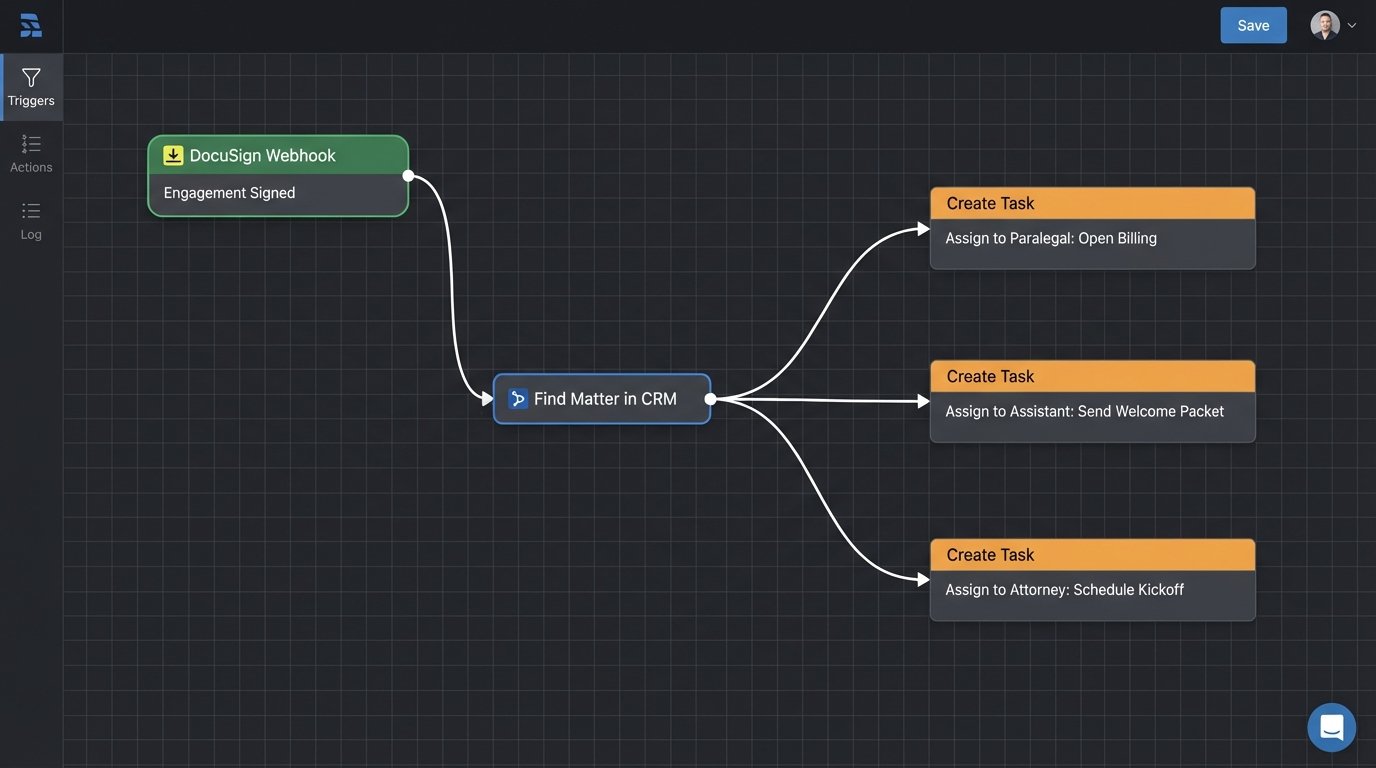
The trigger for this type of automation is often an external event that signifies a major milestone. A perfect example is the execution of an engagement letter through a service like DocuSign. When the client signs, DocuSign’s API can send a webhook to your automation platform. The payload of that webhook contains the client’s identifier. Your script uses this identifier to find the corresponding matter in the CRM.
Once the matter is identified, the script programmatically creates and assigns a series of tasks via the CRM’s API. These are not generic reminders. They are specific, actionable items assigned to the correct roles:
- To the Paralegal: “Open matter in the billing system” with a due date of 2 business days.
- To the Legal Assistant: “Send official client welcome packet” with a link to the document template.
- To the Assigned Attorney: “Schedule internal kickoff meeting” to review the case strategy.
This creates an instant, documented action plan for every new file. It codifies the firm’s best practices into an executable workflow, ensuring a consistent standard of service and reducing the risk of malpractice rooted in disorganization. It also creates a clear audit trail of who was assigned what and when.
Controlling the Noise
A significant risk with automated task generation is creating “notification fatigue.” If every small event generates a task, staff will quickly learn to ignore the entire system. The logic must be built with conditional suppressors. For instance, you might configure the workflow to skip task generation for pro bono matters or for matters of a certain subtype that follow a different process.
The logic can also be tiered. The initial “New Matter” event might trigger five core tasks. Completing one of those tasks, such as “Run Conflict Check,” could then trigger a subsequent, dependent task like “Send Conflict Waiver for Signature.” This creates a dependency chain that guides staff through a complex process in manageable steps. The goal is not to flood users with to-do items, but to present them with only the relevant task at the appropriate time.
The Real Objective: A Trustworthy System of Record
The efficiency gained from these automations is a secondary benefit. The primary benefit is data integrity. By forcing data entry, communications, and task management through automated, structured channels, you transform the CRM from a passive notebook into an active, reliable system of record.
When intake is automated, you can finally generate an accurate report on lead sources and conversion rates. When communications are triggered by status changes, you can measure client response times and identify bottlenecks in your intake process. When tasks are generated systematically, you can analyze team capacity and balance workloads. This level of business intelligence is impossible when the underlying data is a wasteland of typos and empty fields. Automation is the mechanism that cleans the data at the source, making everything that comes after it more valuable.