
Most contract automation projects fail. They fail not because the software is bad, but because the initial strategy is backward. Firms buy a shiny document assembly platform, try to jam their existing Word documents into it, and spend the next year wondering why adoption is nonexistent and the output is riddled with errors. The root of the failure is simple. They start with the document, not the data.
You cannot automate a document. You can only automate a structured data process that produces a document as its final artifact. This distinction is the entire ballgame.
Step 1: Deconstruct Your Master Templates
Before you even look at a vendor demo, your first job is to gut your existing templates. Pull out your firm’s master Non-Disclosure Agreement or a standard Services Agreement. The goal is not to edit the legal language but to surgically identify and tag every single variable piece of information. This is a mechanical, not a legal, task.
Print the document out. Get a red pen. Your team needs to go through it, line by line, and perform three actions:
- Isolate Variables: Any piece of text that changes from contract to contract gets bracketed. This includes names, dates, addresses, monetary figures, and jurisdiction. These are your raw data inputs.
- Tag Conditional Clauses: Find entire paragraphs or sentences that only appear under specific conditions. An indemnification clause that only applies to high-value deals. A data processing addendum required only for EU clients. Mark these sections and write down the business rule that triggers their inclusion. For example: [IF DealValue > 100000, INSERT Indemnity_Clause_A].
- Identify Repeating Blocks: Look for structures that repeat, like a list of directors on a board resolution or a schedule of services in an MSA. These are loops. You need a data structure, likely an array of objects, to populate these sections dynamically. A flat questionnaire won’t handle this.
This process is tedious and non-billable, which is why most firms skip it. Skipping it guarantees your project will become a money pit.
Step 2: Engineer the Data Model
The output of Step 1 is your blueprint. Now you build the data model. This is where you define the structure of the information required to generate any possible permutation of that contract. Forget about the document for a moment. Think only about the data in its purest form. A simple JSON object is the best way to conceptualize this, as it forces you to think in terms of keys, values, and data types.
A basic data model for an NDA might look something like this:
{

  "agreement_date": "2024-08-15",

  "disclosing_party": {

    "name": "Innovate Corp.",

    "entity_type": "Delaware C-Corp",

    "address": "123 Tech Lane, Silicon Valley, CA 94043"

  },

  "receiving_party": {

    "name": "Synergy Solutions LLC",

    "entity_type": "Wyoming LLC",

    "address": "456 Business Blvd, Cheyenne, WY 82001"

  },

  "term_in_months": 36,

  "jurisdiction": "State of Delaware",

  "is_mutual": true,

  "include_non_solicit": false

}
This structure is rigid and predictable. The `term_in_months` is an integer, not a string. The `is_mutual` and `include_non_solicit` fields are booleans. These booleans are the triggers for your conditional clauses. This structured approach prevents a user from typing “thirty-six” in a field that requires a number, a common source of errors in systems that just use dumb web forms.
Building templates without a data model is like trying to pour a concrete foundation without digging footers and laying rebar. You can do it, but the whole structure is unstable and doomed to crack under the slightest pressure.

Step 3: Evaluate Automation Engines (Not “Solutions”)
With a data model defined, you can now assess the tools. They fall into two main camps. Understand the fundamental architectural difference between them before you get locked into a multi-year contract.
The All-In-One Platforms
These are the wallet-drainers. They offer a slick user interface, a questionnaire builder, a template editor, and sometimes even e-signature and a “clause library.” They are designed for firms with minimal to no internal technical expertise. The promise is a turn-key system, but the reality is a walled garden. Customization is limited, and their APIs, if they exist at all, are often sluggish and poorly documented.
They force you to build your templates inside their proprietary Word add-in, which becomes a major point of failure. These add-ins are notoriously brittle and break with every new Microsoft Office update. They are a decent choice if your only goal is to automate a handful of simple documents and you have no desire to integrate the process with other firm systems.
The API-First Generation Engines
These are the workhorses. They are headless systems that do one thing extremely well: merge a JSON data object with a template to produce a document. They don’t care where the data comes from or what your user interface looks like. They expose a clean REST API endpoint. You send it the template and the data, and it sends you back a PDF or DOCX file.
This approach gives you total control. You can build your own front-end intake form, pull data directly from your firm’s CRM or matter management system, and chain the document generation step into a larger workflow. It requires engineering resources to set up, but it’s far more flexible and less likely to become obsolete. You aren’t buying a “solution.” You are buying a component for a system you design and own.
Step 4: Template Authoring and Logic Injection
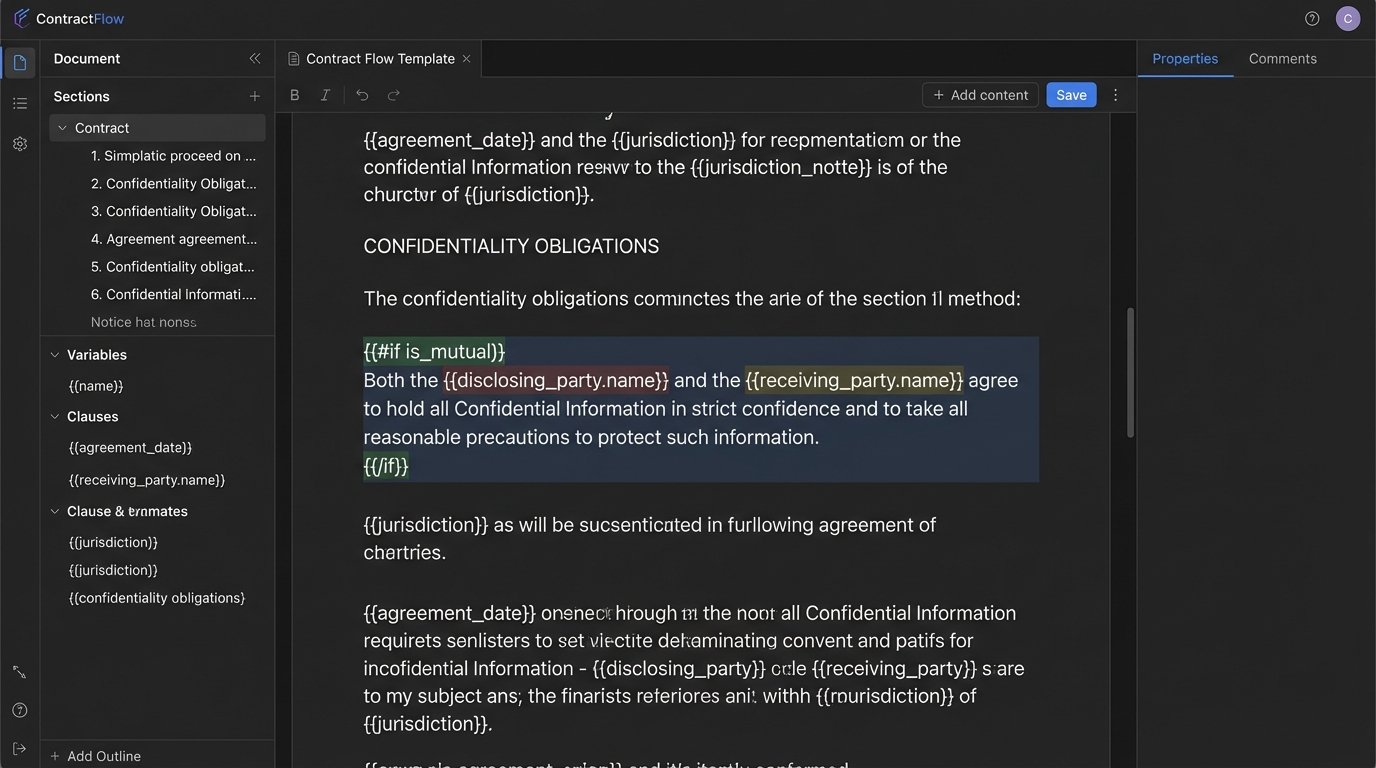
Now you connect your data model to your deconstructed document from Step 1. The specific syntax depends on the engine you chose, but the concepts are universal. You will open your clean Word document and replace your bracketed variables with template tags.
What was once `[Disclosing Party Name]` becomes `{{disclosing_party.name}}`.
This uses a common templating syntax, like Mustache or Handlebars. The engine parses this tag and injects the corresponding value from the JSON data object. The real power comes from injecting logic directly into the template.
To insert a conditional clause, you wrap it in a logic block:
{{#if is_mutual}}

This is a mutual agreement. Both parties shall be considered a "Disclosing Party" and a "Receiving Party" from time to time...

{{/if}}
{{#unless is_mutual}}
Innovate Corp. shall be the "Disclosing Party" and Synergy Solutions LLC shall be the "Receiving Party".
{{/unless}}
The engine evaluates the `is_mutual` boolean from your data model. If it’s true, the first paragraph is rendered. If it’s false, the second one is. This logic lives inside the template itself, right where the attorneys can see it and, more importantly, audit it. There’s no hidden code in some other system determining what goes into the contract.
Step 5: Validation, Versioning, and Deployment
A template is code. You must treat it as such. Every change to a master template must go through a validation and regression testing process. You cannot just have a paralegal “update the file on the shared drive.” That path leads to chaos.
Your process should include:
- Unit Tests: For each template, you need a set of test data objects (in JSON format) that cover the edge cases. One test for a mutual NDA, one for a non-mutual. One test that includes the non-solicit clause, one that excludes it. You run these tests automatically after every template change to confirm the output is still correct.
- Version Control: Templates must be stored in a version control system like Git, not a file server. This gives you a complete audit history of every change, the ability to see who changed what, and the power to roll back to a previous version instantly if a mistake is deployed.
- Controlled Deployment: Deploying a new master template is like performing a software release. There should be a formal process to push the new version from a development environment to production. This prevents a half-finished template from accidentally being used for a live client matter.
Forgetting this discipline is how firms end up sending contracts with broken formatting or, worse, incorrect legal clauses. It’s an operational risk that is completely avoidable with basic software development hygiene.
Step 6: Integration with Core Systems
The final stage is to eliminate manual data entry. The data model you engineered in Step 2 becomes the contract between your systems. Your document generation engine should not be an island. It needs to be bridged to your firm’s system of record, which is likely a CRM like Salesforce or a case management system.
This is typically done via API calls. When a new matter is opened, a trigger can fire. That trigger collects the relevant client and matter data, assembles it into the JSON data model your template expects, and sends it to the generation engine’s API endpoint.
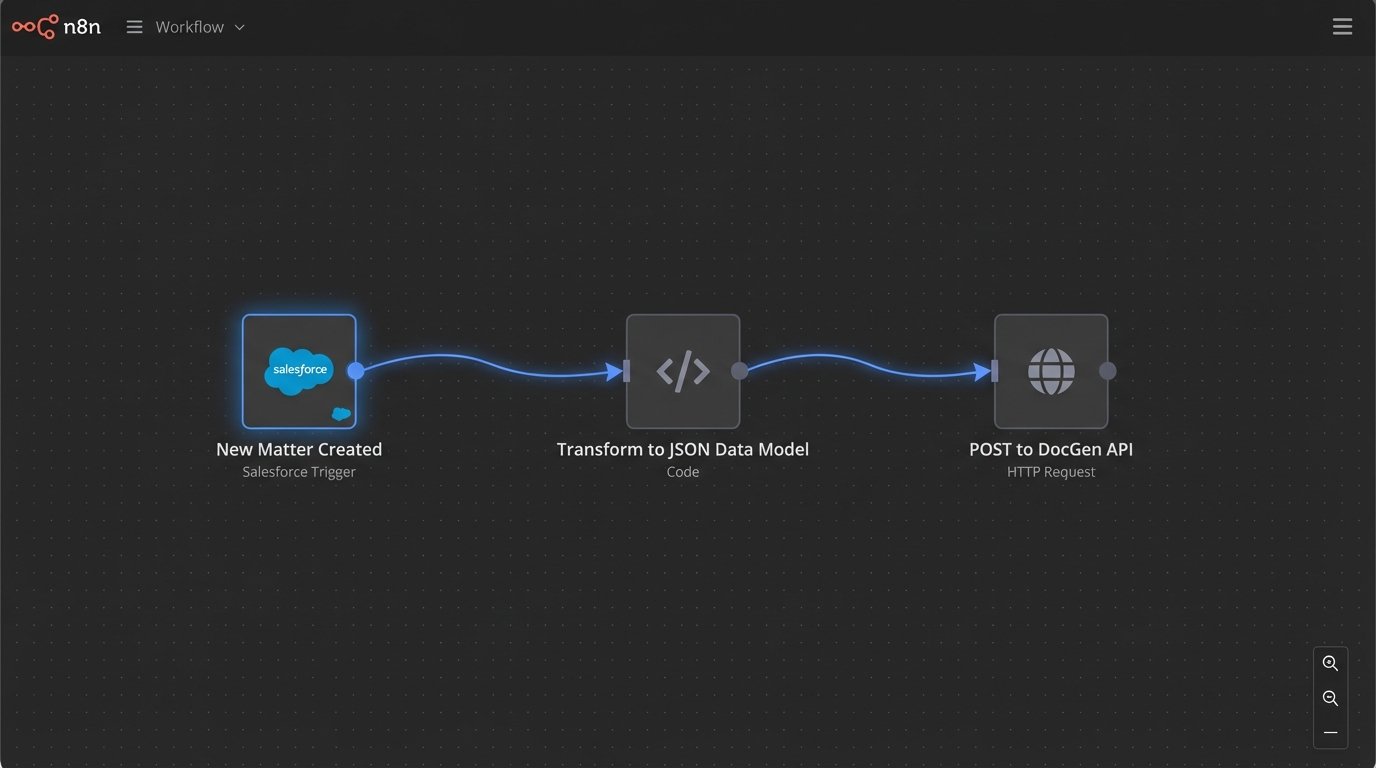
The challenge here is that most legal tech APIs are archaic. They don’t speak the clean JSON you designed. You will likely need to build a small middleware service. This service acts as a translator. It fetches data from the clunky legacy API, strips out the unnecessary junk, transforms it into your pristine JSON structure, and then passes it along to the document engine.
This integration is what separates a simple template-filling tool from a true automation platform. It’s the difference between saving a paralegal ten minutes and creating a fully automated workflow that runs from client intake to a signature-ready document without a single human touching a keyboard. That is the actual objective.