Most legal automation projects fail. They don’t fail because the code is bad or the platform is weak. They fail because nobody uses the tool. They fail because the attorneys and paralegals who are supposed to benefit from it actively work around it. This isn’t a soft-skills problem. It’s a systems engineering problem rooted in a failure to manage the human element of the technical stack. Change management is not about PowerPoint decks and morale-boosting emails. It’s about building a deployment framework that anticipates and neutralizes resistance before it can crater the project.
Success requires treating user adoption as a technical requirement, with dependencies and failure states just like any API integration. The objective is to make the new automated workflow the path of least resistance. Anything less is a waste of budget and billable hours.
Deconstructing the Myth of the “Champion”
The first casualty in a real change management plan is the idea of a single, high-level “champion”. Relying on one managing partner to force a new system on the firm is a single point of failure. When that partner gets busy, loses interest, or leaves, the project’s political cover evaporates. You do not need a champion. You need a steering committee that functions as a tactical unit.
This group is not for show. It is a working group designed to find and exploit weaknesses in the existing process and your proposed solution. Its composition is critical:
- One Power User Paralegal. This person lives in the case management system. They know every workaround, every broken field, and every undocumented procedure that keeps the practice group running. They are your source of ground truth.
- One Mid-Level IT Engineer. Not the director, but the person who actually handles Active Directory group policies, firewall exceptions, and API key provisioning. They know the firm’s real security posture and technical debt, not the one described in the sales brochure.
- One Cynical Senior Associate. Find the attorney who is vocal about how terrible the current software is. They will be your best beta tester because they are motivated to break things. Their skepticism is an asset, not a hurdle.
- One Practice Group Leader. This person feels the pain of inefficiency through their P&L. They have the authority to mandate participation in testing and can connect the automation’s output directly to financial metrics.
This committee’s first job is not to approve your plan. It is to attack it. Their second job is to provide the political and operational cover needed to push the project through the inevitable pockets of resistance.
Mapping the Existing Workflow: An Autopsy in Advance
You cannot automate a process you do not understand at a granular level. High-level flowcharts are useless. You need to map the existing, broken workflow with the precision of a debugger stepping through code. This means sitting with the users and documenting every single click, every copy-paste action, and every time they export a report to Excel because the main system cannot generate it properly.
This audit produces the raw material for your automation strategy. You will uncover “shadow IT” systems, like shared spreadsheets used to track matter status, that are critical to operations but invisible to management. These are your primary targets. Automating the connection between these shadow systems and the official systems of record provides immediate, visible value.
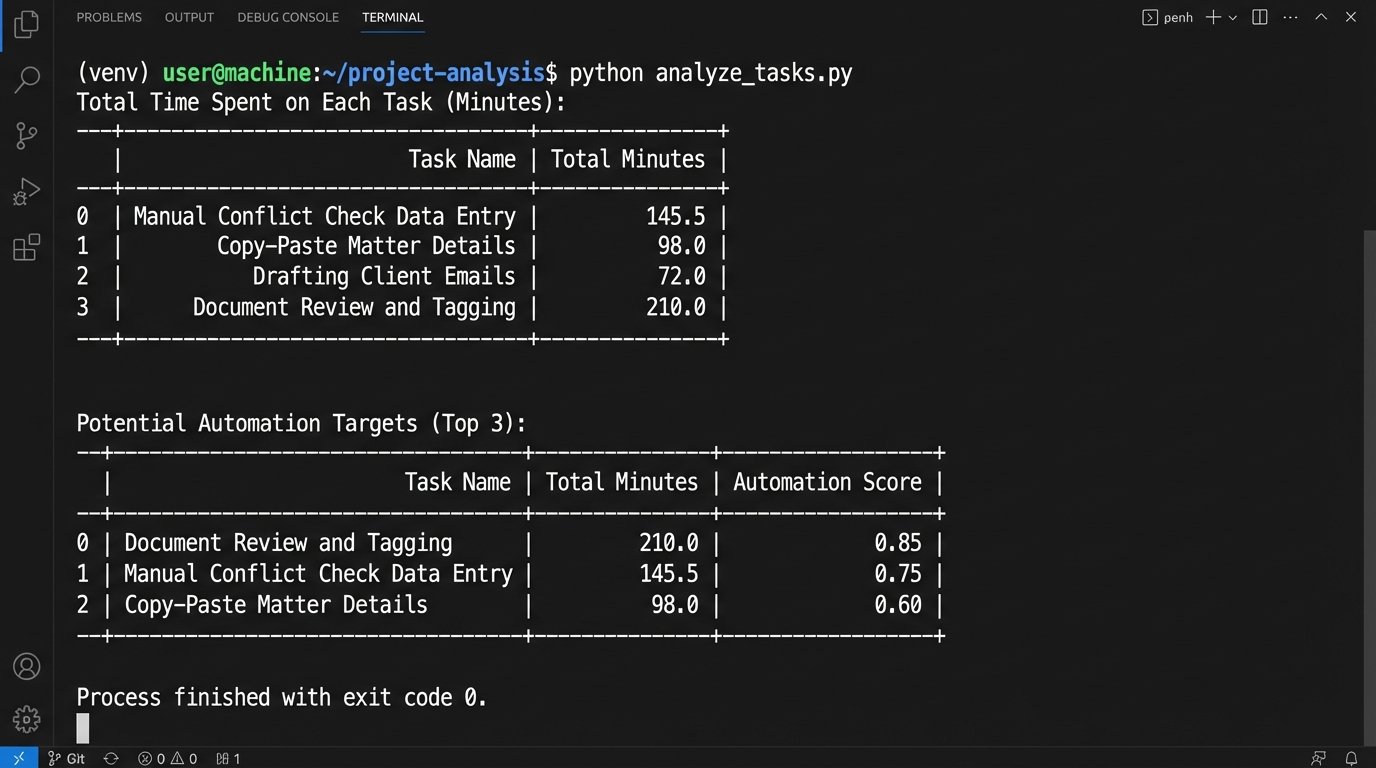
After observing the manual process for a week, you might have a log of user actions. You can force this data into a structured format and analyze it to find the most time-consuming, repetitive tasks. This is not a theoretical exercise. It is data-driven targeting.
import pandas as pd

import matplotlib.pyplot as plt
# Assuming 'task_log.csv' has columns: 'user', 'task_name', 'start_time', 'end_time'
df = pd.read_csv('task_log.csv')
# Convert timestamps to datetime objects
df['start_time'] = pd.to_datetime(df['start_time'])
df['end_time'] = pd.to_datetime(df['end_time'])
# Calculate duration in minutes for each task
df['duration_minutes'] = (df['end_time'] - df['start_time']).dt.total_seconds() / 60
# Find the most time-consuming tasks
task_time_summary = df.groupby('task_name')['duration_minutes'].sum().sort_values(ascending=False)
print("Total Time Spent on Each Task (Minutes):")
print(task_time_summary)
# Identify tasks that are prime candidates for automation
# e.g., high frequency, high duration, low cognitive load
# 'Manual Conflict Check Data Entry' is a classic example
automation_candidates = task_time_summary[task_time_summary.index.str.contains("Data Entry|Copy|Report Generation")]
print("\nPotential Automation Targets:")
print(automation_candidates)
The script’s output is not a suggestion. It is a hit list. The tasks at the top are the ones causing the most friction, and they become the targets for your first automation sprint. This is how you build a business case with numbers, not adjectives.
The process map you build will be ugly. It will show redundant steps, data re-entry, and communication bottlenecks. That ugliness is your justification for the entire project.
Phase One: Target Selection and Quick Wins
Do not start by trying to automate the entire client intake process. It’s a complex beast with too many dependencies and political stakeholders. A public failure on a flagship project will kill any future automation initiatives. Your first target must be small, self-contained, and universally despised by the people who perform it.
Good first targets include:
- NDA Generation: The logic is simple, the inputs are standardized, and the output is a document that everyone needs but no one enjoys creating.
- Conflict Check Report Collation: This often involves running searches in multiple systems and pasting the results into a single document. It is pure mechanical work.
- Audit Letter Response Prep: Pulling matter data based on specific criteria is a repetitive, data-driven task perfect for a script.
The goal of this first phase is not to deliver massive ROI. The goal is to deliver a functional tool in under a month that makes a handful of people’s lives noticeably easier. This initial success serves as propaganda. It proves that automation is not a threat but a tool for eliminating the most tedious parts of the job. This is how you build momentum.
Forcing Transparency with Live Dashboards
Resistance thrives in information vacuums. When users do not know what the system is doing, they assume the worst. They assume it is broken, losing their data, or designed to make them obsolete. The antidote is to expose the system’s guts with a live, no-nonsense dashboard accessible to everyone.
Forget complex analytics. This dashboard should answer three basic questions in real-time:
- What is the system doing right now? (e.g., “Processing 15 NDAs”, “Running conflict check for Matter X”).
- What has the system done today? (e.g., “52 documents generated”, “4 hours of manual work saved (est.)”).
- Is the system healthy? (e.g., “API Connection to CMS: OK”, “Document Template Service: OK”).
This can be built with Power BI, Tableau, or even a simple Flask web app that polls the automation platform’s API endpoints. The point is to replace rumor with data. When a user can see for themselves that the system processed 200 documents without error, it becomes much harder for them to claim “the new system doesn’t work”. It’s shoving a firehose of data through the needle of user doubt.
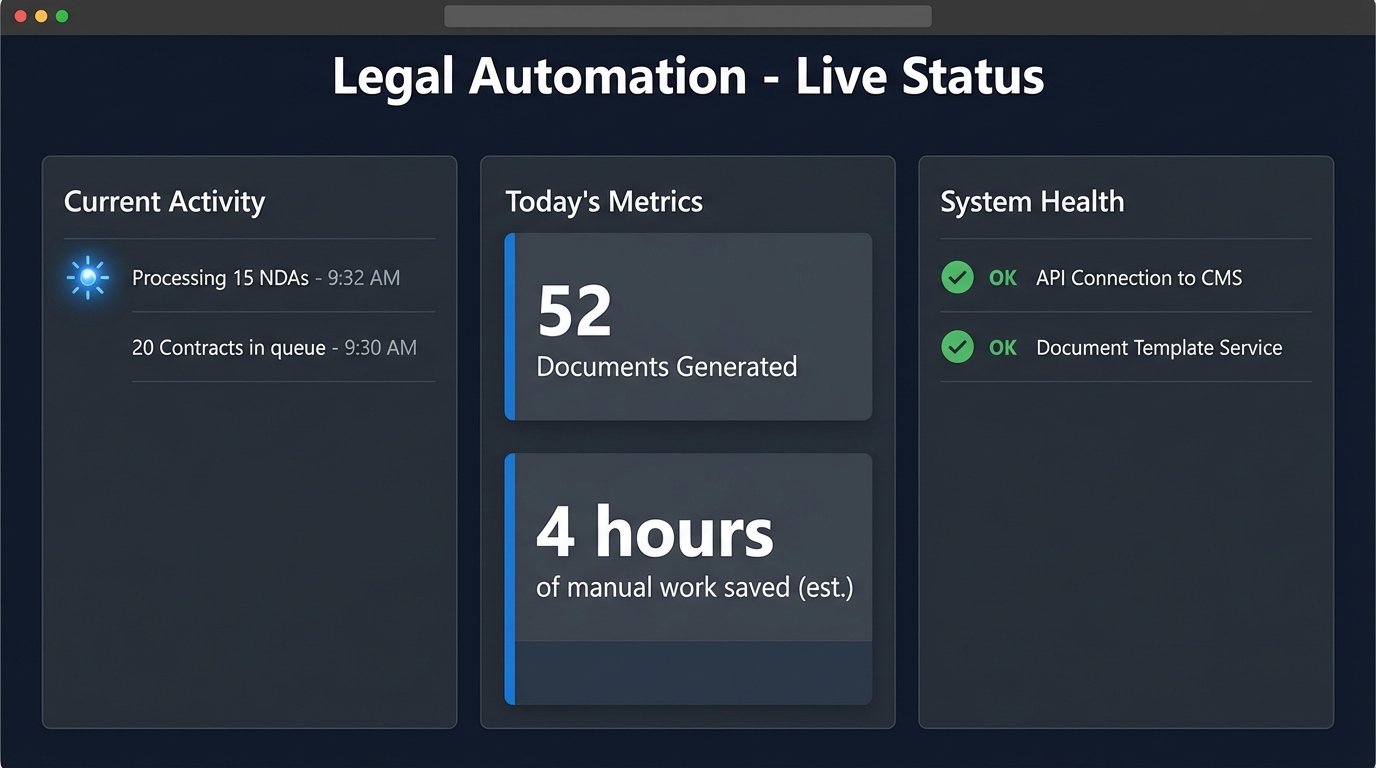
This transparency also holds the implementation team accountable. An eternally “yellow” status light on an API connection forces a fix, preventing small technical issues from becoming systemic trust issues.
User Acceptance Testing as a Destructive Process
User Acceptance Testing (UAT) is not a demo. It is a deliberate attempt by your most skeptical users to break your application. The goal is not to get a sign-off. The goal is to find failure points before a paying client does. Structure your UAT as a series of challenges, not a guided tour.
Provide your testers, especially the Cynical Senior Associate from the committee, with bad data. Give them client names with special characters. Ask them to run a process on a matter that is missing key information. Tell them to try to run two conflicting processes at the same time. Every error they trigger is a victory. It is one less bug that will make it to the production environment.
Log every issue, no matter how small, in a proper ticketing system like Jira or Azure DevOps. An email chain is not an issue tracker. Each ticket must be triaged, assigned, and resolved with its status visible to the UAT participants. This shows you are taking their feedback seriously and reinforces the transparent, collaborative nature of the project.
The Staged Rollout: Controlling the Blast Radius
A firm-wide, “big bang” launch is malpractice. It maximizes the potential for disruption and guarantees your support channels will be overwhelmed on day one. A staged rollout is the only responsible way to deploy a new automation.
The sequence is straightforward:
- Pilot Group (The Committee): The steering committee members are the first to use the system in production for their own real work. They have the most context and are incentivized to make it succeed.
- Alpha Group (One Practice Area): Roll out the tool to a single, tech-friendly practice group. This group understands they are early adopters and are generally more tolerant of minor issues. Monitor system logs and user feedback channels like a hawk.
- Beta Group (Adjacent Practice Areas): Expand to groups with similar workflows. By this point, you should have a solid FAQ, a small library of training materials, and a stable application.
- General Availability: Only after the system has proven its stability and value in multiple practice groups should you consider a firm-wide launch.
During the early stages, you must have robust monitoring and health checks. Simple scripts can be run on a schedule to verify that your dependencies are online and responding correctly. This is basic operational hygiene.
#!/bin/bash
# A simple health check script for automation dependencies
endpoints=(
"https://api.case-management.com/v2/status"
"https://api.document-gen.com/health"
"https://our-firm-db.internal/api/ping"
)
log_file="/var/log/automation_health.log"
timestamp=$(date)
echo "------ Health Check Started: $timestamp ------" >> $log_file
for endpoint in "${endpoints[@]}"
do
response_code=$(curl --write-out %{http_code} --silent --output /dev/null $endpoint)
if [ $response_code -eq 200 ]; then
echo "[$timestamp] SUCCESS: $endpoint responded with 200 OK" >> $log_file
else
echo "[$timestamp] CRITICAL: $endpoint responded with $response_code" >> $log_file
# Optionally, trigger an alert (e.g., send an email or a Slack notification)
# send_alert "Endpoint $endpoint is down!"
fi
done
This script does not prevent outages, but it ensures you are the first to know when a dependency fails. This allows you to proactively inform users of an issue instead of waiting for them to file angry support tickets.
Closing the Loop: Feedback as a Feature
The deployment is not the end of the project. A system without a mechanism for continuous feedback will stagnate and eventually be abandoned. You must build a permanent, low-friction channel for users to report bugs, suggest features, and ask questions.
This could be a dedicated Slack or Teams channel, a simple form on the intranet, or a feedback button built directly into the application. The tool matters less than the response. When a user submits feedback, they must receive an immediate acknowledgment and see a corresponding ticket or task created. They need to see that their input is not going into a black hole.
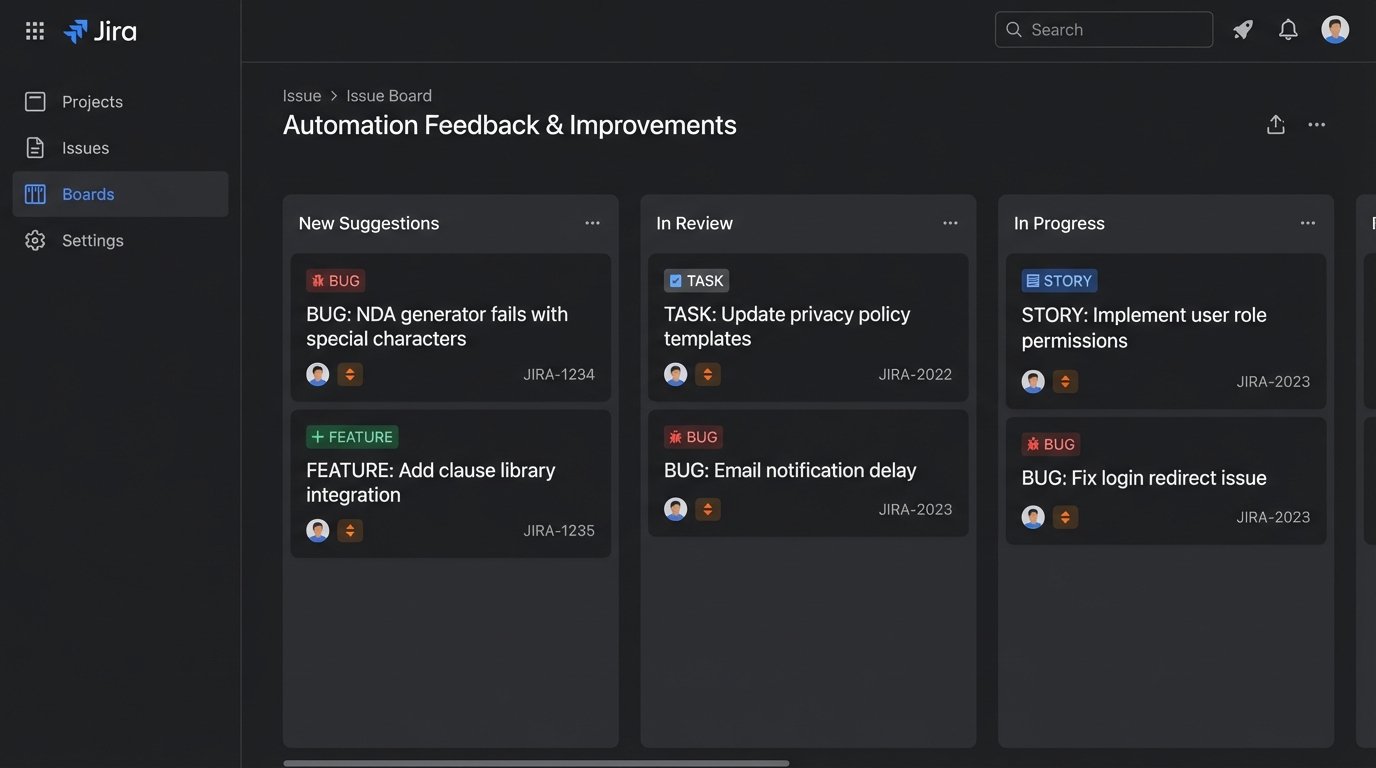
This feedback loop turns users from passive consumers into active stakeholders in the system’s evolution. The best feature ideas will not come from the IT department. They will come from the paralegals and attorneys who use the tool every day.
Ultimately, successful change management for legal automation has little to do with persuasion. It is about demonstrating value, eliminating friction, and engineering a system that is so clearly superior to the old way that resistance becomes a waste of energy. Build a tool that works, prove it with data, and make the path to adoption smoother than the path of resistance.