
Most firms treat client communication as a soft skill problem. It’s not. It’s a data synchronization problem. Every manual email an attorney sends is a low-fidelity, error-prone attempt to replicate a single data point from the case management system to the client’s brain. The process is inefficient, unscalable, and exposes the firm to risk when information is inevitably miscommunicated or delayed.
Automating this channel isn’t about replacing the attorney. It’s about building a reliable data pipeline that handles the low-value, repetitive status updates, freeing up human capital for high-value strategic counsel. The goal is to make the routine invisible so the critical stands out.
The Central Nervous System: Your Case Management System API
Your source of truth is the Case Management System (CMS). Any automation that doesn’t pull directly from the CMS is a liability. Relying on manually updated spreadsheets or secondary databases creates data forks, and you’ll spend more time reconciling discrepancies than you save with the automation itself.
The first step is a brutal assessment of your CMS’s API. A modern, RESTful API with well-documented webhook support is the gold standard. This allows for an event-driven architecture where the CMS actively pushes updates to your automation engine the moment they happen. A case status change, a new document upload, or a court date scheduling can trigger a near-instantaneous, templated client notification.
Many firms are shackled to legacy systems with sluggish, poorly documented SOAP APIs or, worse, no API at all. In these cases, your only option is scheduled polling. Your automation script must query the CMS database every 5, 10, or 15 minutes, looking for changes. This approach is brittle and resource-intensive. You’re essentially forcing the system to ask “anything new?” hundreds of times a day instead of just listening for an announcement. This architecture introduces a built-in delay between the event and the notification.
Building the Logic Layer: Triggers and Actions
An automation is just a set of “if this, then that” rules. The “if” is the trigger, and the “that” is the action. Defining these requires mapping your firm’s actual legal workflows, not the idealized versions management thinks you follow.
- Event Triggers: These are discrete changes in the CMS data. Examples include: `case.status.updated`, `document.uploaded`, `hearing.scheduled`, `invoice.generated`. Each of these should trigger a specific communication workflow.
- Time-Based Triggers: These are scheduled events. Examples: “7 days before a court date,” “24 hours after an invoice is past due,” or the dreaded “30 days of no case activity.” The last one is critical for preventing the client’s perception that their case has fallen into a black hole.
- Compound Triggers: This involves more complex logic. For example, trigger an alert only if `case.status` changes to “Awaiting Client Signature” AND a specific document tag `signature_required` exists. This prevents false positives and ensures the automated message is contextually accurate.
The core challenge is that a single attorney action can fire multiple events in the CMS. Saving a new court date might update the case status, add a calendar event, and upload a scheduling order simultaneously. A naive automation would spam the client with three separate messages. Your logic layer must include debounce or bundling mechanisms to aggregate related changes that occur within a short window (e.g., 60 seconds) into a single, coherent summary message.
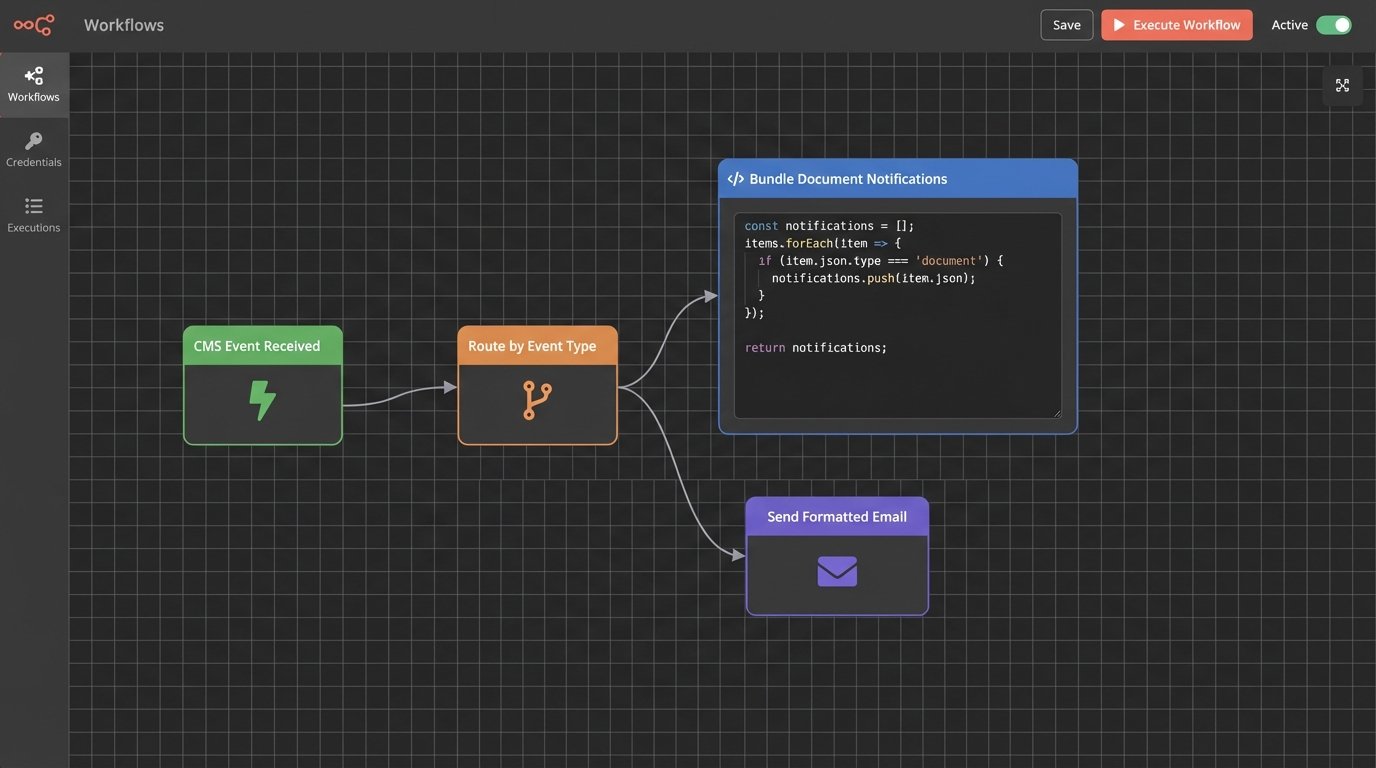
Trying to bridge a modern automation platform like Zapier or a custom-built AWS Lambda function to a ten-year-old CMS is like trying to connect a fiber optic cable with duct tape. The impedance mismatch between a clean JSON payload and a clunky XML response requires a dedicated middleware layer to translate and sanitize the data before it’s used.
Communication Templates: The Line Between Helpful and Robotic
Automated messages fail when they are generic. Effective templating requires deep personalization pulled directly from CMS data fields. The message shouldn’t just say “Your case has been updated.” It should say, “Hi [Client.FirstName], a new document titled ‘[Document.Title]’ has been added to your file for the ‘[Case.Name]’ matter. You can view it in your portal.”
We use a templating engine like Liquid or Handlebars to inject these personalization tokens. This allows for simple variable replacement and, more importantly, conditional logic within the template itself.
For example, you can build logic to change the tone or content based on the case type or client segment. A high-volume, low-margin practice might have very direct, functional templates. A high-touch corporate client’s templates might include more formal language and reference their dedicated relationship manager.
{

  "event_type": "document.uploaded",

  "timestamp": "2023-10-27T10:00:00Z",

  "case_id": "MAT-2023-01138",

  "client_id": "CLI-9904",

  "data": {

    "case_name": "Project Titan Acquisition",

    "client_first_name": "Sarah",

    "document_title": "Q3 Due Diligence Report.pdf",

    "document_category": "Financials",

    "uploaded_by": "John Doe",

    "portal_link": "https://portal.lawfirm.com/view/doc/8a2b3c4d"

  }

}
The JSON payload above is a typical webhook output from a modern CMS. Your automation engine ingests this, validates the `event_type`, and maps the `data` fields directly to the tokens in your email or SMS template. A failure to map even one field can result in an embarrassing message with a blank space or a raw token like `[Client.FirstName]`, which immediately destroys client trust.
Channel Selection and Strategy
The delivery mechanism matters. Choosing the wrong channel for the message type is a common failure pattern.
- Email: The workhorse. Best for detailed updates, document notifications, and formal communications like invoices. Its weakness is low signal-to-noise. Your critical update is sitting next to three retail marketing promotions. Delivery and open rates must be monitored.
- SMS: The high-priority alert system. Ideal for time-sensitive reminders like “Your deposition is tomorrow at 10 AM” or two-factor authentication for portal access. Its open rate is near 100%, but it’s intrusive. Overusing SMS for routine updates is the fastest way to get your number blocked.
- Client Portal Notifications: The secure repository. This is the only acceptable channel for communicating about sensitive documents. The notification itself (via email or SMS) should be a simple pointer: “A new confidential document has been shared with you. Please log in to the secure portal to view it.” Never send sensitive data or attachments directly over an insecure channel.
A multi-channel strategy is necessary. The initial notification might be an email, but if a critical deadline is approaching and the client hasn’t acknowledged the email (which you can track via your delivery platform), the system should automatically escalate to a more direct channel like SMS.
Error Handling, Logging, and Maintenance
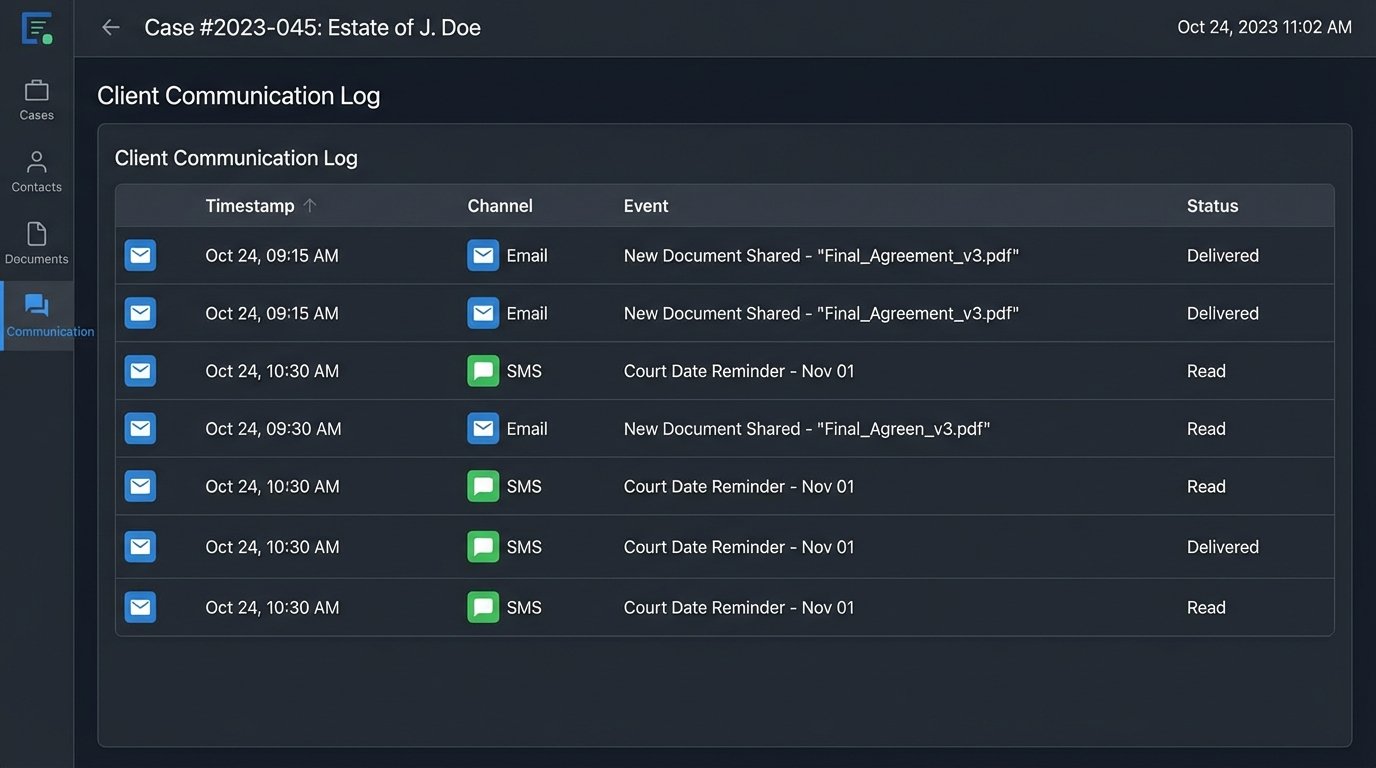
A “set it and forget it” mentality is a recipe for disaster. Automation systems are not static; they are complex systems that require monitoring. Your CMS will get updated, breaking API endpoints. Your email delivery service might have an outage. A lawyer might enter malformed data that breaks your template rendering logic.
Robust logging is non-negotiable. Every trigger event, every API call, every message sent or failed must be logged with a timestamp and relevant metadata. When a client claims they were never notified of a deadline, you need an immutable audit trail to verify what message was sent, to what address or number, and whether the delivery provider accepted it.
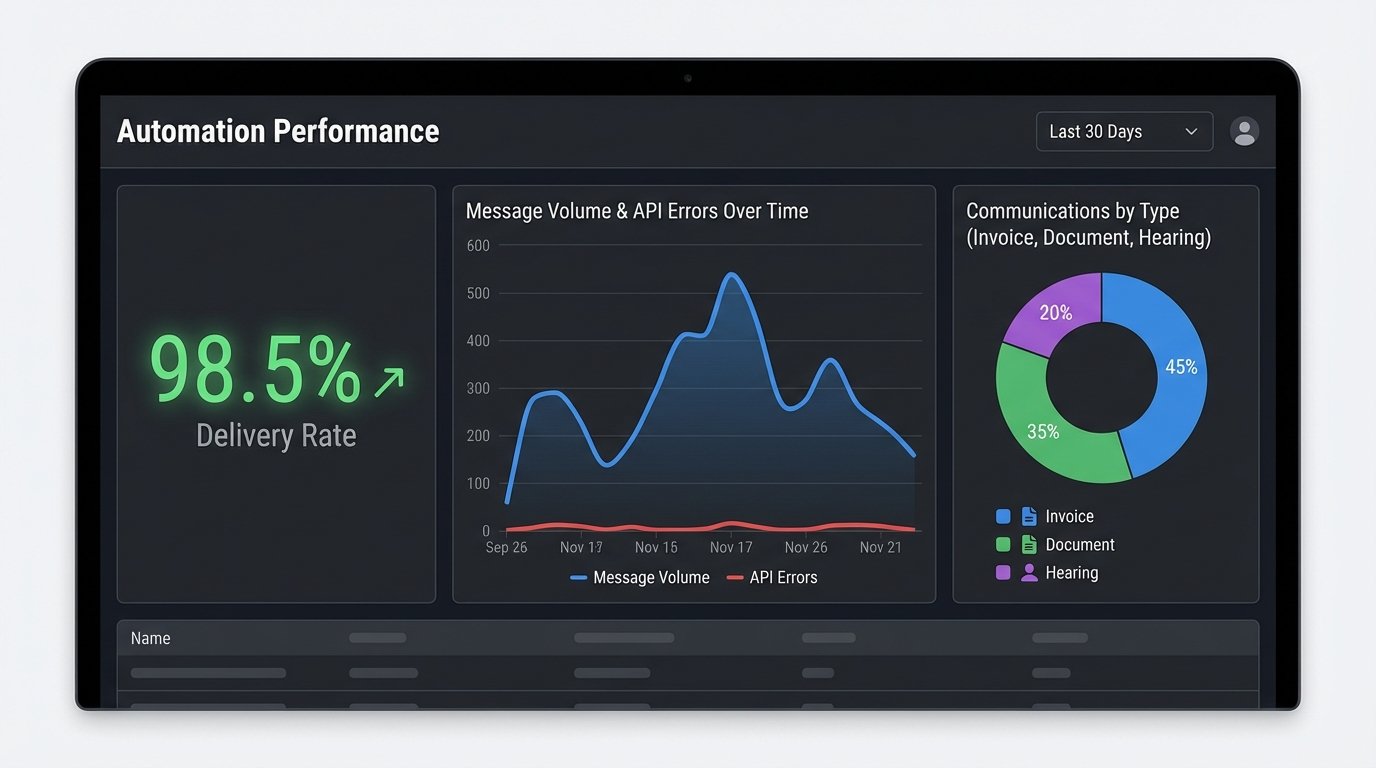
We configure alerts for specific failure conditions. If the API error rate from the CMS exceeds a certain threshold (e.g., 5% over 10 minutes), it should trigger an alert to the IT or Legal Ops team. A silent failure, where the automation simply stops working without notification, is the most dangerous state. It creates a false sense of security while communications are being dropped on the floor.
Governance and Controlling the Flow
Without proper governance, you risk creating a chaotic mess of competing automations. Different practice groups might build their own workflows, resulting in inconsistent client experiences. A central team, typically Legal Ops, must own the automation platform and strategy.
This team is responsible for:
- Vetting New Automations: Does the proposed workflow solve a real problem? Does it overlap with existing automations? Has its logic been properly tested in a sandbox environment?
- Template Management: Maintaining a library of approved, on-brand communication templates. This prevents attorneys from creating their own poorly worded or legally problematic messages.
- Monitoring and Reporting: Tracking key metrics like message volume, delivery rates, open/click rates, and error rates. This data is used to prove ROI and identify areas for improvement.
The final layer of control is rate limiting and frequency capping. No single client should receive more than a predefined number of automated messages per day or week, regardless of case activity. These rules prevent system bugs or unusual flurries of activity from overwhelming a client with notifications. Building these safeguards is an admission that systems fail, and it’s how you protect the client relationship when they do.
This is not a project for an intern. Building a reliable client communication pipeline requires a clear understanding of your firm’s data structure, API integration, and workflow logic. When done correctly, it moves a core firm function from a manual, artisanal process to a predictable, scalable system. The result is a better-informed client and a more efficient legal team.