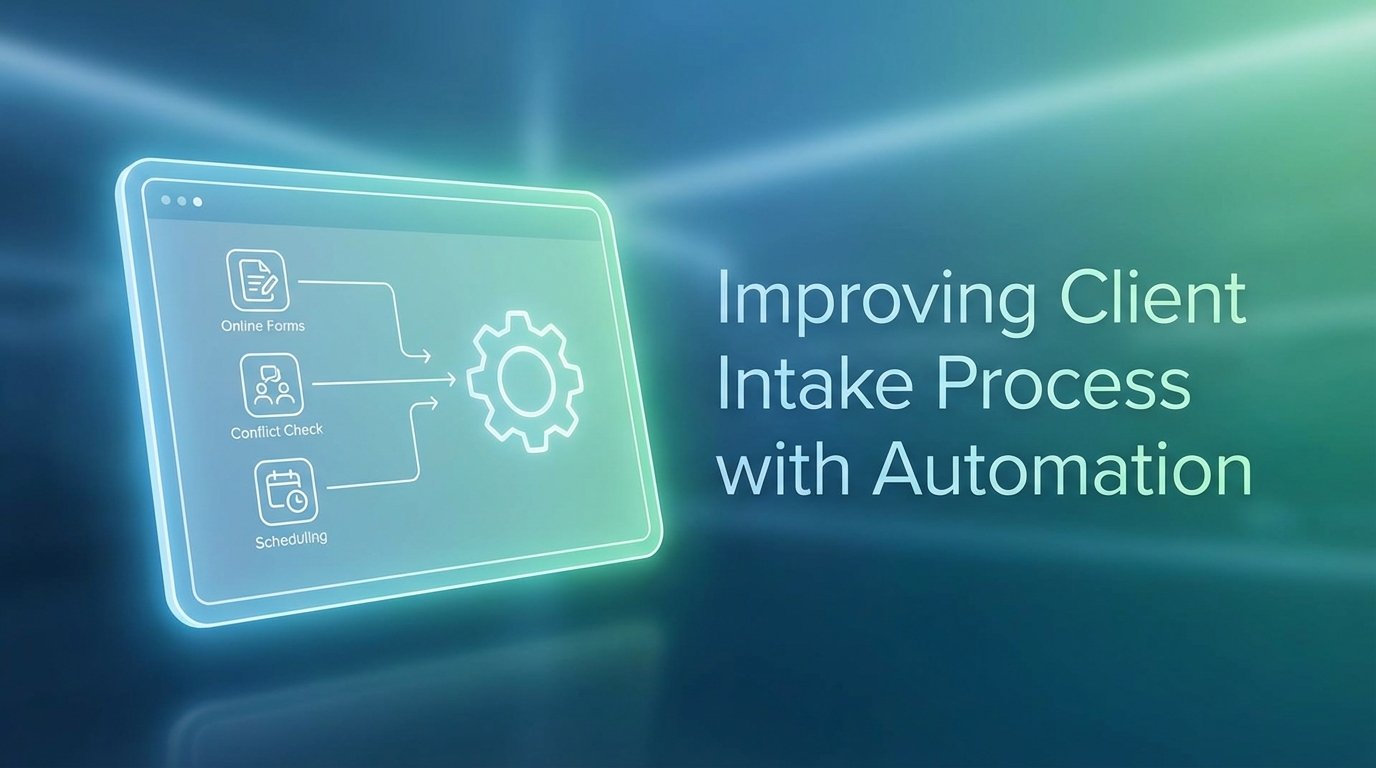
Your firm’s client intake is broken. It’s not a personnel problem. It’s an architectural failure. Relying on manual data entry, emailed PDFs, and phone tag for scheduling is the equivalent of running a modern database on hardware from 1995. It functions, until it catastrophically doesn’t. The result is data corruption, missed opportunities, and a client experience that signals incompetence before the first billable hour is even logged.
This isn’t about making things faster. It’s about forcing accuracy and creating a defensible, auditable trail from the first point of contact.
Deconstructing the Manual Intake Failure
The standard intake process is a series of loosely connected, high-friction events. A potential client fills out a generic “Contact Us” form on your website. That data, often unstructured, is emailed to a general inbox. A paralegal then has to manually transcribe this information into the case management system (CMS), introducing a high probability of human error. Names are misspelled. Phone numbers are transposed. Critical details are omitted.
This initial data entry is the first point of systemic weakness.
Next comes the conflict check. This process is frequently performed manually by searching the CMS. It is slow and its thoroughness is entirely dependent on the operator’s diligence and the accuracy of the initially transcribed data. A single misspelled name from the prior step can cause a conflict to be missed, exposing the firm to significant ethical and financial risk. The delay alone can be enough for a high-value client to seek representation elsewhere.
The entire sequence is a liability waiting to happen.
The Scheduling Bottleneck
Assuming the lead is viable and the conflict check clears, the scheduling dance begins. This involves a chain of emails or phone calls attempting to align the schedules of the potential client and the assigned attorney. Each exchange is a delay. Each delay increases the probability that the lead will go cold. This is not a client service issue. It is a workflow engineering problem.
Firms lose revenue in these gaps. They are not abstract inefficiencies. They are measurable financial losses tied directly to operational drag.
Architecting an Automated Intake Pipeline
A resilient intake system is not a single piece of software. It is a pipeline of connected services, each performing a specific function. The goal is to move a potential client from initial contact to a scheduled consultation with zero manual intervention. The architecture is composed of three primary layers: data capture, processing and validation, and orchestration.
Think of it as an assembly line for client qualification.
Layer 1: Structured Data Capture
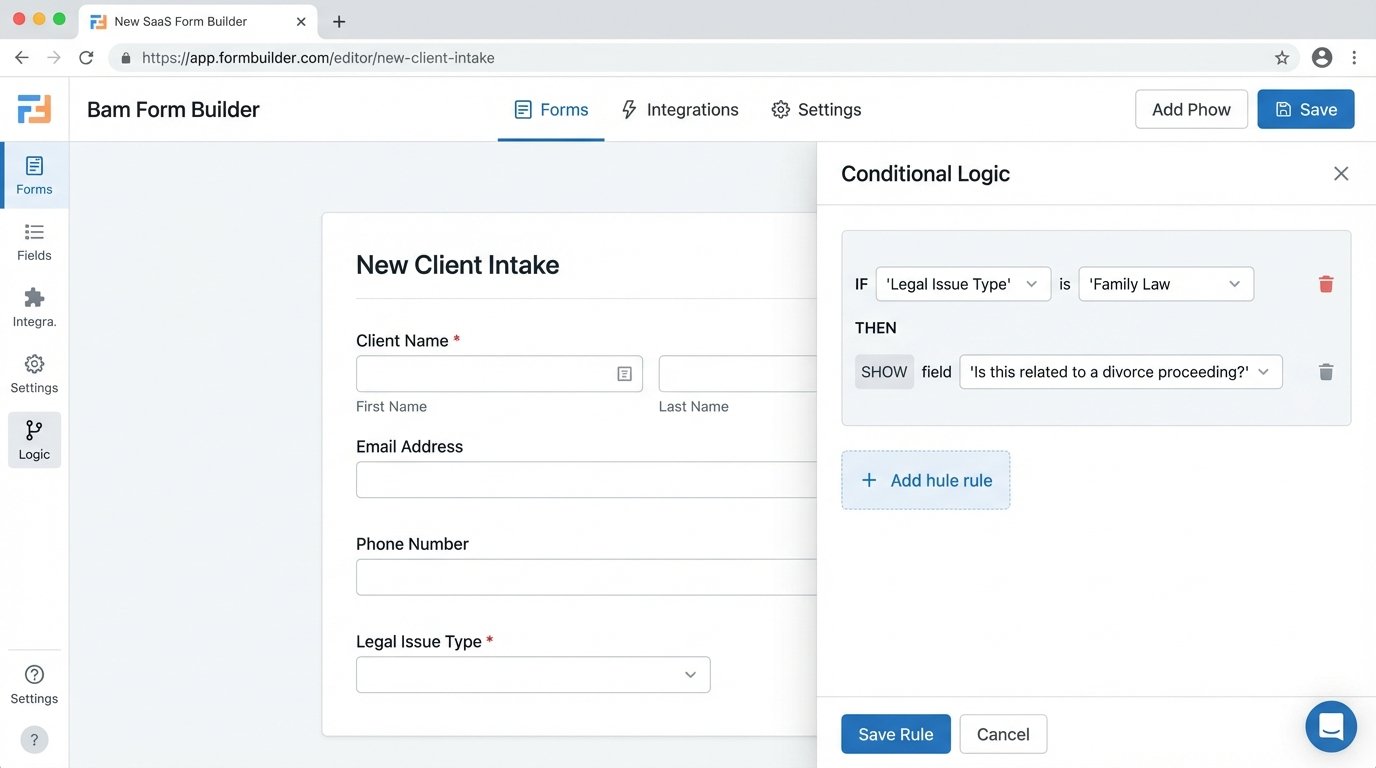
The process begins by replacing generic contact forms with intelligent, conditional web forms. Tools like Typeform, Jotform, or Cognito Forms are adequate for this. The key is not the tool itself, but the implementation of conditional logic. The form must dynamically adapt based on user input to pre-qualify the lead.
For example:
- Question: What is your legal issue?
- User selection: “Family Law”
- Form Logic: Display a follow-up question specific to that practice area, such as “Is this related to a divorce proceeding?”
This approach does two things. It provides a better user experience, and it forces the collection of structured data required for the downstream automation. You get the specific information needed to make an initial assessment without a human needing to ask for it. Every field on this form should map directly to a corresponding field in your CMS. Unstructured “tell us your story” boxes should be minimized or eliminated entirely.
The form’s submission should not trigger an email. It should trigger a webhook, which is a programmatic notification sent to a specific URL endpoint. This is the handoff from the data capture layer to the processing engine.
Layer 2: The Processing and Validation Engine
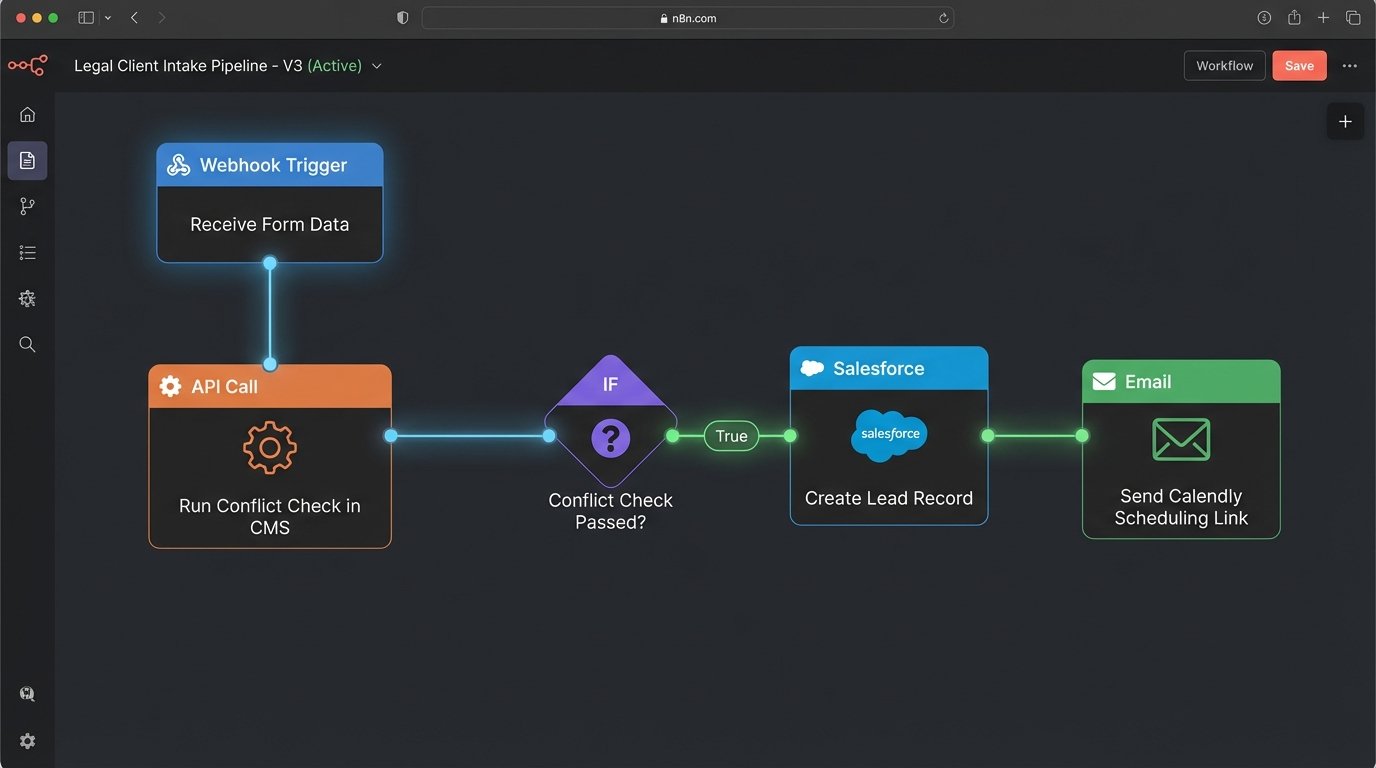
The webhook from the form delivers a payload, typically in JSON format, to a middleware service. This is the brain of the operation. Platforms like Zapier, Make, or a custom-built serverless function (e.g., AWS Lambda) act as the central hub. Upon receiving the data, the engine executes a series of steps automatically.
The first and most critical step is the conflict check. The middleware must be configured to make an API call to your firm’s CMS. You extract the names of the potential client and any adverse parties from the incoming JSON payload and inject them into a search query against your CMS contact database.
A simplified JSON payload from the form might look like this:
{

  "lead_source": "Website Form",

  "potential_client": {

    "first_name": "Jane",

    "last_name": "Doe",

    "email": "jane.doe@example.com",

    "phone": "555-123-4567"

  },

  "case_details": {

    "practice_area": "Corporate Law",

    "adverse_party": "Acme Corp"

  }

}
The engine then formats and sends a request to the CMS API. The API response will indicate whether any matching contacts exist. The automation logic must then branch based on this response. If a conflict is found, the system should automatically send a polite rejection email to the client and create an internal task for an attorney to perform a manual review. No human time was spent reaching this decision point.
The reality of legal tech is that many CMS platforms have poorly documented or sluggish APIs. Your automation logic must account for this. Implement a timeout on the API call. If the CMS doesn’t respond within a set threshold, the workflow must have a fallback path. This could involve sending a notification to a Slack channel for the Legal Ops team and creating a task to perform the check manually. Never assume the API will work perfectly.
Building this connection is often like trying to shove a firehose through a needle. The form captures rich, nested data, while the legacy CMS API might only accept a few flat, primitive text fields. This requires a data transformation step in your middleware to flatten and remap the incoming data to fit the destination system’s rigid schema. It’s not elegant, but it’s necessary.
Layer 3: Orchestration and Engagement
If the conflict check returns clear, the pipeline moves to orchestration. The middleware executes the next sequence of API calls.
- Create Lead Record: The system makes a `POST` request to the CMS API to create a new contact and matter record using the validated data from the form. This eliminates all manual data entry and its associated errors.
- Trigger Scheduling: The automation then interfaces with a scheduling tool like Calendly or Acuity Scheduling via its API. It can pass the client’s name and email address to generate a unique, single-use scheduling link.
- Client Communication: An automated, yet personalized, email is sent to the potential client. This email confirms receipt of their information, states that the initial conflict check is clear, and provides the direct link to schedule their consultation.
The potential client is now empowered to select a time that works for them from the attorney’s real-time availability. This single action eliminates the entire chain of back-and-forth scheduling emails.
Once the client books a meeting, the scheduling tool’s own automation takes over. It sends calendar invitations to both parties and can be configured to send reminders, further reducing administrative overhead.
Confronting Legacy Systems and Brittle Connections
The clean architecture described above assumes your core systems have usable APIs. This is not always the case. Many firms are locked into older, on-premise case management systems that offer no programmatic access. In these scenarios, the solution is less elegant.
Robotic Process Automation (RPA) can serve as a bridge. An RPA bot can be programmed to mimic the actions of a human user. It can read data from the form submission, open the desktop CMS application, and physically type the information into the correct fields to create a new record. It can then execute the search for the conflict check.
This approach is brittle and maintenance-heavy. If the CMS user interface changes even slightly, the bot will break. It should be considered a last resort, a temporary fix while planning a migration to a modern, API-first platform. It is a technical debt you knowingly take on to solve a more immediate problem.
Data Mapping is Non-Negotiable
The link between the form fields and the CMS fields must be explicitly defined and documented. Do not rely on field names being identical. Create a formal mapping document or a configuration file within your middleware that defines these relationships.
A simple mapping might look like this:
| Source Field (Form) | Destination Field (CMS) | Data Type | Notes |
|---|---|---|---|
| `potential_client.first_name` | `contact.FirstName` | String | Required |
| `potential_client.last_name` | `contact.LastName` | String | Required |
| `case_details.practice_area` | `matter.PracticeArea` | String (Dropdown) | Must match one of the predefined values in CMS. |
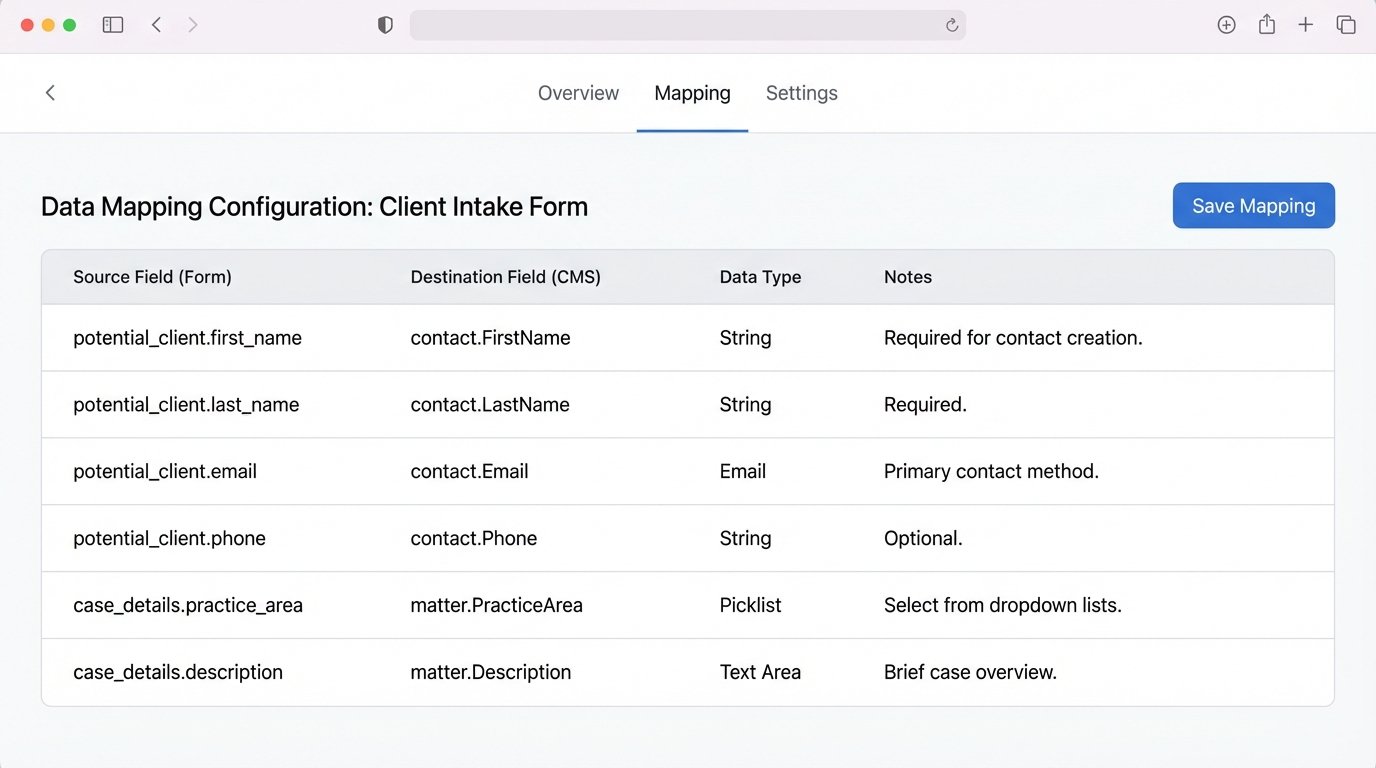
This mapping logic must be maintained. When someone decides to change a dropdown option in the CMS, the intake form and the middleware logic must be updated in lockstep. Failure to do so will break the pipeline.
Monitoring is Not Optional
An automated system generates no noise when it’s working. It can also fail silently. You must build robust logging and monitoring into every step of the pipeline. Every API call, every data transformation, and every logical branch should be logged. When an API call to the CMS fails, it shouldn’t just be retried. It must trigger an immediate alert to a dedicated channel, such as an IT or Legal Ops Slack channel or a PagerDuty incident.
The alert must contain the payload that caused the failure, the API endpoint that was called, and the error response from the server. This provides the necessary information to debug the problem without having to dig through server logs. Without this level of monitoring, you are flying blind. You will only discover the system is broken when a partner complains that their new client pipeline has dried up.
Automating your client intake is not a project to “streamline” operations. It is a fundamental architectural upgrade required to mitigate risk, enforce data integrity, and remain competitive. The cost of a missed conflict or a lost high-value lead due to administrative friction is far greater than the investment required to build a resilient, automated system.