
Most legal automation projects fail before a single line of code is written. They die in conference rooms, killed by vague objectives and a fundamental misunderstanding of the firm’s actual, on-the-ground workflows. The goal isn’t to buy a platform. The goal is to isolate a specific, repetitive, and rule-based task that is currently consuming billable hours and systematically dismantle it.
This is not a high-level strategy document. It is a ground-level guide to getting an automation project from a whiteboard theory to a production system without setting the budget on fire. We will bypass the marketing fluff and focus on the architectural decisions and validation steps that determine success or failure.
Step 1: The Process Autopsy
Before you evaluate any software, you must first dissect the target process. This is not about asking a paralegal to describe their job. It is about a quantitative and unforgiving analysis of a workflow. You need to map every click, every data entry point, and every manual validation step. Use a stopwatch. Time the tasks yourself. The gap between perceived effort and actual time spent is often where the entire business case lives.
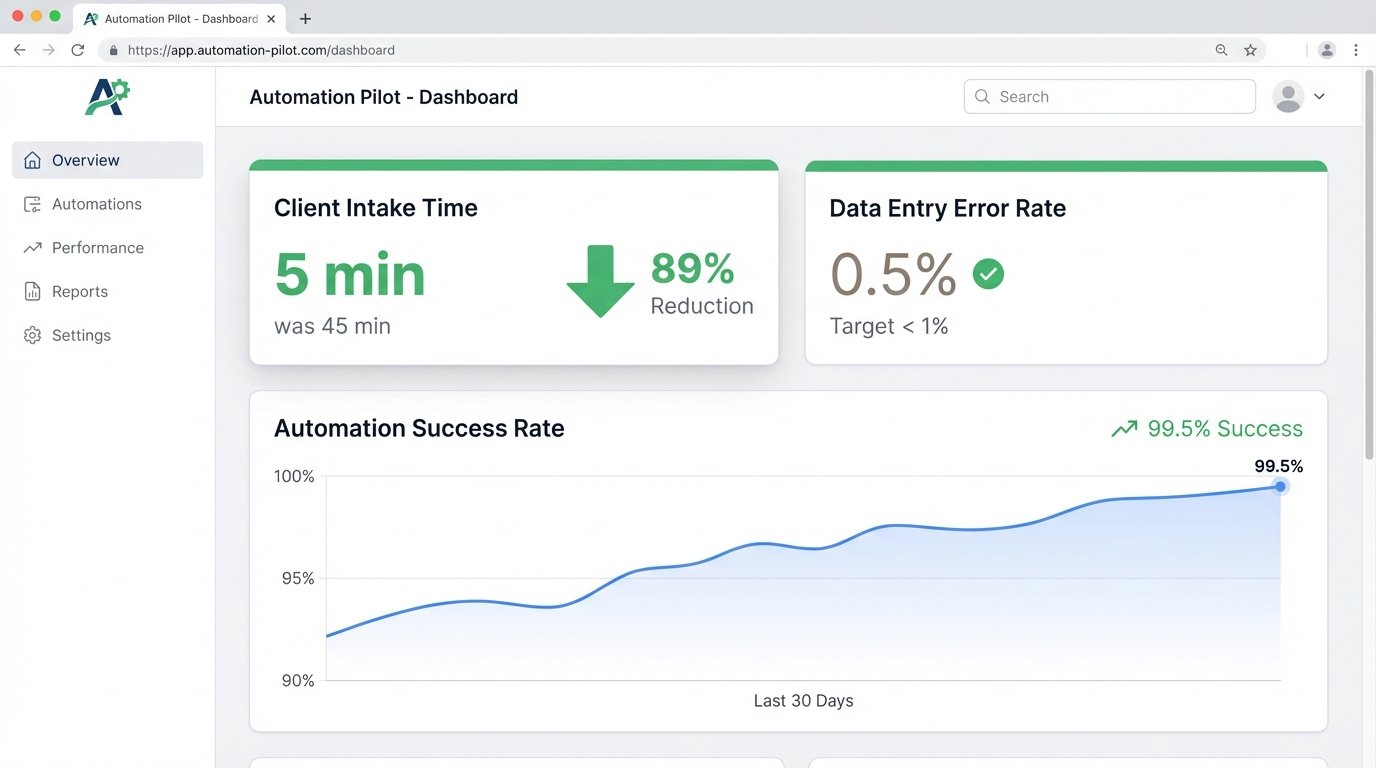
Identify the primary bottleneck. Is it data entry from scanned discovery documents? Is it the manual creation of client intake records in three different systems? The process you choose for a first project must have a clear, measurable outcome. “Improving efficiency” is not a metric. “Reducing new client intake time from 45 minutes to 5 minutes” is a metric.
Isolating the Automation Candidate
A viable candidate for automation has three core traits. It is highly repetitive, meaning the same steps are performed dozens or hundreds of times per day or week. It is rule-based, meaning the decisions within the process follow a logical, programmable path (“if the document is a motion to dismiss, then flag it for attorney review”). Finally, it uses structured or semi-structured digital inputs. Automating from handwritten notes is a path to madness.
Your first target should be painfully simple. Think document naming conventions, folder creation for new matters, or pulling specific data points from a standardized form into the case management system. Pick a process with low exception rates. A workflow that requires human judgment 50% of the time is a poor candidate, as you will spend more time building exception handlers than you will on the core automation logic.
This initial audit is your foundation. A weak foundation guarantees the entire project will collapse under the weight of real-world complexity.
Step 2: Architecture and Tool Selection
The market is saturated with platforms that promise end-to-end automation. Most are overpriced and over-engineered for the specific problems that plague law firms. Your decision is not just about buying a tool. It is an architectural choice between a heavy Robotic Process Automation (RPA) platform, a more flexible Integration Platform as a Service (iPaaS), or a targeted script-based solution.
RPA tools like UiPath or Automation Anywhere are powerful but operate at the UI level. They mimic human clicks and keystrokes. This makes them brittle. A minor change to a web form’s HTML can break your entire automation. They are a necessary evil when you have no API access to a legacy system, but they should be a last resort. Connecting a modern automation tool to a decade-old case management system is like trying to charge a smartphone with a car battery. It requires a specific, often ugly, adapter and a constant fear of frying the circuit.
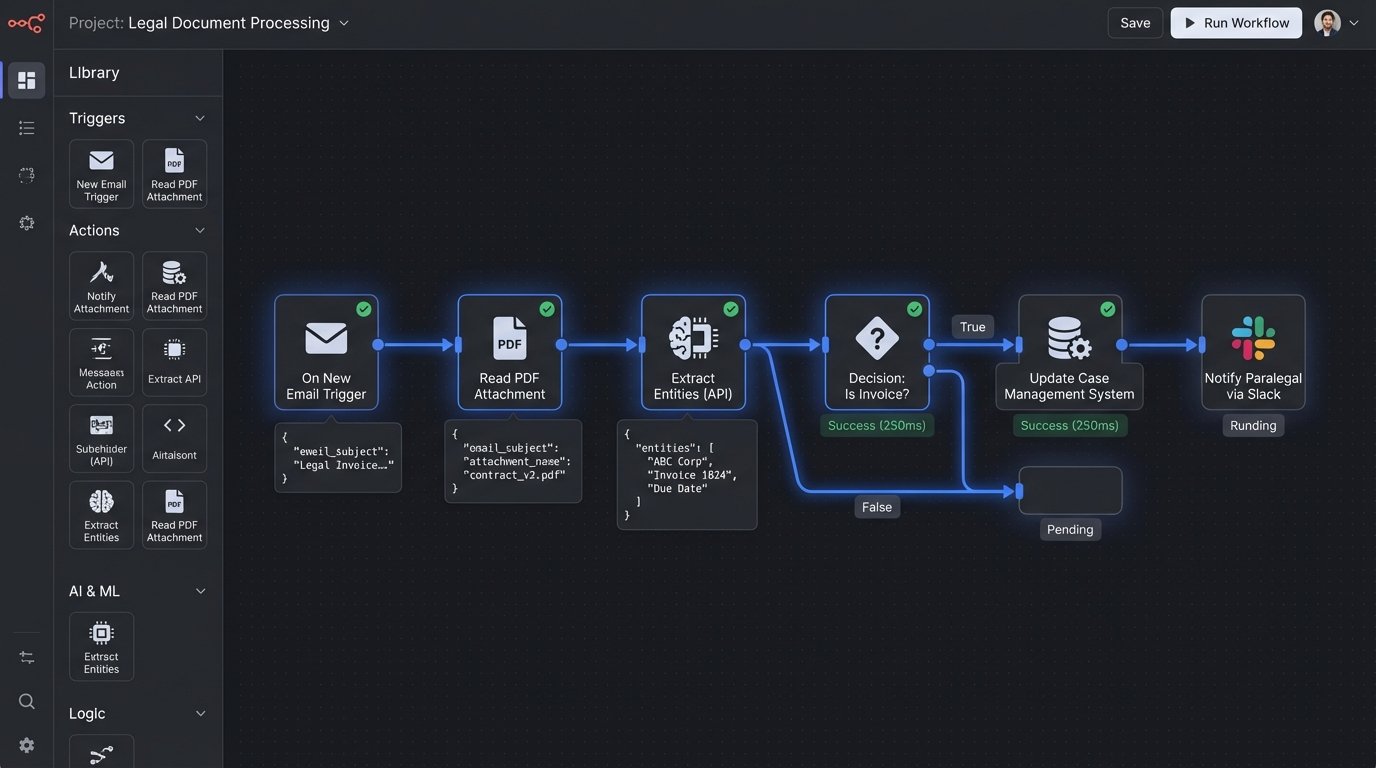
An iPaaS solution like Workato or Zapier is API-first. It builds bridges between systems that are designed to talk to each other. This is far more stable. If your case management system, document management system, and billing software all have accessible APIs, this is the correct path. The development is faster, and the resulting automation is less likely to break when one of the applications is updated.
The Case for Custom Scripting
For specific, data-heavy tasks, a custom script is often the most efficient and cost-effective solution. A Python script using libraries like Pandas for data manipulation and Selenium for web interaction can be built in days, not months. It offers total control and avoids the licensing fees that COTS platforms demand. The downside is maintainability. The script is only as good as its documentation, and it requires in-house or contract expertise to support it.
Consider this simple Python example for stripping inconsistent formatting from a list of client names extracted from a spreadsheet. This is a common data cleaning task that precedes ingestion into a practice management system.
import pandas as pd
def clean_client_data(file_path):
# Read the data from an Excel file
df = pd.read_excel(file_path)
# Force 'ClientName' column to string type, handling potential errors
df['ClientName'] = df['ClientName'].astype(str)
# 1. Strip leading/trailing whitespace
df['ClientName'] = df['ClientName'].str.strip()
# 2. Remove common corporate suffixes for standardization
suffixes_to_remove = ['LLC', 'Inc.', 'Corp.', 'Ltd.']
for suffix in suffixes_to_remove:
df['ClientName'] = df['ClientName'].str.replace(f'\\s*,?\\s*{suffix}', '', regex=True)
# 3. Convert to a consistent case (e.g., uppercase)
df['ClientName'] = df['ClientName'].str.upper()
# 4. Remove any remaining non-alphanumeric characters (except spaces)
df['ClientName'] = df['ClientName'].str.replace('[^A-Z0-9\\s]+', '', regex=True)
return df
# Usage
cleaned_df = clean_client_data('raw_client_list.xlsx')
print(cleaned_df.head())
This level of granular control is impossible with most out-of-the-box platforms without paying for expensive add-ons. Choose the tool that fits the problem. Do not force the problem to fit your shiny new tool.
Step 3: Building a Controlled Pilot
Never attempt a firm-wide rollout from the start. Your first deployment must be a tightly controlled pilot project with a limited scope and a small, forgiving user group. Select the low-risk, high-impact process you identified in the audit. The goal here is twofold: prove the technology works in your specific environment and expose the inevitable “unknown unknowns” that never appear in a demo.
Define success explicitly. The pilot succeeds if it meets predefined key performance indicators (KPIs). These should be quantitative.
- Processing Time: Reduce the average time to process an invoice from 15 minutes to 1 minute.
- Error Rate: Decrease data entry errors in new matter creation from 5% to less than 0.5%.
- Manual Effort: Eliminate 10 hours per week of paralegal time spent on document sorting.
These are not aspirational goals. They are pass-fail criteria for the pilot.
Environment and Data Isolation
The pilot must run in a sandboxed environment with non-production data. Clone your case management database or use a staging instance. Never test a new automation on live client data. This seems obvious, but the pressure to “go fast” often leads to catastrophic mistakes. The pilot phase is where you validate your data mappings, your logic, and your error handling routines without any risk to the firm’s actual records.
During this phase, you will find that the official workflow documentation is a work of fiction. The real process involves undocumented workarounds and tribal knowledge that your automation must account for. This is why a small, engaged group of end-users is critical. They are not just testers. They are subject matter experts who will help you bridge the gap between the documented process and reality.
Step 4: Hardening the Logic and Handling Exceptions
An automation is only as robust as its ability to handle failure. The “happy path,” where everything works perfectly, is easy to build. The value of good engineering is in anticipating the unhappy paths. What happens when a network drive is unavailable? What if a PDF is unreadable by the OCR engine? What if a third-party API returns an error?
Your automation logic must include comprehensive error handling and logging. Every major step should be wrapped in a try-catch block. When an error occurs, the system should not just crash. It should log the specific error, the state of the data it was processing, and send a notification to a designated support channel. A silent failure is the most dangerous type of failure.
Designing a Rules Engine
For processes with complex business logic, avoid hardcoding rules directly into the automation script. Instead, externalize them into a configurable format like JSON or a database table. This allows paralegals or operations staff to update the rules without requiring a developer to change and redeploy the code.
For example, a rule for routing documents could be defined in a simple JSON structure:
{

  "rules": [

    {

      "ruleName": "Route Subpoenas to Litigation",

      "conditions": {

        "all": [

          {

            "fact": "documentType",

            "operator": "equal",

            "value": "Subpoena"

          },

          {

            "fact": "wordCount",

            "operator": "greaterThan",

            "value": 100

          }

        ]

      },

      "event": {

        "type": "routeToDepartment",

        "params": {

          "department": "Litigation",

          "priority": "High"

        }

      }

    },

    {

      "ruleName": "Flag Contracts Over 1M for Partner Review",

      "conditions": {

        "all": [

          {

            "fact": "documentType",

            "operator": "equal",

            "value": "Contract"

          },

          {

            "fact": "contractValue",

            "operator": "greaterThanInclusive",

            "value": 1000000

          }

        ]

      },

      "event": {

        "type": "notifyUser",

        "params": {

          "userGroup": "SeniorPartners",

          "message": "High-value contract requires review."

        }

      }

    }

  ]

}
The automation engine simply reads this configuration and executes the rules. This separates the “what” from the “how,” making the system vastly more maintainable.
Step 5: User Acceptance Testing (UAT) and Deployment
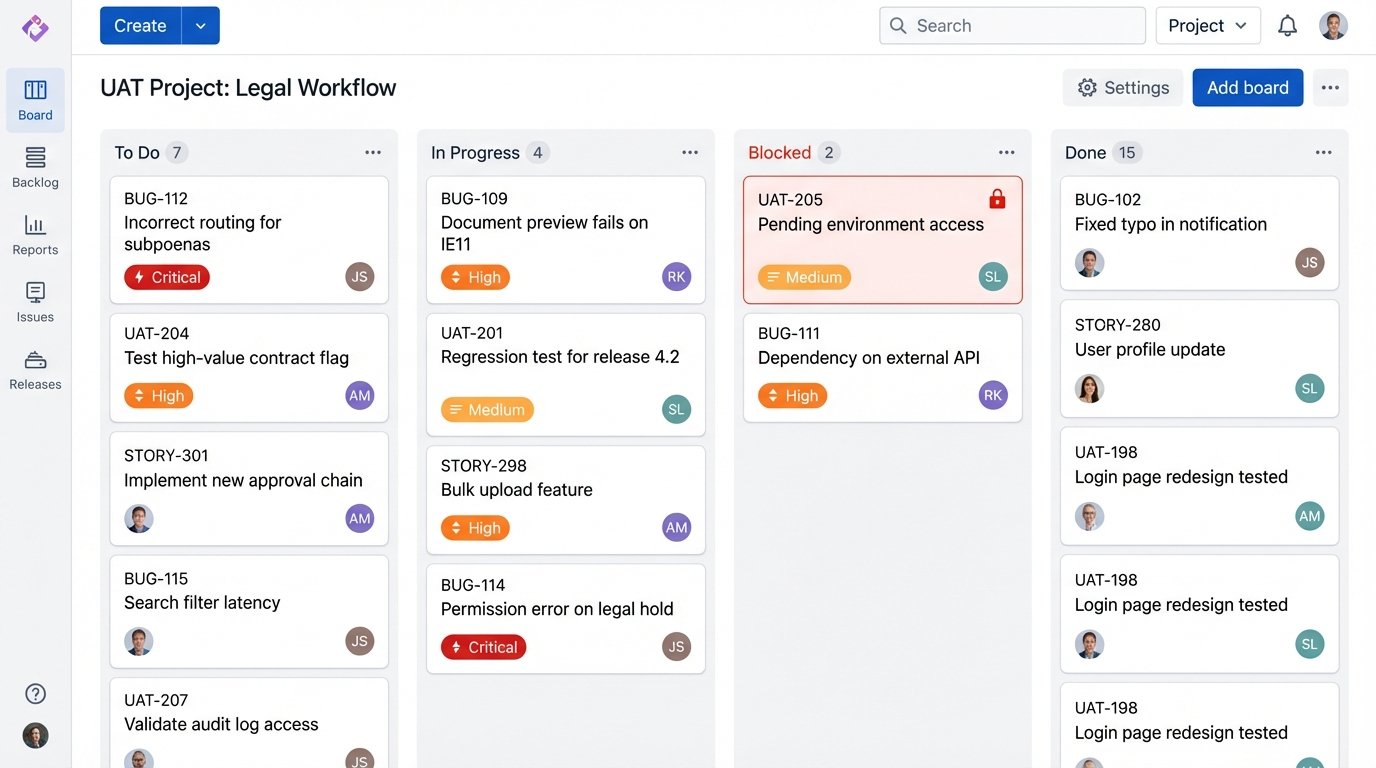
User Acceptance Testing is not a final checkmark. It is a full-contact sport. This is the first time the people who actually do the work will interact with your system. They will break it in ways you cannot anticipate. They will use it incorrectly. They will give you feedback that is both invaluable and contradictory. Your job is to filter the signal from the noise.
Structure the UAT process with specific test cases. Do not just ask users to “try it out.” Give them a list of scenarios to execute, covering both common tasks and known edge cases. Use a proper ticketing system to track bugs and feature requests. An Excel sheet or a chain of emails will quickly become unmanageable.
Phased Rollout Strategy
Once UAT is complete and critical bugs are squashed, do not flip a switch and deploy to everyone. Use a phased rollout. Start with the pilot group. Then expand to the rest of their team. Then move to an adjacent department. This staggered approach limits the blast radius if a production issue is discovered. It also allows your support team to handle the initial wave of training and questions without being overwhelmed.
During the initial deployment, run the automation in parallel with the manual process. For a week or two, have both systems operate. This allows you to compare the outputs directly and verify that the automation is producing identical, correct results. It is a resource-intensive check, but it is the ultimate guarantee of data integrity before you decommission the old way of working.
Step 6: Post-Deployment Monitoring and Maintenance
Deployment is not the end. It is the beginning of the operational lifecycle. Automation systems require constant monitoring. You need a dashboard that tracks key metrics: number of items processed, average processing time, and error rates. Set up automated alerts that trigger when these metrics deviate from the established baseline.
Processes change. The applications your bot interacts with will be updated. The third-party APIs you rely on will be deprecated. A successful automation program includes a budget for ongoing maintenance. The code and configuration will need to be revisited and updated periodically. An automation built today and ignored for two years is a production outage waiting to happen.
Treat your automation portfolio as a set of critical systems, because that is what they are. Give them the same level of monitoring, support, and lifecycle management as your document management or billing platforms. Anything less is professional negligence.