
The executive committee called it a “digital transformation initiative.” For the engineers in the trenches, it was a mandate to stop the bleeding. Our firm’s M&A practice was losing seven figures annually to billing leakage and write-offs on routine due diligence tasks. Associates spent hours manually redacting documents and populating closing binders, work the client rightfully refused to pay top-tier rates for. The problem wasn’t a lack of effort. It was a failure of process architecture, propped up by a patchwork of legacy systems that actively resisted integration.
Our initial audit uncovered a workflow so broken it was almost impressive. A junior associate would receive a diligence request list via email, manually create a folder structure in our Document Management System (DMS), then copy and paste data points into a dozen different spreadsheets. Each spreadsheet served as a temporary database for a different partner’s reporting preference. Version control was a filename convention that changed from matter to matter, and quality control was another associate double-checking the first one’s work. This was our starting point.
Deconstructing the Initial Failure Point
Management’s first instinct was to buy a platform. They wanted a single, expensive solution to paper over the cracks. We argued against this wallet-drainer approach. Injecting a massive new system into a hostile environment of entrenched habits and legacy APIs would have been a disaster. The core issue wasn’t the absence of a tool, but the friction between the existing ones. The DMS, the billing system, and the matter management database didn’t communicate. Forcing them to talk was the only path forward.
The problem was deeply rooted in the firm’s data culture. Critical matter data was siloed. For instance, to generate a simple status report, an attorney had to pull data from three separate sources:
- Elite 3E: For financial data and matter numbers.
- iManage: For document statuses and versions.
- A custom SharePoint list: For tracking key dates, a solution built by a paralegal ten years ago that was now mission-critical.
This multi-system scavenger hunt for basic information was the primary source of non-billable administrative drag. It was eating up an average of four hours per associate, per week, on our top 20 accounts.
The Pilot Project: Taming the NDA Process
To prove the value of an integration-first approach, we targeted the firm’s most repetitive, high-volume task: standard Non-Disclosure Agreements. The existing process involved an attorney finding the “latest” template on the DMS, manually editing placeholders for jurisdiction and counterparty details, and then emailing it back and forth for review. The average cycle time was two business days, an unacceptable delay for clients eager to start discussions.
Our goal was to reduce this to under 30 minutes without direct attorney involvement for standard agreements. This required building a small, focused automation stack that bridged existing systems instead of replacing them.
The Solution Architecture: A Pragmatic Approach
We rejected the idea of a monolithic platform and instead opted for a lean, service-oriented architecture. The stack was composed of a workflow orchestration engine, a document generation tool, and a series of custom connectors we built to force our legacy systems to cooperate. The philosophy was simple: use each tool for its specific strength and make the integration points clean.
The chosen components were:
- Orchestration: Bryter. We needed a no-code/low-code platform that our legal ops analysts could manage without needing a full-time developer for every minor logic change.
- Document Generation: DocuSign Gen for Salesforce. It had a solid API and was already in use by another department, which meant we bypassed a painful procurement cycle.
- Data and Systems: The firm’s existing iManage DMS, Salesforce CRM, and a collection of SharePoint lists.
The workflow itself was straightforward. We replaced the email-based request system with a simple intake form built in Bryter. The form captured the essential variables: counterparty name, governing law, and any non-standard clause requests. This structured data was the fuel for the entire automation. Connecting our modern workflow engine to the firm’s twenty-year-old DMS felt like trying to plug a USB-C cable into a stone tablet. The API documentation was a fantasy novel, and every endpoint had undocumented dependencies.
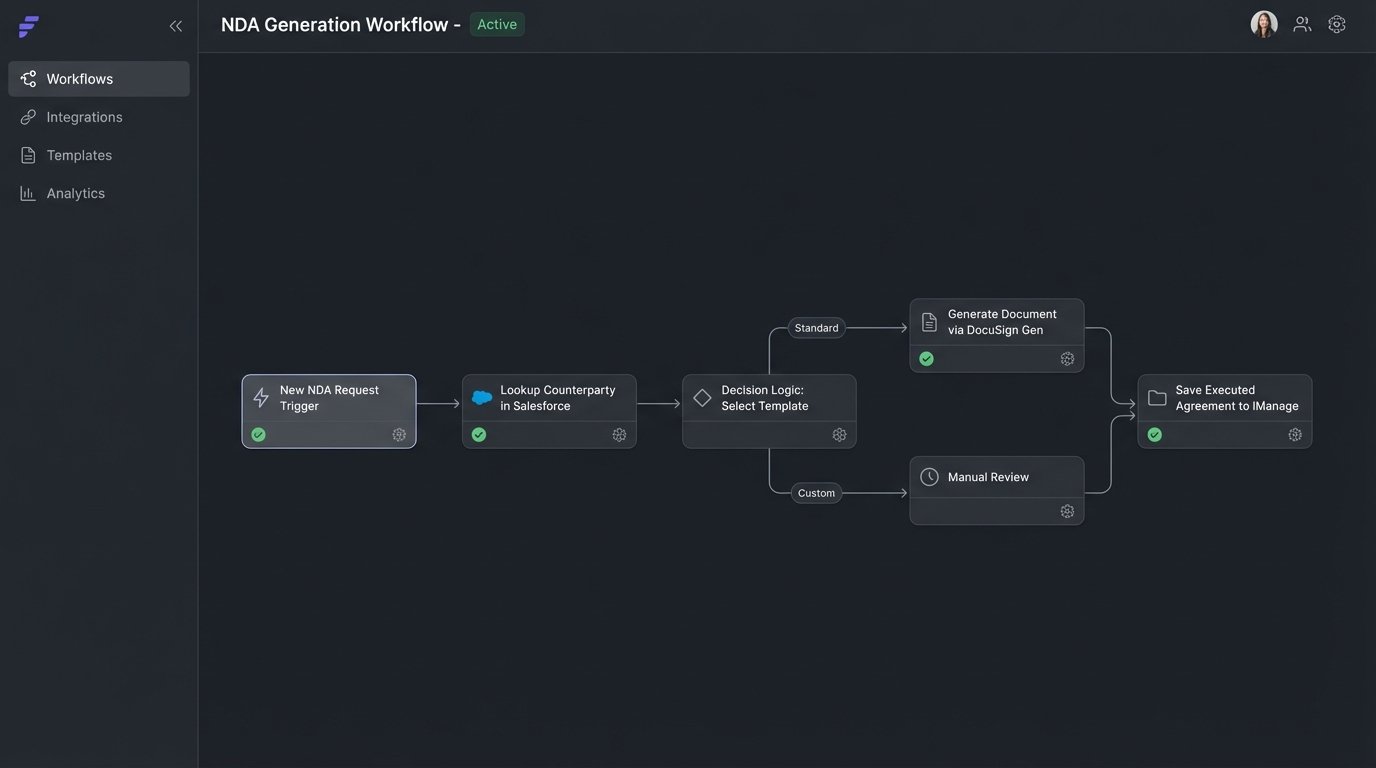
Once the form was submitted, the logic kicked in. A Bryter module would first perform a lookup against Salesforce to see if the counterparty already existed, preventing duplicate entity creation. It would then use a decision tree to select the correct NDA template from a centralized library we established in iManage. The logic forked based on jurisdiction, deal type, and whether one or both parties were disclosing information. This step alone eliminated 90% of the errors caused by attorneys using outdated or incorrect templates.
Data was then injected into the chosen template via the DocuSign Gen API. The generated document was saved back to the correct iManage matter workspace, and a link was sent to the requesting attorney for a final, optional review. If no review was needed, it went straight to the counterparty via DocuSign for signature. The entire process was tracked, and status updates were written back to a central log.
Building for Failure: The Human-in-the-Loop
A common mistake in legal automation is building a “perfect” path that shatters the moment it encounters a real-world exception. We knew partners would demand non-standard clauses. Our workflow was designed to handle this. If the intake form indicated a request for custom language, the automation would pause. It would still generate the base document but would then route it to a specific paralegal pool with a notification explaining the requested change. This prevented the automation from becoming a bottleneck.
The API connections were another potential failure point. Our connector to the billing system’s API would occasionally time out during peak hours. Instead of letting the workflow fail, we built a retry mechanism with exponential backoff. After three failed attempts, it would flag the matter for manual intervention and send an alert to the IT support channel. We didn’t eliminate the problem, but we contained it.
Deployment, Sabotage, and Adoption
Technical implementation was only half the battle. The bigger challenge was cultural. We faced significant resistance from senior associates who saw the automation as a threat to their billable hours. They were comfortable with the old, inefficient way because it was predictable and padded their timesheets. Directives from management were ignored. Formal training sessions were a waste of time and money; nobody paid attention.
The breakthrough came when we abandoned top-down enforcement and identified “champions” within the practice groups. We found a few tech-savvy paralegals and junior associates who were genuinely frustrated by the manual work. We gave them early access, listened to their feedback, and empowered them to train their peers. This peer-to-peer approach worked where our corporate training failed. They demonstrated the tool in the context of their actual work, not in a sterile training environment.
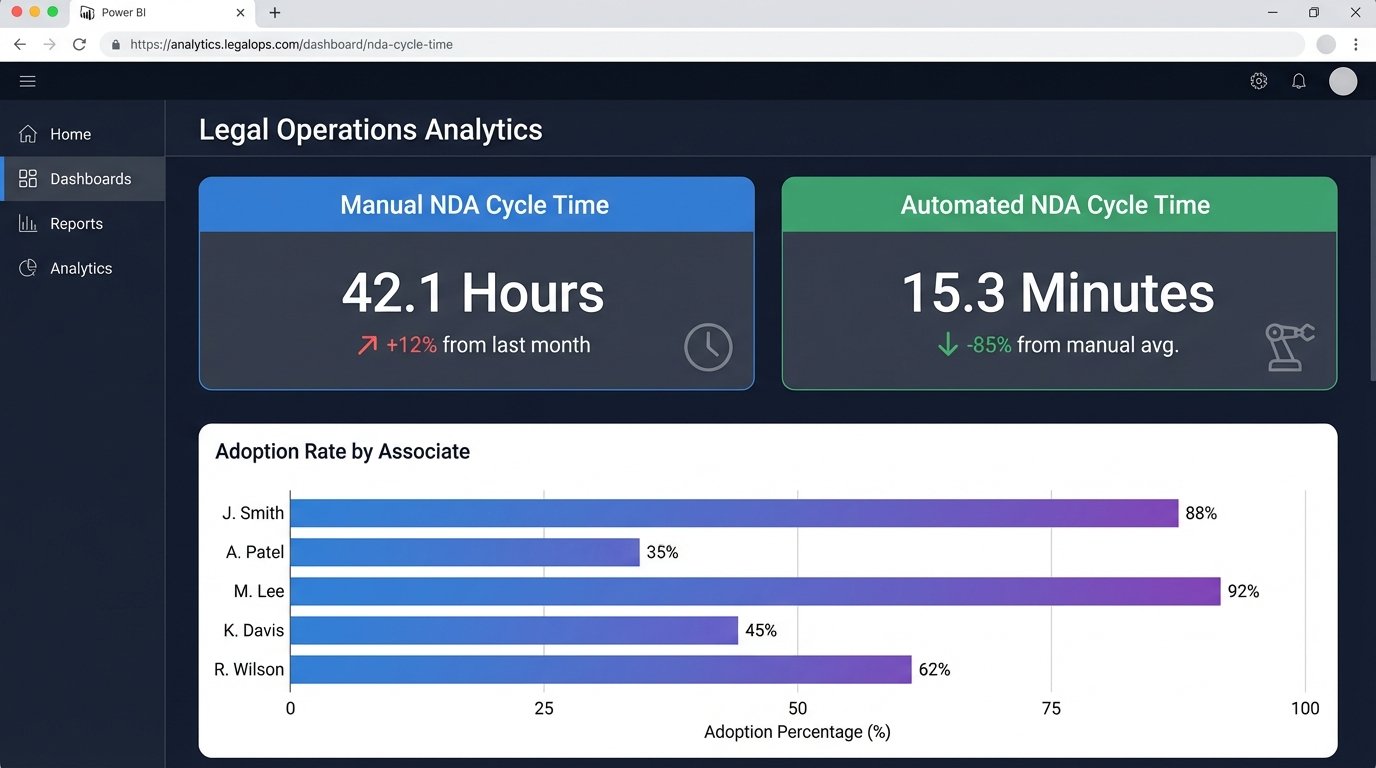
We also built a simple, undeniable dashboard in Power BI. It showed the cycle time for NDAs processed manually versus those processed through the automation. When partners saw a side-by-side comparison of “42 hours” next to “15 minutes,” the argument about “the art of the draft” for a standard agreement evaporated. Data shut down the debate.
We even encountered a form of passive sabotage. For the first month, our “documents generated” metric was suspiciously low. We discovered a senior associate had instructed his team to keep using the old process because he didn’t trust the machine. We didn’t escalate. We just configured the system to send a weekly report to the practice group head showing the adoption rate by attorney. The problem fixed itself within two weeks.
The Code Reality of Legacy Integration
To be clear, bridging these systems was not a clean API-to-API handshake. The DMS required a clunky SOAP request that we had to wrap in a Python script and expose as a REST endpoint via a Flask app just so Bryter could talk to it. The following is a simplified representation of the JSON payload we had to construct to file a document correctly, a process that required reverse-engineering the DMS’s desktop client.
{

  "operation": "fileDocument",

  "credentials": {

    "user": "service_account_user",

    "token": "SECRET_TOKEN_HERE"

  },

  "metadata": {

    "documentClass": "AGREEMENT",

    "custom1": "NDA_Executed",

    "custom2": "M&A_Diligence",

    "author": "Automated Workflow",

    "clientNumber": "12345",

    "matterNumber": "67890"

  },

  "document": {

    "fileName": "Project_Titan_NDA_Executed.pdf",

    "base64Content": "JVBERi0xLjQKJ..."

  }

}
Note the required `custom1` and `custom2` fields. They weren’t in any official documentation. We found them by monitoring network traffic from a licensed user’s machine. This is the unglamorous reality of enterprise legal tech automation.
The Scorecard: Measurable Successes and One Glorious Failure
After six months, the results were clear. The NDA automation was a success. We hit our primary goal and saw several second-order benefits that we hadn’t anticipated.
The Wins:
- Cycle Time Reduction: Average NDA turnaround time dropped from 42 hours to 22 minutes for standard agreements.
- Error Rate Collapse: Manual data entry errors, such as incorrect counterparty names or jurisdictions, fell by 98%.
- Capacity Recapture: The firm recaptured approximately 150 non-billable hours per month from the M&A group alone. Junior associates were re-tasked to higher-value work like preliminary issue spotting in the virtual data room.
- Data Standardization: For the first time, we had clean, structured data about our NDA volume, terms, and cycle times. This data is now being used to inform fixed-fee pricing models.
The Failure:
Our success with NDAs made us overconfident. Our next target was automating the first pass of diligence checklists. We purchased an AI-powered contract analysis tool that promised to identify key clauses like “Change of Control” and “Assignment.” The sales demo was flawless. In production, it was a catastrophe. The tool worked well on standard commercial contracts, but it choked on the complex, multi-layered credit agreements and shareholder documents common in our M&A deals. It produced so many false positives and, worse, false negatives, that the manual review required to clean up its output took longer than the original process. We gutted the project after three months and a significant financial loss.
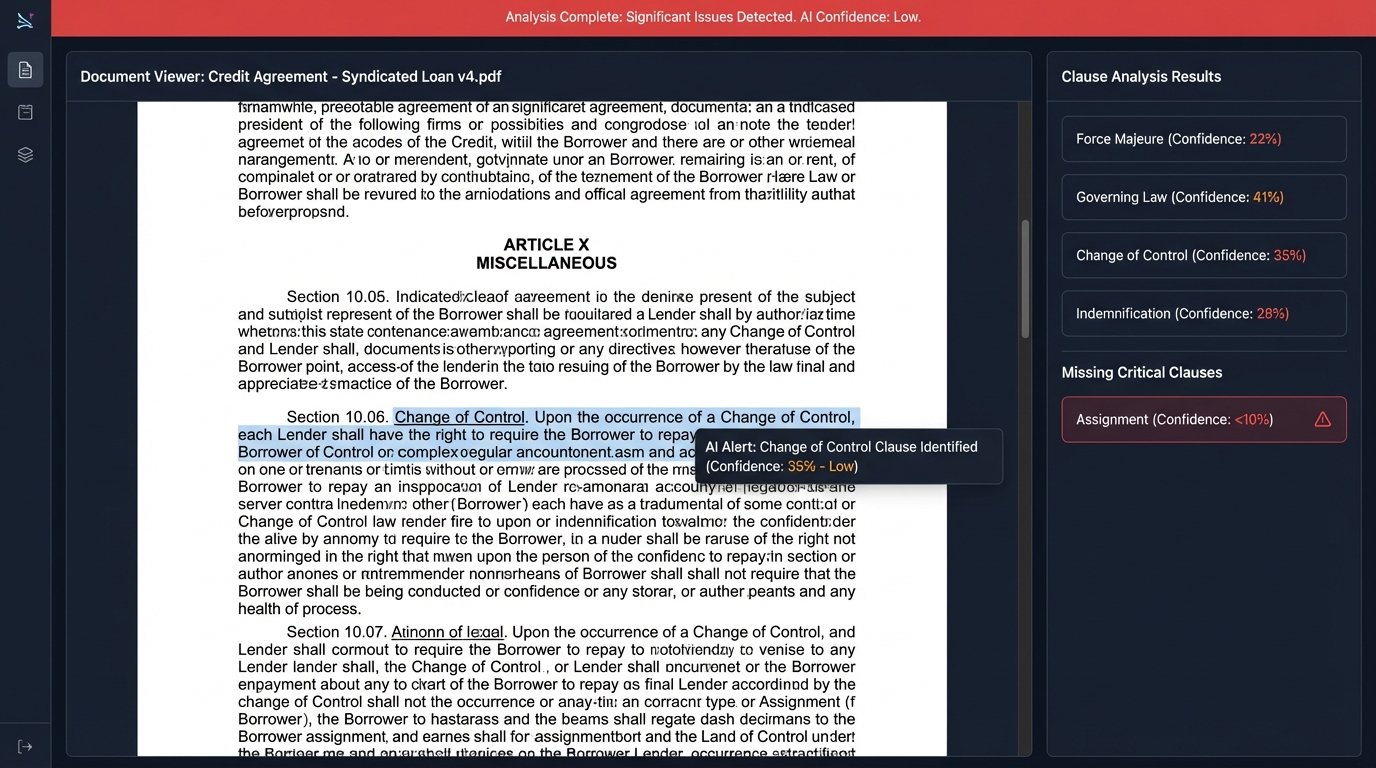
The lesson was painful but valuable. AI tools are not magic. Their effectiveness is entirely dependent on the quality and type of data they are trained on. Our specific, high-stakes document sets were simply outside the tool’s core competency. We learned to run a much more rigorous proof-of-concept on our own documents before signing any contract.
This journey wasn’t about finding the perfect piece of technology. It was about exposing broken processes and forcing accountability with data. We started by targeting a small, painful, and highly visible problem. We proved that bridging existing systems, however ugly the integration, provides more immediate value than chasing a mythical all-in-one platform. The work is not glamorous, but it is the real foundation of a functional legal automation strategy.