
Most automation initiatives fail before a single line of code is written. They are killed in committee rooms by vague fears about security, budget, and a mythical beast called “resistance to change.” The truth is these are symptoms of a deeper technical and strategic miscalculation. We are sold slick user interfaces that conceal brittle backends and promise turnkey solutions for processes that are anything but standard.
The core failure is treating automation as a product you buy instead of a capability you build. A successful program requires gutting existing workflows, forcing data into structured formats, and accepting that the first version of any automated process will likely be slower than the manual one it replaces. The goal is not initial speed. It is precision, scalability, and auditability at a level humans cannot sustain.
The Resistance Myth: Bad Tools, Not Bad People
Associates and paralegals are not afraid of technology. They are allergic to bad technology. When a new platform forces them out of their primary work environment, requires a dozen clicks for a two-click task, and introduces more cognitive load than it removes, they will find a workaround. This is not resistance. It is a rational response to a poorly designed system.
The “single pane of glass” is a vendor-pushed fantasy. Legal professionals live in their email client and their document management system (DMS). Effective automation meets them there. It does not force them into yet another web portal. We must inject automation directly into the existing workflow. This means building email parsers that trigger contract generation or DMS hooks that initiate compliance checks. The best automation is invisible. It feels like the system is just suddenly smarter.
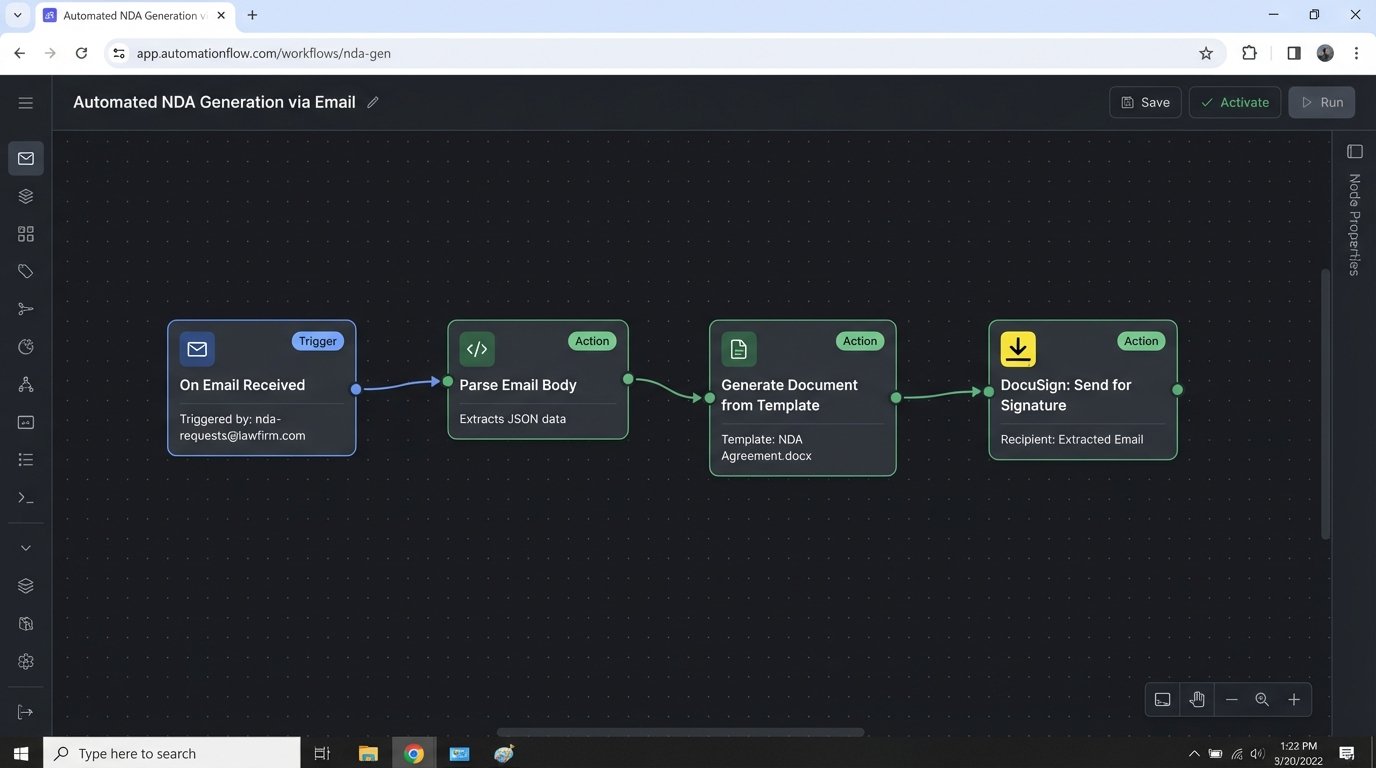
Consider a typical NDA generation process. The manual path is an associate opening a template, finding and replacing placeholders, and saving the new file. A bad automation path is making that associate log into a new “NDA Portal,” fill out a web form that mirrors the same fields, and download the document. A correct automation path is letting them forward the client’s request email to a specific inbox. A service reads the recipient’s email signature to extract the counterparty name and triggers a DocuSign envelope from a template, CC’ing the associate on the result. Zero new interfaces, zero context switching.
Beyond ROI: Calculating the True Cost of Manual Labor
Budget conversations around automation are fundamentally broken. They fixate on software licensing costs and implementation fees while ignoring the massive, ongoing expense of manual processing. The argument cannot be “this tool costs X.” It must be “this manual error rate costs Y in write-offs” or “this compliance reporting delay creates Z in potential fines.”
Every manual task carries hidden costs. There’s the cost of correction when data is entered incorrectly. There’s the opportunity cost of having a high-value lawyer performing low-value administrative work. There’s the attrition cost when your best junior talent leaves because they’re drowning in repetitive tasks they know a script could perform in seconds. These are not soft numbers. They can be calculated and attached to every process you target for automation.
The analysis requires a brutal audit of an existing workflow. Track every step, every click, and every minute. A task that a partner assumes takes “five minutes” often involves twenty minutes of locating files, switching applications, and cross-referencing information. Mapping this out reveals the true financial drain. The objective is to build a case where the cost of the automation is dwarfed by the cost of inaction. A cheap tool that saves 10% of the time but requires constant oversight is a wallet-drainer. An expensive, deeply integrated solution that eliminates the process entirely is a sound investment.
Security as an Engineering Problem, Not a Policy Document
The security objection is valid, but it is often misdirected. The risk is not automation itself. The risk is poorly vetted third-party cloud platforms and badly configured API connections. Handing your client data over to a startup with a slick website and no SOC 2 Type II report is malpractice. Relying on their marketing claims about encryption is not a substitute for proper due diligence.
A secure automation architecture prioritizes controlling data flow. This means understanding exactly what data is sent to a third-party service. For a document analysis tool, do you need to send the entire document, or can you preprocess it to extract only the relevant clauses? This reduces the attack surface and limits your exposure if the vendor is breached. Forcing every API call through a central gateway for logging and auditing is not optional. You must have a complete record of what data left your environment, where it went, and who authorized it.
Building a Secure Payload
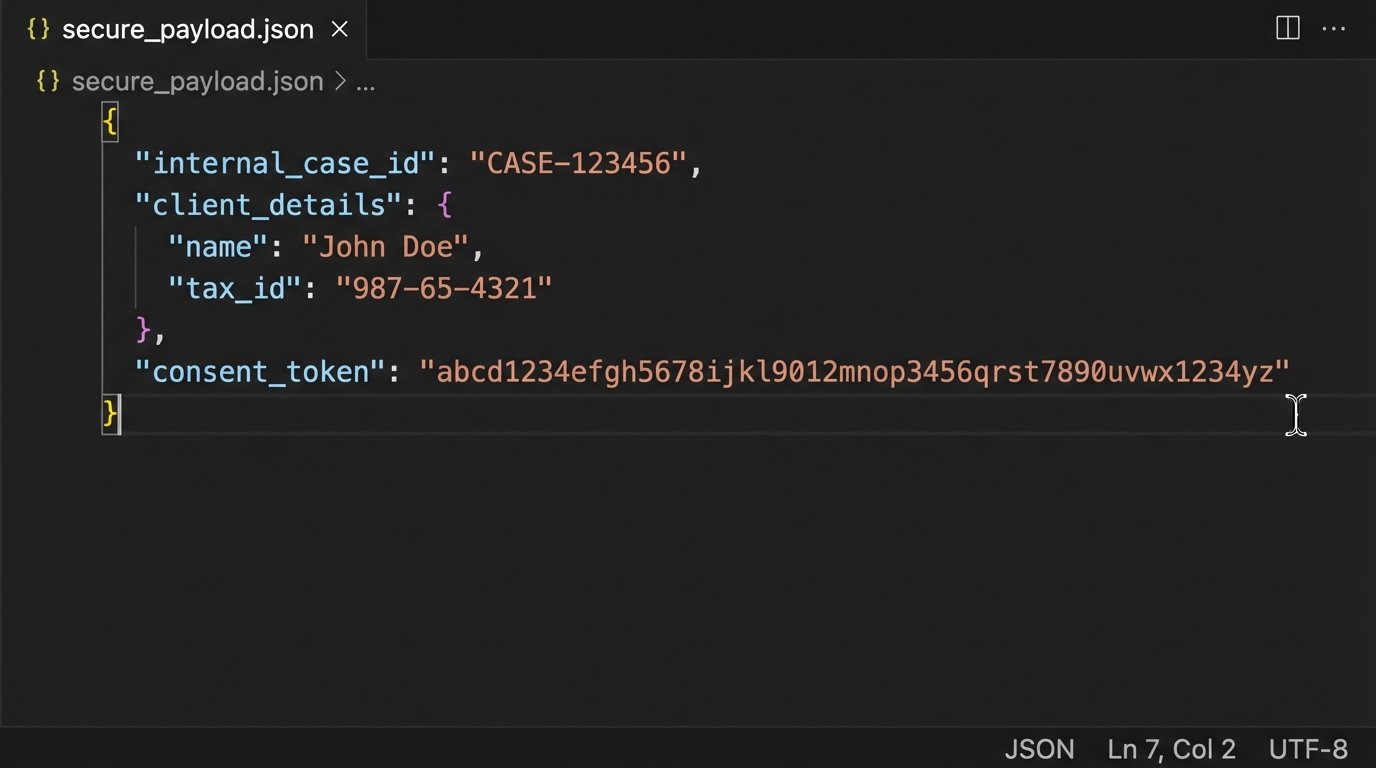
When interacting with an external API, never send the whole data object. Construct a specific payload with only the required fields. This minimizes data exposure. Imagine you need to get a credit score for a client matter. Your internal case management system has a massive object for the client.
A lazy integration sends everything. A secure integration does this:
{

  "internal_case_id": "MTR-2024-03A7",

  "client_details": {

    "full_name": "John Doe",

    "date_of_birth": "1980-05-15",

    "tax_id_last_four": "5555"

  },

  "consent_token": "cons_abc123xyz"

}
This payload sends only the minimum data required for the check. The `internal_case_id` allows you to link the result back to your system without exposing other sensitive case information. The `consent_token` proves you have authorization for the query. Anything else is a liability.
The Data Integrity Pre-Requisite
You cannot automate a mess. Attempting to build workflows on top of inconsistent, unstructured, or “dirty” data is the primary reason technical implementations fail. If your matter intake form has a free-text field for “Client Name,” you will get “ABC Corp,” “ABC Corporation,” and “ABC, Inc.” An automation trying to match this client to a record in your billing system will fail or, worse, match to the wrong entity.
Data cleansing is the first, non-negotiable step of any automation project. This is a thankless, manual, and absolutely critical phase. It involves forcing free-text fields into dropdowns, standardizing date formats, and establishing a single source of truth for core entities like clients and matters. Trying to build logic that accounts for every possible variation of messy data is like trying to shove a firehose through a needle. You are forcing a high-pressure, structured process through a tiny, inconsistent opening. The system will break.
The real work is creating data governance rules that prevent the mess from recurring. The automation is the reward for establishing data discipline. This might require locking down fields in the case management system or building validation rules into the intake process. It is a one-time pain that prevents perpetual downstream failures.
Integration Debt and the API Charade
Every legal tech vendor claims to have a “powerful REST API.” The reality is often a collection of poorly documented, rate-limited, and unreliable endpoints. Connecting your core systems, like the DMS, billing, and case management, is rarely a simple plug-and-play operation. It is an exercise in reverse-engineering and defensive coding.
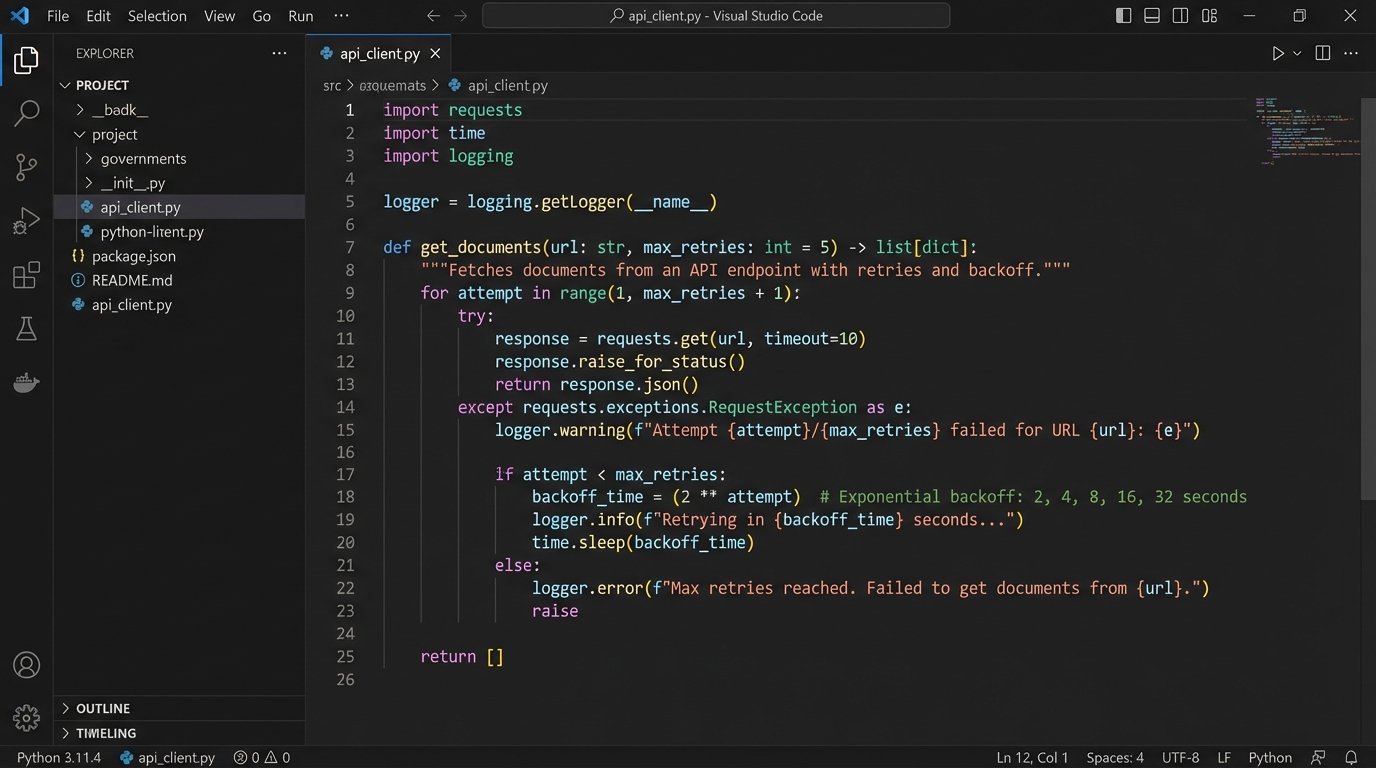
You must assume the vendor’s API will fail. Your code needs to handle unexpected timeouts, cryptic error messages, and changes in the data structure that are not announced in any changelog. Building middleware is often necessary. This is a service you control that sits between your systems and the vendor’s API. It handles authentication, retries failed requests with exponential backoff, and transforms the often-bizarre data formats into something your internal systems can digest.
A simple Python script trying to pull a document list from a legacy DMS might look straightforward:
import requests

import time
def get_documents(matter_id, retries=3, delay=5):
api_url = f"https://legacy.dms.api/matters/{matter_id}/documents"
headers = {"Authorization": "Bearer ..."}
for attempt in range(retries):
try:
response = requests.get(api_url, headers=headers, timeout=10)
response.raise_for_status() # Raises an HTTPError for bad responses
return response.json()
except requests.exceptions.RequestException as e:
print(f"Attempt {attempt + 1} failed: {e}")
if attempt < retries - 1:
time.sleep(delay * (2 ** attempt)) # Exponential backoff
else:
print("All attempts failed.")
return None
This code does not just make a request. It prepares for failure. It includes retries, an exponential backoff to avoid overwhelming the sluggish server, and explicit error handling. This is the minimum level of resilience required when dealing with the harsh reality of legal tech APIs.
This integration complexity is where off-the-shelf connectors like Zapier or Make fall apart for mission-critical functions. They are excellent for simple, non-essential tasks. But when a failed document transfer can derail a closing or miss a filing deadline, you need granular control over error handling, logging, and alerting that these platforms cannot provide. The choice is between the convenience of a no-code connector and the reliability of a purpose-built integration. For core business processes, reliability is the only option.
Start Small, Build Credibility
A firm-wide automation overhaul is a recipe for disaster. The political capital required is immense, and the risk of a high-profile failure is too great. The correct approach is to form a small, cross-functional team of a lawyer, a paralegal, and a technical resource. Give them a mandate to find one high-impact, low-complexity process.
Pick a process that is repetitive, rule-based, and universally hated. Automate it completely. The goal is not just to prove the technology works but to demonstrate a tangible improvement in someone's daily work. A single, successful project that saves a team ten hours a week builds more support than a thousand PowerPoint slides about digital transformation. This initial win provides the political cover and the practical lessons needed to tackle the next, more complex challenge.