
Manual time entry is a system of institutionalized fiction. Attorneys, operating under constant pressure, reconstruct their days from memory, calendar appointments, and sent emails. This process produces data that is, at best, a rough approximation and, at worst, a liability. The entire foundation of firm profitability rests on a guess. Automation is not about replacing the lawyer. It is about replacing the guess with a verifiable data trail.
Deconstructing the Time Capture Engine
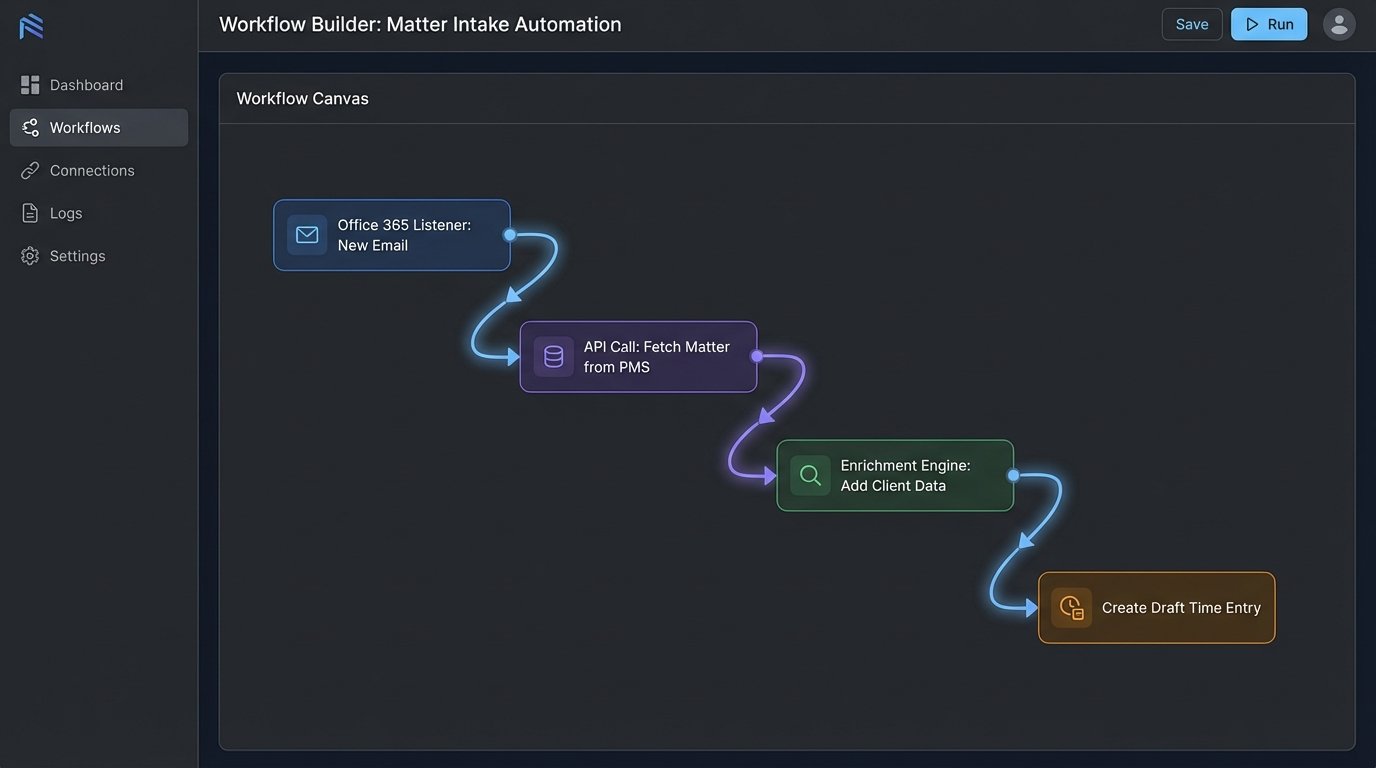
An automated time capture system is not a single piece of software. It is an event-driven architecture that bridges disparate systems. The core components are universal. First, you have the event listeners. These are lightweight agents or API hooks that monitor activity streams from primary work sources: the email server (Microsoft 365, Google Workspace), the calendar, the document management system (DMS), and even phone logs. They don’t capture content. They capture metadata: timestamps, participants, document IDs, and durations.
Second, this raw metadata is piped to a processing engine. The engine’s initial job is to enrich the data. It makes a call to the Practice Management System (PMS) API to fetch client and matter details associated with the participants or document IDs. This enrichment step is critical. It turns a generic log entry like “Email to john.doe@client.com” into a potential time entry linked to “Client X, Matter 123.” This is where most off-the-shelf solutions begin to fail.
They fail because they cannot handle the contextual ambiguity of law firm communications.
The Contextual Ambiguity Problem
An attorney sends an email to a contact who is associated with three different active matters. The system must decide which matter the time belongs to. A naive approach might just flag it for manual review, creating more work. A properly architected system uses a hierarchy of logic. It first scrapes the email subject line or document name for a matter number. If that fails, it analyzes recent activity for that contact, weighting the most recently touched matter higher. It can even parse the body for specific keywords linked to a matter type.
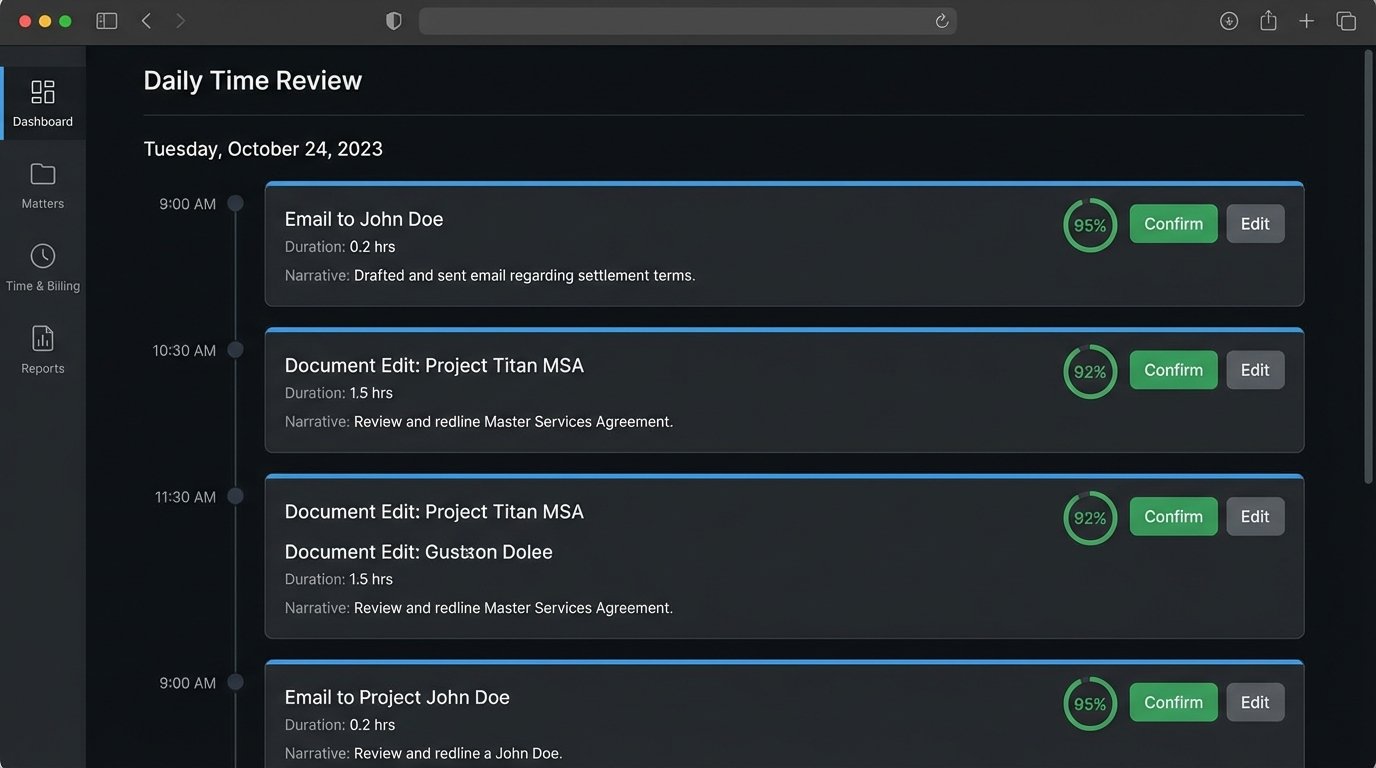
The logic must be configurable per practice group. A litigation group’s logic will differ from a transactional group’s. The goal is to produce a high-confidence “draft” time entry, not a perfect one. The final component is the review interface. This is where the attorney sees a timeline of their day with system-generated draft entries. Their job is no longer recall. It is verification. They confirm, edit, or discard the suggestions. This shifts the cognitive load from creative writing to simple validation.
This entire process lives and dies on the quality of your API integrations.
Wrestling with Legacy APIs
Most Practice Management Systems were not built for the modern API economy. Their endpoints are often slow, poorly documented, and subject to aggressive rate limiting. Pulling matter data for every single email event can quickly get your connection throttled or temporarily banned. The architecture must account for this. We build a caching layer that stores frequently accessed client and matter data locally, refreshing it periodically rather than on every single event.
This introduces a data synchronization challenge. If a matter is closed in the PMS, the cache must be invalidated almost immediately to prevent the system from suggesting time entries for a dead matter. This requires setting up webhooks from the PMS, assuming the PMS even supports them. If it doesn’t, you are forced to run a polling job that queries for changes every few minutes. It is an inefficient but necessary workaround.
You are essentially building a shock absorber between your high-frequency event listeners and your sluggish, legacy system of record. It feels like shoving a firehose through a needle.
Authentication is another battle. Many older systems use outdated protocols. You might find yourself scripting interactions with SOAP APIs that feel like a relic from a different era. The documentation is often inaccurate, forcing you to reverse-engineer endpoint behavior through trial and error. You must budget significant engineering hours just for the integration phase. Anyone who claims their tool “plugs right in” is either lying or has never worked with a law firm’s actual production environment.
Building the Confidence Score
Not all automated suggestions are equal. A time entry generated from a document saved in a specific matter folder in the DMS has a near 100% confidence score. An entry from an email with a generic subject line to a multi-matter contact has a very low score. The system must calculate and display this confidence score for every draft entry. This guides the attorney’s review process.
High-confidence entries might even be configured to auto-post to the PMS after a 24-hour review window, requiring no action from the attorney. Low-confidence entries are flagged and require explicit approval. This tiered approach balances automation with risk management. It prevents the system from injecting bad data into the billing system while still removing the bulk of the manual entry burden.
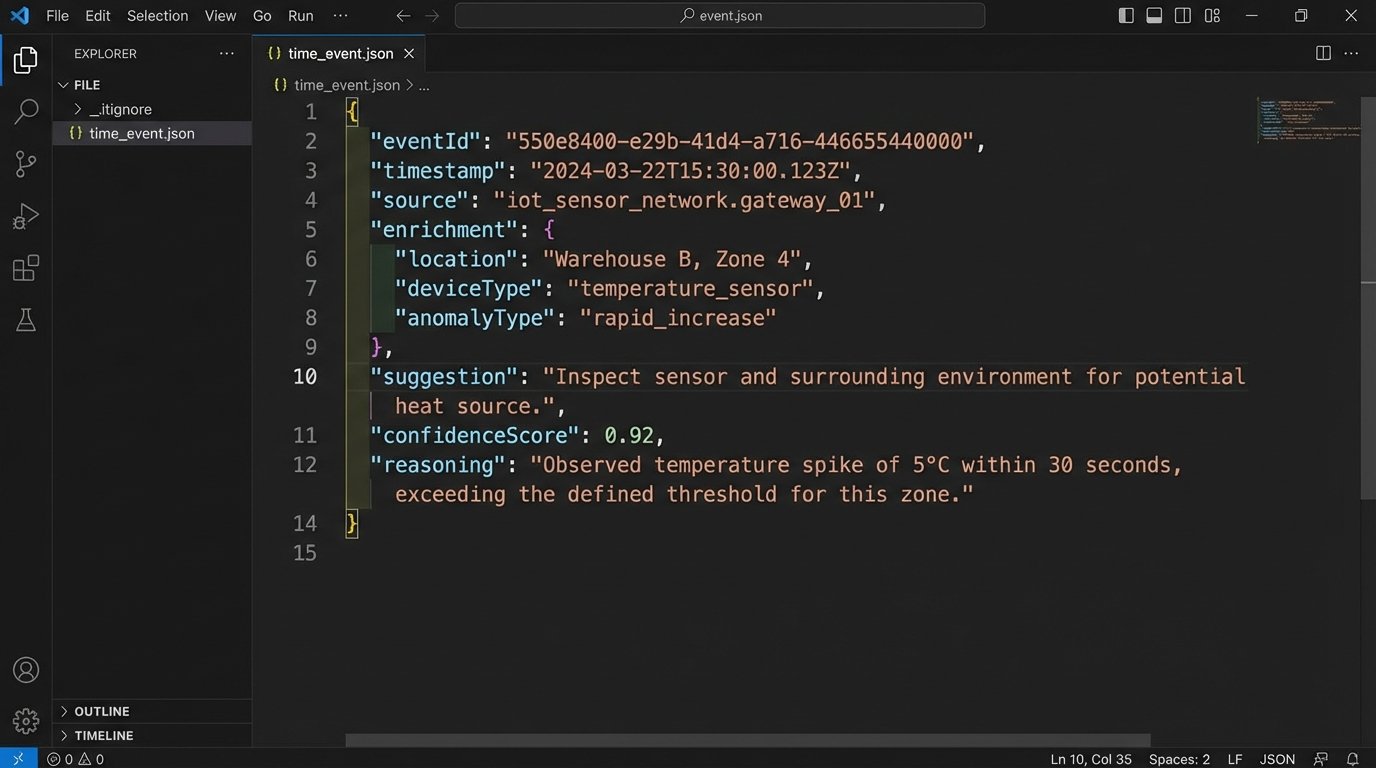
Here is a simplified JSON object representing a captured event after initial processing and enrichment. Notice the `confidenceScore` and `reasoning` fields, which are critical for the attorney review stage.
{

  "eventId": "evt_1a2b3c4d5e",

  "timestamp": "2023-10-27T14:35:11Z",

  "source": "Office365",

  "eventType": "EmailSent",

  "user": "attorney.a@lawfirm.com",

  "durationMinutes": 5,

  "participants": ["john.doe@clientcorp.com", "jane.smith@lawfirm.com"],

  "metadata": {

    "subject": "RE: Draft MSA for Project Titan"

  },

  "enrichment": {

    "clientId": "C_987",

    "clientName": "Client Corp",

    "matterId": "M_654",

    "matterName": "Project Titan MSA Negotiation"

  },

  "suggestion": {

    "narrative": "Email to John Doe regarding Draft MSA for Project Titan.",

    "timekeeper": "ATTORNEY_A",

    "taskCode": "C101",

    "isBillable": true

  },

  "confidenceScore": 0.95,

  "reasoning": "Matter ID M_654 inferred from keywords 'Project Titan' and 'MSA' in subject line; contact john.doe@clientcorp.com is explicitly linked to this matter."

}
This structured data is the raw material for everything that follows. It is verifiable, auditable, and far more valuable than a manually entered line item.
Beyond Billing: Operational Intelligence
The primary driver for time automation is plugging revenue leaks. That is the easy sell. The real value is the high-fidelity operational data it generates. When every phone call, every email, and every document revision is captured as a potential time event, you create a dataset that reveals the true cost of servicing a client or handling a specific matter type.
You can now accurately analyze fixed-fee matters. The firm quotes a price based on an assumption of effort. The automated data stream shows the actual effort in near real-time. You can see which phases of a project consume the most time and which lawyers are most efficient at specific tasks. This allows you to price future fixed-fee work with precision, not guesswork. It turns pricing into a data science problem.
Resource allocation becomes proactive instead of reactive. By analyzing data across similar matters, you can predict potential bottlenecks before they happen. If you see that the discovery phase of litigation matters consistently requires more associate time than allocated, you can staff up accordingly for the next one. The data provides an early warning system for project management.
This is only possible if the data is captured systematically and passively. If you rely on attorneys to manually enter this information, it will never be complete enough to be statistically significant.
The Human Factor: Adoption and Training
No amount of technical elegance will matter if attorneys refuse to use the system. The rollout is as important as the code. The worst thing you can do is force a hard cutover. We implement these systems in “monitor-only” mode first. For several weeks, the system captures data and generates draft entries in the background, but no one sees them. This allows us to validate the logic and tune the confidence scoring against the firm’s actual work patterns.
During this phase, we compare the system’s generated entries against what the attorneys manually entered for the same period. This reveals gaps in the logic and provides hard data to show the value. When you can go to a partner and say, “Our system captured 1.2 billable hours last week that you never recorded,” adoption becomes a much simpler conversation.
The user interface for review must be brutally efficient. It should be a timeline, not a spreadsheet. Attorneys need to glance at it for 60 seconds at the end of the day and approve the drafts. Every extra click you add to the review process will reduce adoption. The design must be optimized for speed and minimal cognitive friction. The goal is to make it faster to approve the drafts than to ignore them.
The Ground Truth
Automating time tracking is not about buying a product. It is about committing to an infrastructure project. It requires deep integration into core systems, a willingness to confront the limitations of legacy software, and a thoughtful approach to user adoption. The initial setup is a heavy lift, requiring expertise in API integration, data caching, and workflow design. Maintaining the system means monitoring API health, updating logic as work patterns change, and managing data synchronization.
Firms that see this as just another software subscription are destined to fail. Firms that treat it as a fundamental upgrade to their data infrastructure will gain a massive advantage. They will not only capture more revenue but will also operate with a level of business intelligence that is impossible to achieve with manual, narrative-based time entry. The data trail becomes the firm’s most valuable asset for strategic decision-making.