
Most client communication automation fails. Not because the tool is wrong or the strategy is flawed, but because the underlying data architecture is garbage. The promise of a seamless client experience gets buried under a mountain of brittle API connections, stale data fields, and workflows that nobody has the courage to document or decommission. Before you buy another marketing automation platform, let’s talk about the plumbing.
Segmentation is a Data Integrity Problem, Not a Marketing Tactic
The marketing team wants to send “personalized” messages based on case type, stage, and client value. This is a reasonable request that becomes an engineering nightmare when you look under the hood. The source of truth, your Practice Management System (PMS), was likely never designed to be a clean, queryable data source for a marketing engine. Your first job is not to write email copy; it’s to perform a data audit that will make you question every life choice up to this point.
The core task is mapping fields from the PMS to your CRM or marketing tool. This is never a one-to-one operation. A “Case Status” field in your PMS might be a free-text box, a cryptic numerical code, or a dropdown with 50 options, half of which are deprecated. You have to write transformation logic to sanitize this data before it ever hits the marketing platform. Without this, your segmentation is useless.
You’ll build segments like “PI Cases – In Discovery” or “Corporate M&A – Pre-Closing.” This requires a constant, reliable sync. If that data is stale by even 24 hours, you risk sending a cheerful “Welcome aboard!” message to a client whose case just got closed out. This isn’t just a bad look; it’s a breach of trust coded into your own system.
Forcing Data Hygiene with Validation Rules
You cannot trust attorneys or paralegals to maintain perfect data discipline. They are paid to practice law, not to be database administrators. Therefore, you must force data hygiene at the point of entry. Implement strict validation rules in the PMS. The “Case Sub-Type” field cannot be optional. The “Date of Injury” must be a valid date format. If the system allows for null or garbage values, your automations will inherit that garbage.
This is a political battle as much as a technical one. You will get pushback about slowing down intake or adding “unnecessary” clicks. Your job is to demonstrate that a few seconds of required data entry upfront prevents hours of manual cleanup and the brand damage of sending the wrong automated message to a high-value client. Make the pain of bad data more visible than the inconvenience of good data entry.
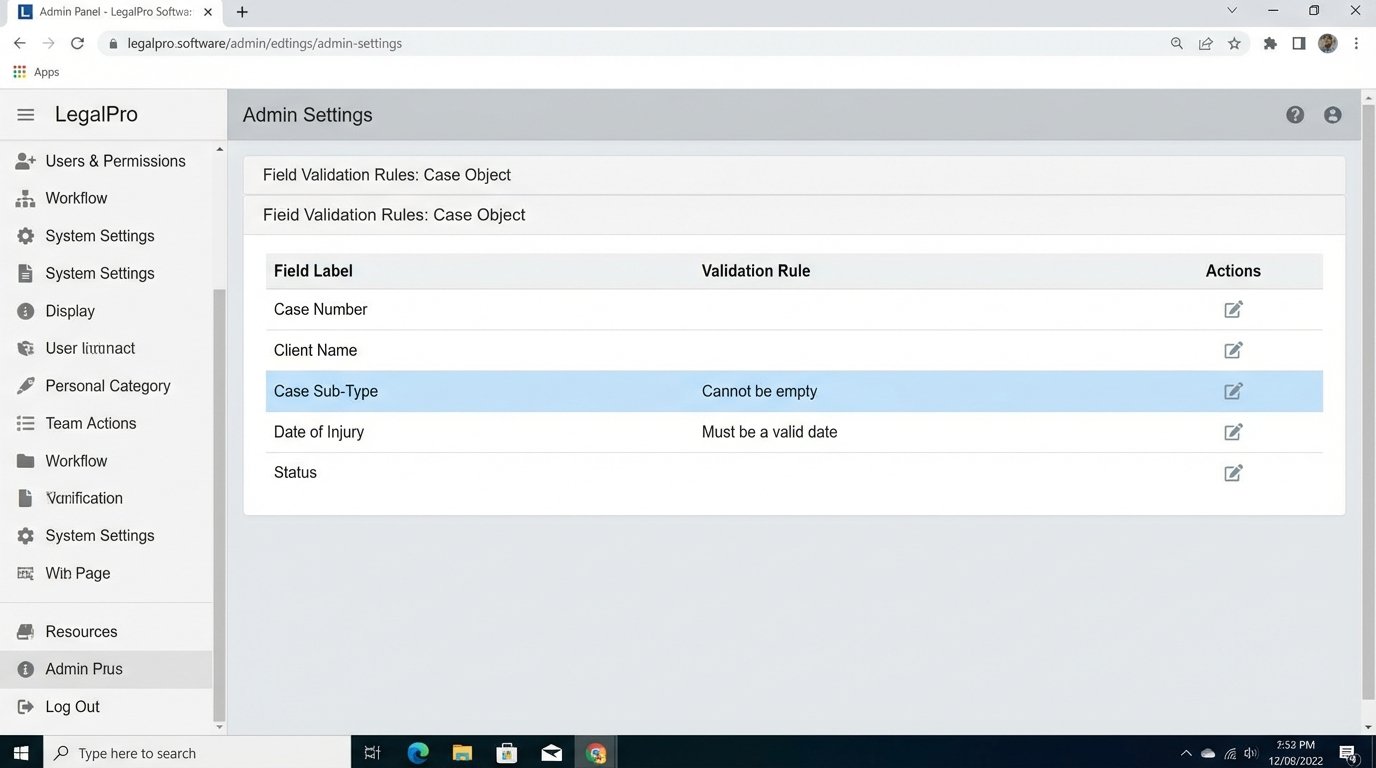
The logic is simple. Garbage in, garbage out. Your sophisticated automation sequence is only as smart as the data you feed it.
Ditching Batch Jobs for Event-Driven Triggers
Many firms still rely on nightly batch jobs to sync data between systems. This is an artifact of a bygone era. A client’s status changes at 10 AM, but your automation system doesn’t know about it until the sync runs at 2 AM the next day. The window for a timely, relevant communication has slammed shut. This is unacceptable for status updates, appointment reminders, or document requests.
The modern approach is to use event-driven triggers, typically through webhooks. When a record is updated in your PMS, the system fires a webhook containing a payload of data to a specified endpoint. This endpoint is a listener you configure in your automation platform or a custom middleware function. The communication is nearly instantaneous. The case status changes, and a workflow triggers within seconds, not hours.
Setting this up requires that your PMS has a decent API that supports webhooks. Many legacy systems do not, or they have rate limits that are laughably low. You have to investigate this before you promise real-time updates. If your PMS API is a dinosaur, your only option might be to poll for changes every few minutes, which is inefficient and still not truly real-time. It’s a kludge, but sometimes it’s the only kludge you have.
Here is what a typical webhook payload for a case status change might look like. Your job is to parse this JSON and use its contents to drive your logic.
{

  "event": "case.status.updated",

  "timestamp": "2023-10-27T10:05:21Z",

  "case": {

    "id": "CASE-001278",

    "client_id": "CL-009845",

    "previous_status": "Discovery",

    "current_status": "Settlement Negotiation",

    "assigned_attorney_id": "ATTN-045"

  },

  "triggered_by": {

    "user_id": "USER-112",

    "role": "Paralegal"

  }

}
This payload gives you everything you need. You know which case was updated, what the old and new statuses are, and who made the change. You can now build a workflow that says, “If `previous_status` was ‘Discovery’ and `current_status` is ‘Settlement Negotiation’, then trigger the ‘Settlement Update’ email sequence for client CL-009845.”
This is sharp, precise, and immediate. It’s also more complex to set up and debug than a simple batch job.
Engineering the “Human Touch” with Escalation Logic
The term “human touch” in automation is a marketing fiction. You cannot fake sincerity with a `{{client.first_name}}` merge tag. What you can do is build intelligent systems that know when to stop and get a human involved. This is about defining failure conditions and escalation paths, not about choosing a folksy email font.
Your automations need logic checks that prevent them from doing something stupid. For example, an automated email confirming receipt of documents should not be sent if the documents have not actually been attached to the client’s file in the DMS. The workflow needs to first perform a lookup against the DMS API. If the document count for that matter ID is zero, the workflow should not send the confirmation. Instead, it should create a task for the paralegal assigned to the case, notifying them of the discrepancy.
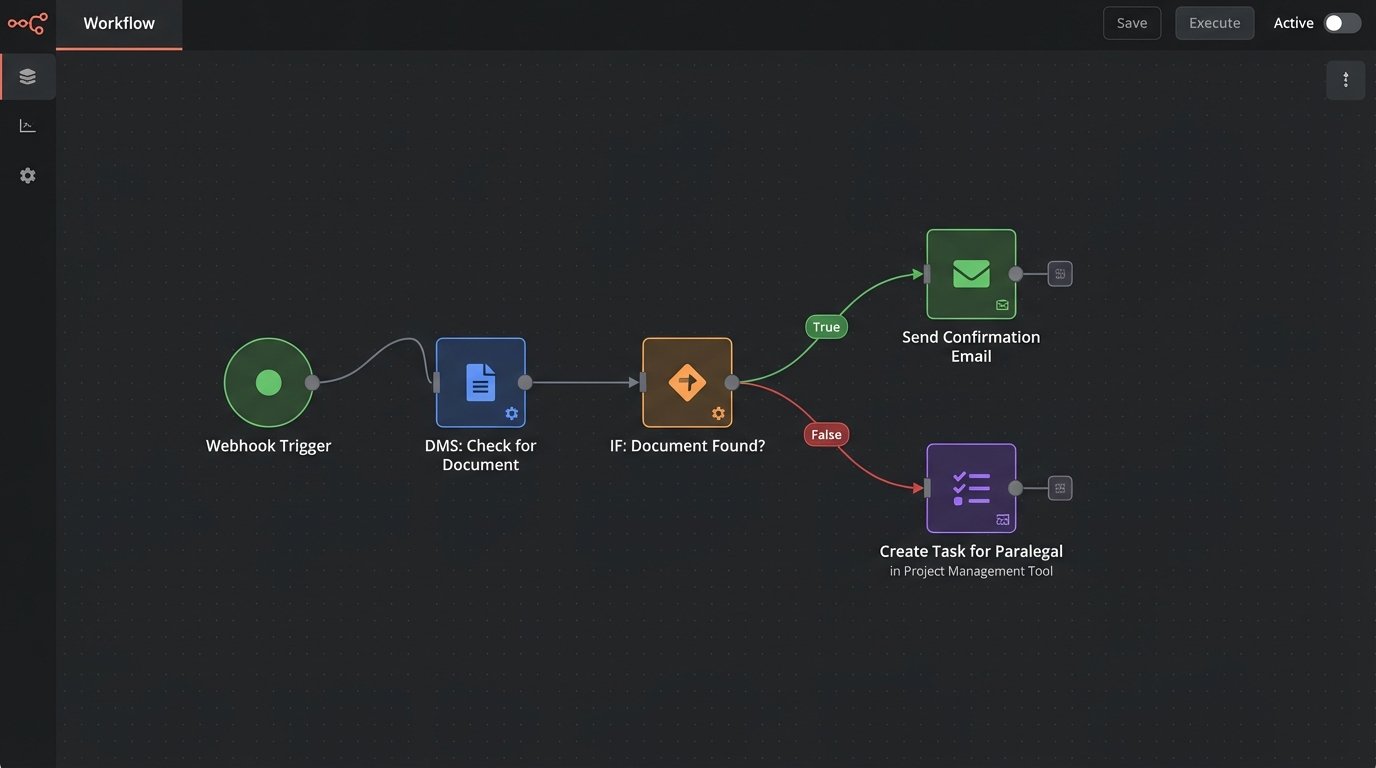
This turns your automation from a dumb message-blaster into a proactive quality control agent. It catches human error and flags it for correction. That is infinitely more valuable than a “warm” and “friendly” email sent at the wrong time with incorrect information.
Another critical escalation path is sentiment analysis. If a client replies to an automated status update with an angry email, your system should not just file it away. You can pipe inbound email replies through a sentiment analysis service. If the sentiment score is strongly negative, the automation should immediately halt any further scheduled communications to that client and create a high-priority ticket for the managing partner. Trying to sync a legacy PMS with a modern CRM is like trying to connect old cast iron plumbing to a smart faucet. The pressure is wrong, the threads don’t match, and something is guaranteed to leak.
Building the Off-Ramp
Every single automation sequence needs a clear “off-ramp.” This can be a simple tag or custom field, like `is_automation_disabled`, that you can set on a client’s record. When this flag is true, all communication workflows must terminate. This gives your staff a kill switch for situations where the automation is inappropriate, such as a client bereavement or a breakdown in the attorney-client relationship.
Without this manual override, you are putting the machine in charge of client relationships. That’s not just bad service; it’s malpractice waiting to happen. The override needs to be easy for any staff member to access and apply directly from the PMS or CRM interface.
Tooling and API Headaches
The legal tech market is fragmented. You will be forced to bridge systems that were never meant to speak to each other. Your PMS might have a SOAP API from 2005, while your email platform has a modern RESTful API with GraphQL endpoints. You will spend a significant amount of your time as a glorified data translator, writing middleware to convert data from one format to another.
Do not underestimate the cost of this integration work. The subscription fee for the automation tool is just the entry price. The real cost is in the developer hours required to build, test, and maintain the connectors that feed it data. These connectors are brittle. An update to the PMS can break your entire stack without warning. The documentation for these APIs is often outdated or just plain wrong.
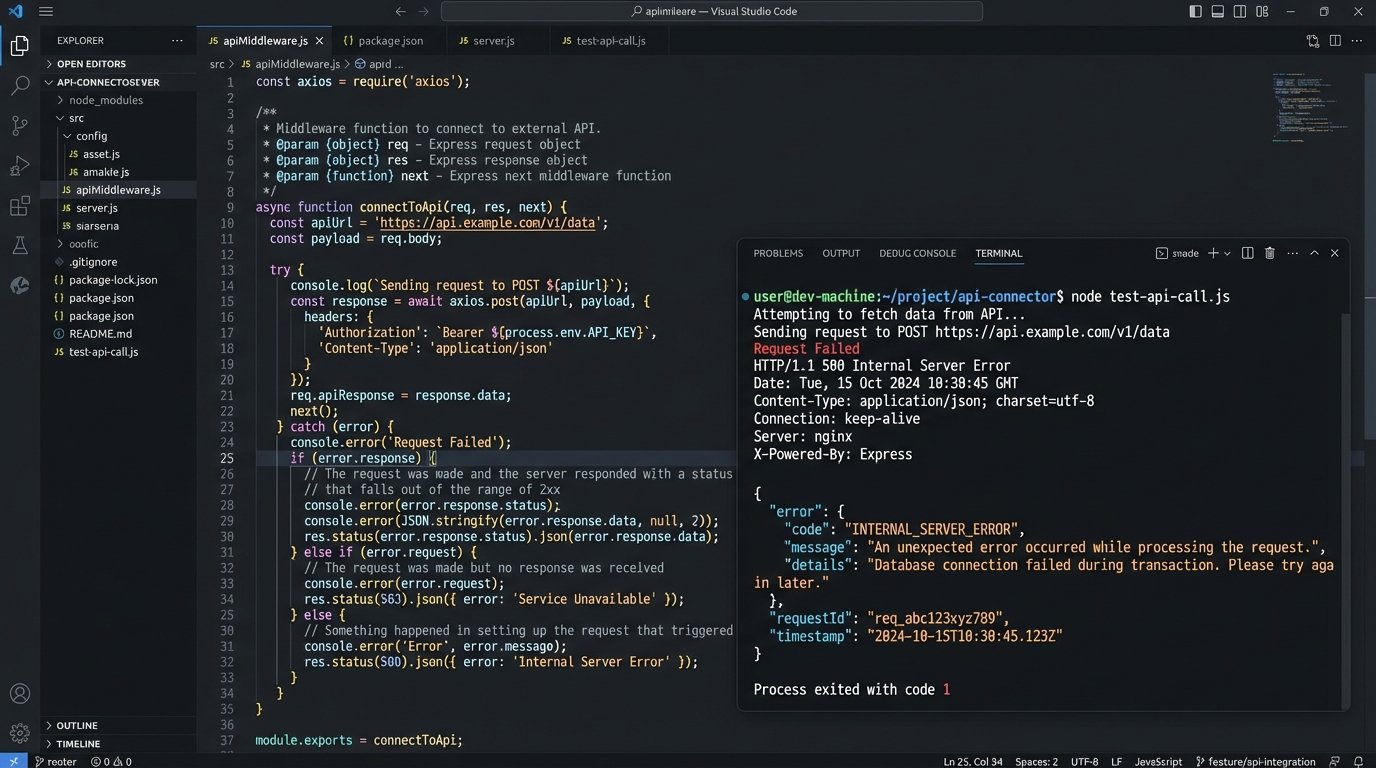
You need a robust monitoring and logging strategy. When an API call fails, you need an immediate alert that tells you the endpoint, the error code, and the payload that caused the failure. Flying blind is not an option. You must assume that your integrations will fail and build your systems to be resilient and observable when they do.
The choice of tooling matters. Platforms with pre-built connectors for major legal PMS systems can save you some initial setup time, but you sacrifice control. Building your own integrations with a platform like Zapier or a dedicated integration platform as a service (iPaaS) gives you more flexibility but also puts the entire burden of maintenance on your shoulders. There is no easy answer here, only a series of compromises.