
Litigation preparation is a sequence of data integrity checks punctuated by moments of pure panic. The core problem is data fragmentation. Key evidence lives in a network share, witness contact details are siloed in a case management system, and production sets from opposing counsel arrive in a format that seems designed to break standard ingestion tools. The goal of automation is not to remove lawyers, but to strip away the non-legal grunt work that introduces unforced errors before you ever step into court.
These tools are not magic wands. They are force multipliers that require careful integration and a clear understanding of their breaking points. Buying the software is the easy part. The real work is forcing it to talk to your other broken, legacy systems without data loss.
1. A Case Management System with a Real API
Most case management systems (CMS) are glorified digital file cabinets. Their primary function is to centralize dates, contacts, and basic case information. The differentiator for automation is the Application Programming Interface (API). A well-documented, RESTful API is the only thing that elevates a CMS from a simple database into a central nervous system for your litigation workflow. Tools like Filevine and Clio Manage are common, but the brand matters less than the API’s reliability.
You need to be able to programmatically query and mutate case data. This allows you to build custom dashboards, trigger alerts, and bridge data into other platforms without a paralegal spending their day on copy-paste tasks. The API is the gateway for any meaningful automation.
Key Technical Function: Event-Driven Triggers
The core use case is building workflows based on case events. When a case status is updated or a deadline is logged, the CMS should be able to fire a webhook. This webhook sends a JSON payload to an endpoint you control, which can then kick off a series of automated actions. For example, a new deposition date entry can trigger a script that automatically generates a prep folder structure, assigns tasks to the legal team, and adds a calendar block for the key attorney.
This bypasses the need for constant polling, where your script has to ask the CMS every five minutes if anything has changed. It’s inefficient and burns through API rate limits.
Here’s a simplified look at a potential webhook payload you might receive when a deadline is created:
{

  "event_type": "deadline.created",

  "timestamp": "2023-10-27T10:00:00Z",

  "case_id": "LIT-2023-01138",

  "deadline": {

    "deadline_id": "dl_987xyz",

    "title": "Response to Plaintiff's Motion to Compel",

    "due_date": "2023-11-15",

    "assigned_to": "user_paralegal_04"

  },

  "triggered_by": "user_attorney_01"

}
Your automation server just needs to listen for this payload and execute the logic you’ve defined for `deadline.created` events. It’s a direct, machine-to-machine communication that eliminates human error.
The Inevitable Friction
CMS APIs are notoriously under-documented and often sluggish. You will spend more time debugging undocumented error codes and dealing with authentication issues than you will writing the actual business logic. Their data models are frequently rigid, forcing you to cram your firm’s specific processes into predefined fields that don’t quite fit. It’s a constant battle to make a generic tool work for a specific practice.
Assume the provided documentation is at least two versions out of date.
2. An E-Discovery Platform Built for Ingestion Speed
E-discovery is a game of data volume. You get handed terabytes of unstructured data, from emails with cryptic attachments to forensic images of hard drives. The job is to find the few critical documents buried inside. A platform like RelativityOne or Logikcull is built around a powerful ingestion and processing engine. Its sole purpose is to crack open container files, extract text and metadata, and make it all searchable.
The value isn’t just search. It’s the ability to de-duplicate, run optical character recognition (OCR) on millions of pages, and apply filters to cull massive datasets down to something a human can actually review. Without this, you are manually opening files, a task that is both financially ruinous and impossible at scale.

Key Technical Function: Technology-Assisted Review (TAR)
Technology-Assisted Review, or predictive coding, is the most important feature. You start by having a senior attorney review a seed set of documents, marking them as responsive or non-responsive. The platform’s algorithm learns the characteristics of these documents. It then scores the rest of the document population based on the probability of relevance.
This allows you to prioritize the review queue, putting the most likely relevant documents in front of human reviewers first. In some cases, it can be used to defensibly argue that documents below a certain relevance threshold do not need to be reviewed at all. This guts the cost of large-scale document reviews.
The Inevitable Friction
These platforms are wallet-drainers. Pricing is almost always based on the amount of data you host, creating a massive financial incentive to get data in, reviewed, and produced or deleted as fast as possible. Exporting data can also be a painful process, with complex production settings that are easy to get wrong, potentially leading to inadvertent disclosure of privileged information. The system is designed to keep you inside its ecosystem.
Getting your data out is always harder than getting it in.
3. Trial Presentation Software That Is Battle-Tested
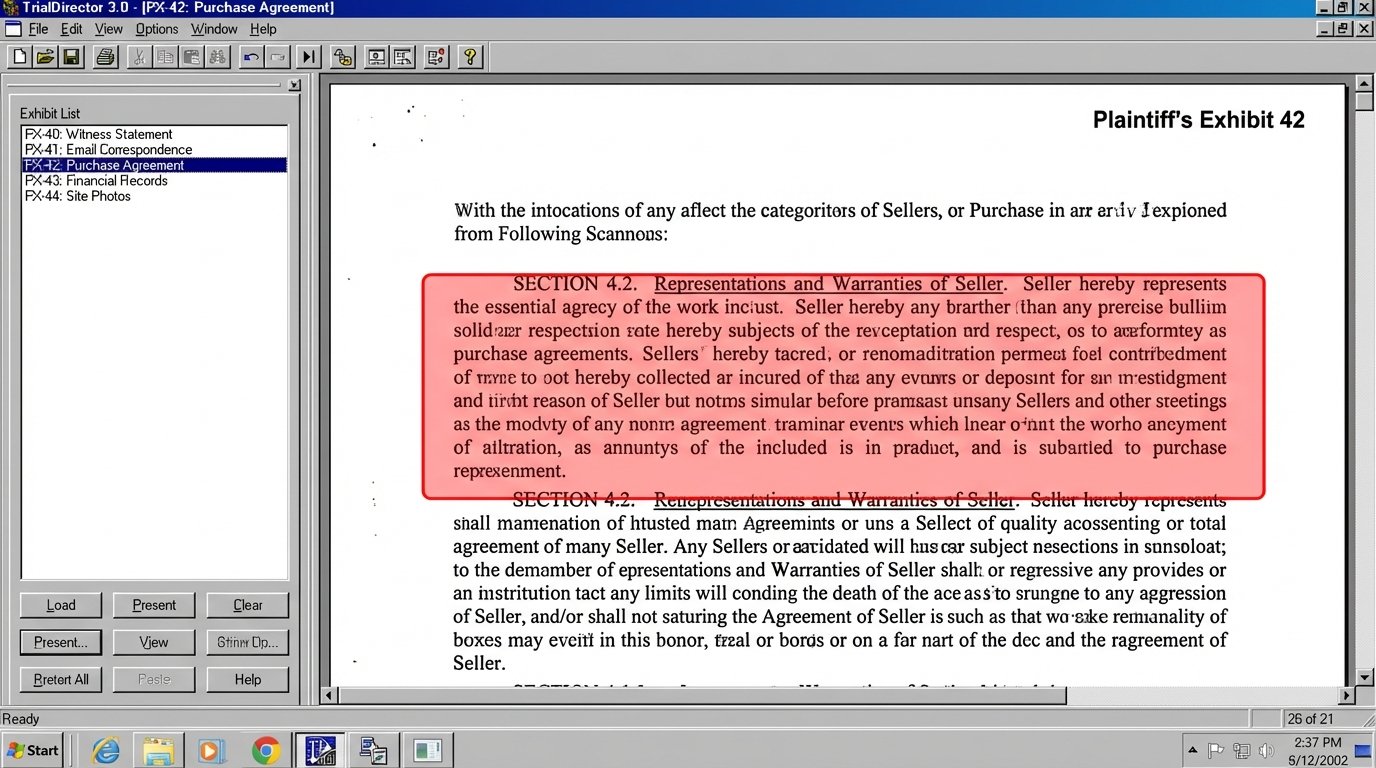
Once you have your key exhibits, you need a tool to present them in court. This is not a job for PowerPoint. Trial presentation software like TrialDirector or OnCue is designed for one thing: instant recall and display of evidence under pressure. These systems pre-load and cache all exhibits, video clips, and depositions so there is zero lag when an attorney calls for a document.
The core function is stability. A crash in the middle of a cross-examination can destroy a trial narrative. These tools are built to be self-contained and run on a dedicated machine, minimizing dependencies and potential points of failure. They let you annotate on the fly, create call-outs of specific text, and run deposition video synced to a scrolling transcript.
Key Technical Function: Exhibit Barcoding and Scripting
A high-functioning trial setup involves scripting the presentation. Every exhibit is assigned a unique identifier, often a barcode. The trial technician has a script of the direct or cross-examination with the corresponding barcodes. When the attorney asks for “Plaintiff’s Exhibit 104,” the tech scans the barcode, and the document appears on screen.
This removes the chance of pulling up the wrong document. For complex trials, you can pre-program sequences of call-outs and document comparisons. It turns the presentation from a reactive task into a rehearsed performance, which is exactly what you want.
The Inevitable Friction
The user interfaces for these applications are ancient. They are powerful but not intuitive. They require a dedicated technician to operate effectively; this is not software an attorney can learn to run the night before trial. They also create a single point of failure. If the presentation laptop goes down, your trial grinds to a halt. There is no cloud-based failover. Debugging a presentation workflow is often like trying to fix a jet engine during takeoff. You’re working with a complex, isolated system under extreme pressure, and the documentation assumes you already know everything.
It’s powerful, but it feels like it was designed by engineers who never had to use it.
4. Workflow Automation Engines to Bridge the Silos
The tools above do not speak to each other out of the box. The CMS has no idea what’s happening in the e-discovery platform. You need a layer of glue to connect them. This is where a workflow engine like Make (formerly Integromat) or even a set of custom Python scripts hosted on a small server comes in. These tools are designed to listen for triggers from one system and push actions to another.
You are essentially building your own custom middleware. It’s the only way to create a seamless flow of information between best-in-class point solutions. Without this layer, you are just buying expensive software silos and relying on manual processes to move data between them.
Key Technical Function: API Chaining and Logic Checks
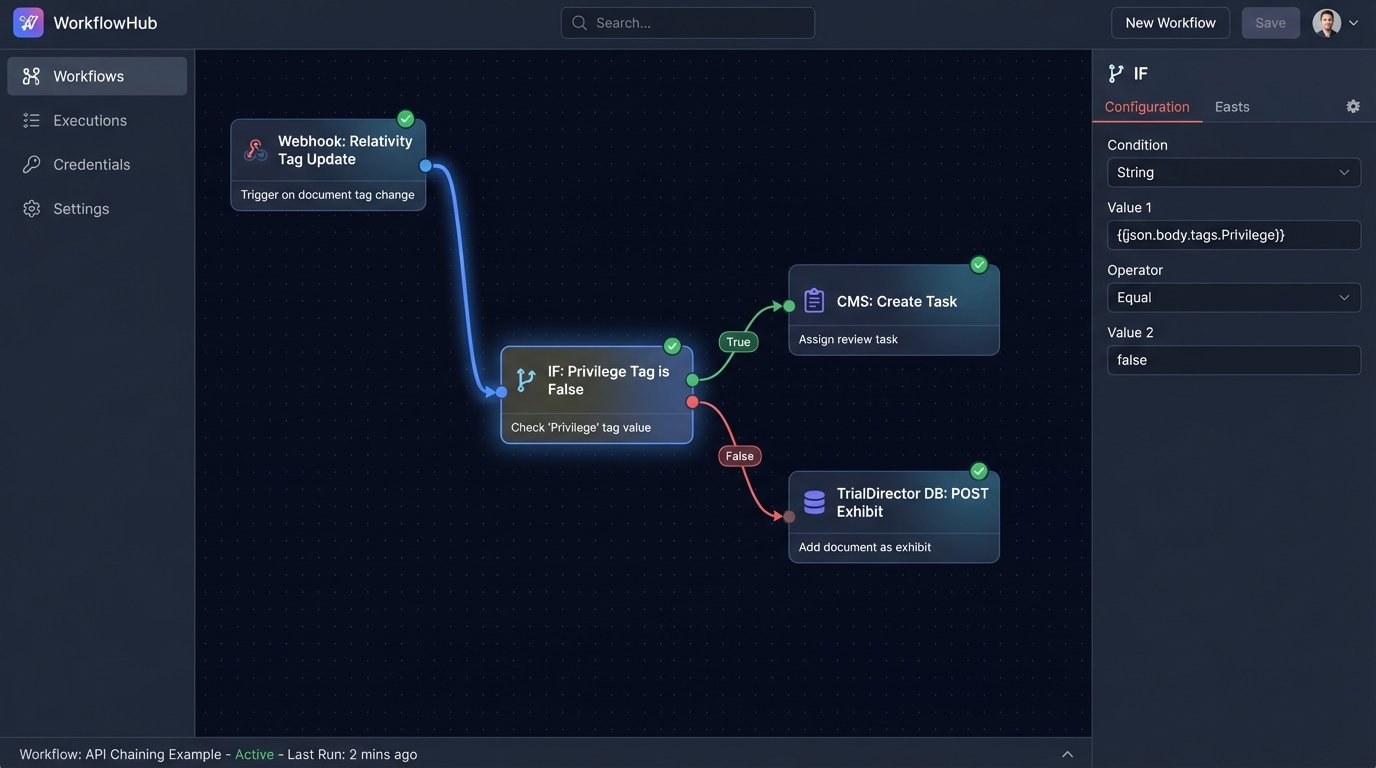
A practical example is managing hot documents. An attorney tags a document as “Key Evidence” in Relativity. This action can be configured to trigger a webhook. Your workflow engine catches this webhook. It then performs a series of API calls: first, it pulls the document’s metadata from Relativity. Second, it logic-checks the data to ensure it’s not tagged as privileged. Third, it pushes a new task into the CMS, assigning a paralegal to draft a summary of the document. Finally, it might create a placeholder for the exhibit in your trial presentation database.
- Trigger: Document tag updated in Relativity.
- Action 1: GET document metadata from Relativity API.
- Logic Check: IF `privilege_tag` IS NOT `true`.
- Action 2: POST new task to CMS API.
- Action 3: POST new exhibit record to TrialDirector database.
This entire chain executes in seconds, without any human intervention. It ensures critical documents are acted upon immediately.
The Inevitable Friction
This is where your automations are most fragile. You are building a system that depends on three or four different APIs that you don’t control. If the CMS vendor changes an API endpoint in a new update, your entire workflow shatters without warning. Troubleshooting is a nightmare, as you have to dig through logs on multiple platforms to find the point of failure. It requires constant maintenance and defensive coding.
You become the unpaid integration engineer for all your software vendors.
5. A Document Management System (DMS) with True Version Control
A shared network drive is not a document management system. It’s a disaster waiting to happen. A proper DMS like NetDocuments or iManage provides an immutable audit trail for every document. It answers the questions: Who created this? Who has viewed it? Who changed it, and when? This is critical for both security and defensibility.
The core of a DMS is version control. It prevents the dreaded “final_v2_final_JDS_edits.docx” problem. Every time a document is saved, it creates a new version, but the old versions are preserved. You can roll back to a previous state if a bad edit is made. This is essential for collaborative drafting of briefs, motions, and settlement agreements.
Key Technical Function: Ethical Walls and Access Control
In litigation, you frequently have conflicts of interest. A DMS allows you to build digital “ethical walls.” You can create granular access control rules that wall off all information related to a specific client or matter. This means attorneys who are conflicted out of a case can be programmatically blocked from even seeing that the files exist.
Trying to manage this on a standard file server is a manual, error-prone process that terrifies general counsel. A DMS enforces these rules at the system level, providing a defensible record that the firm took reasonable steps to protect client confidentiality.
The Inevitable Friction
Getting attorneys to adopt a DMS is a massive change management challenge. They are used to the freedom of a file system, and the structured nature of a DMS feels restrictive. Search can sometimes be slower or less intuitive than a simple desktop search, leading to frustration and low adoption. The system is only as good as the data within it, and if users are saving critical documents to their local desktops to bypass the DMS, you’ve just bought a very expensive and empty database.
The technology is solid. The human element is the weak point.
None of these tools will prepare a case for you. Their job is to absorb the repetitive, low-value administrative work and build a reliable data pipeline from discovery to courtroom. They are dumb machines that execute instructions. Success depends entirely on the quality of the architecture you design to connect them and the discipline of the teams who use them.