
Most client communication automation fails. It fails not because the idea is wrong, but because the implementation ignores the messy reality of legal data. Your case management system (CMS) is a decade old, its API is an afterthought, and the data fields are a wasteland of inconsistent free-text entries. Bolting on a slick communication tool without gutting your data pipeline first is a recipe for sending the wrong update to the right client, which is a disaster.
The goal isn’t just to send messages. The goal is to trigger the right message from a specific data state change in your source of truth. A case status flip from ‘Pending’ to ‘Filed’ must be the event that fires the notification. Anything less is just high-volume spam that erodes client trust. The following tools can get you there, but none of them is a magic wand. Each requires a significant investment in data discipline and process engineering.
1. Twilio API
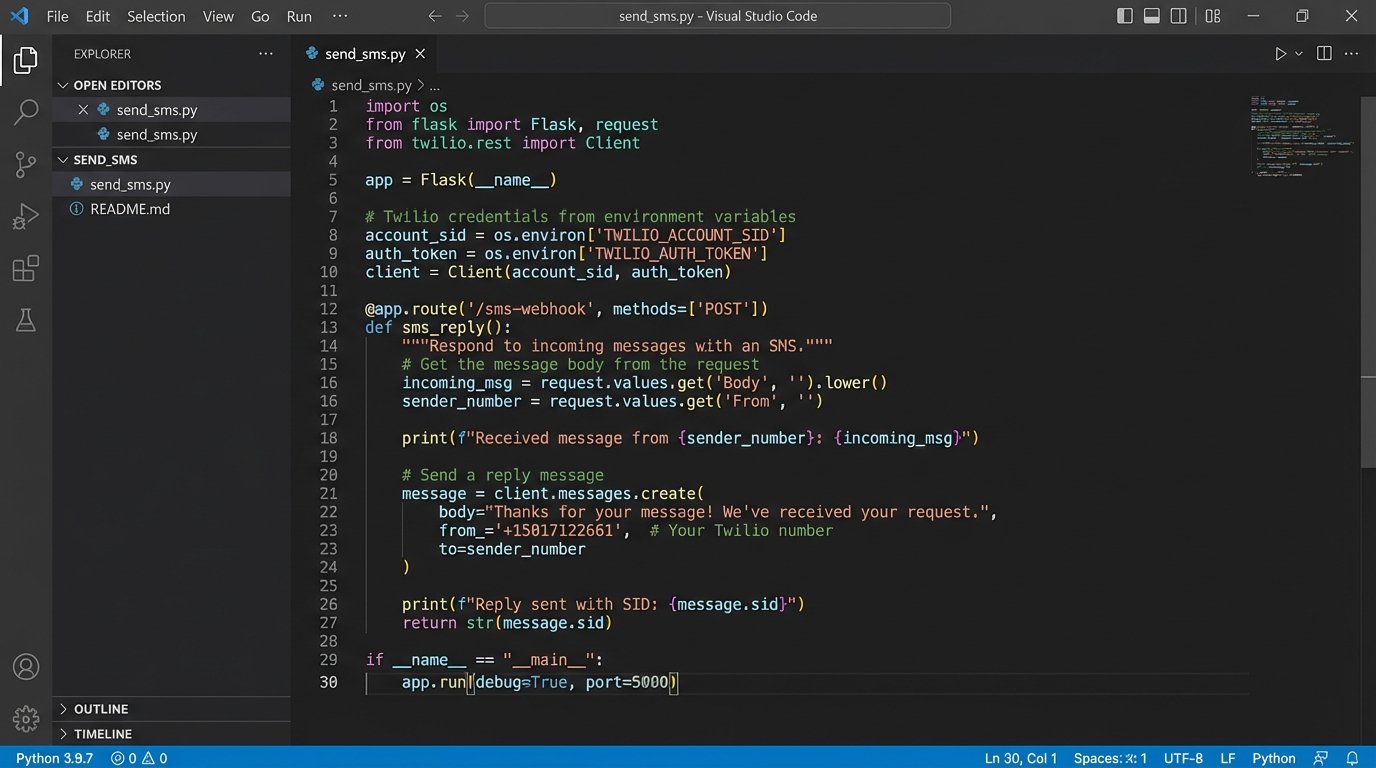
Twilio is not a platform, it is a box of bare-metal components. It provides the core APIs for SMS, voice, and WhatsApp messaging, giving you absolute control over the logic. You are not buying a finished product. You are buying the engine and are responsible for building the car, the dashboard, and the safety features around it. This is for firms with in-house or dedicated development resources.
Technical Benefits
The primary advantage is direct, unfiltered API access. You can force-inject communication triggers anywhere in your stack. A status update in your CMS can fire a webhook that hits your custom endpoint, which then constructs and sends a specific SMS message via the Twilio API. There is no user interface to fight, no pre-built workflow that doesn’t quite fit your intake process. You control the logic, the retry attempts, and the error logging down to the wire.
Use Cases
Firms use this for high-stakes, time-sensitive notifications where pre-canned platform solutions are too slow or inflexible. Think automated court date reminders that pull directly from the court’s docketing system API, or immediate SMS confirmations for document receipt that are triggered by your document management system’s own internal hooks. It is also the only sane choice for building a custom, multi-stage intake qualification bot that requires complex conditional logic based on a client’s answers.
Known Headaches
This path is a wallet-drainer in terms of development hours. Every feature, from a simple opt-out list to message scheduling, must be built from scratch. You are now responsible for managing API keys, securing endpoints, and handling deliverability issues. The documentation is excellent for developers, but if your point person leaves, you’re left with a black box of custom code that nobody else understands.
2. Intercom
Intercom is a premium messaging platform masquerading as a simple website chatbot. Its real power lies in its deep user segmentation and event-driven automation rules. It excels at managing conversations across multiple channels, from a live chat on your website to targeted email sequences. It treats every client as a user profile, tracking their every interaction and using that data to drive communication.
Technical Benefits
The event-based architecture is the core strength. You can feed custom events into Intercom from your other systems. For example, when a client signs a document in DocuSign, a webhook can send an event to Intercom like `signed_engagement_letter`. This event can then trigger an entire automated workflow: tag the client as ‘Active’, assign them to the onboarding team, and send them a welcome email sequence. It is powerful for stitching together a coherent client journey from disparate systems.
The segmentation engine allows you to build audiences based on a combination of properties and events. You can create a segment for “PI clients with upcoming depositions in the next 14 days” and send them a targeted prep email. This is far more potent than simple mailing list tags.
Use Cases
This tool is ideal for practice areas with long client lifecycles and multiple touchpoints, like mass tort or immigration. It can automate the initial intake and qualification process via its chatbot, then transition the client into long-term email nurturing sequences that provide case updates or request further documentation. The ability to see a client’s entire communication history in one unified thread is a massive operational win for client service teams.
Known Headaches
Intercom is expensive. The price scales with contacts, and the features you actually need are locked behind the higher-tier plans. The integration with legacy legal CMS platforms is non-existent, so be prepared to build a custom data-sync bridge. Shoving a firehose of real-time client events from your systems through the needle of its API requires careful planning to avoid hitting rate limits and creating data consistency problems.
3. ActiveCampaign
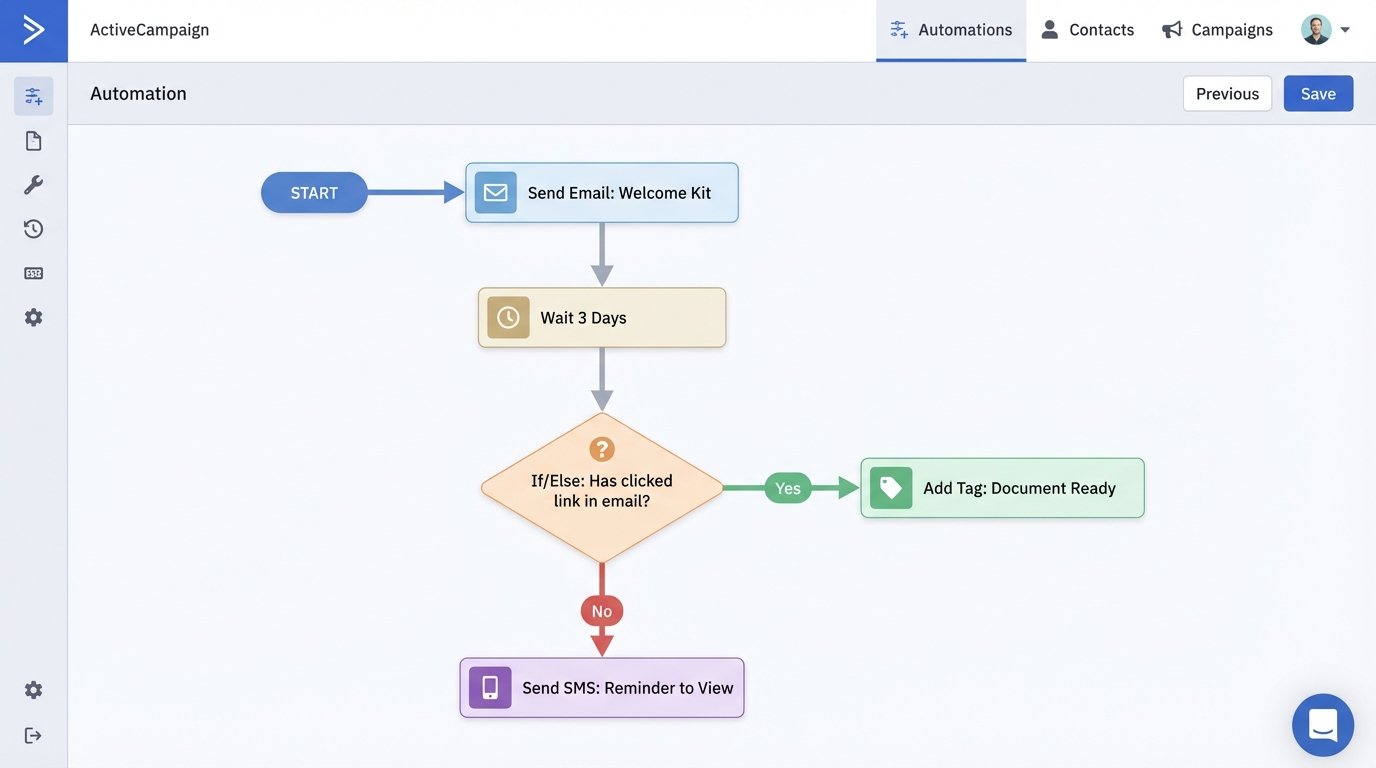
ActiveCampaign is an email automation platform on steroids. While it started in the marketing world, its flexible automation builder is perfectly suited for complex, logic-driven client communication workflows in a law firm. It combines a CRM, email marketing, and SMS messaging into a single system, but its primary value is the visual workflow engine that lets you map out every step of a client communication sequence.
Technical Benefits
The visual automation builder is the key. You can create branching logic, set wait conditions, and trigger actions based on client behavior. For example, you can send an email requesting a document. The system can then wait three days. If the client has not clicked the link in the email, it can automatically send a follow-up SMS. If they have clicked it, it can tag their contact record and move them to the next stage of the workflow. This level of state management is difficult to build custom.
Use Cases
This is the go-to for any process that requires a multi-step sequence over time. Think long-term case status updates for class-action lawsuits, where you need to send monthly or quarterly updates to thousands of clients. It is also powerful for post-case follow-up, automatically sending review requests, referral program information, or annual check-in emails to former clients to maintain the relationship.
Known Headaches
The CRM functionality is weak compared to a dedicated legal practice management system. You will spend an inordinate amount of time mapping data fields between your CMS and ActiveCampaign. Data synchronization is the central challenge. A client’s status might change in your CMS, but if the sync fails, they could receive an email from ActiveCampaign that is completely wrong, which immediately undermines your credibility.
4. Lawmatics
Lawmatics is one of the few platforms built specifically for law firm marketing and intake. It is a combined CRM, email platform, and workflow automation tool that understands legal-specific concepts like matters, statutes of limitations, and intake forms out of the box. This vertical focus is both its greatest strength and its most significant weakness.
Technical Benefits
The pre-built data models save a ton of setup time. You are not trying to jury-rig a generic sales CRM to understand the difference between a client and a matter. It includes features like automated document generation and e-signature requests directly within its automation sequences. You can build a workflow that automatically sends an engagement letter for signature after a client fills out an intake form, without having to stitch together three different services.
Use Cases
This tool shines for high-volume, process-driven practice areas like personal injury, bankruptcy, or family law. The entire intake process can be automated, from the initial website contact form to scheduling the consultation, sending reminders, and generating the initial client file. The focus is squarely on converting a lead into a signed client with minimal manual intervention.
Known Headaches
You are living in a walled garden. The integrations with other systems, especially non-legal ones, are limited and often brittle. If your firm relies on a separate, best-in-class document management system or a complex accounting platform, getting Lawmatics to talk to it is a serious challenge. You are betting that their feature set will cover all your needs, because extending it is not a realistic option.
5. Make (Formerly Integromat) / Zapier
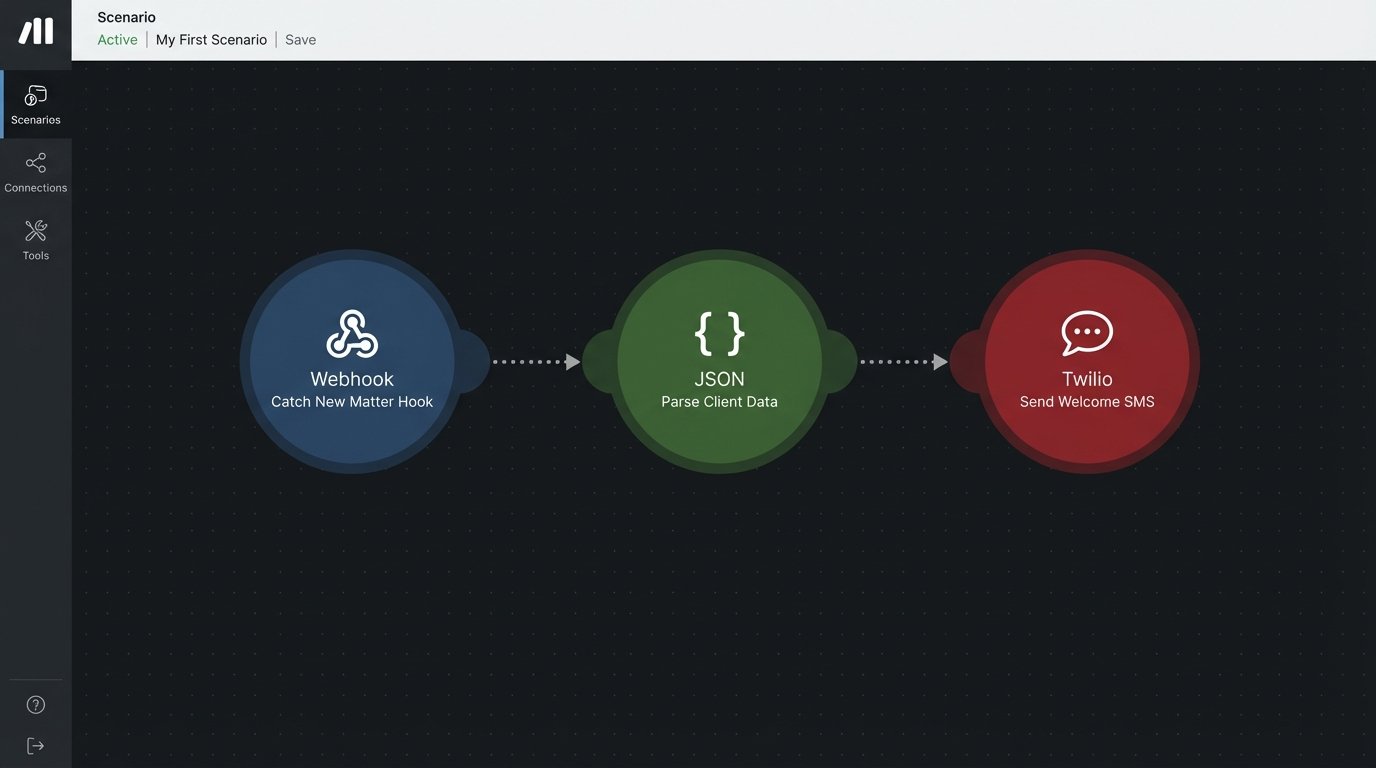
These are not communication tools. They are the plumbing. Make and Zapier are integration platforms as a service (iPaaS) that let you connect the APIs of different applications without writing code. You use them to detect a trigger in one system (like a new record in your CMS) and cause an action in another (like sending an SMS via Twilio). No modern automation stack exists without this kind of glue.
Technical Benefits
The primary benefit is speed of development. You can prototype and deploy a complex, multi-app workflow in hours instead of weeks. They provide a visual interface for mapping data between API endpoints, handling simple data transformations, and chaining actions together. This lets you connect your legacy CMS to a modern messaging platform, even if the CMS only supports a clunky, outdated API.
Below is a simplified JSON payload you might send from your CMS webhook to a Make scenario to trigger a new client welcome message.
{

  "event_type": "NEW_MATTER_CREATED",

  "timestamp": "2023-10-27T10:00:00Z",

  "matter_id": "PI-2023-0451",

  "client": {

    "first_name": "Jane",

    "last_name": "Doe",

    "mobile_phone": "+15551234567"

  },

  "assigned_attorney": {

    "name": "Robert Smith",

    "email": "r.smith@lawfirm.com"

  }

}
Make would catch this payload, parse the data, and use it to populate a pre-written SMS template to send to the client’s mobile number.
Use Cases
Use this for everything that connects your systems. Bridge your website’s contact form directly to your practice management software. Sync client status updates from your CMS to a spreadsheet for reporting. Automatically create a task in your project management tool when a client signs an engagement letter. They are essential for creating a single, cohesive automated system out of a collection of otherwise disconnected software.
Known Headaches
These tools create a new kind of technical debt. Your critical business processes now depend on a third-party service that can change its pricing or break a specific app connector at any time. Debugging a failed “Zap” can be a nightmare of checking logs and re-running tasks. They are also deceptively expensive at scale. The per-task pricing model means a high-volume workflow can quickly run up a massive bill.