
Most legal CRM automation discussions are marketing fluff. They promise a seamless, push-button world where client intake and marketing run themselves. The reality is a patchwork of brittle API connections, mismatched data models, and workflows that break if a paralegal sneezes too hard. We are not building elegant machines. We are performing duct tape surgery on legacy systems to force-feed them leads and stop revenue leakage.
The goal is not to find a perfect tool. That tool does not exist. The goal is to find the system whose limitations you can tolerate and whose core architecture gives you the leverage to build what you actually need. Below is an analysis of five common platforms, stripped of the sales pitch. We will look at their guts, their breaking points, and where they genuinely solve a problem versus just creating a new one.
Evaluating the Core Automation Stacks
Before picking a tool, you need to dissect your actual process. What are you trying to automate? Is it the monotonous task of sending follow-up emails to a new lead from your website? Is it about creating a new matter record in your Practice Management System (PMS) once a client signs an engagement letter? Or is it a complex, multi-stage nurturing sequence for high-value corporate clients? Each of these requires a different kind of architectural strength.
Some systems are great at linear, time-based sequences. Others excel at trigger-based logic that reacts to client actions. Very few are good at both, and none of them integrate with the average law firm’s PMS without a fight. The real work is not in the drag-and-drop workflow builder. It is in the data mapping, the error handling, and the logic you build to deal with the inevitable API failures.
1. Clio Grow
Clio Grow gets the top spot because it is the path of least resistance for any firm already running Clio Manage. The native integration is the entire selling point. Data for contacts and matters flows between the two systems with minimal setup. You do not need to build a custom bridge or fight with a third-party connector to sync basic information. This is its primary and, frankly, only major advantage.
The automation capabilities are rudimentary. You can build basic email drip campaigns triggered by a lead’s status change. You can schedule follow-up task reminders for your intake team. This is useful for preventing leads from falling through the cracks, a common and expensive problem. The platform is designed for a specific, linear intake process: lead capture, qualification, scheduling, and conversion. If your firm’s intake fits that mold, Grow works.
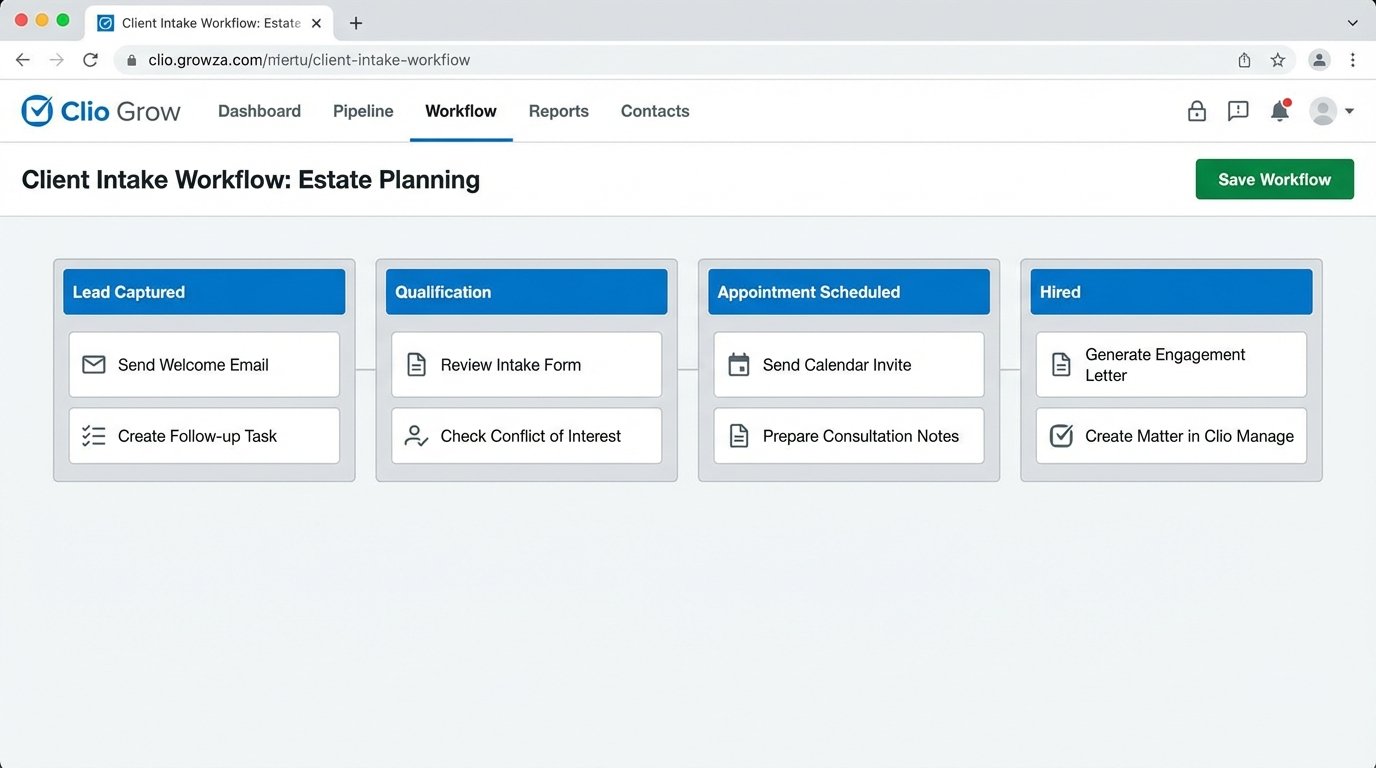
The problems start when you try to deviate from that prescribed path. The logic is rigid. You cannot build complex conditional branching, like “if lead source is ‘Referral’ AND budget is over ‘$50k,’ then assign to Senior Partner and trigger internal Slack notification.” The workflow builder is not designed for that kind of granularity. You get what Clio gives you. Trying to force more complex marketing automation into it is a fool’s errand. It is a solid intake funnel, not a marketing engine.
Its API is also limited compared to its competitors. Pulling data out is straightforward, but programmatically manipulating workflows or intake forms is not its strength. Think of Grow as an on-ramp to Clio Manage, not as a central automation hub.
2. Lawmatics
Lawmatics was built from the ground up to address the automation shortcomings of tools like Clio Grow. Its core strength is a far more flexible and powerful workflow engine. You can build automation sequences with multiple branches, conditional logic, and a wider array of triggers. This lets you tailor communication based on practice area, lead source, or custom data fields you define.
For example, you can design a workflow that automatically sends a potential PI client a different set of educational emails than a potential family law client. The system can also automate document generation, sending engagement letters or intake questionnaires for e-signature based on the client’s progression through your pipeline. This moves beyond simple email reminders and into genuine process automation.
Integrations are a mixed bag. It has native connections to many popular legal tech platforms like Clio, PracticePanther, and Filevine. These are generally reliable for core data syncing. The issue is that these native integrations are still just mapping standard fields. When you have custom data objects or complex matter structures in your PMS, the native sync often breaks down. You end up exporting CSV files or using a middleware tool anyway, which partially defeats the purpose.
The platform’s user interface can be sluggish, especially when managing a large number of contacts or complex workflows. It is a feature-rich system, but that richness comes at the cost of performance. It is a more powerful tool than Grow, but it also requires more technical skill to manage and debug when things go wrong.
3. HubSpot
HubSpot is not a legal-specific CRM, and that is both its biggest weakness and its greatest strength. Out of the box, it knows nothing about matters, conflicts of interest, or trust accounting. You have to torture its data model, typically by repurposing “Deals” as “Matters” and creating dozens of custom properties to track legal-specific information. This setup is a significant project in itself.
The payoff for that pain is access to a world-class marketing and sales automation engine. HubSpot’s workflow builder is orders of magnitude more powerful than anything in the legal-specific market. You can create deeply complex, behavior-driven automation. A contact visits your firm’s “Chapter 13 Bankruptcy” page, and you can automatically enroll them in an email sequence about debt relief and alert the bankruptcy practice group leader. That level of targeted automation is simply not possible with most legal CRMs.
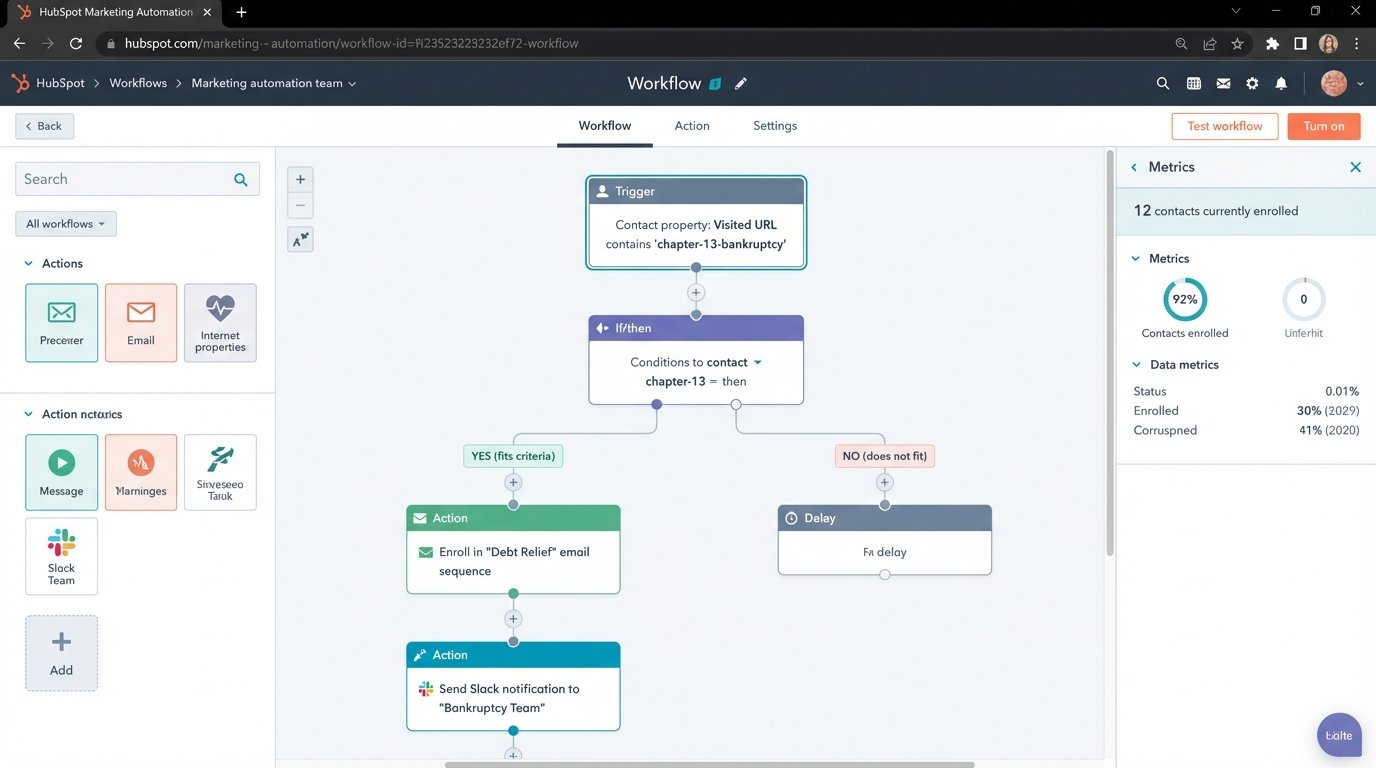
Integration is handled through its robust API and a massive marketplace of third-party apps. Connecting it to a PMS almost always requires a middleware tool like Zapier or a more serious integration platform as a service (iPaaS) like Make. You are pulling data from the HubSpot API, transforming it, and then pushing it into your PMS API. Trying to sync these two systems without a proper middleware is like connecting two high-pressure water pipes with duct tape. It might hold for a minute, but the eventual data integrity disaster is guaranteed.
Here is a simplified JSON payload you might get from a HubSpot form submission webhook, which you would then need to parse and map to your PMS.
{

  "portalId": 123456,

  "formGuid": "a1b2c3d4-e5f6-7890-g1h2-i3j4k5l6m7n8",

  "submissions": [

    {

      "submittedAt": 1678886400000,

      "fields": [

        {

          "name": "firstname",

          "value": "Jane"

        },

        {

          "name": "lastname",

          "value": "Doe"

        },

        {

          "name": "email",

          "value": "jane.doe@example.com"

        },

        {

          "name": "practice_area_of_interest",

          "value": "Family Law"

        }

      ],

      "context": {

        "pageUri": "www.yourlawfirm.com/contact",

        "pageName": "Contact Us"

      }

    }

  ]

}
Your middleware service has to catch this payload, identify “Family Law” as the key, and then execute the API call to create a new lead record in your PMS, correctly tagged. HubSpot is a powerful option for firms with a dedicated marketing team and the technical resources to manage the integration overhead. It is not a plug-and-play solution.
4. Salesforce
Putting Salesforce on this list feels like a foregone conclusion. It is the 800-pound gorilla of the CRM world. Its power is undeniable. With the right configuration, you can build a system that manages the entire client lifecycle, from initial marketing touchpoint to final case resolution and beyond. The platform’s customizability is nearly infinite. You can create custom data objects for anything: matters, conflicts, evidence logs, settlement negotiations. You name it, you can build it.
The automation tools, Process Builder and Flow, are exceptionally powerful. You can design logic that automates almost any routine task in a law firm. When a matter status changes to “Awaiting Signature,” a flow can automatically generate the engagement letter, send it via DocuSign, and create a follow-up task for the responsible attorney. This is deep, operational automation, far beyond simple email drips.
This power comes at a staggering cost, both in licensing fees and implementation complexity. Salesforce is not a tool you “set up.” It is a platform you develop on. A typical implementation for a mid-sized law firm requires a team of certified consultants and developers and can take months. The system is a notorious wallet-drainer. You will pay for the core licenses, for every add-on app from the AppExchange, and for the specialized talent required to maintain and modify it.
Firms that succeed with Salesforce treat it like a central operating system, not just a CRM. They invest heavily in building it out to be the single source of truth for all client and matter data. For large firms with complex processes and deep pockets, it can be the right choice. For everyone else, it is a dangerous and expensive over-commitment.
5. Make (formerly Integromat)
This last one is not a CRM at all. Make is an iPaaS, a visual platform for building integrations and automated workflows between different applications. It deserves a spot on this list because, for many firms, the best “CRM” is actually a collection of best-in-breed tools stitched together with a powerful integration engine. You might use a simple tool like Jotform for web forms, Calendly for scheduling, Mailchimp for newsletters, and your PMS for case management.
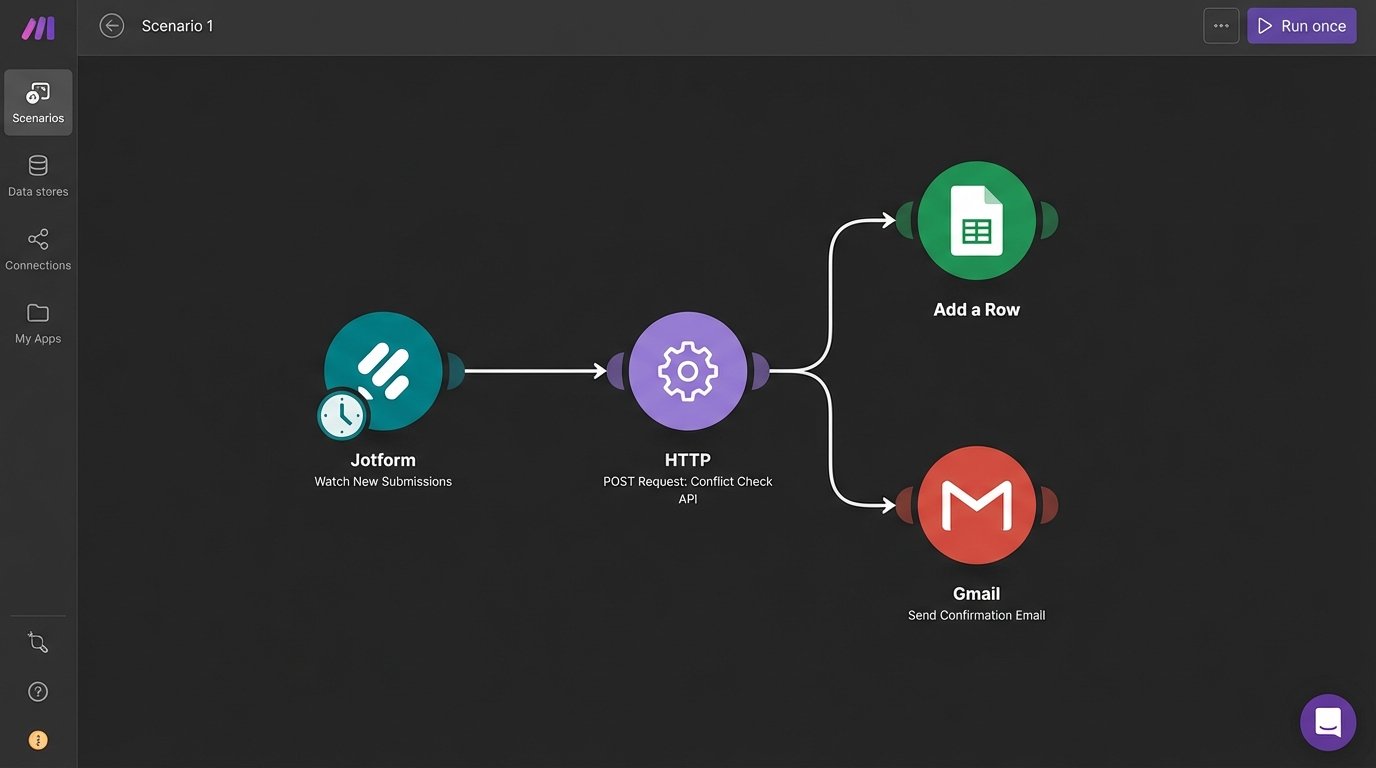
Make is the nervous system that connects them all. When a new form is submitted, a Make scenario can trigger. It can parse the form data, run a basic conflict check against your PMS via an API call, create a new contact record, add a task for the intake team, and send a confirmation email to the potential client. You build these workflows visually, connecting modules that represent different applications and actions.
This approach provides maximum flexibility. You are not locked into one vendor’s ecosystem. You can swap out components as your needs change. The downside is that you are now the architect and a janitor of this complex system. There is no single support number to call when a connection breaks. You have to understand how each API works, manage authentication keys, and build robust error handling into your scenarios. When the Calendly API changes, your scheduling automation breaks, and it is on you to fix it.
Using a tool like Make requires a technical mindset. It is not for firms that want an all-in-one, managed solution. It is for firms that want total control and are willing to accept the responsibility that comes with it. The cost is low in terms of subscription fees, but high in terms of the required internal expertise.