
The entire premise of manual time tracking is built on a logical fallacy. It assumes a lawyer’s primary function is to be a meticulous, real-time archivist of their own labor. This is a catastrophic misallocation of a high-value resource. We ask for precision from a human brain that is context-switching every six minutes, then act surprised when the resulting data is incomplete, block-billed, and submitted three weeks late. The goal is not to get lawyers to try harder. The goal is to remove them from the data entry process entirely.
Automated time capture is not about replacing judgment. It’s about building a system that logs the raw material of legal work, the digital exhaust, so that judgment can be applied more effectively during the review phase. Every sent email, every document edit, every calendar event, and every phone call generates a data point. Our job is to capture these event streams and transform them into a coherent, defensible narrative of work performed.
The Foundational Flaw: Manual Recall vs. Event Sourcing
Trying to reconstruct a day from memory is like rebuilding a server from logs written on napkins. The data is imprecise, lacks timestamps, and is heavily biased by the reconstructor’s perception. A lawyer remembers the 45-minute call with senior counsel but forgets the four 8-minute document reviews that preceded it. This isn’t a moral failing. It is a predictable limitation of human cognition under load.
The technical alternative is event sourcing. Instead of asking “What did you do?”, the system logs events as they occur. It doesn’t ask for interpretation. It just records the facts: an email was sent from `user@firm.com` to `client@corp.com` with subject `Re: Merger Agreement Draft v3` at `2023-10-27T14:32:01Z`. A document named `MSA_Final.docx` was active on the user’s desktop for 17 minutes. A calendar event titled `Strategy Session: Project Titan` occupied a 60-minute block.
This approach shifts the burden of proof. The system presents a verifiable log of activity. The lawyer’s role changes from data creator to data validator. They are no longer pulling entries from thin air. They are curating a pre-populated list, correcting context, and adding narrative where the system cannot infer it. This fundamentally fixes the data integrity problem at its source.
Architecture of a Passive Capture System
A functional passive capture system is not a single piece of software. It is a distributed architecture of collectors, a central processing engine, and an integration layer that feeds the firm’s billing system. Breaking it down, you have three core components.
1. Data Collectors and Event Hooks
The collectors are the tentacles of the system. These are lightweight agents or API integrations that hook into the firm’s primary work platforms. Common sources include:
- Microsoft 365 / Google Workspace: API hooks into Outlook/Gmail for email metadata and Exchange/Google Calendar for appointments. We are not interested in the body content, only the `to`, `from`, `subject`, and `timestamp`.
- Document Management Systems (DMS): Agents that monitor file access, edits, and versioning. This requires hooking into the DMS’s event model, which can be a sluggish and poorly documented affair depending on the vendor.
- Phone Systems (VoIP): Integration with systems like RingCentral or Teams Voice to log call metadata: `caller_id`, `recipient_id`, `duration`, and `timestamp`.
- Local Activity Monitors: A desktop agent that tracks active application windows. This is the most contentious piece, raising privacy flags if not scoped correctly. The goal is to track the active document or browser tab title, not keystrokes or screen content.
These collectors need to be fault-tolerant. If the connection to the M365 Graph API fails, the agent must queue events locally and retry. Failure to do so creates gaps in the timeline, which destroys user trust.
2. The Central Processing Engine and Rule-Based Logic
The data stream from these event sources is a firehose. The goal is not to drink from it, but to build a filtration system that pulls out only the billable droplets. This is where the processing engine lives. It ingests the raw JSON events from all collectors, normalizes them, and begins the process of enrichment and association.
First, it must de-duplicate events. A single “Join Teams Meeting” action might generate a calendar event, an application focus event, and a network traffic event. The engine needs logic to collapse these into a single activity. Next comes association. The engine queries the firm’s matter management system to link email addresses, phone numbers, and document names to specific client matter IDs. This is the most critical and often the most fragile part of the entire stack.
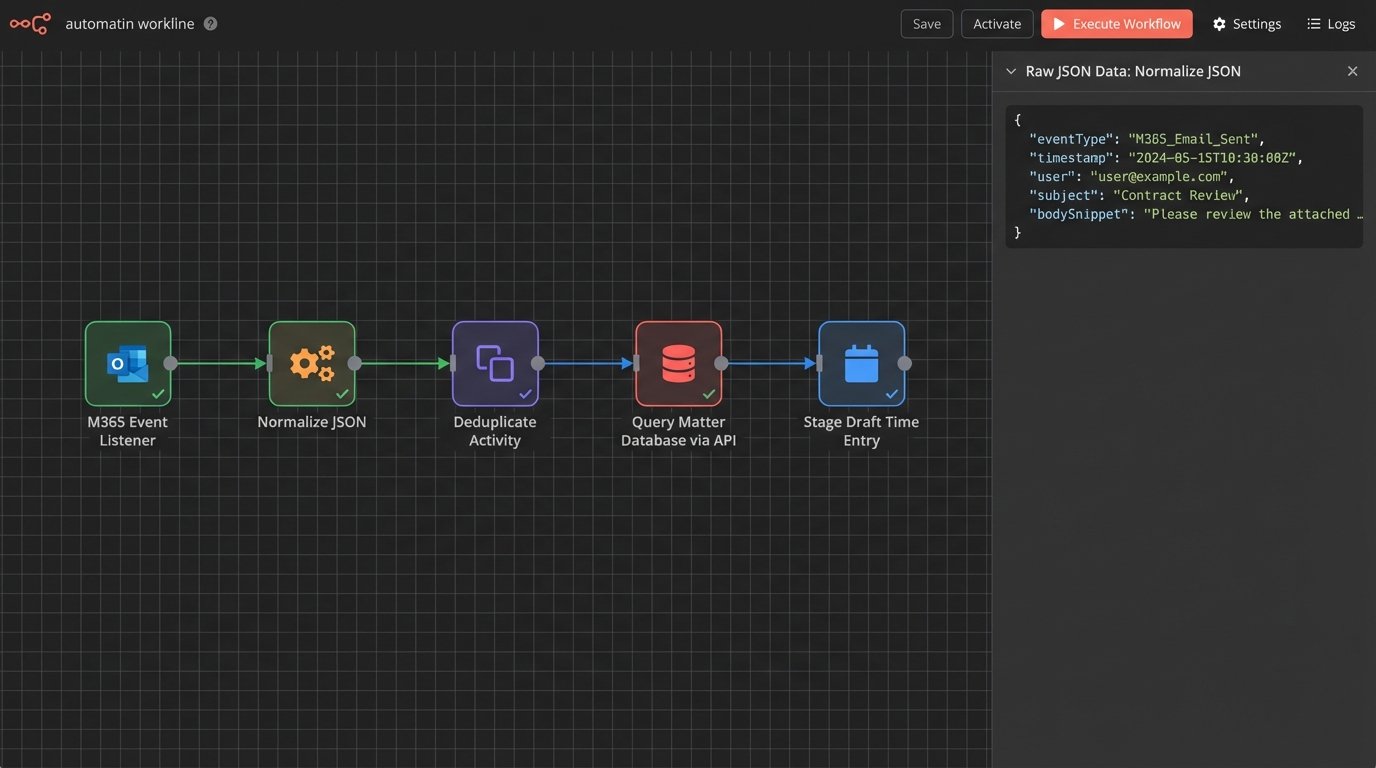
A typical raw event might look like this before processing:
{

  "source": "m365_outlook",

  "eventType": "email_sent",

  "timestamp": "2023-10-27T14:32:01Z",

  "user": "j.smith@firm.com",

  "metadata": {

    "to": ["external.counsel@corp.com"],

    "cc": ["partner@firm.com"],

    "subject": "Re: Merger Agreement Draft v3",

    "message_id": "<A1B2C3D4E5F6@mail.m365.com>"

  }

}
The engine’s job is to take that, look up `external.counsel@corp.com` in the CRM, find the associated matter `Project Titan (M-12345)`, and stage a potential time entry. This requires a clean, accessible source of truth for client-matter data. Without it, the entire system generates noise instead of signal.
3. The User Interface and Billing System Integration
The final component is the user-facing timeline. This is where the processed, enriched data is presented to the lawyer for review. It cannot be a spreadsheet. It must be a visual, interactive timeline that shows overlapping activities and system-suggested time entries. The lawyer can then drag, merge, or dismiss activities, add narratives, and release the entries to the billing system.
The integration back to the billing system (e.g., Aderant, Elite 3E) is the final hurdle. Connecting a modern event listener to a legacy case management system is often an exercise in API archeology, trying to make sense of endpoints documented when flip phones were standard issue. You might be forced to bypass a clean API and inject data directly into a staging table, a solution that works right up until it doesn’t.
Solving Revenue Leakage and Improving Billing Hygiene
The primary ROI of this architecture is the immediate reduction of revenue leakage. Most firms estimate they lose between 10% and 25% of billable time to simple recording failures. An automated system captures the small, interstitial activities that are almost always forgotten. The five minutes spent reviewing a document, the three-minute phone call to confirm a detail, the ten minutes spent searching the DMS for a precedent. These “scraps” of time aggregate into hundreds of billable hours per lawyer per year.
Beyond capturing more time, the system enforces better billing hygiene. It forces contemporaneous time entry because the data is captured in real-time. This eliminates the “Friday afternoon scramble” where lawyers invent their timesheets for the entire week. The resulting entries are more detailed, accurate, and defensible under audit. When a client questions an invoice, you can produce a log of the exact digital activities that comprise that time entry. This moves the conversation from “I don’t remember this” to “The system logged these specific actions.”

This data also provides a powerful feedback loop. A partner can see that an associate spent four hours in a non-billable research tool for a task that should have taken one. It exposes process inefficiencies that were previously invisible, hidden behind generic, block-billed time entries like “Legal Research.”
Secondary Effects: Resource Planning and Process Mining
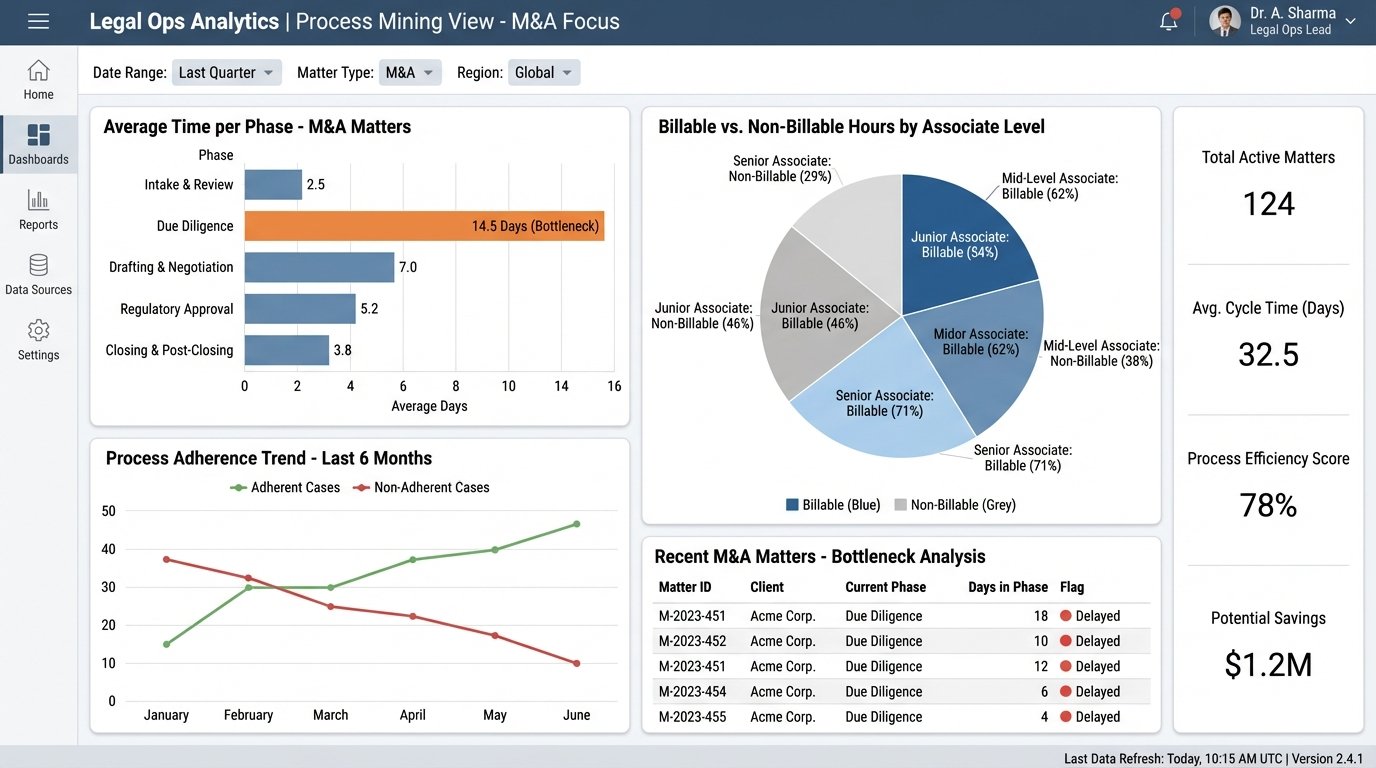
While revenue is the main driver, the long-term value is in the data asset you create. You are building a high-fidelity log of how work actually gets done at your firm. A manual timesheet is a pre-corrupted database. You are trying to run analytics on data that was flawed from the moment of inception. An automated log, however, is ground truth.
This allows for genuine process mining. You can analyze the lifecycle of a typical M&A deal, identifying bottlenecks where documents stall or communication breaks down. You can see precisely how much time is spent on non-billable administrative overhead versus client-facing work. This data is gold for legal operations teams tasked with optimizing workflows and technology stacks.
Resource planning becomes data-driven instead of anecdotal. Instead of guessing how many associates are needed for a large-scale litigation, you can model it based on activity data from similar past matters. You can build predictive models for matter budgeting that are based on empirical evidence, not a partner’s gut feeling. This ability to accurately forecast effort is a massive competitive advantage when bidding for fixed-fee work.
The final benefit is a subtle but important one: lawyer satisfaction. Forcing highly paid legal experts to spend an hour a day on clerical data entry is demoralizing and wasteful. Removing that burden allows them to focus on the high-value work they were trained to do. The initial resistance to being “monitored” quickly fades when they realize the system is not a surveillance tool, but a powerful assistant that eliminates their most hated administrative task.
Implementing this is not simple. It requires navigating privacy concerns, integrating with brittle legacy systems, and managing cultural change. But the alternative is to continue relying on a manual, error-prone process that leaks revenue and provides zero operational insight. The technology is no longer speculative. The question is not whether firms will adopt it, but how long they can afford not to.