
Most firms treat client intake as a glorified contact form. They bolt a generic plugin onto their website, point it at a paralegal’s inbox, and call it a day. This is a fundamental misunderstanding of the process. Intake is not a passive information receptacle. It is the primary data ingestion point for your entire case management lifecycle, and treating it lightly injects poison into the system from the very first interaction.
The manual re-entry of data from an email into a Case Management System (CMS) is not just inefficient. It is a direct cause of data corruption. Every time a human hand touches the data, you introduce the probability of typos, formatting inconsistencies, and omissions. A potential client entering “John A. Smith” on a form becomes “J. Smith” in the CMS, instantly creating a duplicate contact record or failing a conflict check down the line. This is a slow, creeping data integrity failure that costs real money to fix.
Deconstructing the Intake Data Pipeline
A functional intake system is not a single tool. It is a multi-stage pipeline designed to capture, validate, enrich, and route information with minimal human intervention. Thinking of it as just a web form is like thinking of a car as just a steering wheel. You miss the engine, the transmission, and the brakes. The process must be broken down into its core architectural components: the collection layer, the logic layer, and the storage layer.
The Collection Layer: Beyond Basic Text Fields
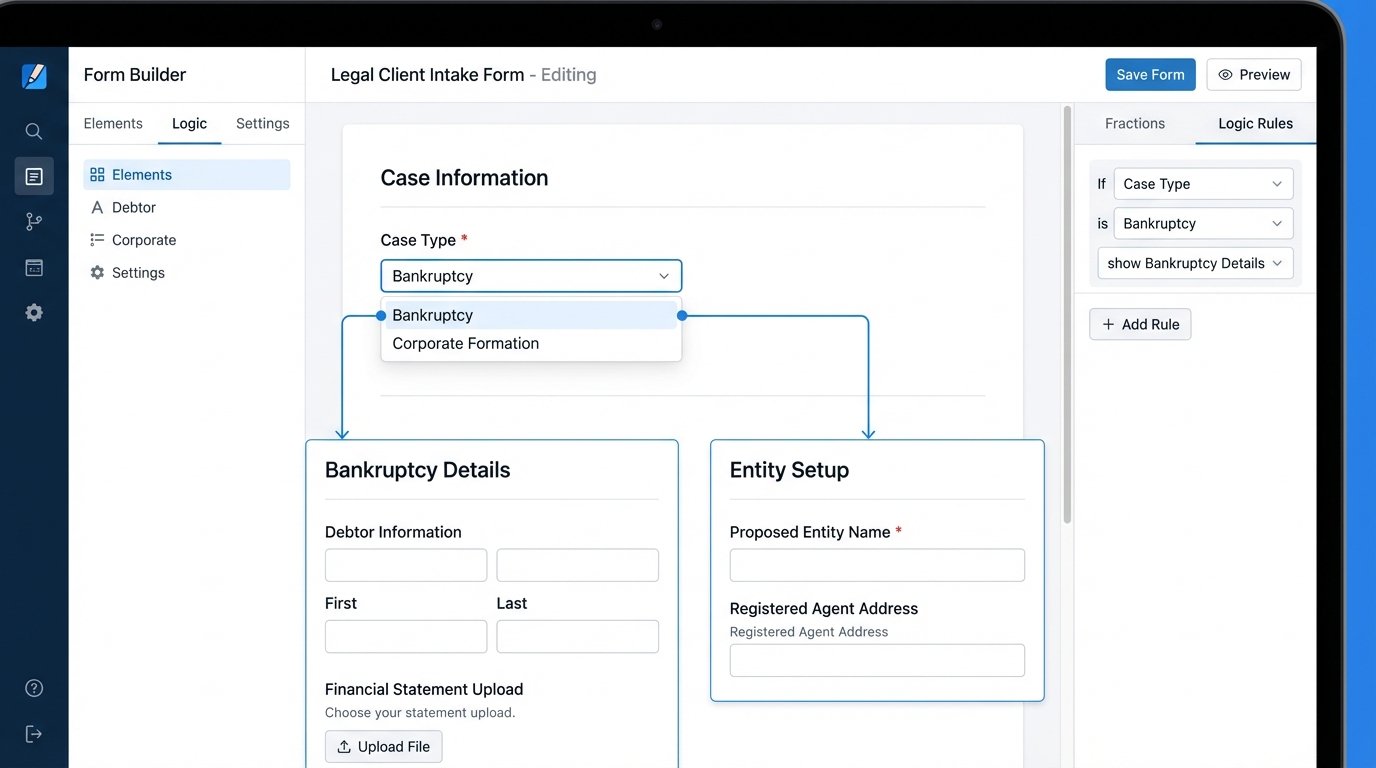
The public-facing form is the most visible part of the system, but its job is more complex than just collecting text. A well-built form uses conditional logic to dynamically alter the questions based on user input. If a potential client selects “Bankruptcy” as their case type, the form should then present questions about debt and income. If they select “Corporate Formation,” it should ask about business structure and partners. Shoving a single, monolithic form at every potential client is lazy and creates a terrible first impression.
This front-end structure forces the client to provide organized data from the start. You are not asking them to write an essay in a “Describe your issue” box. You are guiding them through a structured interview. This is the first line of defense against low-quality, unstructured data polluting your backend systems. It also filters out unserious inquiries. A person unwilling to spend three minutes answering targeted questions is unlikely to be a client you want.
The Logic Layer: Where Raw Data Gets Refined
Once the form is submitted, the raw data payload should not go directly to your CMS or a person’s email. It needs to be intercepted by a middleware component. This can be a service like Zapier or Make for simpler workflows, or a serverless function (AWS Lambda, Google Cloud Functions) for more complex requirements. This logic layer is the brain of the operation, responsible for the critical tasks that happen between submission and storage.
Its primary jobs include:
- Data Validation and Sanitization: The middleware checks the data for correctness. It can strip special characters from phone numbers, standardize address formats using an API like Google Geocoding, and enforce proper casing for names. This step is non-negotiable for data hygiene.
- Routing: Based on the form inputs, the logic layer decides where the information goes. A potential high-value commercial litigation case should trigger an instant alert in a specific Slack channel for the senior partners. A routine family law inquiry can be routed to a paralegal’s task queue in Asana.
- Enrichment: The middleware can take a piece of submitted data, like a corporate email address, and use an external API (like Clearbit) to pull in additional information about the company, such as its size and industry. This gives the reviewing attorney immediate context without manual research.
This is the difference between a simple notification and an intelligent alert. It is about processing the information before a human ever sees it. Sending a raw, unvalidated JSON object from a form directly to your practice management software’s API is just asking for trouble.
Consider the difference in payloads. The raw output from a generic form might look like this, filled with inconsistent casing and formatting issues.
{

  "firstName": "john",

  "lastName": "smith",

  "phone": "555-867-5309",

  "caseType": "corp_formation",

  "notes": "need to start an LLC for my new business venture"

}
After passing through a proper logic layer, the data sent to the CMS API should be cleaned, standardized, and ready for direct injection into the database. This is what a clean payload looks like.
{

  "contact": {

    "first_name": "John",

    "last_name": "Smith",

    "phone_primary": "+15558675309"

  },

  "matter": {

    "status": "Pending",

    "description": "Corporate Formation: LLC for new business venture.",

    "practice_area_id": "8675309",

    "responsible_attorney_id": "1138"

  }

}
The second payload is immediately useful. The first one requires manual cleanup. Extrapolate that cleanup cost over thousands of inquiries per year.
The Storage Layer and API Handshake
The final step is to push this clean, structured data into your firm’s system of record, typically a CMS like Clio, MyCase, or PracticePanther. This is done via an API call. Every major CMS provides an API, but their quality and documentation vary wildly. Some are modern and well-documented. Others feel like they were built a decade ago and left to rust. This is often the most fragile part of the entire automation.
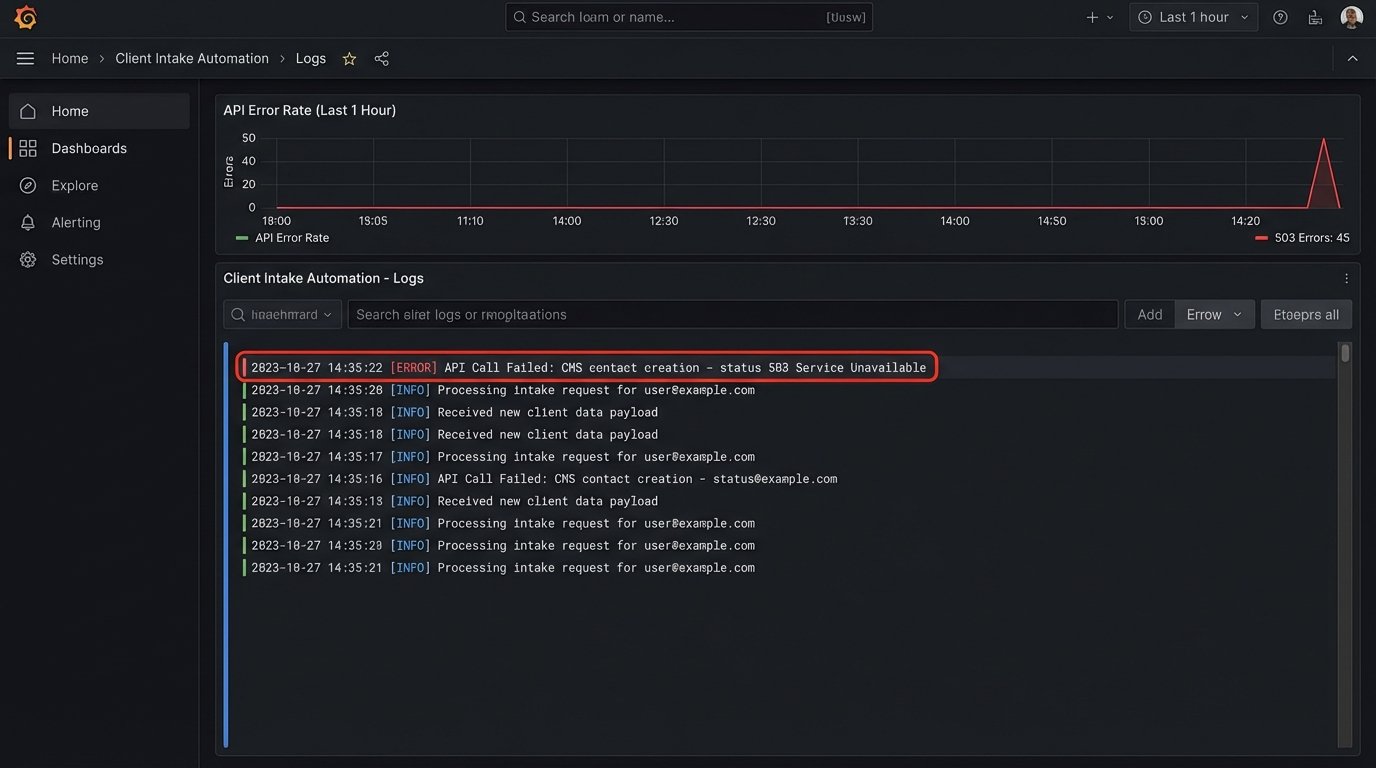
Successfully mapping the fields from your logic layer to the specific object structure required by the CMS API is critical. You are essentially performing a data transplant, and if the blood types do not match, the recipient rejects the organ. A single mismatched field name or incorrect data type (e.g., sending a number as a string) will cause the entire API call to fail. Proper error handling here is essential. If the API call fails, the system must have a fallback, like sending an alert to an administrator with the failed data payload for manual review. Relying on the API to be available and functional 100% of the time is a rookie mistake.
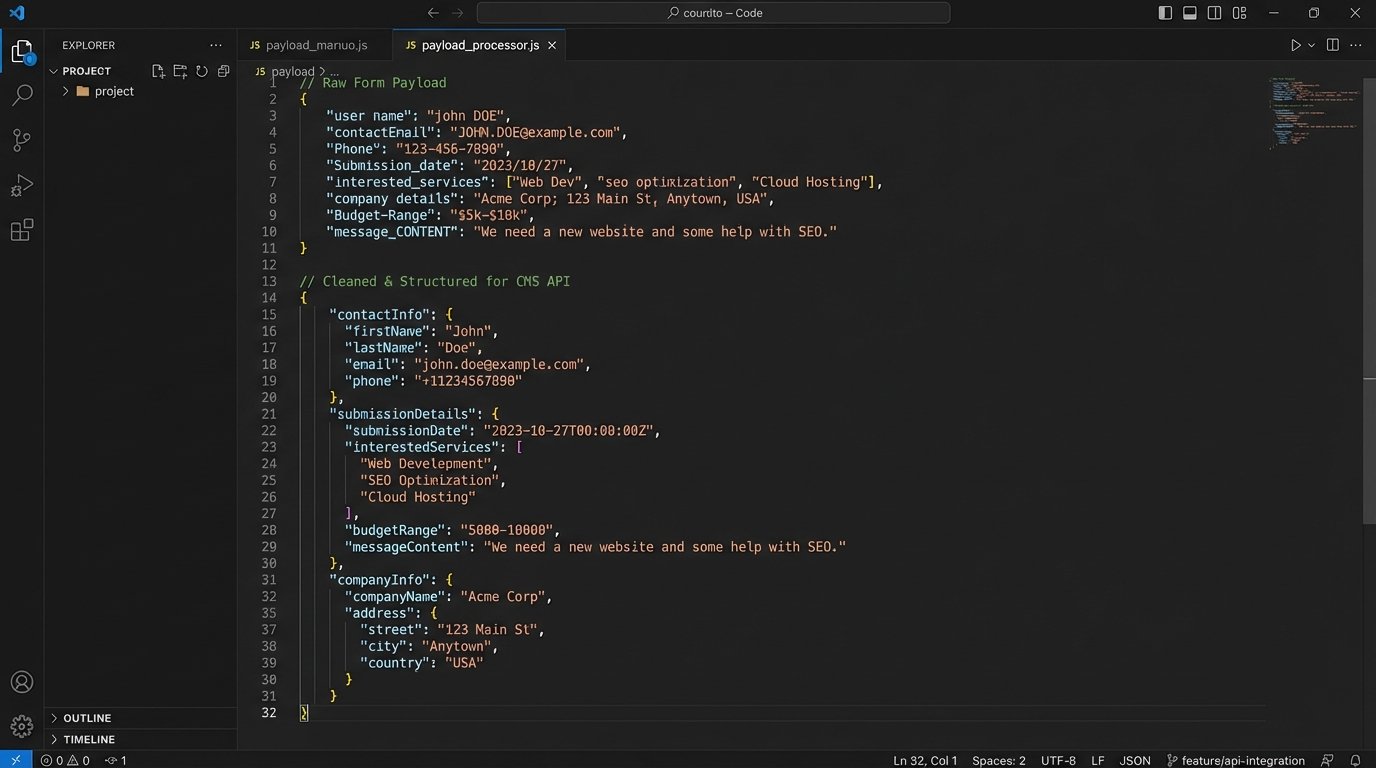
Getting this handshake right is like trying to thread a needle with a firehose. The form collects a blast of raw information, and you have to carefully shape and direct it to fit the very specific, often rigid, structure of the CMS database. Without the middleware to act as a funnel and filter, you are just spraying messy data all over your system.
Immediate Client Feedback and Internal Triage
A properly architected intake system does more than just file data away. It provides immediate, intelligent feedback to the potential client. A generic “Thank you for your submission” email is forgettable. An automated email that says, “We have received your inquiry regarding a potential patent application. Our IP practice group will review your information. In the meantime, here is a link to our guide on the patent process” demonstrates immediate competence and sets expectations.
This is not just about client perception. It is about conditioning the client to expect a process-driven, organized engagement. You are showing them from the first click that your firm operates on systems, not on ad-hoc emails and forgotten sticky notes. This builds confidence before they have even spoken to an attorney.
Internally, the benefits are about speed and allocation of attention. When a new lead is created, the system should not just send an email. It should create a task in your project management tool, assign it to the correct person based on case type, and set a due date for follow-up. This hardwires accountability into the process. Nothing gets lost in a crowded inbox. The lead is now a trackable, accountable work item with a clear owner.
The Realities of Maintenance and System Brittleness
Building this pipeline is not a one-time project. It is an ongoing operational responsibility. SaaS vendors change their APIs, form builders update their code, and your own firm’s needs will evolve. The connections you build are brittle. An undocumented change by your CMS provider can break your entire intake process without warning.
This requires monitoring. You need logs and alerts that tell you when a step in the pipeline fails. Waiting for a potential client to call you and say “your contact form is broken” is not an acceptable monitoring strategy. You must assume it will break and build the diagnostic tools to detect it before it impacts the business.
There is also a cost. The tools required for a serious intake pipeline, a premium form builder with conditional logic, a middleware platform with sufficient task limits, and developer time to script the connections, are not free. This is a wallet-drainer compared to a simple contact form plugin. But the cost of not doing it is hidden in the salaries of administrative staff who spend their days acting as human copy-paste machines, fixing data errors, and chasing down lost leads.
Automating client intake is not about adding a fancy gadget to your website. It is a strategic decision about how you value data integrity, staff time, and the first impression you make on a potential client. A manual, email-based intake process is a declaration that you are willing to accept data errors, inefficient workflows, and a slow response time as the cost of doing business. A properly automated intake pipeline is the foundation of an operationally sound and scalable law practice.