
10 Tools to Automate Real Estate Transaction Management
The average real estate transaction involves over 200 documents and interactions. Most of this data is unstructured, locked in PDFs, or siloed in proprietary platforms with poorly documented APIs. Automating this workflow is not about finding a single magic bullet. It is about chaining together specific tools that each solve one part of the problem without introducing catastrophic failure points.
1. Dotloop
Dotloop acts as a central repository for transaction documents and compliance checklists. Its primary function is managing the document lifecycle, from creation to signature to archival. Its API offers access to “loops,” which are the transaction containers holding participants, documents, and task lists. This is your primary source of truth for document status.
Technical Benefit: The webhook system is the most valuable part. You can configure webhooks to fire on specific events, such as a document being signed or a loop status changing. This avoids the need for constant polling, which drains API quotas and adds latency. The event-driven architecture is the only sane way to build real-time status updates.
Use Case: Configure a webhook for the “Document Signed” event. The webhook payload contains the loop ID and document ID. Your service endpoint receives this payload, then uses the Dotloop API to fetch the signed PDF. This document can then be routed to a parsing engine or archived in cold storage.
The Catch: The API documentation is decent but leaves gaps in explaining the nuances of object relationships. You will spend time reverse-engineering how participant roles connect to specific document fields. Rate limits are also a real constraint for brokerages processing hundreds of transactions a day.
2. SkySlope
SkySlope is another major player focused heavily on compliance and document storage for brokerages. Its API provides endpoints for fetching checklists, documents, and transaction details. Where Dotloop focuses on the collaborative loop, SkySlope orients more around the brokerage’s internal compliance review process. It is fundamentally a brokerage-centric tool.
Technical Benefit: The checklist API is granular. You can programmatically track the status of every required document, from the initial purchase agreement to the final closing statement. This allows for building automated compliance dashboards or notification systems that alert agents or transaction coordinators about missing items.
Use Case: Write a script that runs nightly. It authenticates with the SkySlope API, pulls all active transactions, and iterates through their associated checklists. If a document is marked “Incomplete” and its due date is within 48 hours, the script triggers an SMS alert to the agent via Twilio.
The Catch: Authentication can be a headache. Depending on the integration tier you pay for, you might be stuck with less flexible auth flows. Getting transaction data from multiple systems into a state that SkySlope’s API can accept requires careful data mapping, almost like trying to stitch together mismatched pipes with duct tape.
3. Nanonets
This is an OCR and data extraction platform. You feed it a PDF, like a HUD-1 settlement statement or a purchase agreement, and it pulls out structured data based on a pre-trained or custom model. Generic OCR is useless for real estate forms. You need a tool that understands the spatial layout and terminology of these specific documents.
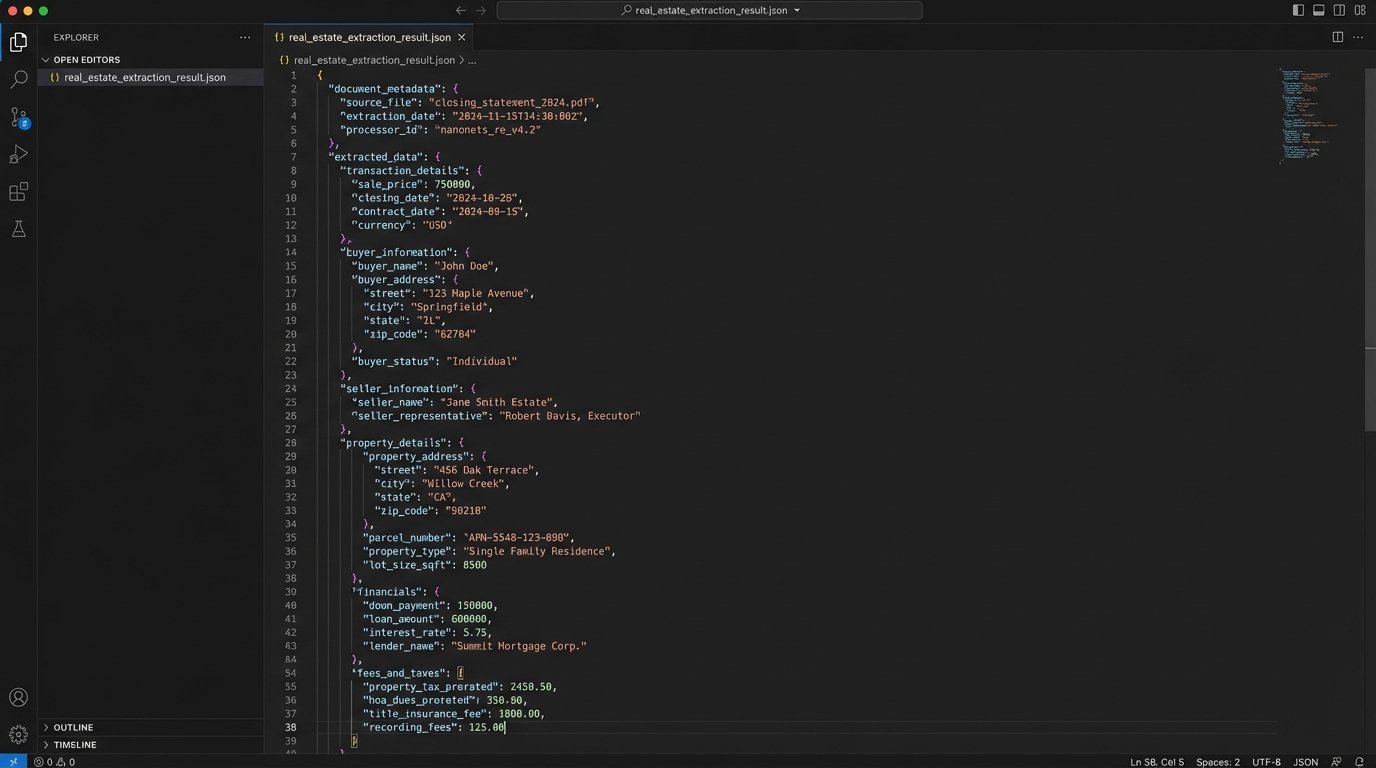
Technical Benefit: Nanonets lets you define models for specific document types. You can train it to find the “Sale Price,” “Closing Date,” or “Buyer’s Name” on a contract, even if the document format varies slightly between states or associations. The API returns a clean JSON object with the extracted fields.
Use Case: An agent uploads a signed purchase agreement into a designated folder. A file system trigger activates a script that sends the PDF to the Nanonets API. The API returns a JSON payload. Your script then parses this JSON to extract key dates and financials, injecting them into the primary transaction record in your CRM or database.
The Catch: This is a wallet-drainer. Per-document processing costs add up quickly. It also requires an initial time investment to train the models accurately. If you feed it a poorly scanned document, the accuracy drops off a cliff, and you will need a human-in-the-loop workflow to correct the errors.
4. Zapier
Zapier is the low-code integration glue that connects disparate systems. It operates on a simple trigger-action model. When an event happens in one app (the trigger), Zapier performs a pre-defined task in another app (the action). It has pre-built connectors for hundreds of applications, including many real estate platforms.
Technical Benefit: Speed of deployment for simple, linear workflows. You can connect a new lead from a web form to your CRM and send a notification email in about ten minutes without writing a single line of code. It is a prototyping tool that sometimes makes it into production.
Use Case: Create a Zap where the trigger is a “New Signed Document” in DocuSign. The action is to take that document, upload it to a specific Google Drive folder named after the property address, and then post a message in a Slack channel alerting the transaction coordinator. This automates the initial document filing.
The Catch: Zapier is brittle and expensive for complex or high-volume operations. Multi-step Zaps with conditional logic become a tangled mess to debug. The polling intervals on lower-tier plans mean your automation can have a significant delay. Relying on it for mission-critical data sync is a gamble.
5. Twilio API
Twilio provides communication APIs, primarily for sending and receiving SMS messages and making phone calls. In transaction management, it is the most direct line to an agent or client. Email notifications get buried. A text message about an impending deadline gets read almost instantly.
Technical Benefit: High reliability and detailed delivery reporting. The API is straightforward, and the documentation is among the best in the industry. You get webhooks for delivery status (sent, failed, delivered), allowing you to build resilient notification systems that can retry or escalate if a message fails.
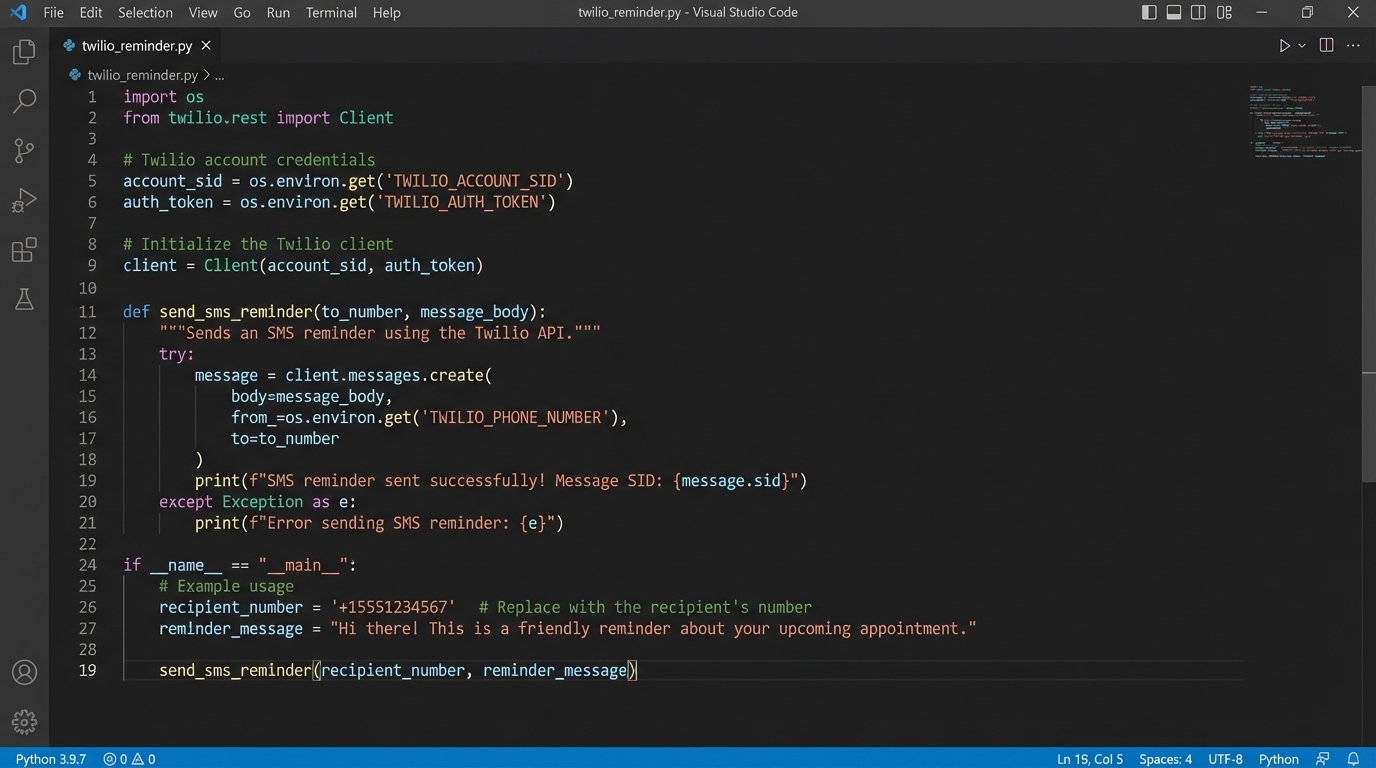
Use Case: A contingency removal deadline is stored in a database. A cron job runs daily, querying for deadlines that are 24 hours away. For each one, it calls the Twilio API to send a templated SMS to the agent: “Reminder: Contingency removal for 123 Main St is due tomorrow, [Date]. Please submit the required form.”
import os
from twilio.rest import Client

# Find your Account SID and Auth Token at twilio.com/console
account_sid = os.environ['TWILIO_ACCOUNT_SID']
auth_token = os.environ['TWILIO_AUTH_TOKEN']
client = Client(account_sid, auth_token)

message = client.messages.create(
    body="Reminder: Contingency removal for 123 Main St is due tomorrow, Oct 26.",
    from_='+15017122661',
    to='+15558675309'
)

print(f"Message SID: {message.sid}")
The Catch: Compliance with carrier regulations (A2P 10DLC) is a bureaucratic nightmare you have to navigate. Getting your numbers and campaigns registered is a mandatory, time-consuming process. Ignoring it will get your messages blocked.
6. Google Calendar API
Nearly every agent and transaction coordinator lives by their calendar. The Google Calendar API allows you to programmatically create, update, and delete events. This is the endpoint for turning extracted contract dates into actionable reminders for the entire transaction team.
Technical Benefit: The ability to create shared events and invite attendees (agent, client, lender, title officer) automatically. You can inject a Google Meet link for virtual meetings and set multiple, timed reminders (e.g., 1 day before, 1 hour before) within the same API call. It handles the hard parts of scheduling.
Use Case: After the OCR tool extracts the “Inspection Period End Date” from a purchase contract, your automation service authenticates with the Google Calendar API via OAuth 2.0. It then creates an all-day event on that date titled “Inspection Contingency Ends: 123 Main St” and invites the buyer’s agent and the transaction coordinator.
The Catch: OAuth 2.0. The authentication flow required to act on behalf of a user is complex to set up and maintain. You have to handle token generation, storage, and refresh cycles securely. It is a common point of failure for new developers.
7. Folio by Amitree
Folio is a Chrome extension that intelligently organizes an agent’s Gmail inbox around transactions. It automatically detects emails related to a specific deal and groups them into a smart folder. While not a traditional API-first tool, its value is in reducing the manual email triage that consumes hours of an agent’s day.
Technical Benefit: It provides a timeline view of the transaction based on email content. It parses dates and details from email bodies to build a shared calendar and contact list. It brings order to the chaos of email communication without requiring the user to change their behavior.
Use Case: An agent enables Folio on their Gmail account. When a new email arrives from the lender with an attachment, Folio automatically files it into the correct transaction folder. The agent can then see a complete communication history for that deal in one place, preventing critical documents from getting lost in the inbox.
The Catch: It is a black box. You have no control over its parsing logic and no API to integrate with. It lives and dies inside the user’s browser and Gmail account. This makes it a useful tool for end-users but not a component you can build a larger, reliable automation system on top of.
8. Airtable
Airtable is a hybrid between a spreadsheet and a database. It provides a flexible, user-friendly interface for managing structured data, but with a robust API that spreadsheets lack. For transaction management, it can serve as a central “data hub” that is both human-readable and machine-accessible.
Technical Benefit: The API is dead simple to use and well-documented. It allows you to perform full CRUD (Create, Read, Update, Delete) operations on your data. Its “Views” feature lets you create filtered and sorted subsets of your data that can be accessed via their own unique API endpoints, simplifying query logic in your code.
Use Case: Create an Airtable base to track all active transactions. When a new transaction is initiated, a script populates a new record with data pulled from the CRM. As documents are signed in DocuSign and dates are extracted by Nanonets, webhooks trigger scripts that update the corresponding fields in the Airtable record. A transaction coordinator can watch this base as their master dashboard.
The Catch: It is not a relational database. While you can link records, you cannot enforce true referential integrity or perform complex SQL joins. For massive operations with heavy data integrity requirements, you will outgrow it and need to migrate to something like PostgreSQL. Chaining these API calls together feels like building a Rube Goldberg machine where one loose screw collapses the entire sequence.
9. DocuSign API
DocuSign is the de facto standard for e-signatures. Its API is critical for automating the first and last mile of any document workflow: sending a document out for signature and retrieving the legally binding, executed copy. Its core function is managing the signature envelope and its recipients.
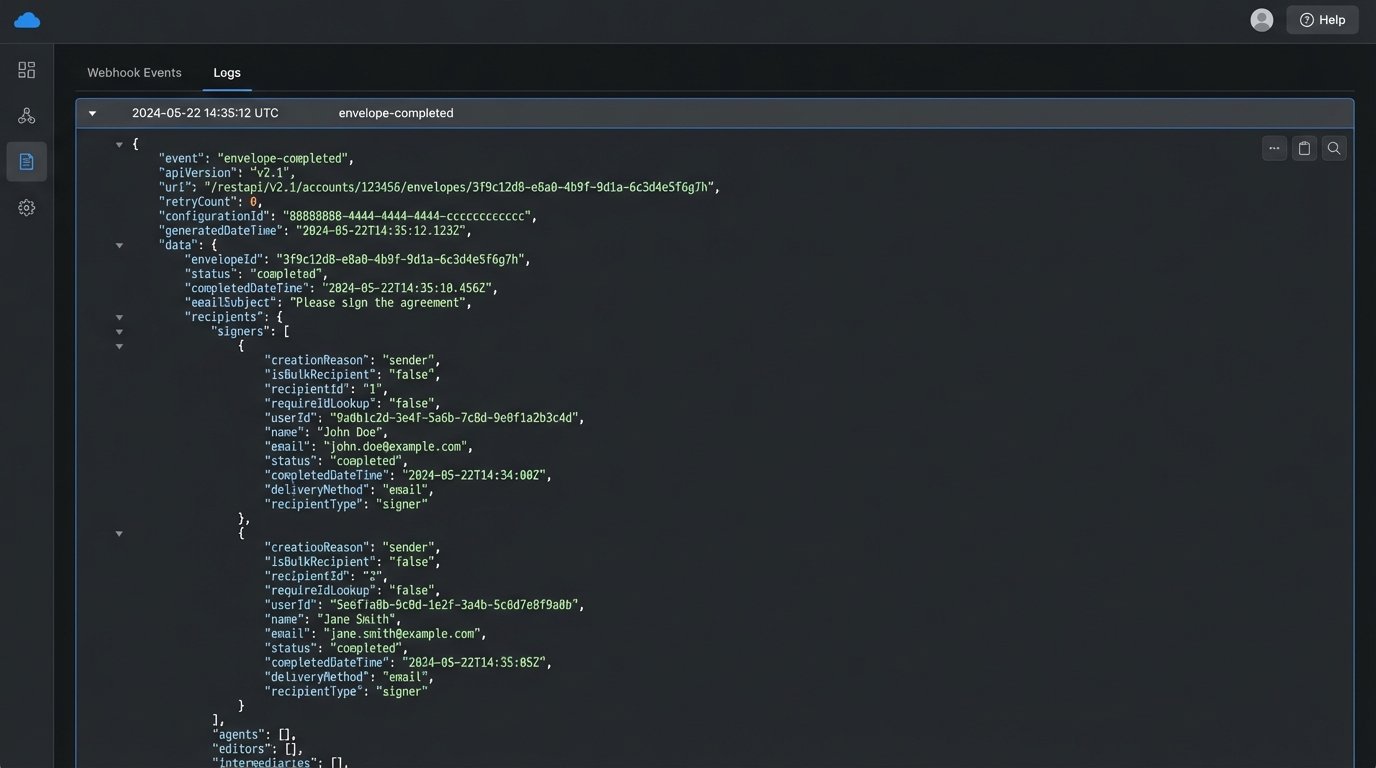
Technical Benefit: The Connect webhook system is its strongest feature. It can push detailed XML or JSON payloads to your endpoint upon envelope completion or recipient action. The API also supports templating, allowing you to pre-define documents with signature tags and then programmatically populate signer information and send them out.
Use Case: A transaction coordinator finalizes a disclosure package. They use an internal tool that calls the DocuSign API to create an envelope from a pre-defined template. The tool injects the buyer’s and seller’s names and email addresses. DocuSign handles the entire signing ceremony. Once all parties have signed, DocuSign Connect sends a webhook to your server with the completed PDF attached.
The Catch: The API is vast and can be overwhelming. Understanding the difference between templates, envelopes, documents, and recipients takes time. The sandbox environment also has limitations that can hide production issues, particularly around API rate limits and user permissions.
10. n8n (Self-Hosted)
n8n is an open-source workflow automation tool, similar in concept to Zapier but designed to be self-hosted. This gives you complete control over your data, execution environment, and costs. It uses a visual, node-based interface to build workflows that can include custom code steps.
Technical Benefit: No arbitrary limits on the number of steps or executions. Since you host it yourself, you are only constrained by your server’s resources. It provides the flexibility to write custom JavaScript or Python snippets within a workflow, bridging the gap between no-code simplicity and full-code power. This is essential for handling weird API responses or complex data transformations.
Use Case: Host n8n on a small cloud server. Build a workflow that is triggered by a webhook from Dotloop. The first node receives the data. The next node makes an API call back to Dotloop to get more details. A function node transforms the data into the format expected by your Airtable base. The final node makes a POST request to the Airtable API to update the transaction record.
The Catch: You are responsible for maintenance. You have to manage the server, apply security updates, and monitor performance. If your server goes down, all your automations stop. It is a significant step up in operational responsibility compared to a managed service like Zapier.