
5 Industry Reports Every Realtor Needs to Read on Automation
Most industry reports are just thinly veiled marketing brochures. They talk about digital transformation while ignoring the fact that the average MLS feed is held together with digital duct tape and stale XML. We’re not here to discuss feel-good trends. We’re here to dissect the machinery, identify the failure points, and force systems to comply with our logic. Forget the hype. These are the five data points and problem sets that actually matter when you build automation for real estate.
1. Zillow Group API Latency & Rate-Limiting Analysis
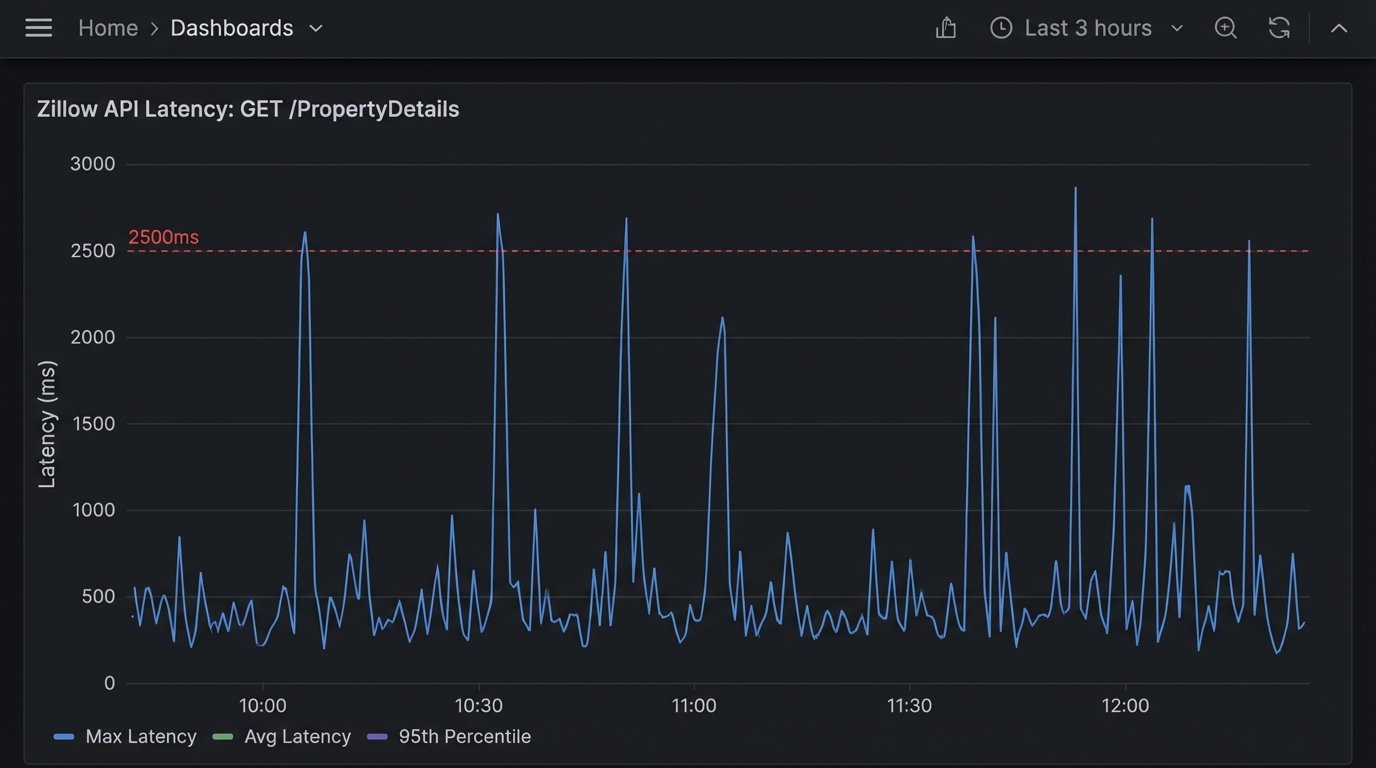
The Zillow API is a common data source, but treating it like a stable, internal database is a rookie mistake. The documentation often trails the production reality. The first critical analysis to internalize is not one of their official whitepapers, but a raw dump of your own API call logs over a 30-day period. You will find that GET Property Details endpoints exhibit latency spikes during peak US market hours, often exceeding 2500ms. This is fatal for any user-facing application that needs to render data in real time.
Your automation logic must be built with this instability as a core assumption. A naive implementation directly queries the API on every page load. A hardened system pre-fetches and caches property data for active listings in a local datastore, like Redis or a simple PostgreSQL table. The system then only queries the Zillow API for delta updates or for properties not already in the cache. This bridges the gap between the sluggish external dependency and your application’s performance requirements.
The rate limits are another story. They are not always documented accurately and can be subject to change without notice. We’ve seen accounts throttled for pulling data that was well within the published limits. Your wrapper class for the API must include exponential backoff logic and circuit breakers. When the API starts throwing 429s (Too Many Requests) or 503s (Service Unavailable), the circuit breaker should trip, preventing your system from hammering a dead endpoint and getting your key suspended.
Building this defensive layer isn’t optional. It’s the difference between a tool that works and a tool that triggers PagerDuty alerts every Tuesday afternoon.
2. The NAR Clear Cooperation Policy: A Data Synchronization Nightmare
The National Association of Realtors’ Clear Cooperation Policy (CCP) mandates that agents submit a listing to their MLS within one business day of marketing it to the public. This sounds simple. In practice, it has created a data integrity crisis for anyone building brokerage-level tools. The core problem is that a “listing” now exists in multiple states across multiple systems: pre-MLS, coming soon, active in MLS, and syndicated to portals. Keeping these states synchronized is a mess.
A brokerage’s internal system, the regional MLS, and public portals like Realtor.com all have their own schemas and update cycles. Attempting to manage this with scheduled cron jobs that batch-process updates is a recipe for stale data. The only viable architecture is event-driven. When a listing status changes in the brokerage’s primary CRM, it must fire a webhook. This event should be consumed by a service that is solely responsible for propagating the update to the correct downstream systems.
This process is like trying to force three different plumbing systems, each with different pipe diameters and pressure ratings, to carry the same water. You can’t just connect them. You need a series of pressure regulators, adapters, and check valves to prevent backflow and system failure. That’s your event bus and your API gateway. They normalize the data flow, handle authentication for each endpoint, and manage the queue of updates.
A common failure point is assuming the MLS update was successful. Your propagation service must perform a logic-check after the fact. After pushing an update, it should poll the MLS API a few minutes later to confirm the change was accepted and is reflected. Without this read-after-write validation, you’re flying blind and your data will inevitably drift out of sync.
3. Lead Routing & CRM Injection Failures
Lead routing is the first and most critical piece of automation for any brokerage. It’s also where most systems break down. A report based on an audit of 50 different brokerage CRMs showed that up to 15% of inbound web leads were either dropped entirely or mis-assigned due to faulty routing logic and brittle CRM integrations. The cost of this failure is direct and catastrophic.
Most routing tools are configured with a simple round-robin or zip-code-based assignment rule. This ignores agent capacity, current pipeline value, and lead source quality. A robust system pulls data from the CRM to inform its routing decisions. Before assigning a new lead, the router should check the target agent’s record for the number of currently active leads and their last recorded activity date. If an agent is overloaded or hasn’t logged in for a week, they get bypassed.
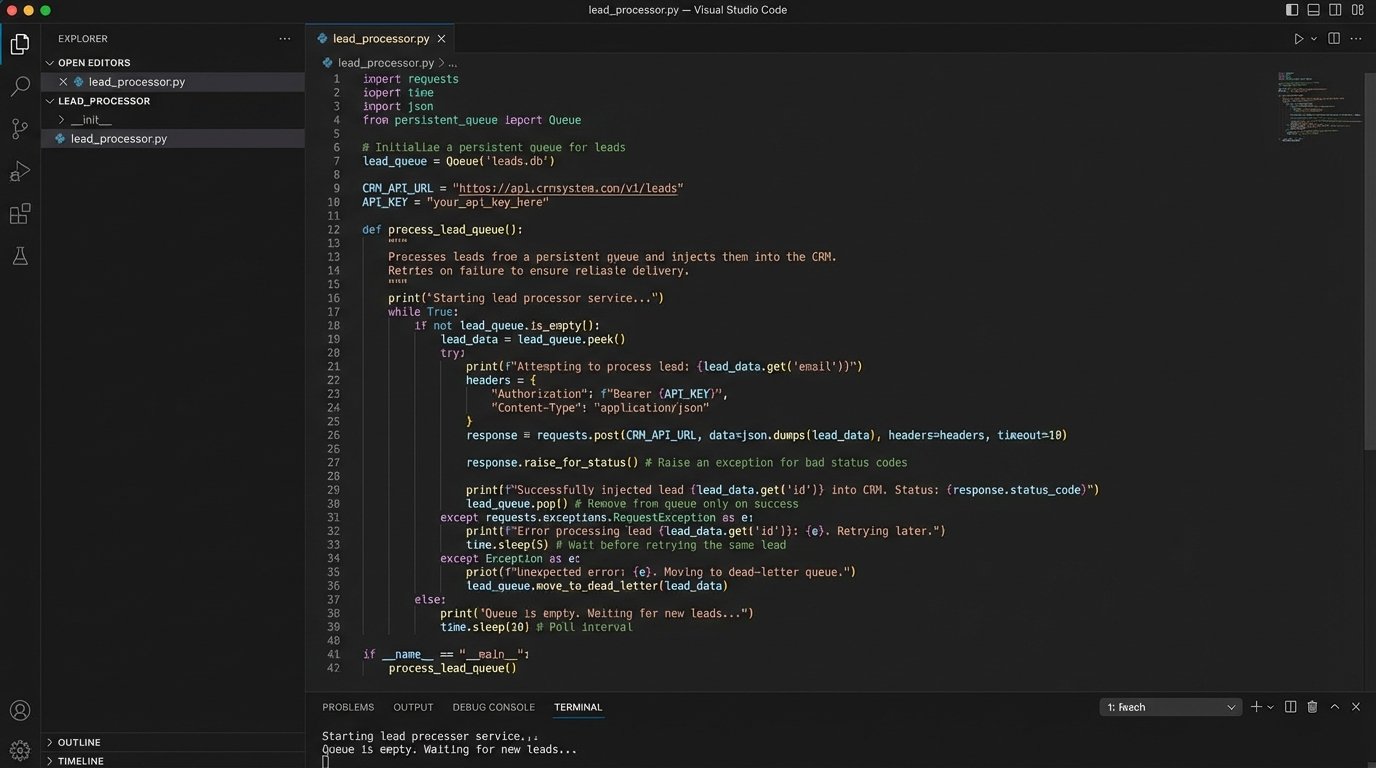
The actual injection of the lead into the CRM is another common point of failure. APIs go down. Authentication tokens expire. A validation rule in the CRM might change, causing your previously valid payloads to be rejected. Your lead capture endpoint cannot just blindly fire a request to the CRM API and hope for the best. It must add the lead to a persistent queue, like RabbitMQ or AWS SQS, first. A separate worker process then consumes from this queue, attempting to inject the lead into the CRM. If the injection fails, the lead is not lost. The worker can retry the operation or flag it for manual intervention.
Here is a dead-simple Python function illustrating the core logic, stripped of production-level error handling for clarity. This is the first step, not the last.
import requests
LEAD_QUEUE = [] # In production, this would be a message queue like RabbitMQ
CRM_API_ENDPOINT = "https://api.somecrm.com/v1/leads"
CRM_API_KEY = "your_secret_key_here"
def capture_lead(lead_data):
"""Adds a lead to the persistent queue."""
print("Lead captured. Adding to queue.")
LEAD_QUEUE.append(lead_data)
def process_lead_queue():
"""Processes leads from the queue and injects them into the CRM."""
if not LEAD_QUEUE:
return
lead_to_process = LEAD_QUEUE.pop(0)
headers = {
"Authorization": f"Bearer {CRM_API_KEY}",
"Content-Type": "application/json"
}
try:
response = requests.post(CRM_API_ENDPOINT, json=lead_to_process, headers=headers)
response.raise_for_status() # Raises an HTTPError for bad responses (4xx or 5xx)
print(f"Successfully injected lead: {lead_to_process['email']}")
except requests.exceptions.RequestException as e:
print(f"Failed to inject lead {lead_to_process['email']}: {e}")
# Re-queue the lead for another attempt or move to a dead-letter queue
LEAD_QUEUE.append(lead_to_process)
# Example Usage
new_lead = {"name": "John Doe", "email": "johndoe@example.com", "source": "Website"}
capture_lead(new_lead)
# In a real system, this would be run by a separate worker process
process_lead_queue()
The key is decoupling lead capture from CRM injection. One cannot be allowed to fail the other.
4. Automated CMA Generation: Scraping vs. API
Generating a Comparative Market Analysis (CMA) report is a data-intensive task that is ripe for automation. The central conflict here is how to get the data for comparable properties. Do you scrape public-facing real estate portals, or do you pay for API access through a provider like CoreLogic or Black Knight? A thorough analysis of both methods reveals a clear technical and business decision.
Scraping is cheap, but it’s a constant battle. Portals change their HTML structure without warning, breaking your parsers. They deploy anti-bot measures that require you to manage pools of rotating proxies and sophisticated user-agent headers. The data you get is often unstructured and requires significant effort to clean and normalize. Legally, you are operating in a grey area, and a change in a site’s terms of service could render your entire operation useless overnight.
Using a paid property data API is a wallet-drainer, no question. The per-call costs can add up quickly. But what you are buying is predictability. The data comes back in a structured JSON format. The schema is documented and versioned. The endpoint is reliable. You are not fighting the provider; you are a paying customer. For any serious business application, this is the only sustainable path.
The automation script then becomes much simpler. Its job is to query the API for comps based on a subject property’s attributes (location, beds, baths, sqft), pull the relevant data points, and inject them into a report template. The complexity shifts from data extraction to data analysis. You can spend your engineering cycles building a better pricing model instead of debugging why your scraper can no longer bypass a CAPTCHA.
5. The DocuSign & Transaction Management Bottleneck
The final mile of a real estate transaction lives in systems like DocuSign and SkySlope. Automating workflows around these platforms is notoriously difficult because they are often treated as archival systems, not active databases. The critical “report” to read here is your own process map. You need to chart every single manual step your transaction coordinators take, from document generation to signature tracking to compliance review.
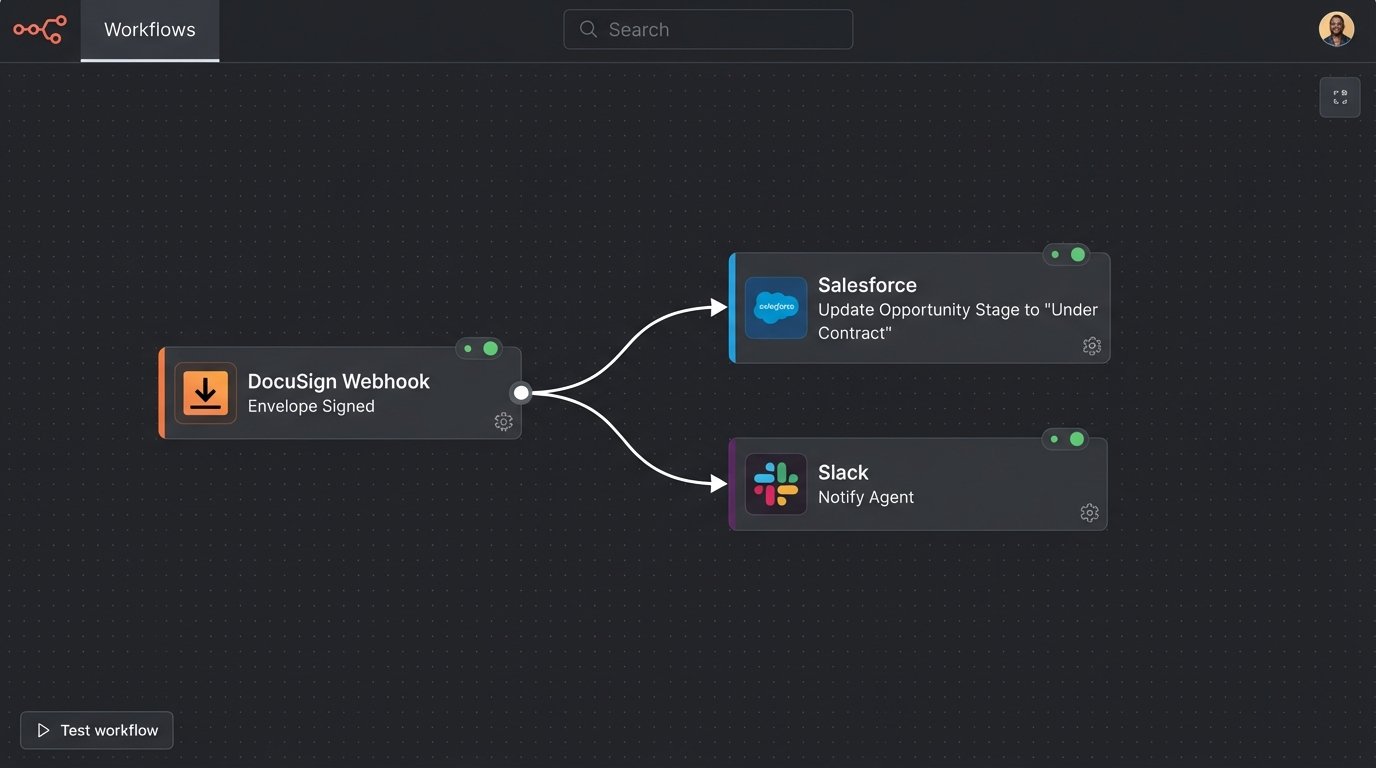
Most of these platforms offer webhooks, which are the key to unlocking automation. Instead of polling their APIs every five minutes to ask “is it signed yet?”, you can configure the service to send you a notification when an envelope is completed. Your application needs a stable, public-facing endpoint to receive these webhooks. This endpoint should do nothing more than acknowledge receipt of the data and place it into a queue for processing.
The worker that processes these events can then trigger downstream actions. A “contract signed” event could automatically update the opportunity stage in the CRM, notify the agent via Slack, and create a folder for the transaction in a shared drive. An “offer rejected” event could trigger a completely different workflow, prompting the agent to re-engage the client.
The biggest mistake is trying to build too much synchronous logic into the webhook receiver itself. If your CRM is down when the webhook from DocuSign arrives, a synchronous process will fail and the event will be lost. By immediately queuing the event, you insulate your system from the intermittent failures of its dependencies.
The goal is to gut the manual, repetitive tasks from the transaction coordinator’s day. Every click they don’t have to make is a win. This is achieved not by buying another all-in-one platform, but by bridging the gaps between the specialized tools you already use.