
Automated social media posting is not a magic content machine. It’s a distributed system with a dozen points of failure, most of them outside your control. The goal isn’t to build a system that never breaks. The goal is to build a system that fails predictably and reports its own death instead of spamming your company’s feed with broken template variables for six hours overnight.
Forget the marketing gloss. We’re talking about brittle APIs, dirty data, and the constant threat of a platform changing its authentication method with zero warning. These tips are about survival and building something that doesn’t page you at 3 AM.
1. The API is Not Your Friend
Every social media platform API is a black box governed by unpublished rules and guarded by aggressive rate limits. Treating API documentation as gospel is the first mistake. Treating the rate limit as a soft suggestion is the second, and it’s the one that gets your app key blacklisted. The platform does not care about your marketing deadline.
Respect Throttling or Get Blocked
The documented rate limit is a ceiling, not a target. A sudden burst of activity, even if technically within the per-minute limit, can trigger temporary shadow bans or stricter throttling. The logic inside these platforms is designed to stop spam bots, and your carefully crafted automation looks exactly like a spam bot to their algorithms. You must build your system to behave less like a machine and more like a human with a caffeine addiction: fast, but with pauses.
This means implementing delays and jitter between posts. It’s a crude but effective method to avoid tripping automated abuse flags.
Implement Exponential Backoff
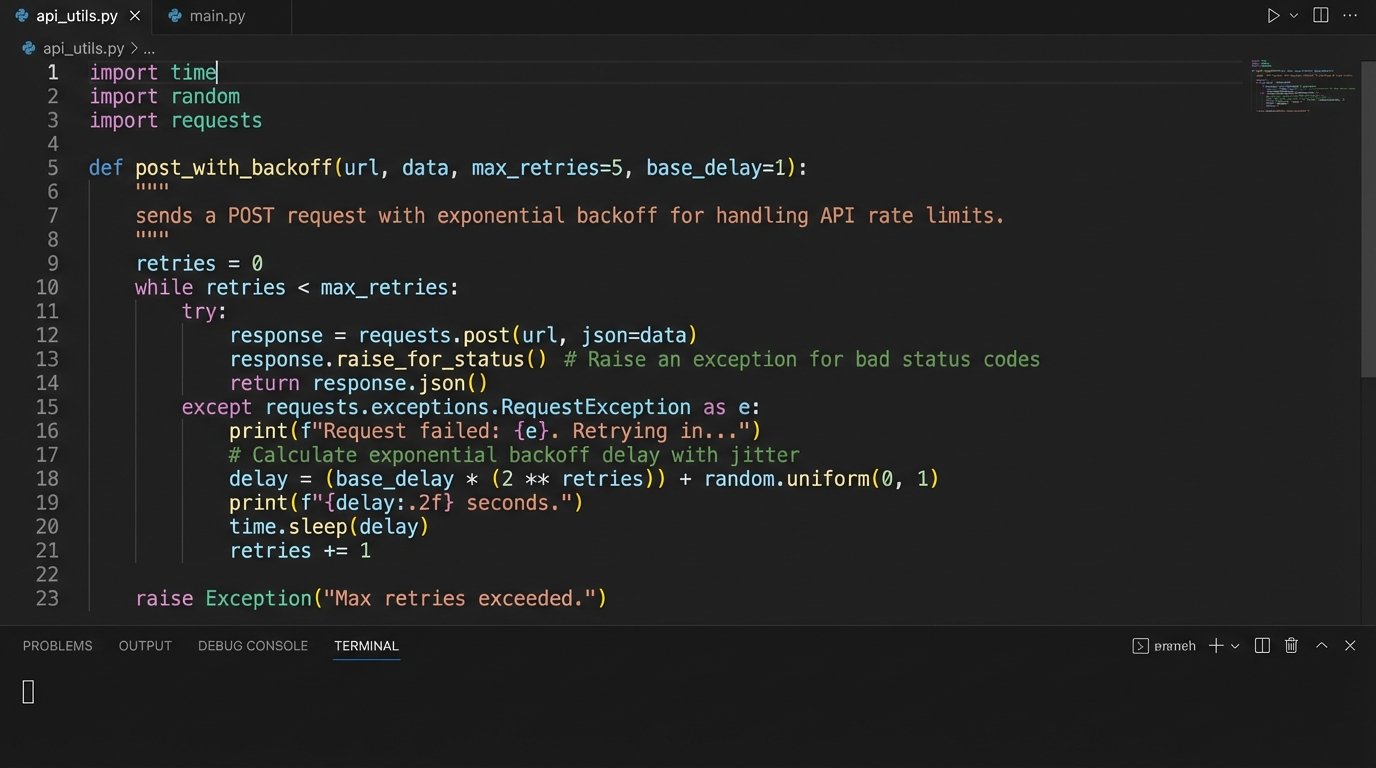
When you inevitably get a 429 “Too Many Requests” response, the worst possible action is to retry immediately. This signals a poorly designed client and escalates the situation. The correct approach is an exponential backoff strategy with jitter. The script must pause, then retry after a longer interval, continuing to increase the delay until it succeeds or hits a max retry limit. Trying to force data through a throttled API is like shoving a firehose through a needle.
A basic implementation in Python looks something like this. Notice the randomized jitter to prevent multiple instances of your script from retrying in a synchronized, thundering herd.
import time
import random
def post_with_backoff(api_call_function, max_retries=5):
base_delay = 1 # seconds
for attempt in range(max_retries):
try:
response = api_call_function()
if response.status_code == 200:
print("Post successful.")
return response
elif response.status_code == 429:
print(f"Rate limit hit. Attempt {attempt + 1} of {max_retries}.")
delay = (base_delay * 2 ** attempt) + random.uniform(0, 1)
print(f"Waiting for {delay:.2f} seconds.")
time.sleep(delay)
else:
print(f"API Error: {response.status_code}. Aborting.")
return None # Or raise an exception
except Exception as e:
print(f"Request failed: {e}")
# Optional: Implement backoff for network errors too
print("Max retries exceeded. Failed to post.")
return None
Without this, your automation is just a denial-of-service tool aimed at yourself.
2. Your Content Source Defines Your Ceiling
The most sophisticated scheduling and posting engine is worthless if its input is garbage. The automation pipeline begins with the data source, whether it’s a product database, a CRM, an RSS feed, or a Google Sheet managed by the marketing team. A single unescaped character or a malformed URL in this source data can bring the entire system to a halt or, worse, publish corrupted content.
The Sanitization Pipeline
Every piece of data must be treated as hostile until proven otherwise. Before any content is injected into a template or passed to an API, it must run through a rigorous sanitization pipeline. This isn’t just about security. It’s about data integrity and predictable behavior. Your pipeline should strip weird characters, logic-check URL formats, and truncate text to the platform’s character limit minus a safety buffer.
Trying to fix data after it’s been rejected by the API is a losing battle. You need to pre-process it, validate its structure, and have a clear dead-letter queue for any source item that fails validation. Do not let one bad entry poison the entire batch.
Structured Data Beats Generative Guesswork
Hooking your automation directly to a generative AI prompt like “write me a post about today’s news” is a fantastic way to burn money and lose control. For 99% of campaigns, structured data is superior. A well-maintained database of products with fields for `product_name`, `description`, `price`, and `image_url` provides a solid, predictable foundation for content templates. The output is consistent and requires no human review for brand safety violations.
Let the marketing team control the inputs in a structured format they understand. Your job is to build the plumbing that carries it, not to invent the water.
3. Idempotency Prevents Public Meltdowns
What happens if your script posts to Twitter, then crashes before it can post to LinkedIn? When you restart it, will it post to Twitter again? If the answer is “yes” or “maybe,” your architecture is flawed. A lack of idempotency is how you get duplicate posts, confused customers, and an angry boss. Each operation must be designed to be safely retried without changing the result beyond the initial execution.
State Management is Non-Negotiable
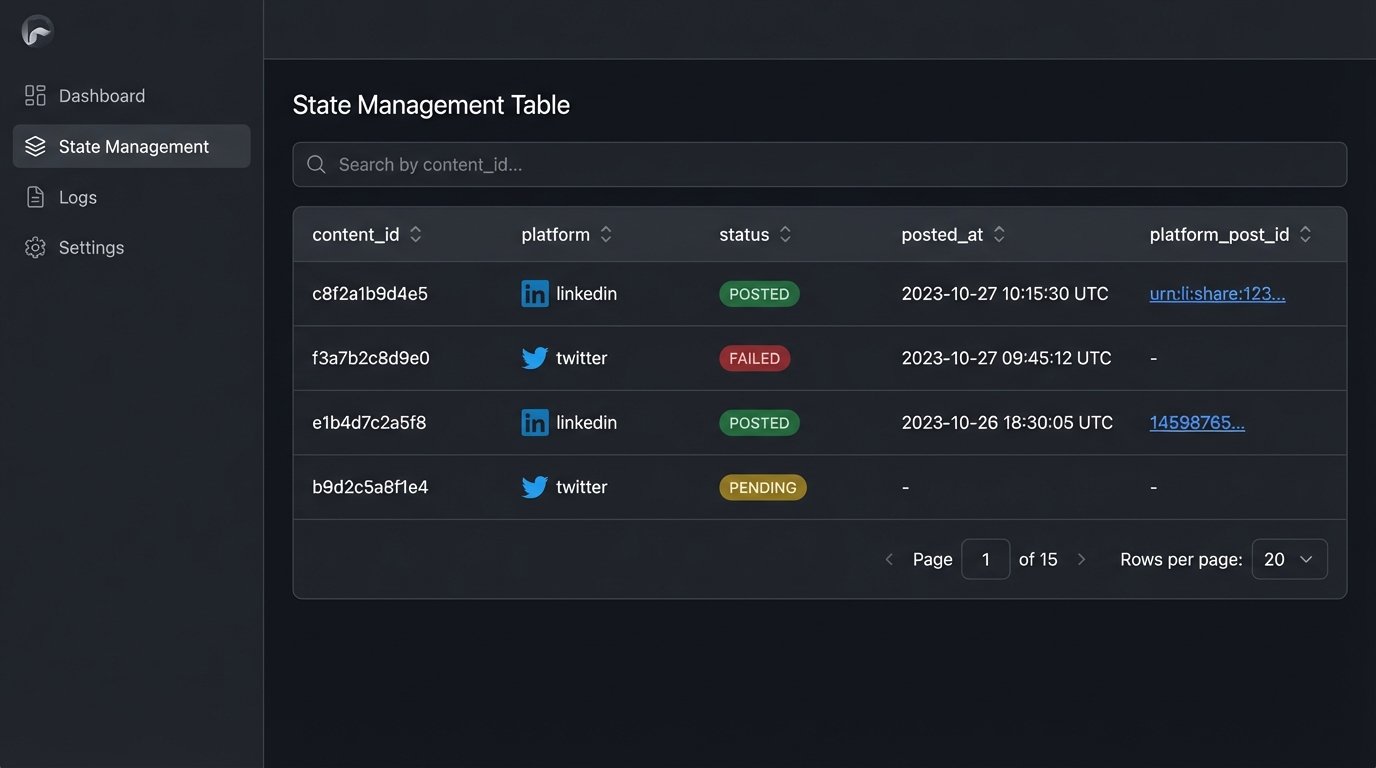
You cannot operate blindly. Your automation needs a simple, persistent way to track its work. This doesn’t require a massive database. A local SQLite file or a Redis instance is often sufficient. Before posting a piece of content, the script must check if that content’s unique ID has already been posted to the target platform.
The flow looks like this:
- Generate a unique hash or ID for the content item (e.g., MD5 of the post text and image URL).
- For each target platform (e.g., ‘linkedin’, ‘twitter’):
- Check your state database: `is_posted(content_id, ‘linkedin’)?`
- If false, attempt the API call.
- If the API call returns success (e.g., a post ID), record it in the state DB: `mark_as_posted(content_id, ‘linkedin’, returned_post_id)`.
This simple logic-check prevents the dreaded double-post and makes your entire system resilient to crashes and restarts.
4. Template Engines Are Your Friend. Generative AI is a Frenemy.
The debate between rigid templating and generative AI for content creation is about one thing: control. Template engines like Jinja2 or Mustache give you absolute control over the output. Generative AI gives you scale at the cost of predictability and budget. It is a costly, unpredictable intern.
The Power of Deterministic Templates
A good template system separates the data (the “what”) from the presentation (the “how”). Your marketing team can provide a spreadsheet of product features, and your templates can automatically format them into dozens of variations for different platforms. A template for Twitter might be short and punchy, while the one for LinkedIn includes more professional language and links.
This approach is testable, deterministic, and cheap to run. You can unit test your templates to ensure they handle missing data gracefully. You know exactly what the output will be every single time.
The True Cost of AI Content
Calling an LLM API for every social media post is a wallet-drainer. It also introduces a significant failure point. The API can be slow, the model can return poorly formatted text, or it can “hallucinate” incorrect information. This output then requires either a human review step, which negates the automation, or a complex set of validation parsers that attempt to “AI-proof” the AI’s output, which is a fool’s errand.
Use generative AI for what it’s good at: brainstorming initial template ideas or summarizing long articles into bullet points as part of the *data preparation* stage. Do not put it in the critical path of your posting pipeline unless you have the budget to burn and the headcount to clean up its mistakes.
5. Build Kill Switches and Health Checks First
The most important feature of any long-running automation is the “off” button. Before you write a single line of posting logic, you must build the mechanism to stop it. A “kill switch” is not an optional extra. It’s a prerequisite for deploying anything that touches a public-facing platform.
The Emergency Brake
A global kill switch can be as simple as a boolean flag in a config file or a value in a database that your script checks at the start of every run. If the flag is set to `true`, the script immediately exits with a log message. This allows anyone on the team to halt the entire system instantly if something goes wrong, without needing code access or deployment credentials.
This single feature can be the difference between a minor bug and a brand-damaging public incident where your bot spends hours posting broken content.
Meaningful Monitoring
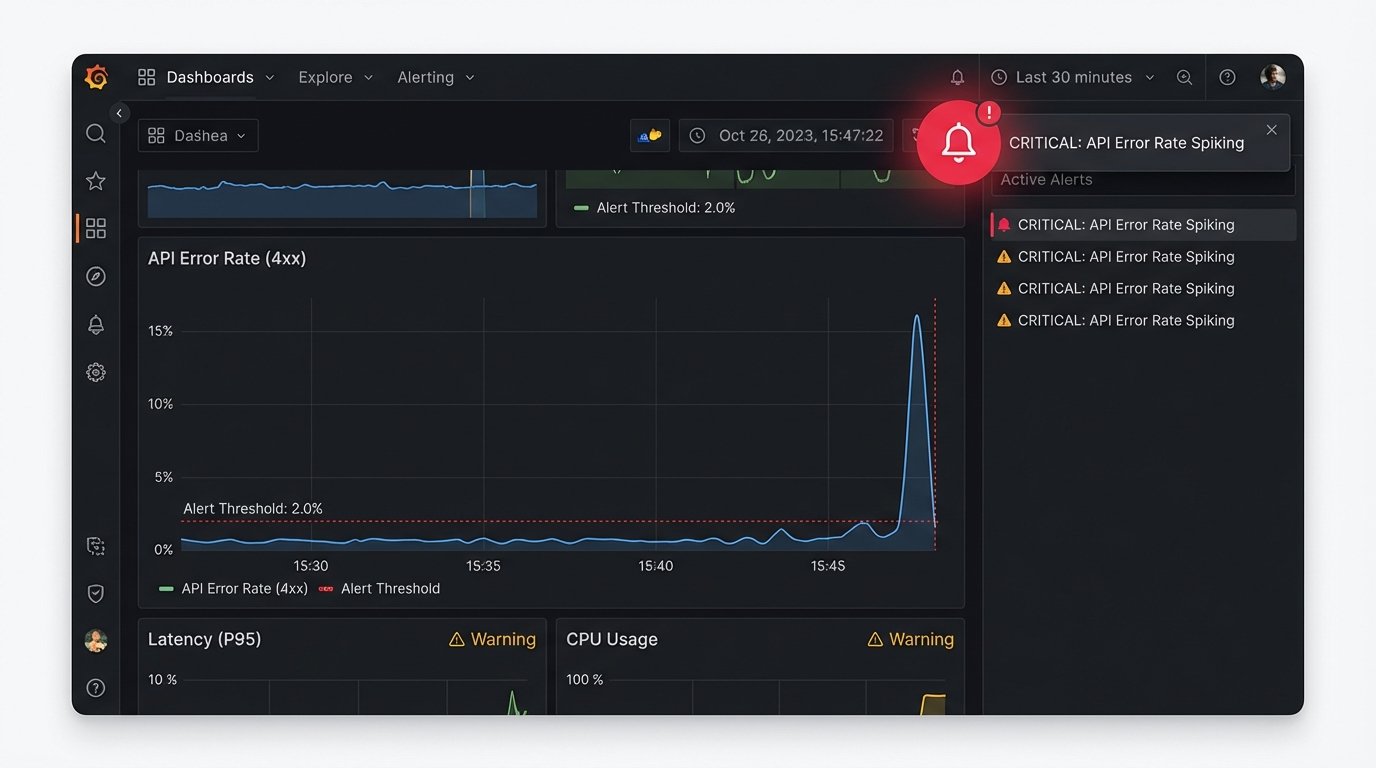
Logging that you successfully posted is useless. You need to log the failures. Your monitoring should track API error rates, latency, and data validation failures. Set up alerts for when the percentage of failed posts in a batch exceeds a certain threshold, like 10%.
A sudden spike in 400 “Bad Request” errors probably means the platform changed its API and your calls are now invalid. A spike in 500 “Server Error” responses means the platform is having a bad day and your script should probably back off entirely. Sending these alerts to a Slack channel or PagerDuty is trivial to implement and provides immediate visibility when the system starts to fail.
Without health checks, your automation is just screaming into the void. You won’t know it’s broken until someone sees the mess it made.