Most articles on CRM automation are a waste of digital ink. They praise the virtues of sending a happy birthday email or a notification when a new lead comes in. That’s table stakes. We’re architects, not marketing interns. The real power of a CRM workflow isn’t in pleasantries. It’s in offloading the brutal, repetitive, logic-based tasks that bleed hours from your technical and sales teams.
Your CRM is either a force multiplier or a glorified, expensive spreadsheet. The difference is the quality of the automation you build on top of it. Here are five workflow patterns that actually solve problems, prevent bad data, and let your teams focus on work that requires a pulse.
1. The Automated Lead Triage Engine
A firehose of inbound leads is a good problem until it isn’t. When sales reps have to manually sift through hundreds of “Mickey Mouse” entries to find one qualified buyer, they stop sifting. The result is lost revenue. An intelligent triage workflow stops this dead.
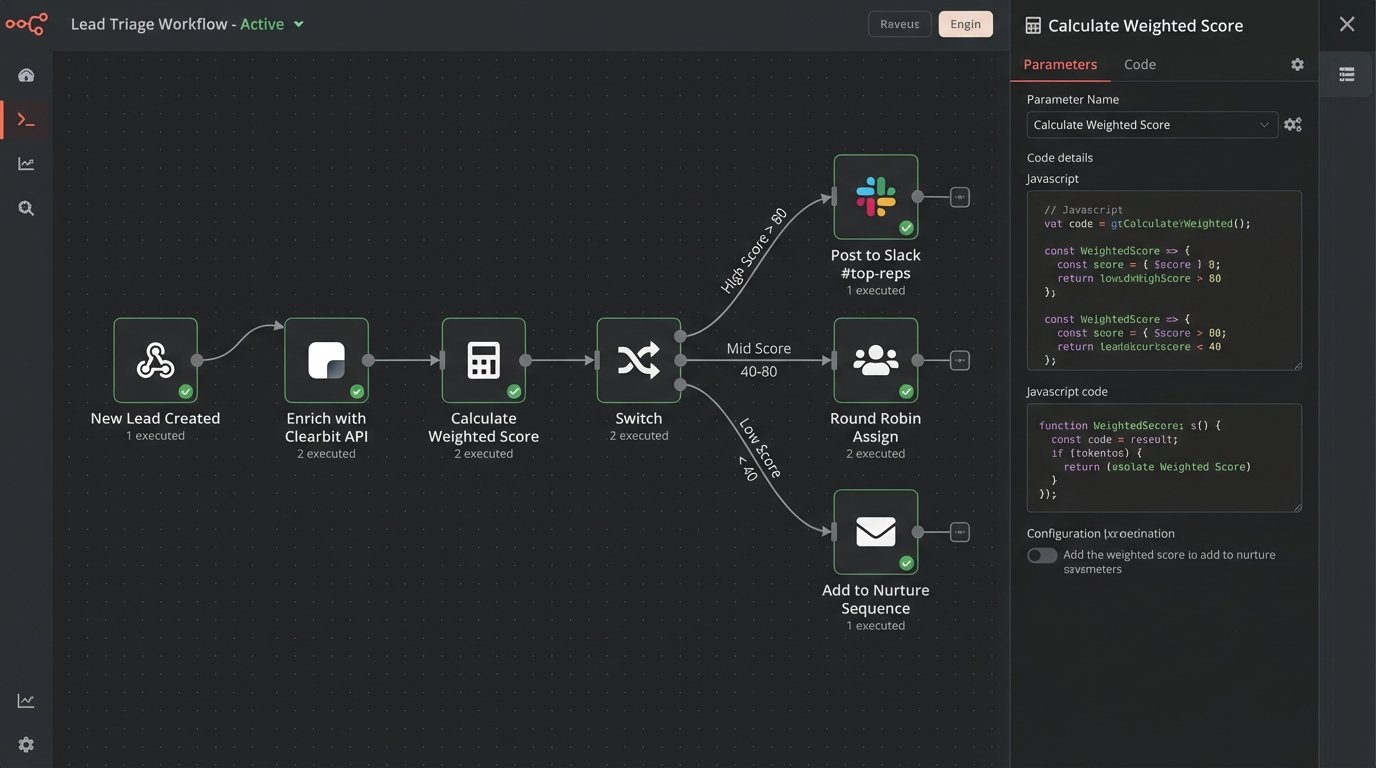
This isn’t just about scoring. It’s about scoring, enriching, and routing in a single, atomic operation. The workflow triggers on new contact creation. First, it logic-checks the email address against a list of known free providers (gmail.com, yahoo.com). Second, it pings an enrichment API like Clearbit or Hunter to pull in firmographic data. The real work happens next. The workflow applies a weighted score based on this new, richer data. A “Director” title gets +15 points. A company size of “500+” gets +20. A demo request form submission gets +50.
High-value leads, those scoring over a predefined threshold, bypass the standard queue entirely. The workflow pushes them directly into a dedicated Slack channel for the top sales reps, complete with all the enriched data. Low-value leads get dropped into a generic nurturing sequence. The mid-tier leads get assigned in a round-robin to the junior team.
The system separates the signal from the noise before a human ever touches it.
2. Proactive Data Hygiene Enforcement
Your CRM’s data integrity is constantly under attack. Reps fat-finger phone numbers, import messy spreadsheets, and leave critical fields blank. Letting unverified data into your CRM is like letting raccoons into your attic. It seems minor at first, but soon you’re dealing with a system-wide infestation that’s expensive to clean up.
A hygiene workflow acts as a gatekeeper. We build this to trigger whenever a contact’s core properties are updated. The workflow runs a series of validation checks. Is the “State” field a valid two-letter abbreviation? Does the “Phone Number” field contain characters that aren’t digits or standard symbols? If a check fails, the automation doesn’t just flag it. It reverts the change and creates a task for the user who made the edit, telling them exactly what they did wrong.
Backfilling Missing Intel
The second part of hygiene is enrichment. When a new company record is created with just a name and a domain, a workflow can kick off an API call to a data provider. The goal is to get structured data back to populate fields like employee count, annual revenue, and industry classification.
Here’s what a typical JSON response payload from an enrichment tool looks like after you send it a domain. The workflow has to parse this and map the values to the correct CRM properties.
{
  "company": {
    "name": "Example Corp",
    "domain": "example.com",
    "industry": "Software",
    "metrics": {
      "employees": 250,
      "marketCap": null,
      "annualRevenue": 50000000
    },
    "location": {
      "city": "Austin",
      "state": "Texas",
      "country": "USA"
    }
  }
}
This prevents your database from decaying into a swamp of incomplete records. It also means your sales team has the context they need without spending thirty minutes on Google before every call.
3. Conditional Task Sequencing for Complex Deals
Closing a big deal isn’t a single event. It’s a chain of internal operations involving sales, legal, finance, and engineering. Dropping the ball during this handoff process is how you lose six-figure contracts.
A sophisticated workflow can manage this entire sequence. When a deal stage moves to “Negotiation,” the automation doesn’t just create one task. It triggers a conditional branching path. If the deal value is over $100k, it creates a task for the legal team to review the Master Service Agreement and assigns it to the “Legal Review” queue. Simultaneously, it creates a task for a solutions architect to validate the technical scope and assigns it to the engineering lead.
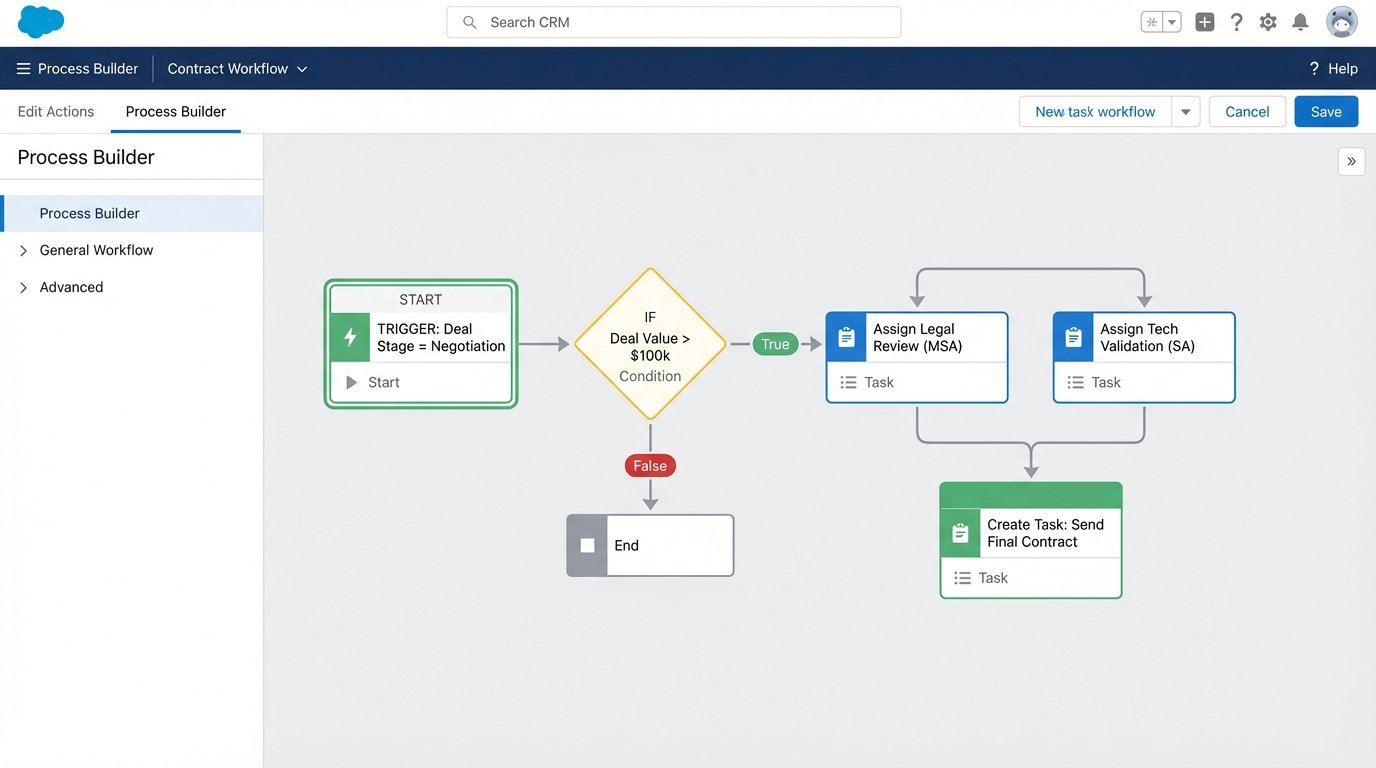
Each task has dependencies. The follow-up task for the account executive to “Send Final Contract” is only created after the “Legal Review” and “Technical Validation” tasks are both marked as complete. This builds an enforceable process directly into the tool your teams already use, and it stops reps from sending out contracts that haven’t been properly vetted.
This works perfectly, assuming the sales team remembers to update the deal stage. Which they won’t, so you also build a reminder workflow for that.
4. The “Stale Deal” Watchdog
Deals die in silence. A rep gets busy, a prospect goes dark, and a promising opportunity withers on the vine. A watchdog workflow surfaces these at-risk deals before they’re lost causes.
This is a scheduled workflow, not a trigger-based one. It runs every Monday at 9 AM. The logic is simple but effective: find all open deals where the “Last Activity Date” is more than 14 days ago AND the “Close Date” is in the current fiscal quarter. That’s your high-risk list.
The workflow then iterates through this list. For each stale deal, it pings the deal owner via Slack or Teams with a direct link to the record and a simple message: “This deal has no activity. Update status or push the close date.” It also posts a summary report to a sales management channel, giving leadership a clean view of pipeline rot without needing to run a manual report.
An expression in a tool like n8n to check the date might look something like this. It’s not complex, but it’s the kind of logic that saves deals.
{{ $json.last_activity_date < $now.minus({ "days": 14 }).toISO() }}
This creates accountability. It forces a decision. Either re-engage the prospect or disqualify the deal and clean up the pipeline.
5. The "Closed-Won" to "Cash-In" Bridge
The moment a deal is marked "Closed-Won" should be a moment of celebration, not the start of a manual, error-prone administrative process. Bridging the gap between your CRM and your accounting system is one of the highest-value automations you can build.
When the deal stage changes, a webhook fires. It sends a payload of customer and deal data (company name, contact info, line items, total value) to a middleware platform like Workato, n8n, or even a custom AWS Lambda function. This intermediate service is critical for transformation and error handling.
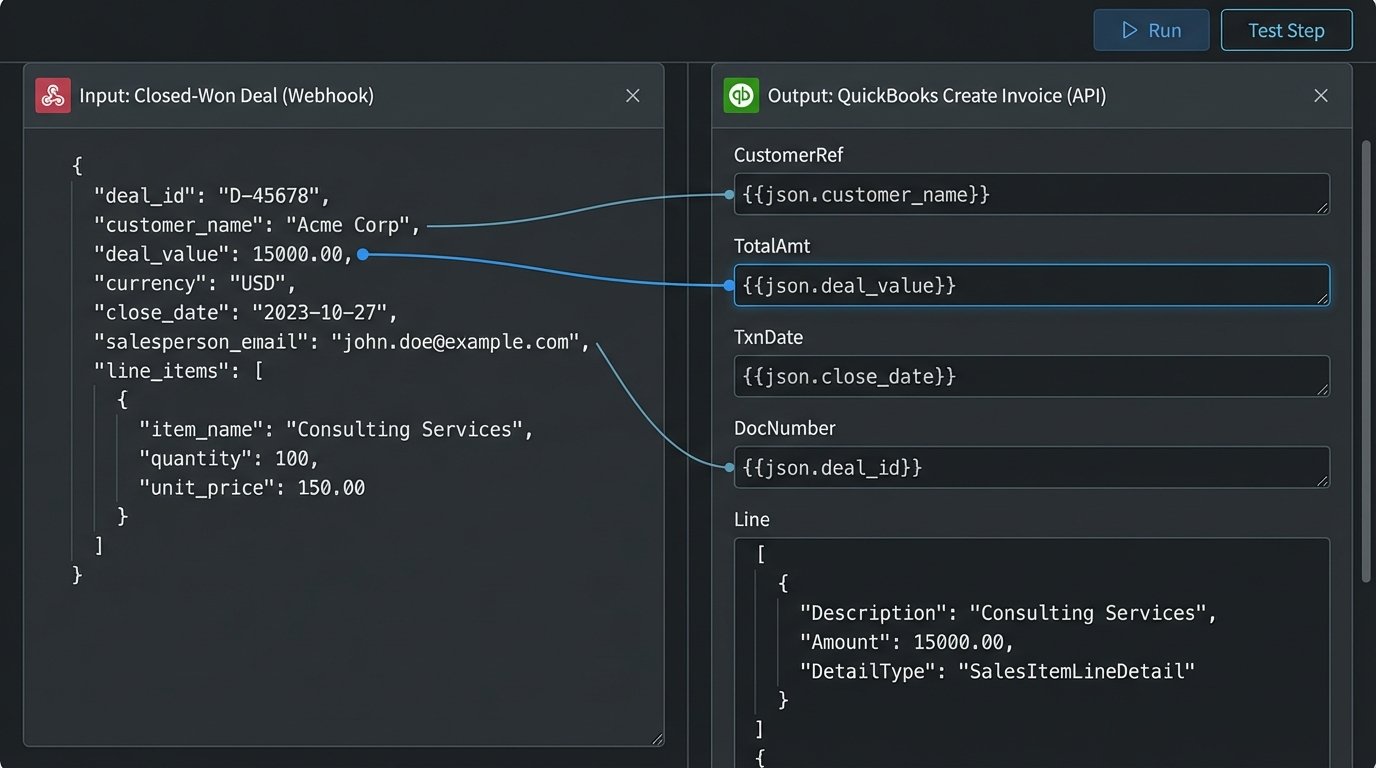
The middleware logic-checks the data. It formats the address correctly for the accounting system. It maps the product SKUs from the CRM to the item codes in QuickBooks or Xero. Once the data is hammered into shape, it makes a series of API calls: first to create a new customer in the finance platform, then to generate a draft invoice using the deal's line items. A final API call back to the CRM updates a custom property on the deal record with the new invoice number.
The trade-off is complexity. You need robust error handling. What happens if the accounting API is down? You need a dead-letter queue and a retry mechanism. It sounds clean on a whiteboard, but production will find a way to break it. Still, getting this right eliminates manual data entry, cuts invoice generation time from hours to seconds, and ensures you get paid faster.
That's a workflow worth building.