
6 Tips for Writing High-Converting Automated Real Estate Emails
Most automated real estate emails are garbage. They fail because they’re built on a foundation of stale data, flimsy logic, and a misplaced faith in the CRM’s native email builder. The goal isn’t to send more emails; it’s to trigger the right action with the right data at the moment of intent. Anything else is just sophisticated spam that burns lead reputation and deliverability scores.
Getting this right isn’t about clever copy. It’s about solid architecture. It’s about treating your email system like a production application, not a marketing toy. Here are six principles, born from debugging failed sends and tracing data inconsistencies back to their source, that actually matter.
1. Gut Your CRM’s Native Email Builder
The WYSIWYG editor in your average real estate CRM is a trap. It promises drag-and-drop simplicity but delivers bloated, non-responsive HTML that breaks inconsistently across email clients. The template logic is often sluggish, performing blocking data lookups that add seconds of latency to every single render, which is a disaster for any real-time send triggers. Maintaining these templates is a nightmare of clicking through menus instead of managing version-controlled code.
A better approach is to decouple the data from the presentation layer. Your automation platform should be responsible for one thing: triggering the send based on logic. The actual email rendering should happen elsewhere. Use a dedicated templating engine like Twig, Jinja2, or Liquid, hosted on a serverless function or a small service. You pass a clean JSON object to this endpoint, and it returns compiled HTML. This forces a clean separation of concerns, makes your templates testable, and lets you manage your HTML like any other piece of code in a Git repository.
This method lets you inject far more complex logic without wrestling a GUI. You can loop through a list of properties, conditionally show or hide blocks based on lead status, and format data correctly without relying on the CRM’s limited filter set. The performance gain alone is worth the setup. Your CRM API call fetches the raw data, your automation workflow assembles the JSON payload, and a purpose-built function renders the HTML. The result is fast, maintainable, and predictable.
It’s the difference between trying to build a house with a child’s toy hammer and using a proper pneumatic nail gun.
2. Engineer a Unified Data Model First
The most common point of failure is data integrity. Your contact data lives in the CRM, property data comes from an MLS feed via RETS or an API, and user behavior data might be in a third system. Simply mapping `{{contact.first_name}}` and `{{listing.price}}` is amateur hour. You need to build a single, coherent data object for each send, normalizing data from all sources before it ever touches the template.
This means writing a data access layer that acts as an intermediary. This layer is responsible for fetching, cleaning, and structuring the data into a predictable JSON object. It handles the impedance mismatch between the MLS feed’s property status codes and the human-readable terms you want in the email. It standardizes address formats, calculates days on market, and pulls in the agent’s contact information. This logic does not belong in the email template. It belongs in a separate, testable module.
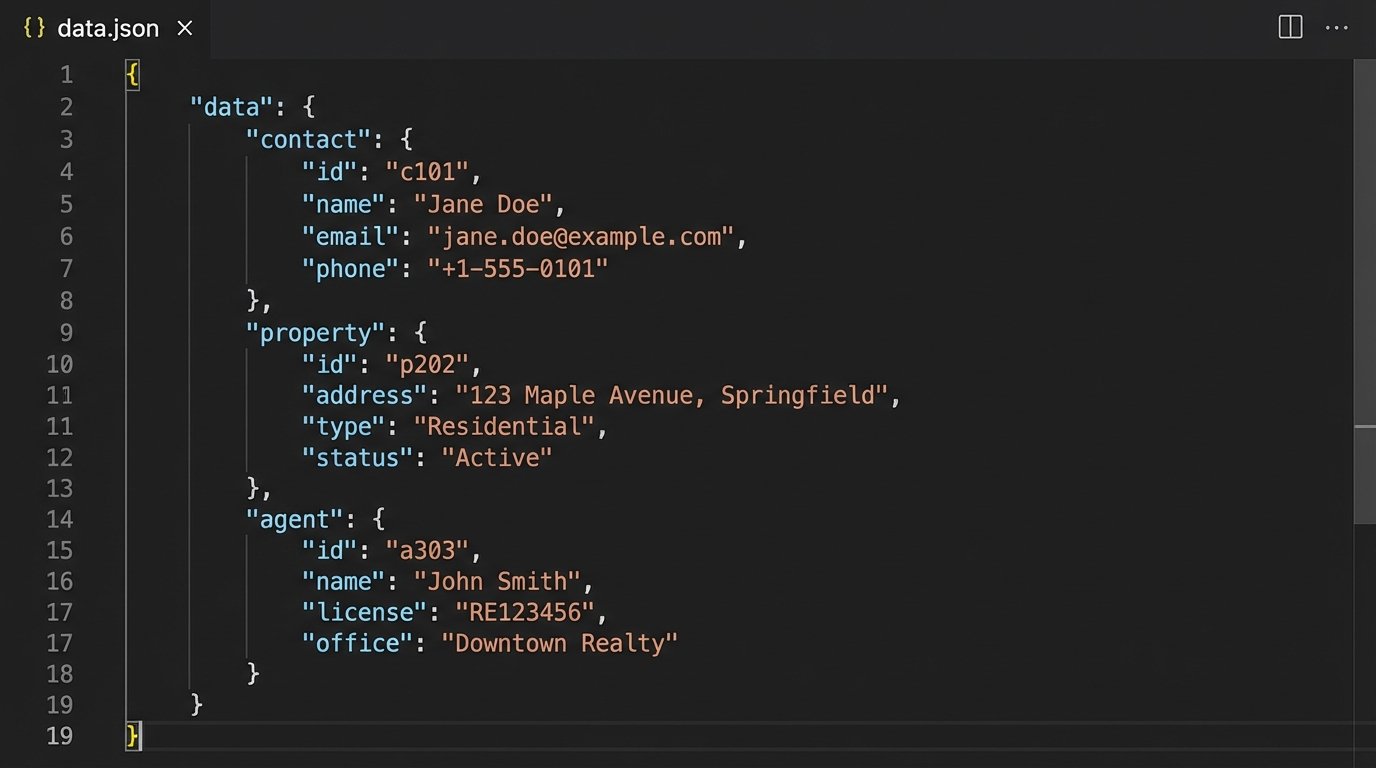
For example, a property object in your final payload should look clean, containing only what the template needs.
{
"contact": {
"firstName": "Alex",
"leadScore": 85,
"lastActivityUTC": "2023-10-27T18:45:00Z",
"savedSearch": {
"city": "Austin",
"minBeds": 3,
"maxPrice": 750000
}
},
"property": {
"mlsId": "1234567",
"status": "Active",
"address": "456 Oak Lane, Austin, TX 78704",
"price": 725000,
"bedrooms": 3,
"bathrooms": 2.5,
"daysOnMarket": 12,
"primaryImage": "https://cdn.mls.com/1234567.jpg"
},
"agent": {
"fullName": "Jane Doe",
"email": "jane.doe@example.com",
"phone": "512-555-1234"
}
}
Building this model is 80% of the work. It forces you to account for null values, mismatched data types, and API failures upfront. Without it, your templates become a mess of defensive code trying to handle every possible data permutation. Fix the data at the source, not in the presentation.
3. Segment by Behavior, Not Just Static Fields
Segmenting by “buyer” vs. “seller” or by ZIP code is rudimentary. Those are static database fields. High-converting automation runs on behavioral triggers, which are event streams. The system must react to what users *do*, not what they *are*. Actions like saving a search, viewing a specific property three times in 24 hours, or calculating a mortgage on a listing page are strong buying signals.
This requires an event-driven architecture. Forget nightly batch jobs that query the CRM for contacts who meet certain criteria. You need to pipe user activity from your website or app into a message queue or an event-processing system. When a “Saved Search” event fires, it should trigger a workflow instantly. That workflow then uses the unified data model to find new matching properties that have hit the market in the last 12 hours and sends a targeted alert.
This approach moves you from scheduled campaigns to real-time conversations. The email a user receives is a direct consequence of an action they just took. The technical lift involves implementing a tracking script, defining key events, and building listeners that trigger your automation hooks. The payoff is relevance. An email about new 3-bedroom listings in Austin is infinitely more powerful when it arrives five minutes after the user created that exact search.
Relying on static fields is like trying to navigate a city using a printed map from last year. You need the live traffic data to see what’s actually happening right now.
4. Force Pre-Send Data Validation
The state of real estate data is fluid. A property can go from “Active” to “Pending” in minutes. Sending an email promoting a property that’s already under contract is more than a waste; it erodes trust. The data you used to trigger the automation might be stale by the time the email is actually sent, especially in a queue-based system.
The only way to mitigate this is with a final logic-check immediately before the send. Your automation workflow must include a step that makes a blocking API call to the source of truth, typically the MLS, to re-verify the critical data points. Is the property still “Active”? Has the price changed in the last hour? If the validation check fails, the workflow must have a path to abort the send or shunt it to a different branch, perhaps a notification about the status change instead.
This introduces latency. A pre-send API call can add 100-500ms to the process. For a bulk send, that’s a problem. For triggered, high-intent automations, it’s a necessary cost of accuracy. The system must choose data integrity over raw speed. You can optimize this by creating a lightweight API endpoint that only returns the bare minimum for validation: `mlsId`, `status`, and `price`.
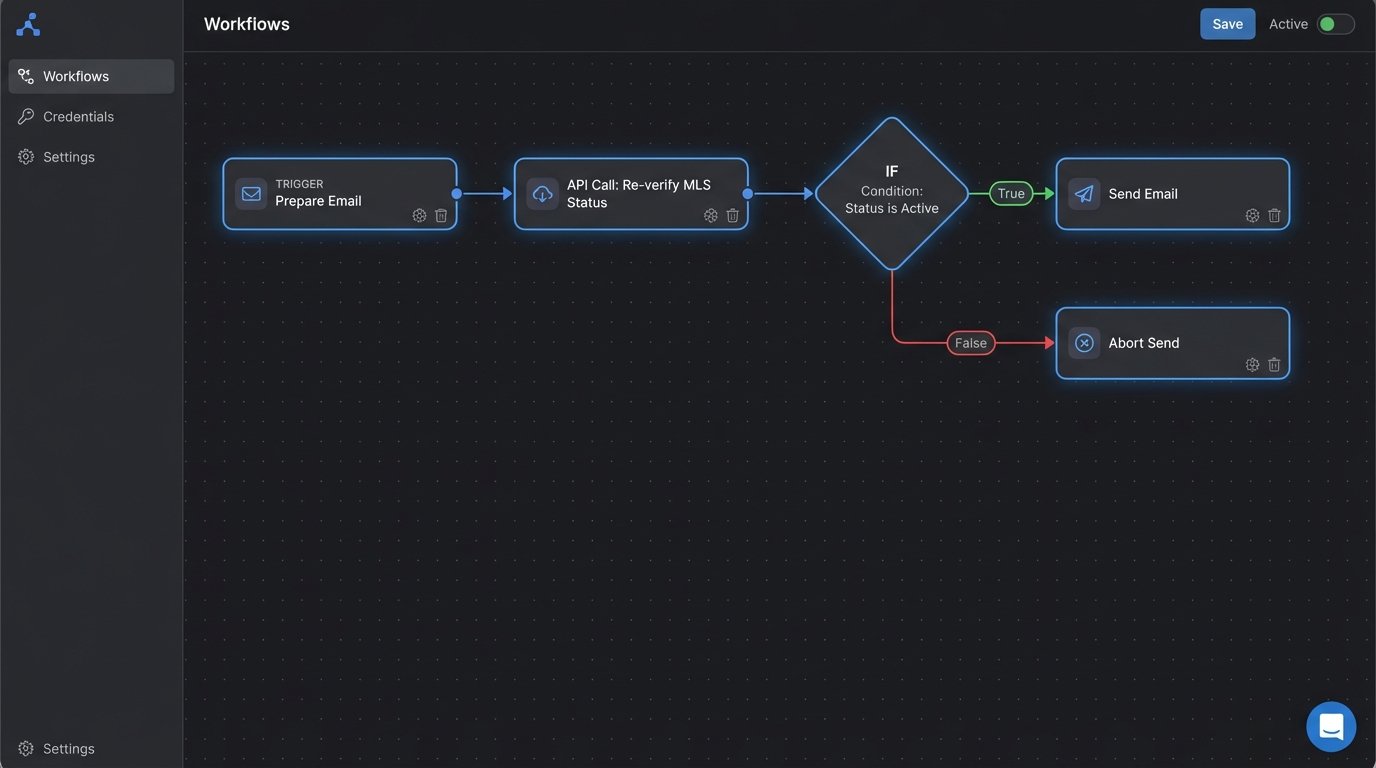
Building this safety check prevents the most embarrassing and trust-destroying errors. It assumes failure and builds a guardrail, which is the mark of a production-ready system.
5. Personalize Send Timing with User Activity
Generic “send time optimization” is mostly statistical noise. The best time to email a specific user is directly related to their own activity patterns. Sending an email at 9 AM on a Tuesday because a study said so is ignoring the most powerful signal you have: the user’s “last seen” timestamp.
Your system should be capturing user activity timestamps with every interaction. When triggering a follow-up sequence, use this data. If a user is most active on your site between 9 PM and 11 PM, queue non-urgent emails like market reports to be delivered in that window. For immediate, action-based triggers like a new listing alert, send it instantly. The key is to differentiate between urgency and general communication.
This requires storing a `last_active_utc` timestamp on the contact record and updating it with every meaningful interaction. Your automation logic can then use this. A simple rule could be: “If last activity was within the last 2 hours, send immediately. Otherwise, queue the send for the next day at the hour of their last activity.” This simple piece of logic respects the user’s patterns and increases the probability of the email being seen in a relevant context.
It’s about bridging the system’s actions to the user’s real-world behavior, not forcing them onto a predetermined schedule.
6. Instrument Every Link and Pipe Data to a BI Tool
An email platform’s dashboard showing open and click rates is vanity. It tells you nothing about revenue or pipeline. To understand if your automation is actually working, you have to instrument every single link with parameters that allow you to trace the user journey all the way to a closed deal.
Every link in every automated email should be appended with UTM parameters or custom tracking codes that identify the user, the specific automation, the email version or branch, and the listing ID. A link to a property should not be `domain.com/listing/12345`. It should be `domain.com/listing/12345?uid=contact_guid&utm_source=automation&utm_campaign=new_listing_alert&utm_content=v2_price_change`. This data gets captured by your web analytics.
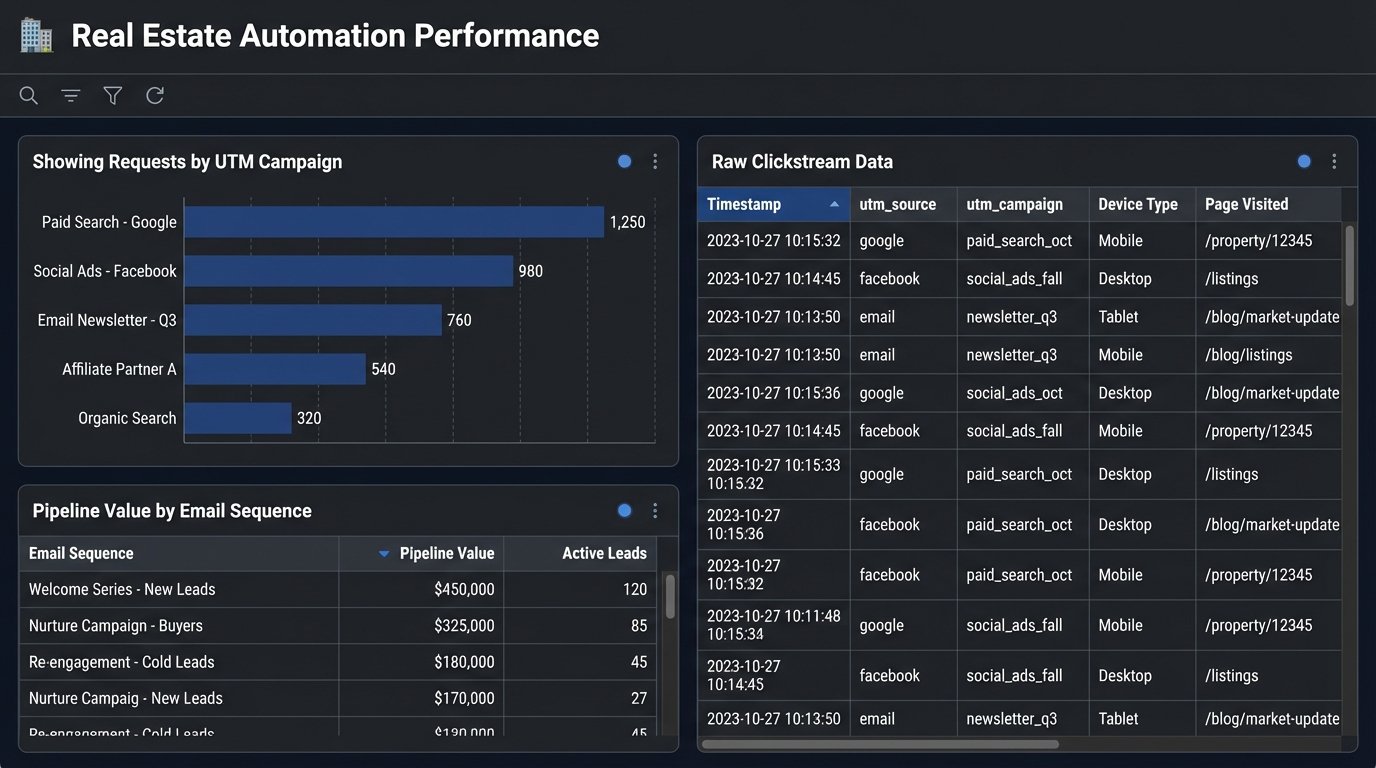
The final step is to get this data out of the marketing tools. The email platform’s engagement data and the website’s clickstream data must be exported or piped via webhooks into a proper data warehouse or BI tool. This is where you can join it with your CRM data, which holds the transaction information. Only then can you answer the real questions: “Which automation sequence generates the most showing requests?” or “What is the dollar value of leads who engaged with the price change alert vs. the market report?”
Without this closed-loop reporting, you’re flying blind, optimizing for clicks instead of commissions.