A Look at 7 Real Estate CRMs and Their Workflow Automation Claims
Most real estate agents lose productive hours to data entry and manual follow-up. The industry’s solution is the CRM, and the marketing promise is always “automation.” This promise often translates to little more than a glorified email scheduler. We are going to strip down the marketing veneer of seven platforms and inspect the actual workflow engines. The focus is on trigger granularity, action diversity, and the capacity for conditional logic that doesn’t buckle under real-world pressure.
The evaluation isn’t about which platform has the slickest user interface. It’s about whether the automation can genuinely offload mission-critical tasks or if it just creates a new, more complex system to troubleshoot when a lead goes cold. We will look at what you can build, what it will cost you in time or money, and where the guardrails are. Some platforms give you a sandbox to build a castle, others give you a set of pre-fabricated walls.
1. Salesforce Real Estate Cloud
Salesforce is the default enterprise choice, and its Real Estate Cloud is a specialized configuration of its core platform. Automation is handled by two primary tools: Process Builder and the more formidable Flow Builder. Flow lets you construct complex, stateful logic that can query objects, loop through records, call external APIs, and present custom UI elements to users. You can engineer entire transaction management systems that trigger task lists, send documents for signature, and update financial records based on contract dates.
This is not a tool for the faint of heart. Building a non-trivial workflow in Flow requires a deep understanding of the Salesforce data model, governor limits, and API callouts. A poorly designed flow can burn through your daily API quota before lunch or lock up records during critical business hours. It’s the definition of a high-ceiling, low-floor system. The power is absolute, but so is the potential to architect a spectacular failure.
The primary trade-off is cost and complexity. You don’t just buy Salesforce; you invest in an ecosystem that requires certified administrators or expensive consultants to properly manage. Attempting to run it without dedicated technical talent is like trying to service a jet engine with a socket wrench. It’s a wallet-drainer, but for large brokerages needing to enforce rigid compliance and business logic, there is no substitute for its raw power.
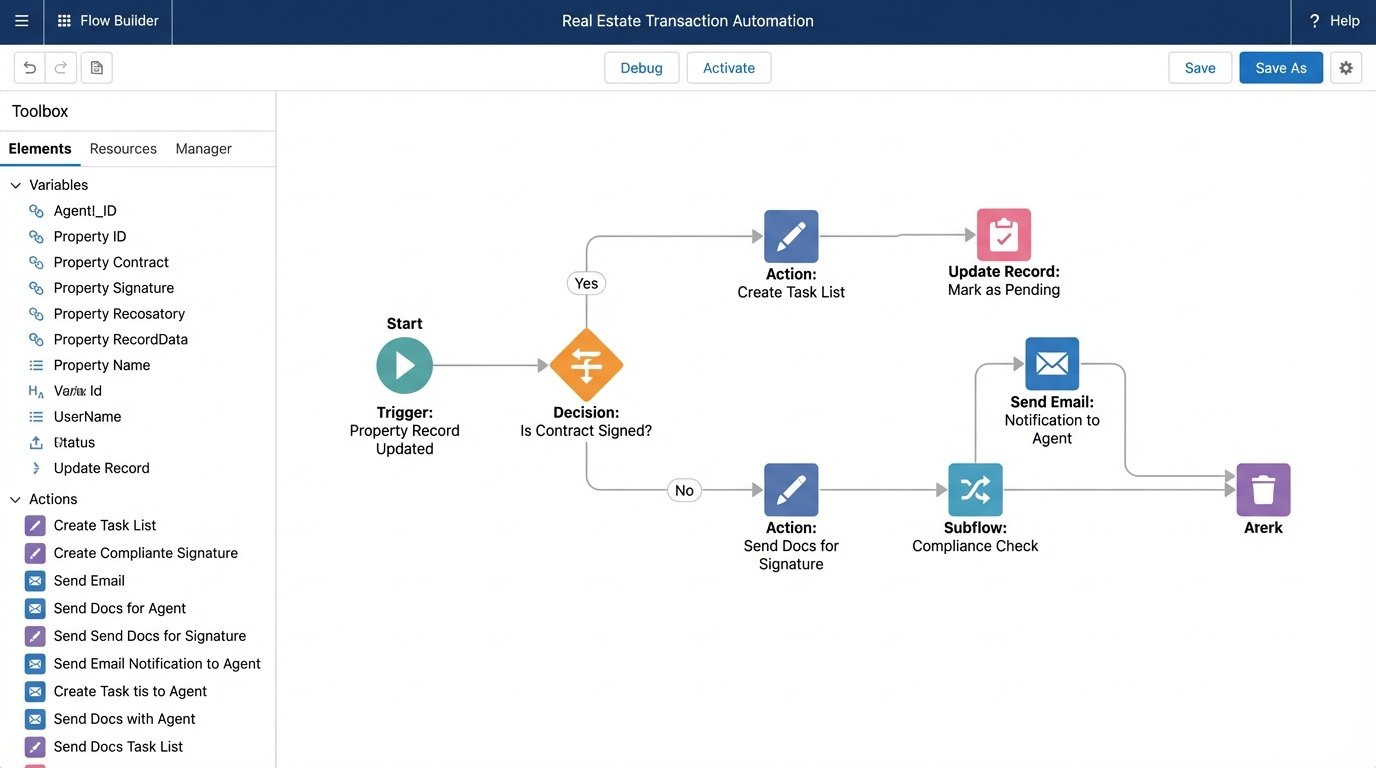
Conditional logic is its strength. A flow can be triggered when a property record is updated, then check 15 different fields before deciding on one of seven different notification and task-creation paths. This level of granularity is where simpler systems fall apart. You can force data integrity and process compliance at a level most other platforms cannot touch. You just have to pay for the privilege.
2. Follow Up Boss
Follow Up Boss targets high-volume agents and teams, with a laser focus on lead ingestion and speed to first contact. Its automation engine is called “Action Plans.” These are sequences of tasks, emails, and text messages that can be triggered manually or automatically based on specific events, like a new lead arriving from Zillow. The builder is straightforward and UI-driven, requiring zero code. You define the steps, set the time delays, and assign the plan.
Its core function is to bridge the gap between a new lead hitting the system and an agent making contact. You can configure it so a new lead from a specific source is immediately sent an automated text, a first email, and a task is created for an agent to call within five minutes. The system also supports a shared team inbox, preventing multiple agents from colliding while chasing the same lead. It excels at managing the chaos of initial lead response.
The limitations become apparent when you try to manage anything beyond lead nurturing. Action Plans are linear and lack sophisticated conditional logic. You cannot, for example, have an Action Plan that alters its path based on whether a contact opened a previous email or visited a specific page on your website. It’s a one-way street. The automation is designed to start a conversation, not to manage the entire client lifecycle through closing and beyond.
3. HubSpot
HubSpot entered the market from the marketing automation side, and its “Workflows” tool reflects that DNA. It’s one of the most powerful and intuitive visual workflow builders available. Triggers can be anything from a form submission to a contact’s property value changing or their inclusion in a specific list. The workflow canvas allows for if/then branching, delays, and a massive library of actions including internal notifications, data manipulation, and ad audience management.
For top-of-funnel and mid-funnel activities, HubSpot is exceptional. You can build a nurturing sequence that sends different content based on how a lead interacts with your site, automatically segmenting them into “hot” or “cold” lists. You can then create tasks for agents only when a lead displays specific high-intent behavior, like viewing a single property three times in 24 hours. This filters the noise and lets agents focus on engaged prospects.
Trying to force HubSpot to manage the post-contract, transaction-to-close process is like shoving a firehose through a needle. The system’s data objects are built around contacts, companies, and deals, not the intricate, date-driven checklists required for real estate transactions. While you can create custom objects, the workflows are not optimized for the kind of dependent, multi-stakeholder task management needed to get a deal from “signed contract” to “closed.” It can be done, but it feels like you’re fighting the tool’s intended purpose.
4. Zoho CRM
Zoho presents itself as a cost-effective alternative to the giants, but its feature set is surprisingly deep. Automation is handled through “Workflow Rules” for simple trigger-action pairs and “Blueprint” for enforcing rigid processes. A Workflow Rule might be: “If a deal’s stage is changed to ‘Negotiation’, send an alert to the brokerage manager.” It’s simple, reliable, and effective for basic process automation.
Blueprint is where Zoho gets interesting. It allows you to design a state machine for your sales process. You define each stage and dictate exactly which actions a user must take before they can move a deal to the next stage. For example, you cannot move a deal from “Showing” to “Offer Made” until the user has filled out three specific fields and uploaded a required document. This is process enforcement, not just automation, and it’s a powerful tool for maintaining data hygiene and compliance in a large team.
The user interface for configuring these tools can be a maze. Debugging a failing workflow often involves clicking through multiple screens with non-obvious dependencies. The documentation is extensive but not always clear. It has all the raw components you need, but connecting them correctly requires patience. It’s a system that rewards methodical configuration and severely punishes a “move fast and break things” approach.
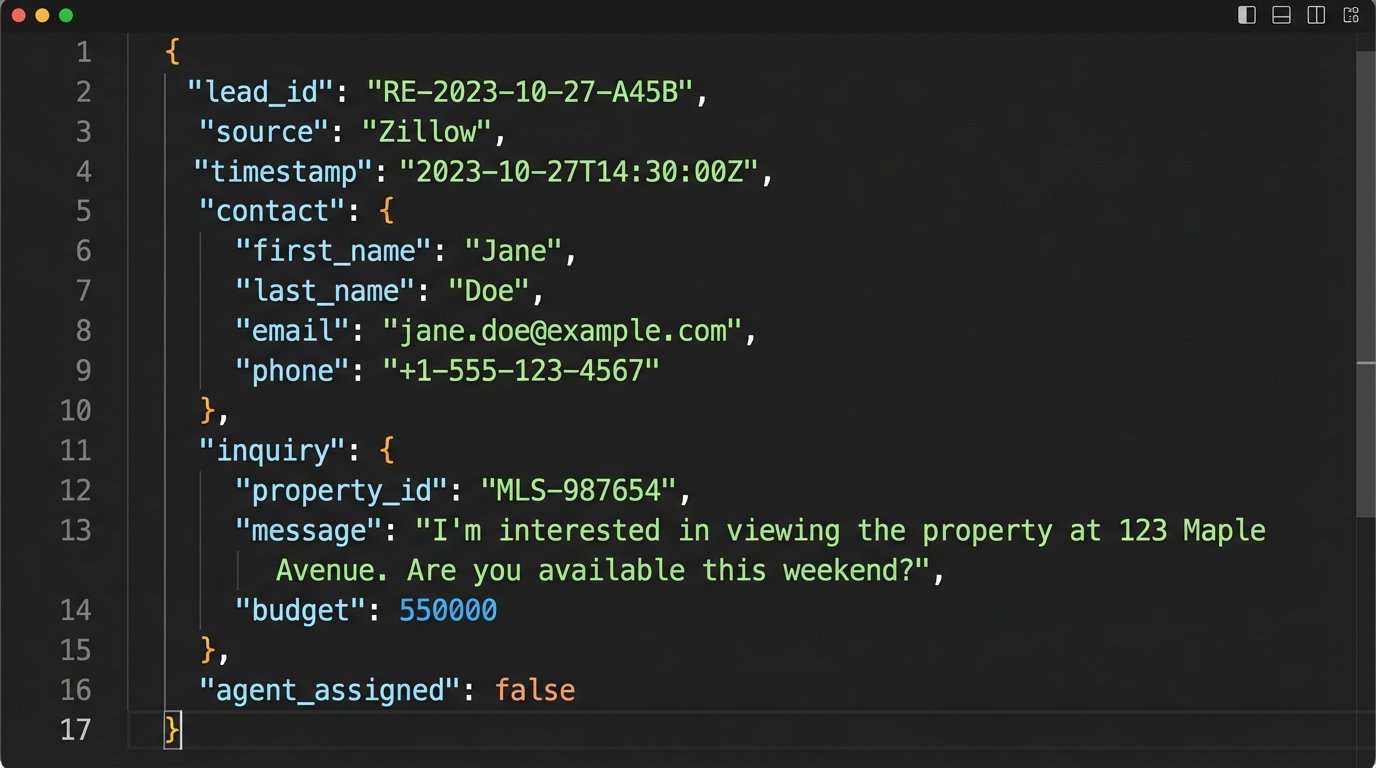
Its API is solid, which opens up integration possibilities with other systems. A common pattern is to use Zoho as the central database and process engine, then use webhooks to trigger actions in external platforms like transaction management or e-signature software. Here is a sample JSON payload a webhook might receive from a lead source, which a Zoho workflow could then parse.
{

  "lead_id": "LID98765",

  "source": "Realtor.com",

  "timestamp": "2023-10-27T10:00:00Z",

  "contact": {

    "first_name": "Jane",

    "last_name": "Doe",

    "email": "jane.doe@example.com",

    "phone": "555-123-4567"

  },

  "inquiry": {

    "property_mls": "MLS12345678",

    "type": "Property Inquiry",

    "budget_max": 750000

  }

}
A workflow could parse this, create a new contact and deal, and use a conditional check on the `budget_max` field to assign it to the correct agent tier. This is the kind of backend logic that separates a real automation platform from a simple task manager.
5. Pipedrive
Pipedrive is built around a single concept: the visual sales pipeline. Its entire interface and automation engine are designed to move deals from one stage to the next. The “Workflow Automation” feature allows you to trigger actions when a deal is created or moved to a new stage. For example, when a deal is dragged into the “Contract Sent” stage, the system can automatically create a follow-up activity for three days later and notify the agent’s manager.
This focus makes it incredibly intuitive for sales process automation. The trigger-action setup is clean and easy to understand. For an agent or team whose primary need is to track deal flow and automate the associated sales activities, Pipedrive is a lean and effective tool. It avoids the feature bloat of larger platforms, keeping the user focused on the singular goal of closing the deal.
The specialization is also its weakness. It offers very little for automating marketing activities or post-close client follow-up. It is not a client lifecycle management tool. Once a deal is marked as “Won,” the automation capabilities largely cease. You would need to integrate it with another system via its API to handle things like “just closed” marketing campaigns or long-term nurture sequences for past clients.
6. LionDesk
LionDesk is built specifically for real estate agents and includes features tailored to their needs, like video email and texting capabilities. Its automation is centered on “Drip Campaigns.” These are multi-step communication sequences that can include emails, texts, and internal task reminders. A key feature is its ability to route incoming leads into these campaigns automatically based on the lead source.
The platform also heavily markets its AI assistant, “Lead Assist,” which can engage with new leads via text message to qualify them before handing them off to a human agent. This “AI” is essentially a well-structured chatbot running on a decision tree. It’s effective for filtering out low-quality inquiries and providing an instant response, which is critical for lead conversion. It’s a pre-built automation that saves an agent from having to manually text every new lead that comes in at 2 AM.
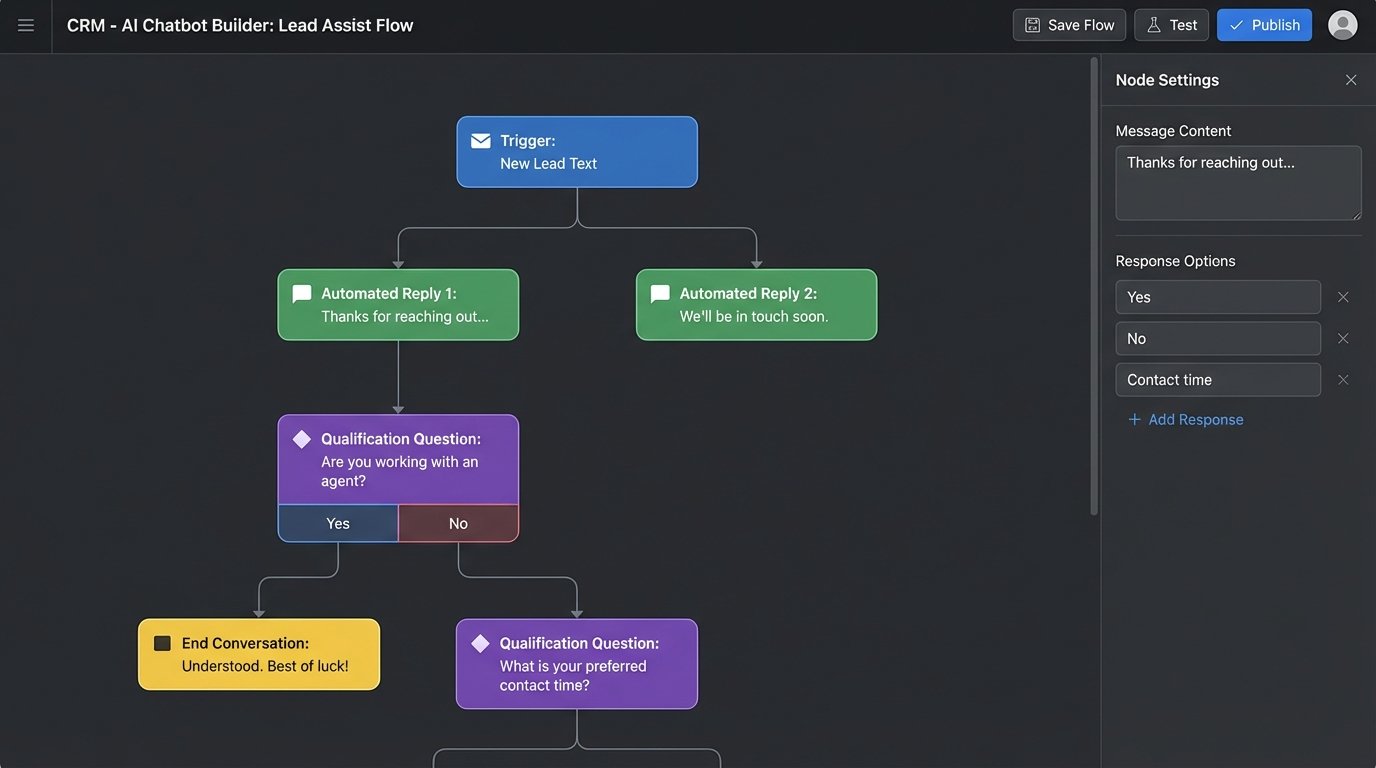
The campaign builder itself is less flexible than the workflow engines in HubSpot or Salesforce. You are largely confined to a linear sequence of communications. The conditional logic is minimal. While it serves its primary purpose of automated follow-up very well, it lacks the ability to build complex, branching logic that adapts to a contact’s behavior in real time. It’s a good tool for executing a pre-defined communication strategy, not for creating a dynamic one.
7. Top Producer
Top Producer is one of the oldest CRMs in the real estate space. Its automation features reflect that legacy. It has reliable, if dated, tools for creating action plans and drip email campaigns. For brokerages that have used it for years, it works. The workflows for managing transaction checklists, known as “Closing Plans,” are functional and can be triggered when a listing’s status changes.
The system is stable. It’s the COBOL of real estate CRMs; it has been running for decades, and its core functions are battle-tested. For an agent who needs a digital rolodex with reliable task reminders and basic email automation, it does the job without requiring a steep learning curve. It automates the fundamentals of follow-up and transaction coordination.
Its limitations are in its extensibility and modern integrations. The API is not as robust or well-documented as newer platforms, making it difficult to connect to the modern ecosystem of real estate tech. The workflow builder lacks the visual interface and flexibility of its competitors. You can automate a set process, but adapting that process or integrating external data triggers is a significant technical challenge. It automates yesterday’s workflows effectively.