Scrap the Notification Noise: Forcing Slack to Work for a Real Estate Office
Your Slack workspace is probably a digital fire alarm that never stops. Every new lead, client email, and scheduling change triggers another notification, burying critical updates under a mountain of noise. Most offices use it as a glorified chat room, a complete waste of its potential as a central nervous system for operations. We are not here to talk about setting your status or creating fun emoji. We are here to inject automation directly into the workflow to stop wasting agent time and prevent deals from failing due to missed information.
These are not simple “tips”. They are architectural patterns for funneling the chaos of real estate transactions into a structured, machine-readable, and actionable format. Each requires some level of technical comfort. None of them are one-click installs. They require work because anything valuable does.
1. The MLS Update Bot: A Direct Feed for New Listings
Agents lose deals because they see a new listing or a price drop an hour too late. Manually refreshing the MLS is a low-value task that eats up productive time. The fix is to build a bot that polls your MLS data source and pipes relevant changes directly into a dedicated Slack channel like #new-listings-feed.
The build depends entirely on your MLS provider’s data access method. Some offer a modern REST API. Many still rely on RETS, which is archaic. Others just provide a nightly CSV file dump to an FTP server. Your first step is to identify the source and write a script to fetch and parse it. A serverless function, like AWS Lambda or a Google Cloud Function, running on a 15-minute cron job is the correct tool for this. The script fetches the data, calculates a hash for each listing, and compares it to the previously stored state in a simple database like DynamoDB or Redis. If a new listing appears or a hash for an existing listing changes (indicating a price or status update), it triggers a post to Slack.
This approach bypasses the need for every agent to maintain their own saved searches and alerts.
Your primary obstacle will be the data source itself. Expect inconsistent data formats, poorly documented APIs, and strict rate limits. You are building a bridge to a system that was likely designed two decades ago. Budget time for cleaning and normalizing the data before it ever hits your Slack channel.
2. Centralized Showing Requests with Emoji-Based Triage
Showing requests arrive from everywhere: the MLS booking system, emails to the front desk, texts to the listing agent. This creates multiple points of failure. The goal is to force all requests into a single channel, #showing-requests, and use Slack’s native features to manage the workflow. This isn’t just about notifications. It’s about state management.
Use a service like Zapier, Make, or a custom email parser to watch for incoming requests. A new email to showings@yourbrokerage.com can trigger a workflow that extracts the property address, requested time, and buyer’s agent info, then posts it as a structured message in the channel. For this to work, you need to enforce a standardized subject line format for email requests, which is a process change, not a technical one.
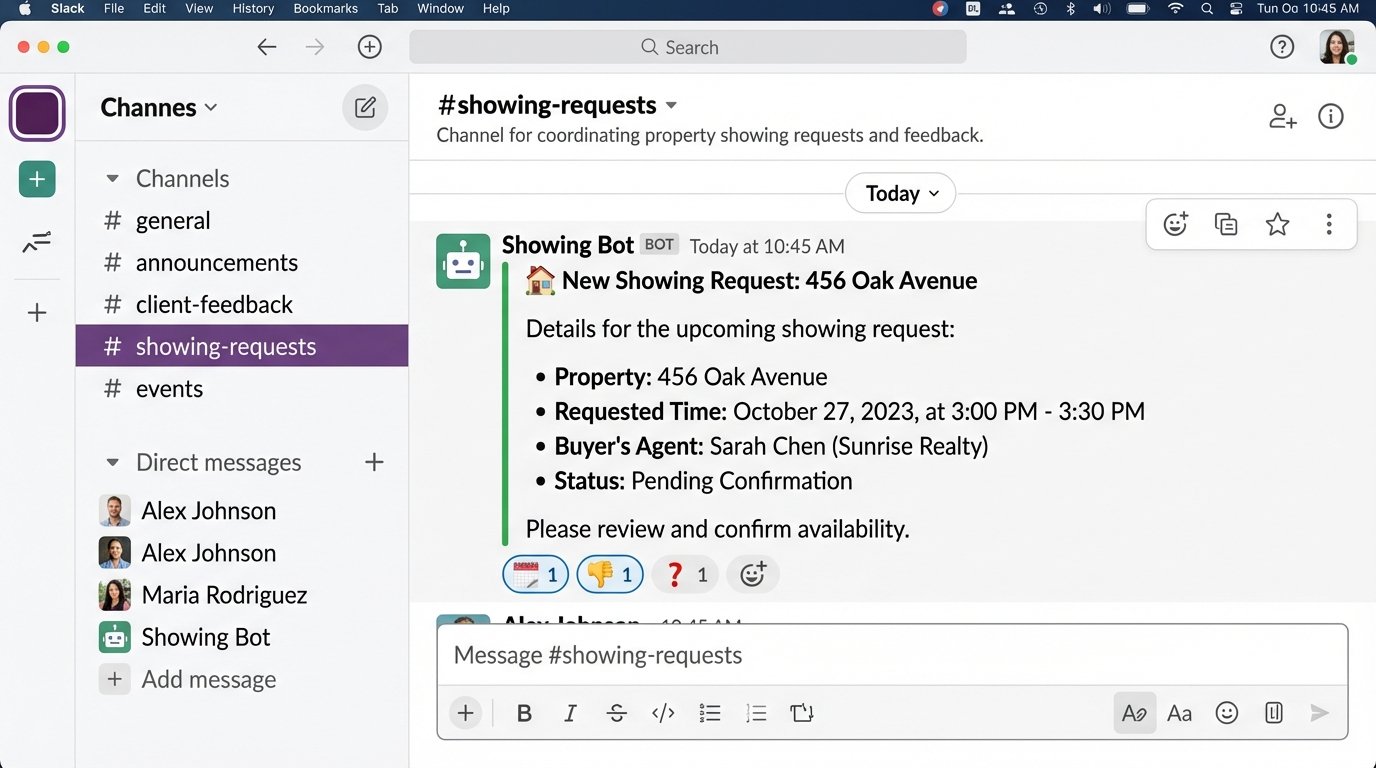
Once the request is in Slack, the transaction coordinator or agent reacts with an emoji to signal the next step.
- 📅 (Calendar): Triggers a second automation that adds the event to a shared Google Calendar and sends a confirmation.
- 👎 (Thumbs Down): Notifies the buyer’s agent that the time is unavailable.
- ❓ (Question Mark): Pings the listing agent in a thread to ask for more information.
This system creates a visible, auditable log of every showing request. It removes the “did you see my email?” ambiguity that plagues most offices. The dependency here is user discipline. If agents start confirming showings via text again, the whole system collapses.
3. The Transaction Channel Generator
Every new deal spawns a mountain of recurring tasks. Creating a dedicated space for each transaction is essential, but doing it manually is tedious. A custom Slack slash command, /new-deal [property address] [client name], can automate this entire setup process in seconds.
Executing this command should trigger a backend script that performs a sequence of actions:
- Create a new private channel: The channel name should be predictable, like #deal-123-main-st. This requires the
channels:managescope for your Slack app. - Invite key personnel: The listing agent, transaction coordinator, and maybe the broker should be automatically added. This uses the
conversations.invitemethod. - Pin a standardized checklist: A message containing the entire closing checklist, from initial offer to final walkthrough, is posted and pinned to the channel. This gives the team a single source of truth for the deal’s status.
- Set the channel topic: The topic can be populated with critical data like the closing date, client name, and MLS number.
This is like having a factory assembly line that stamps out a new, perfectly configured workspace for each transaction. It removes human error from the setup and ensures every deal follows the exact same process from day one. You are forcing consistency on a process that is naturally chaotic.
Building a custom Slack app is not trivial. You will need to handle OAuth for authentication, set up a server to listen for the slash command invocation, and understand the Slack API’s permission model. This is a weekend project for an experienced developer, not a plug-and-play solution.
4. Mainlining Portal Leads into a Triage Channel
Leads from Zillow, Realtor.com, and other portals have a short half-life. The industry standard is that response time is everything. Yet, most brokerages funnel these leads to a general email inbox where they sit until someone manually assigns them. This latency kills conversion rates.
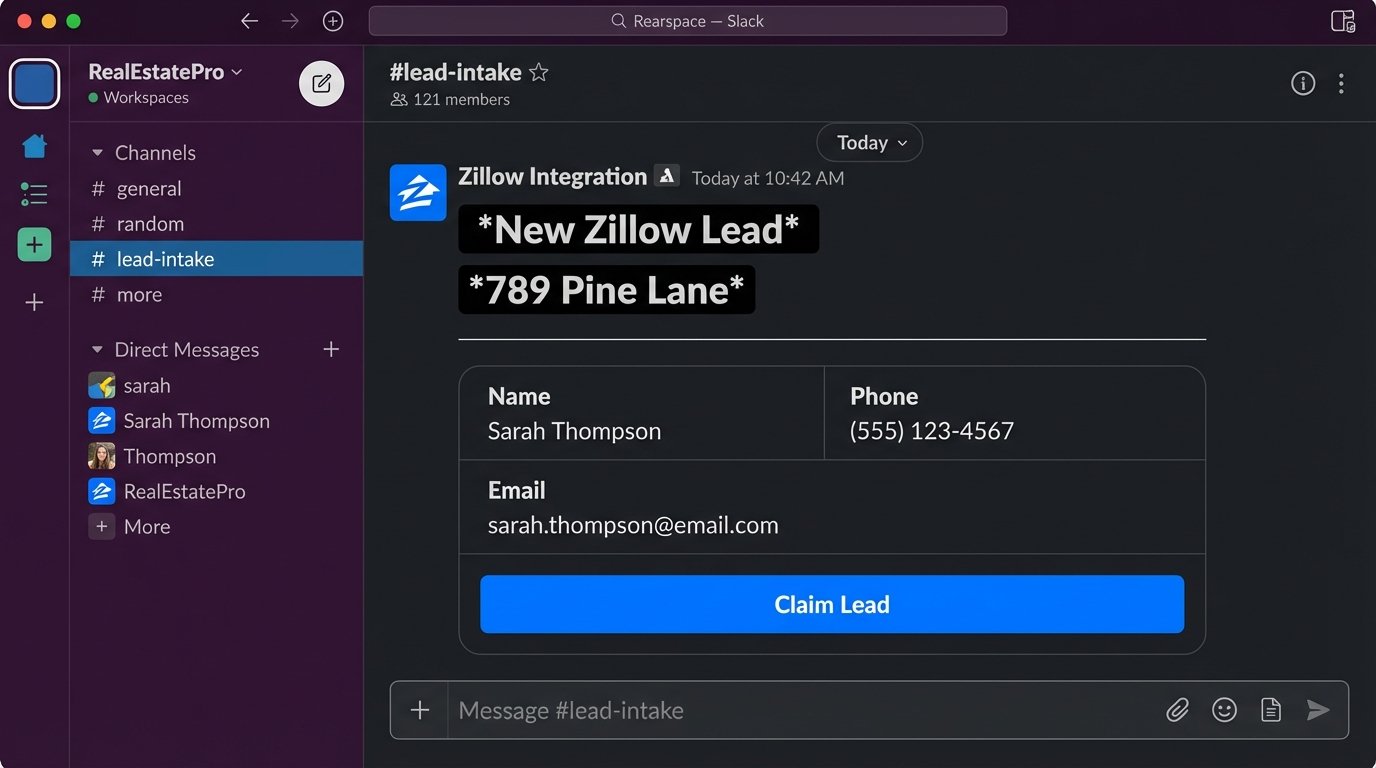
The correct architecture is to bypass email entirely. Most CRMs that ingest these leads (like Follow Up Boss or BoomTown) can fire a webhook whenever a new lead is created. You create a dedicated Slack channel, #lead-intake, and generate an Incoming Webhook URL for it. In your CRM, you configure it to send a POST request with a JSON payload to that URL.
The JSON payload can be formatted using Slack’s Block Kit to create a rich message that includes not just the lead’s contact info, but also buttons for immediate action like “Claim Lead” or “Assign to [Agent Name]”. When an agent clicks “Claim Lead”, that button can trigger another webhook back to your CRM to update the lead’s owner. This closes the loop.
A simple JSON payload for a new lead alert might look like this:
{

    "blocks": [

        {

            "type": "section",

            "text": {

                "type": "mrkdwn",

                "text": "*New Zillow Lead*\n*Property:* 123 Main St, Anytown, USA"

            }

        },

        {

            "type": "section",

            "fields": [

                {

                    "type": "mrkdwn",

                    "text": "*Name:*\nJohn Doe"

                },

                {

                    "type": "mrkdwn",

                    "text": "*Phone:*\n555-123-4567"

                },

                {

                    "type": "mrkdwn",

                    "text": "*Email:*\njohn.doe@email.com"

                }

            ]

        },

        {

            "type": "actions",

            "elements": [

                {

                    "type": "button",

                    "text": {

                        "type": "plain_text",

                        "text": "Claim Lead"

                    },

                    "style": "primary",

                    "value": "claim_lead_12345"

                }

            ]

        }

    ]

}
This transforms a passive notification system into an interactive lead assignment desk. The biggest risk is security. Your Incoming Webhook URL is a secret. If it leaks, anyone can post messages to your channel. Treat it like a password.
5. E-Signature Status Injection for Transaction Channels
The constant back-and-forth checking on document status is pure friction. “Did the buyer sign the addendum?” “Have we received the signed disclosures?” These questions clog up communication channels. The solution is to have the e-signature platform report its status directly into the corresponding transaction channel.
Services like DocuSign and PandaDoc have robust webhook systems. You can configure them to send notifications for key events: Document Sent, Document Viewed, and, most critically, Document Completed. You create a single endpoint on your server that accepts these webhooks. The webhook payload will contain the document name and signer information. Your server’s job is to parse this payload, determine which transaction it belongs to (perhaps by looking for an address or MLS number in the document title), and then post a simple, clear message to the correct Slack channel (e.g., “[Offer to Purchase – 123 Main St] has been signed by all parties.”).
This eliminates the need for agents and coordinators to constantly log in to the e-signature platform. The document’s state becomes an ambient part of the channel’s conversation history. The hard part is the logic-check on your receiving endpoint. You must reliably map an incoming webhook to the correct transaction channel. A failure here could post sensitive information to the wrong channel, which is a significant data breach.
6. The Personalized Daily Digest for Each Agent
Agents start their day needing a clear picture of their priorities. This information usually lives in a CRM or transaction management system, requiring them to log in and run reports. A far more efficient method is to push a personalized summary to them as a direct message in Slack every morning at 7 AM.
This requires a scheduled script (again, a serverless function is a good fit). The script authenticates with your CRM’s API, iterates through each agent, and queries for their specific critical data points:
- Upcoming closings in the next 7 days.
- Listings set to expire in the next 14 days.
- New leads assigned in the last 24 hours.
- Critical contract deadlines for today.
- Client birthdays for today.
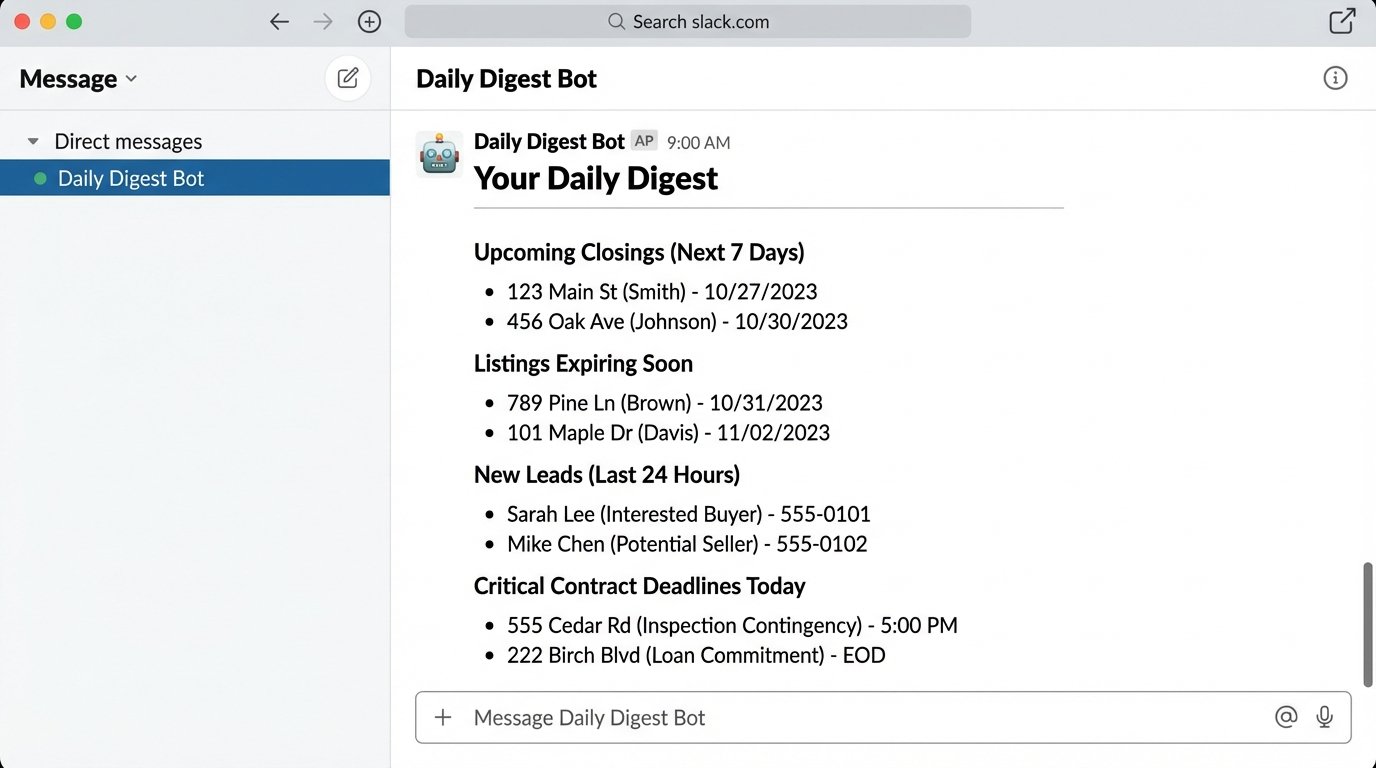
The script then formats this information into a clean message and uses Slack’s chat.postMessage API method to send it as a DM to the correct user. The biggest technical hurdle is mapping the CRM user ID to the Slack user ID. You’ll need to maintain a mapping table for this. This build requires read-only API access to your most critical systems, so credential management and security are paramount.
7. Instant Comps via Slash Command
An agent with a client needs to pull comparable sales data immediately. Navigating the MLS on a mobile device is often slow and clumsy. A slash command like /comps [property address] can provide this data in under five seconds, directly within Slack.
This is the most complex integration here. It requires a backend service that listens for the command. When invoked, the service takes the address, geocodes it to get latitude and longitude, and then queries a real estate data API (like CoreLogic, ATTOM Data, or even your local MLS’s API if available) for recently sold properties within a specified radius. The service then filters, sorts, and formats the top 3-5 comps into a concise summary and sends it back as an ephemeral message visible only to the user who made the request.
The response should be data-dense: address, sold date, sold price, square footage, and price per square foot. This gives the agent immediate, actionable intelligence to share with a client.
Be warned, this is a wallet-drainer. Real-time property data APIs are not cheap. You pay per API call, so you need to implement usage tracking and potentially limit the number of requests per user per day. The value is immense speed, but it comes at a direct operational cost.