
Every lead that slips through the cracks is a direct hit to the bottom line. The core problem in real estate isn’t a lack of leads. It’s the gaping maw between a lead source like Zillow and an agent’s calendar. Manual data entry is the enemy of speed, and in this market, speed is the only variable you can control. The goal isn’t to get more leads. It’s to process the ones you have with ruthless efficiency.
A good CRM with built-in automation acts as a traffic controller, not a simple database. It should ingest, parse, route, and trigger follow-ups before a human even sees the notification. Anything less is just a glorified spreadsheet that costs you ten times as much.
1. Follow Up Boss
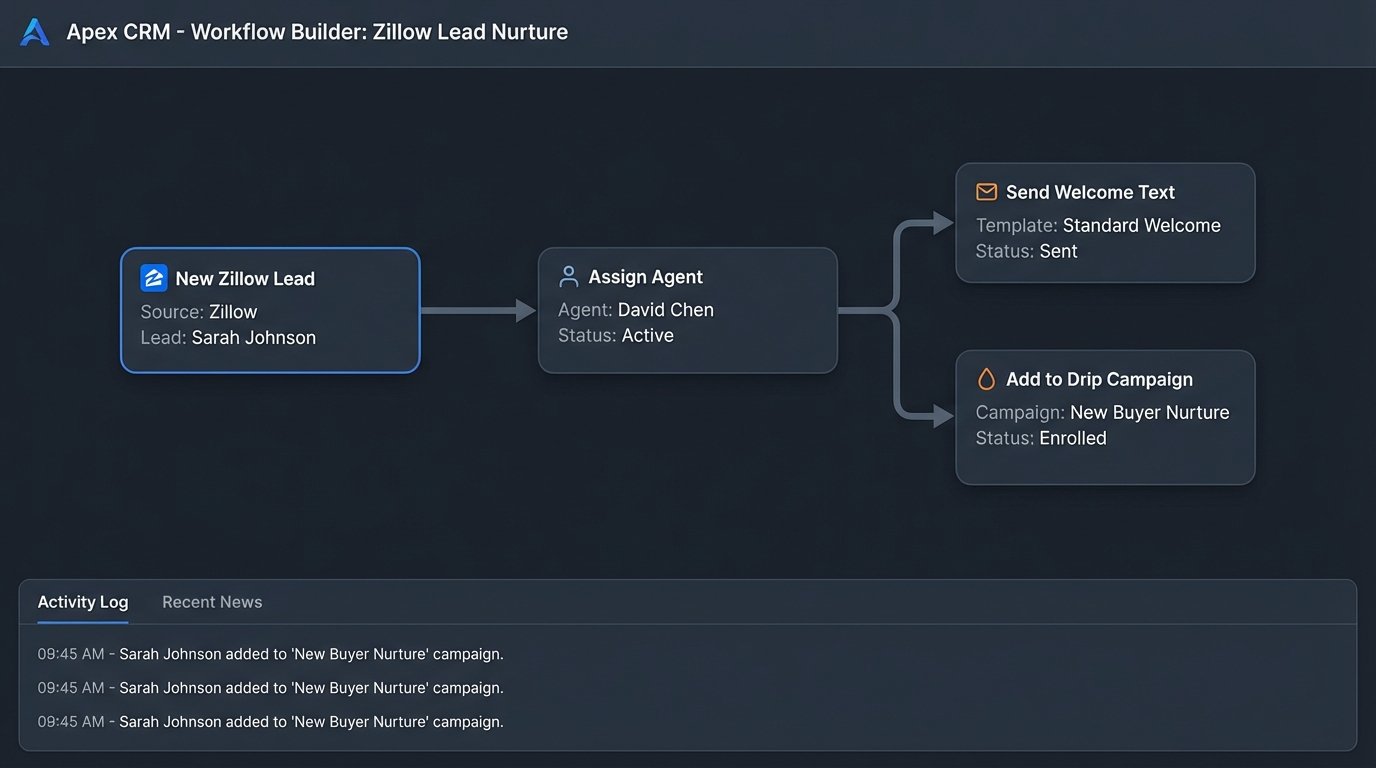
This platform is built around a single, obsessive premise: speed to lead. Its primary strength is the direct API integration with over 200 lead sources. When a lead hits from Zillow, Realtor.com, or a direct website form, Follow Up Boss ingests it and triggers what they call an “Action Plan.” This isn’t just a task reminder. It’s a multi-step sequence of texts, emails, and internal alerts.
The trade-off here is rigidity. You operate within their ecosystem. Customization is limited, so if you need to build complex, multi-branching logic based on esoteric lead data, you’re going to hit a wall. But for pure-play lead response, it’s a hammer, and it hits the nail hard.
Use Case: The “New Zillow Lead” Workflow
A webhook from Zillow hits the Follow Up Boss API endpoint. The system immediately parses the JSON payload, creates a new contact, and assigns it to an agent via a round-robin rule. Simultaneously, Action Plan “Tier 1 Buyer” fires: an automated text goes to the lead, an email with property details follows 5 minutes later, and a task is created for the agent to call within the hour.
2. LionDesk
LionDesk carves out its niche with native video messaging. Instead of a plain text, their automation sequences can include pre-recorded video texts and emails. This is a significant pattern interrupt for leads buried under an avalanche of generic “Hi, I’m an agent” messages. Their campaign builder is visual and relatively straightforward, letting you drag and drop communication steps over a timeline.
The system’s background processes can get sluggish, especially during bulk campaign sends. You also have to be mindful of carrier filtering when sending video via SMS at scale. It’s a powerful tool, but it requires you to logic-check your own send-volume to avoid getting flagged.
Use Case: Post-Open-House Nurturing
An agent bulk-uploads a CSV of open house attendees and assigns them to the “Open House Follow-up” campaign. The automation sends a video text from the agent an hour later. Two days later, it sends an email with links to similar properties. The sequence then pauses, waiting for a trigger like an email open or link click to move the contact into a “Hot Lead” bucket for a manual call.
3. kvCORE
This is less a CRM and more of an operating system for a brokerage. kvCORE bundles an IDX website, a CRM, and a marketing automation engine into one massive platform. Its key automation feature is behavioral. It tracks user activity on the integrated website and adjusts its communication. A user saving a specific property triggers a different automated alert than a user who just browses.
Be warned: this is a wallet-drainer. It’s an enterprise tool with an enterprise price tag. Getting data *out* of its silo for analysis in external tools is also a pain point, as their API is not as open as some of its competitors.
Use Case: Behavioral Property Alerts
A lead browses three 4-bedroom homes in a specific zip code on the brokerage’s kvCORE-powered website. The system logs this behavior. Instead of sending a generic “new listings” email, the automation engine builds a targeted alert titled “New 4-Bedroom Homes in [Zip Code]” and sends it out the next morning. It feels personal, but it’s entirely machine-driven.
{
  "lead_source": "Zillow",
  "contact": {
    "first_name": "John",
    "last_name": "Doe",
    "email": "johndoe@example.com",
    "phone": "555-123-4567"
  },
  "property_inquiry": {
    "mls_id": "12345XYZ",
    "address": "123 Main St, Anytown, USA"
  },
  "timestamp": "2023-10-27T10:00:00Z"
}
4. Chime
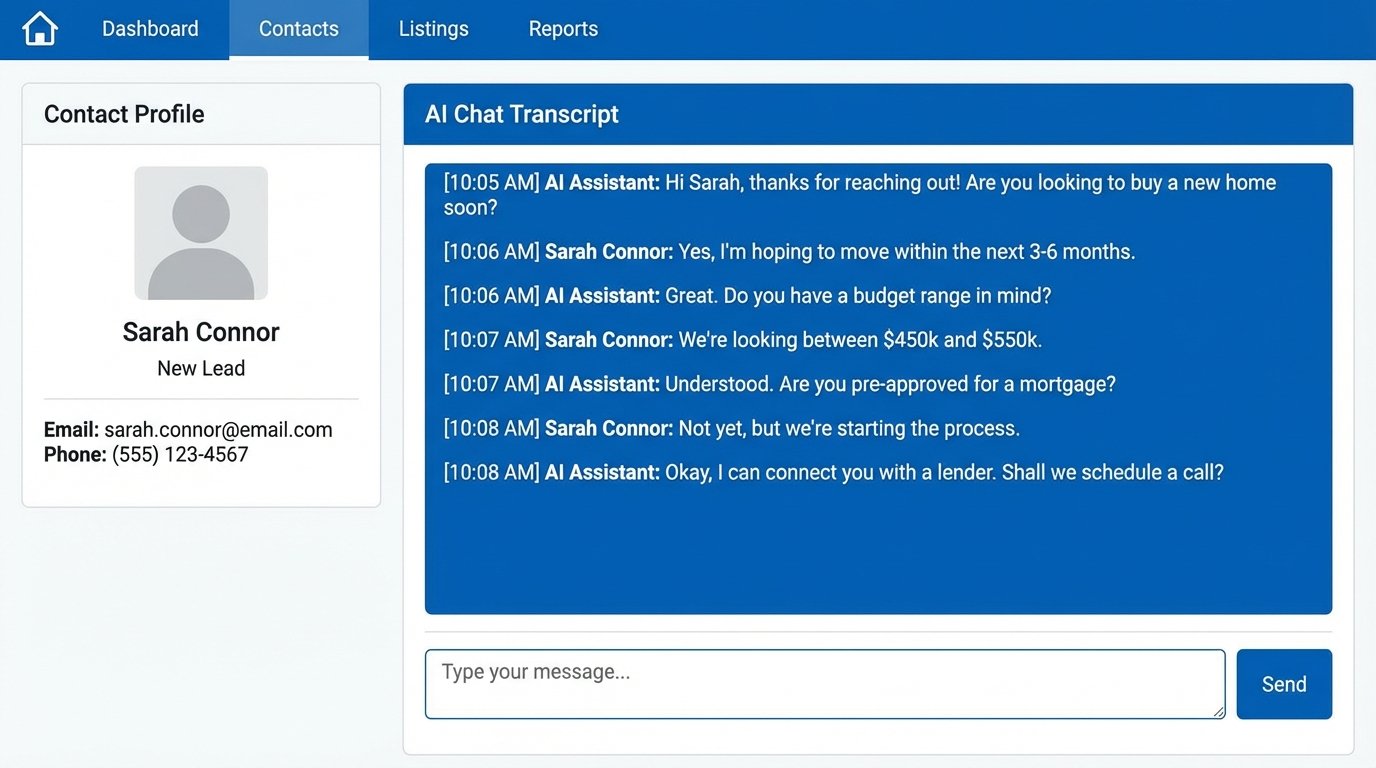
Chime’s automation leans heavily on its AI Assistant. This is essentially a chatbot layer designed to handle initial lead qualification and appointment setting. It engages new leads via text, asking qualifying questions about their timeline, budget, and if they’re working with another agent. The goal is to strip out the noise and hand off a conversation-ready lead to a human agent, complete with a transcript of the AI’s chat.
The “AI” is a decision tree, not a sentient being. If a lead goes off-script with a complex question, the bot gets stuck and can make the brokerage look foolish. It requires careful setup of its logic paths and constant monitoring of its conversations to find where the scripts are breaking.
5. BoomTown
BoomTown’s automation focuses on predictive analytics. It’s a lead-scoring engine that watches for buying signals. It tracks every email open, link click, saved search, and property view, then crunches that data to surface leads it categorizes as “hot.” Agents see a prioritized list, allowing them to ignore the tire-kickers and focus on leads who are actively engaging.
This system lives and dies by the quality of its data. Sending this much behavioral data from disparate sources into one scoring model is like trying to shove a firehose through a needle. If the tracking scripts on your site are misconfigured or your lead sources send junk data, the predictive model will give you garbage predictions.
Use Case: Re-engaging Old Leads
A lead that has been dormant for six months logs back into the website and saves a new property. BoomTown’s engine flags this activity, instantly upgrades the lead’s status, and triggers an automation that alerts the assigned agent via text with a direct link to the contact’s profile. The agent can see the new activity and call with immediate, relevant context.
import requests
import json

def push_lead_to_crm(api_url, api_key, lead_data):
    headers = {
        'Authorization': f'Bearer {api_key}',
        'Content-Type': 'application/json'
    }
    response = requests.post(api_url, headers=headers, data=json.dumps(lead_data))

    if response.status_code == 201:
        print("Lead successfully created.")
    else:
        print(f"Failed. Status: {response.status_code}, Body: {response.text}")

# Example usage
crm_endpoint = "https://api.crm.com/v1/leads"
key = "YOUR_SECRET_API_KEY"
new_lead = {
  "first_name": "Jane",
  "last_name": "Smith",
  "email": "janesmith@example.com",
  "source": "Website Form"
}

push_lead_to_crm(crm_endpoint, key, new_lead)
6. Real Geeks
The automation here is tightly coupled with lead generation, specifically Facebook Ads. Real Geeks provides a Facebook Marketing Tool that bridges the ad platform directly to the CRM. You can create dynamic ads for properties that, when clicked, capture lead info from Facebook and dump it straight into a new contact record. It collapses the funnel from ad impression to CRM entry into a single, automated step.
The catch is that you’re playing in their walled garden. The tools work brilliantly together, but integrating outside lead sources or ad platforms can be kludgy. It’s built for agents who want an all-in-one ad-to-CRM pipeline and don’t want to stitch together three different services to get it.
7. The Architect’s Choice: HubSpot/Airtable + n8n
Off-the-shelf tools will always have baked-in limitations. For ultimate control, you build your own hub. Use a flexible platform like HubSpot (for its sales tools) or Airtable (for its relational database structure) as the core. Then, you pipe everything through a workflow automation tool like n8n or Zapier. This puts you in the driver’s seat.
You can build branching logic that no real estate CRM can handle. Route leads based on mortgage pre-approval status. Change follow-up sequences based on the specific words a lead uses in a form submission. The power is immense, but so is the responsibility. This setup is brittle. An API change from a lead source can break your entire workflow, and there’s no support desk to call. It’s all on you.
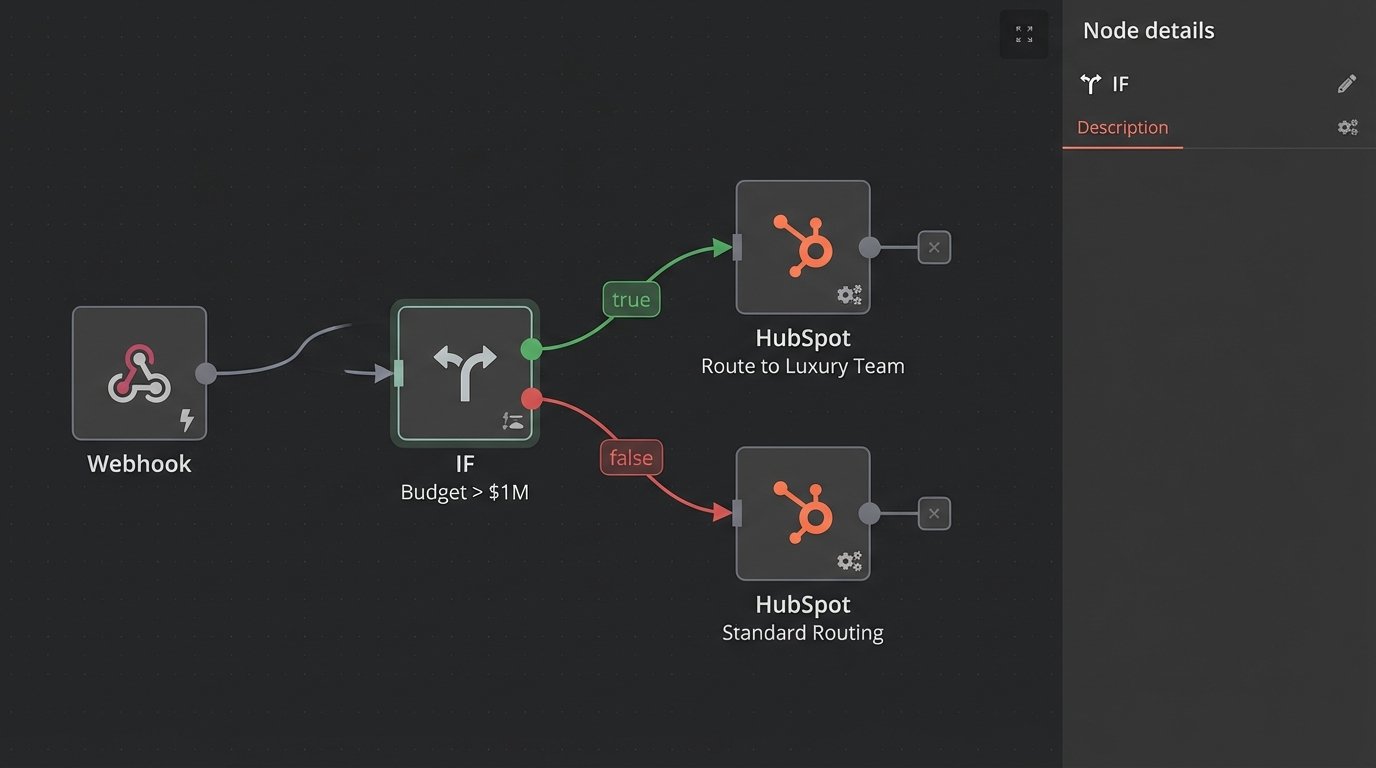
Use Case: Multi-Condition Lead Routing
A webhook from your website hits your n8n instance. A custom function node checks the lead’s desired budget. If the budget is >$1M, it routes to the “Luxury Team” in HubSpot. If the lead also checked “Needs to Sell First,” it adds a tag and assigns a specific task sequence for a seller/buyer consultation.
// n8n Expression to route based on budget
{{$json["budget"] > 500000 ? "High Priority" : "Standard Priority"}}
Final Logic Check
The choice isn’t about which CRM has the longest feature list. It’s about identifying your primary bottleneck and finding the tool that obliterates it. If your problem is slow lead response, Follow Up Boss is a solid bet. If you need to qualify a flood of low-quality leads, Chime’s chatbot might be the answer. If you have a complex sales process that no off-the-shelf product understands, you have to build your own logic flows.
Don’t buy the marketing. Map your actual lead-to-close process, find the part that is bleeding money, and select the tool that automates that specific failure point away. The rest is just noise.