
8 Automation Tools to Supercharge Your Client Management
Your CRM is lying to you. Not maliciously, but through omission. The data is stale because a sales rep forgot to update a field. The contract status is wrong because the signed DocuSign event never made it back. Manual client data management is a slow-motion catastrophe of mismatched records and duplicated effort. The goal isn’t to add more tools, it’s to build a nervous system that connects the ones you already have.
This isn’t a list of “top 8” marketing fluff. It’s a breakdown of tools for different levels of technical pain and budget, from point-and-click connectors to full-blown development platforms.
1. HubSpot Operations Hub
Let’s get the big one out of the way. If you’re already trapped in the HubSpot ecosystem, fighting it is a waste of energy. Operations Hub is their answer to the data chaos that their own platform can create. Its core strength is two-way, real-time data synchronization. We’re talking about mapping fields between HubSpot and NetSuite, or HubSpot and another CRM during a painful migration.
The programmable automation features are the real reason it’s on this list. You can write custom JavaScript actions directly within a HubSpot workflow. Need to format a phone number, calculate a custom commission, or query an external API for data enrichment? You can code it right in. This beats exporting a CSV, running a script, and re-importing it every week.
The trade-off is price. It is a wallet-drainer, and its true power is locked behind the higher tiers. It’s a powerful, native solution if your company bleeds HubSpot orange, but a questionable expense otherwise.
2. n8n.io
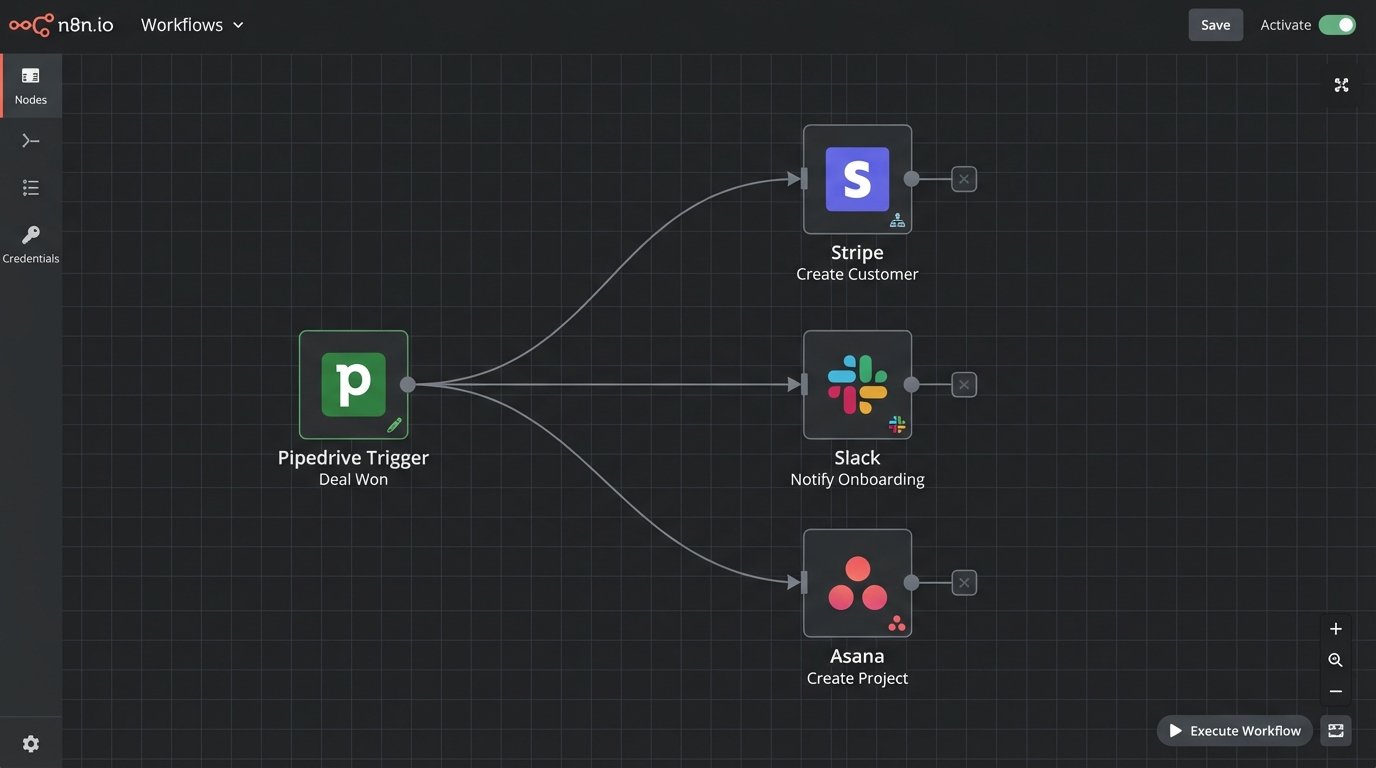
For those who want power without the enterprise price tag, n8n is the answer. It’s a workflow automation tool that you can self-host or use on their cloud. Think of it as Zapier’s more technical, less-hand-holding cousin. Its visual workflow builder is node-based, which forces you to think more like a programmer. You build logical branches, handle errors explicitly, and loop through data sets with actual control.
A classic use case: A deal is marked “Closed Won” in Pipedrive. A webhook fires to n8n. The workflow then finds or creates the customer in Stripe, generates the first invoice from a template, creates a private Slack channel for the client, and adds a new project in Asana. Trying to build this kind of multi-path logic in a simpler tool often results in a fragile chain of dependent zaps.
Here’s what a simple node to format customer data might look like in its JSON representation:
{
  "nodes": [
    {
      "parameters": {
        "functionCode": "const customer = $json.customer;\n\n$json.formattedName = customer.firstName.toUpperCase() + ' ' + customer.lastName.toUpperCase();\n$json.onboarding_channel = 'project_client_' + customer.id;\n\nreturn $json;"
      },
      "name": "Format Data",
      "type": "n8n-nodes-base.function",
      "typeVersion": 1,
      "position": [
        1020,
        340
      ]
    }
  ],
  "connections": {}
}
The learning curve is steeper. You need to understand HTTP requests, JSON structures, and data mapping. It’s not for the marketing department.
3. Zapier
Look, we have to mention it. Zapier is the gateway drug to automation. It connects to everything, and for simple A-to-B triggers, it’s fast and effective. New lead from a Facebook Ad? Create a contact in Salesforce. Done. New entry in a Typeform? Add a row to Google Sheets. Easy.
The problem is when you try to build a real business process on it. Multi-step zaps get expensive fast, and debugging them is a nightmare. Chaining zaps together, where one zap’s output triggers another, creates a brittle system with no central error handling. It’s a fantastic tool for one-off tasks and filling small gaps. It is not an architecture.
4. Pipedream
Pipedream is for the engineer who looks at Zapier’s UI and wishes they could just write code. It’s a serverless integration platform where every step in a workflow can be a pre-built action or a block of Node.js, Python, Go, or Bash. This strips away all the abstraction. You’re not “mapping fields,” you are writing the code that manipulates the event object directly.
This gives you infinite flexibility. You can install any NPM package, connect to any API with or without a native connector, and transform data with the full power of a programming language. Managing client onboarding that requires generating custom credentials and interacting with a proprietary database? Pipedream is built for that.
Here’s a trivial Python example of pulling a client ID from a webhook payload and calling another service:
import requests

def handler(pd):
    # Get the client ID from the webhook trigger
    client_id = pd.steps["trigger"]["event"]["body"]["client_id"]

    # Define the endpoint for your internal provisioning API
    api_url = f"https://api.internal.yourservice.com/v1/provision/{client_id}"

    headers = {
        "Authorization": f"Bearer {pd.env.INTERNAL_API_KEY}"
    }

    # Make the authenticated API call
    response = requests.post(api_url, headers=headers)

    # Export the status code to use in the next step
    return {"status_code": response.status_code}
The downside is obvious: you need a developer. This isn’t a low-code tool. It’s a tool for engineers to build automations faster than setting up their own server and webhook listener.
5. Airtable Automations
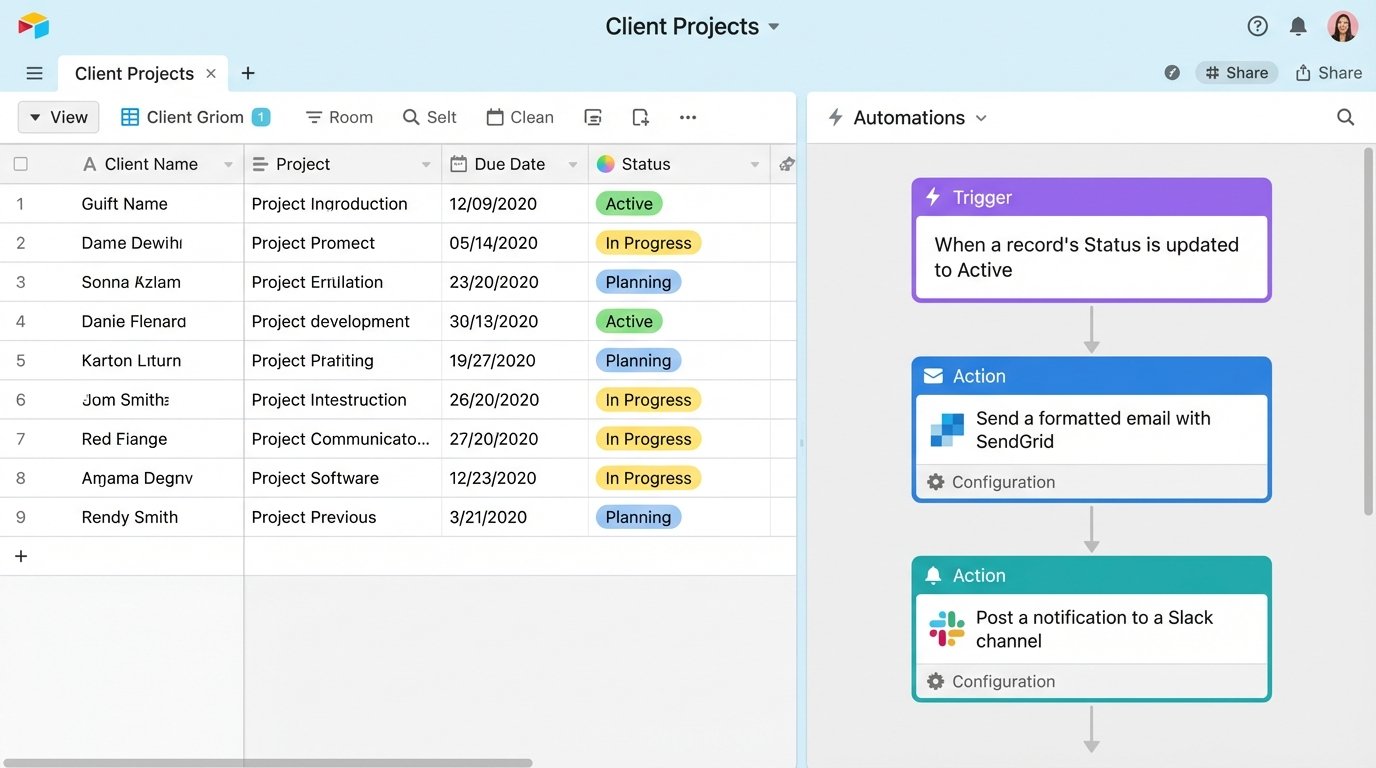
Sometimes the best automation lives right inside your data source. If your client management system is essentially a well-structured Airtable base, its native automations are surprisingly powerful. You can build triggers based on record creation, field updates, or when a record enters a specific view.
A common pattern is using Airtable as the “source of truth” for client projects. When a project’s status field is changed from “Pending” to “Active,” an automation triggers. This action can send a formatted email through the SendGrid block, post a notification to a Slack channel, and even run a script to calculate the project’s projected end date. Pushing all this data through an external iPaaS like Zapier is like trying to shove a firehose through a needle. The internal triggers are faster and more reliable.
Its limitation is that it’s fundamentally an island. The integrations are good, but you’re always working from the inside out. It’s not built to be the central hub orchestrating ten other systems.
6. Calendly
This seems too simple to be on the list, but everyone underestimates the automation potential of a good scheduling tool. Don’t think of it as just a calendar link. Think of it as the starting gun for your entire client onboarding workflow. Calendly’s power comes from its webhook support and native integrations.
When a new client books their kickoff call, you shouldn’t be manually creating records. A “New Invitee Created” event should fire. That webhook payload contains the client’s name, email, and any answers to custom questions you asked on the booking form. This is gold. That single event can trigger a workflow (in n8n or Pipedream) that creates the user in your CRM, sets up their Google Drive folder, and sends them a preliminary “what to expect” email. You’ve done three tasks before the first meeting.
This is a sample of the JSON payload you’d get from a Calendly webhook. Your automation just needs to parse it:
{
  "event": "invitee.created",
  "payload": {
    "uri": "https://api.calendly.com/scheduled_events/GBGBD-...",
    "email": "test.client@example.com",
    "name": "Test Client",
    "status": "active",
    "questions_and_answers": [
      {
        "question": "What is your primary goal for this project?",
        "answer": "To finally fix our broken lead routing system."
      }
    ],
    "timezone": "America/New_York"
  }
}
7. Outfunnel
General-purpose tools are great, but sometimes a specialist tool saves you days of configuration. Outfunnel does one thing: it bridges the chasm between your CRM (like Pipedrive or HubSpot) and your marketing email tool (like Mailchimp or ActiveCampaign). Getting sales activity to properly inform marketing campaigns is a classic automation headache.
Outfunnel keeps contacts and their marketing engagement (email opens, clicks) synced to the CRM. A sales rep can see if a prospect just clicked a link in the latest newsletter without ever leaving the CRM interface. It also syncs CRM data back to the marketing tool, letting you trigger campaigns based on deal stage. It’s a focused, sharp tool for a specific, recurring problem.
8. Segment (or another CDP)
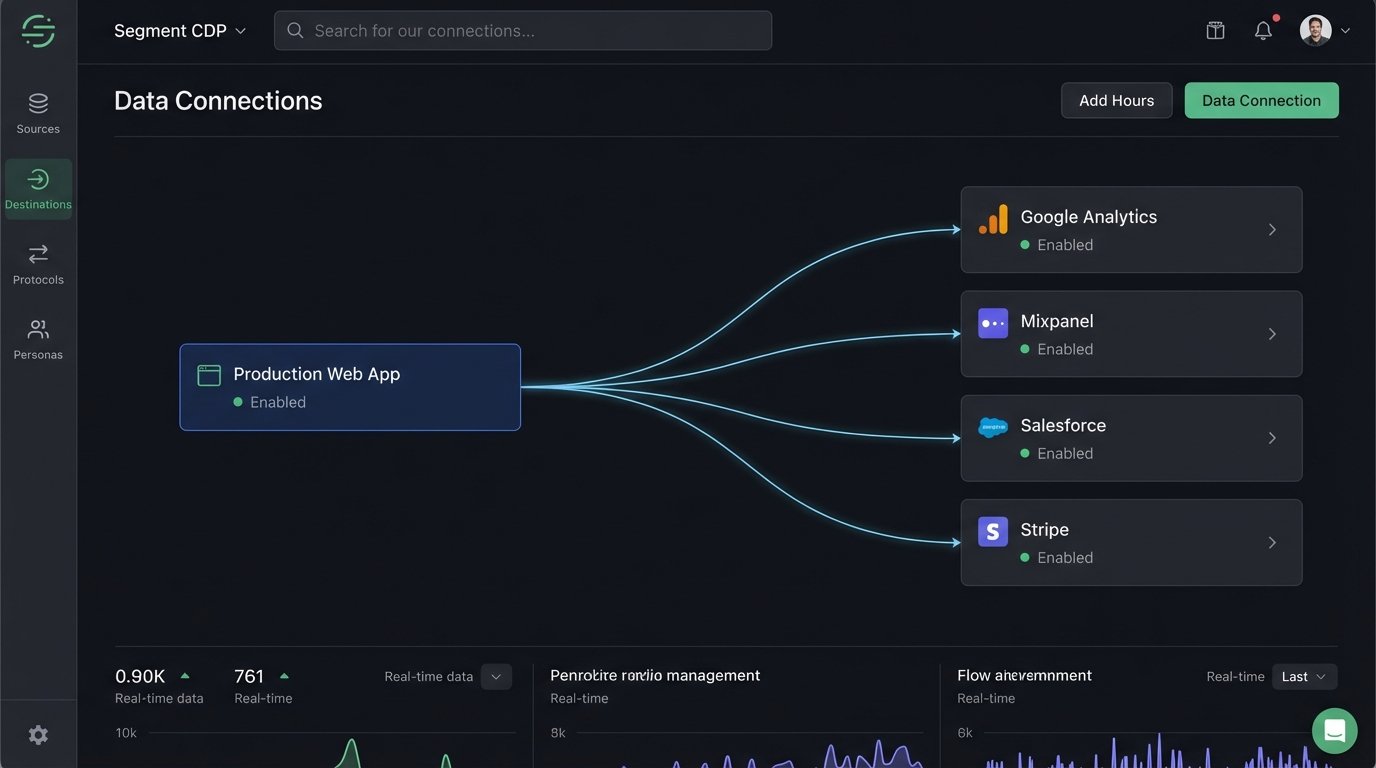
All the tools above are about connecting pipes. A Customer Data Platform (CDP) is about redesigning the plumbing. Instead of point-to-point connections (HubSpot to Mailchimp, Stripe to Pipedrive), all your tools send their data to one central hub: the CDP. Segment then forwards that clean, standardized data to all your other tools.
When a user signs up, you don’t send an event to Google Analytics, Mixpanel, and your CRM. You send one `identify` call to Segment. Segment handles the fan-out. If you need to add a new marketing tool later, you just flip a switch in the Segment dashboard instead of instrumenting new tracking code. For client management, this creates a single, unified view of every touchpoint, from website visit to support ticket to payment.
This is the heavyweight solution. It requires developer time to implement the tracking code properly and it is not cheap. But for a business with serious data fragmentation issues, it fixes the root problem instead of just patching the symptoms.
The right tool depends on your budget, your team’s technical skills, and how deep your data chaos runs. A cheap tool with a solid data model beats an expensive platform slapped on top of a broken process. Fix the process first, then automate it.