
A Look Under the Hood of Real Estate Marketing Stacks
Every real estate agent gets sold on a platform’s user interface. The dashboards are clean, the buttons are big, and the sales pitch promises a flood of leads. The technical reality is a different beast entirely. We are the ones who get the late-night call when the lead data is corrupt, the Zillow API key is invalidated without warning, or the custom CRM sync job has failed for the tenth time. This is not a list of what to buy. This is a field report on what it’s like to integrate, automate, and maintain the tech that agents think “just works”.
The core problem is data fragmentation. An agent’s workflow depends on lead sources, a CRM, an appointment scheduler, and an email system that were never designed to speak to each other. Our job is to build the translators. Some platforms make this simple with well-documented webhooks. Others require painful screen-scraping jobs or brittle, undocumented endpoints. The “love” an agent has for a platform is directly proportional to how little they have to call their tech support, which is directly proportional to how clean the system’s data architecture is. Let’s inspect some of them.
1. Zillow Premier Agent
Zillow is the 800-pound gorilla of lead generation. From a technical standpoint, the primary job is to get leads out of their system and into a usable CRM in near real-time. Their “Tech Connect” platform allows lead forwarding via email parsing or direct partner integration. The email parsing route is a disaster waiting to happen. It’s fragile and breaks the moment Zillow’s marketing team decides to change a single HTML tag in their notification template. We always bypass it.
The direct integrations are better, but you are locked into their supported CRM partners. For custom builds, the only sane option is to use a third-party parser service like Zapier or write your own API-driven intake that bridges Zillow’s email notifications to your system. The lead data itself is straightforward: name, email, phone, and the property they inquired about. The challenge is speed, not complexity. An agent expects that lead on their phone within seconds, not minutes.
- Technical Benefit: Ubiquitous lead source. The data structure for a lead is simple and has remained mostly consistent.
- Specific Use Case: We configure a dedicated email address just for Zillow leads. A cloud function (AWS Lambda or Google Cloud Functions) triggers on new mail, strips the lead data from the HTML body using a regex pattern, and injects it directly into the client’s CRM via its API. This bypasses the unreliable official parsers.
- Warning: Relying on Zillow’s official partner integrations means you are at the mercy of their roadmap. If they drop support for your CRM, your workflow is dead in the water.
2. Follow Up Boss
This is a CRM that was clearly built with integration in mind. Follow Up Boss has a sane, well-documented REST API that is a breath of fresh air. API keys are easy to generate and manage on a per-user or company-wide basis. The API covers all the core objects you would expect: contacts, notes, appointments, and email history. Their webhook system is also reliable for triggering external workflows when an event occurs inside the platform, like a new lead being added or a stage being updated.
The API rate limits are generous for most use cases, typically around 120 requests per minute. This is more than enough for real-time lead injection and periodic data syncs. The data schema is logical. You can push a new contact with custom fields and tags in a single API call, which is not always the case with other CRMs that require multiple chained requests to achieve the same result. It’s a system designed by engineers who expect other engineers to interact with it.
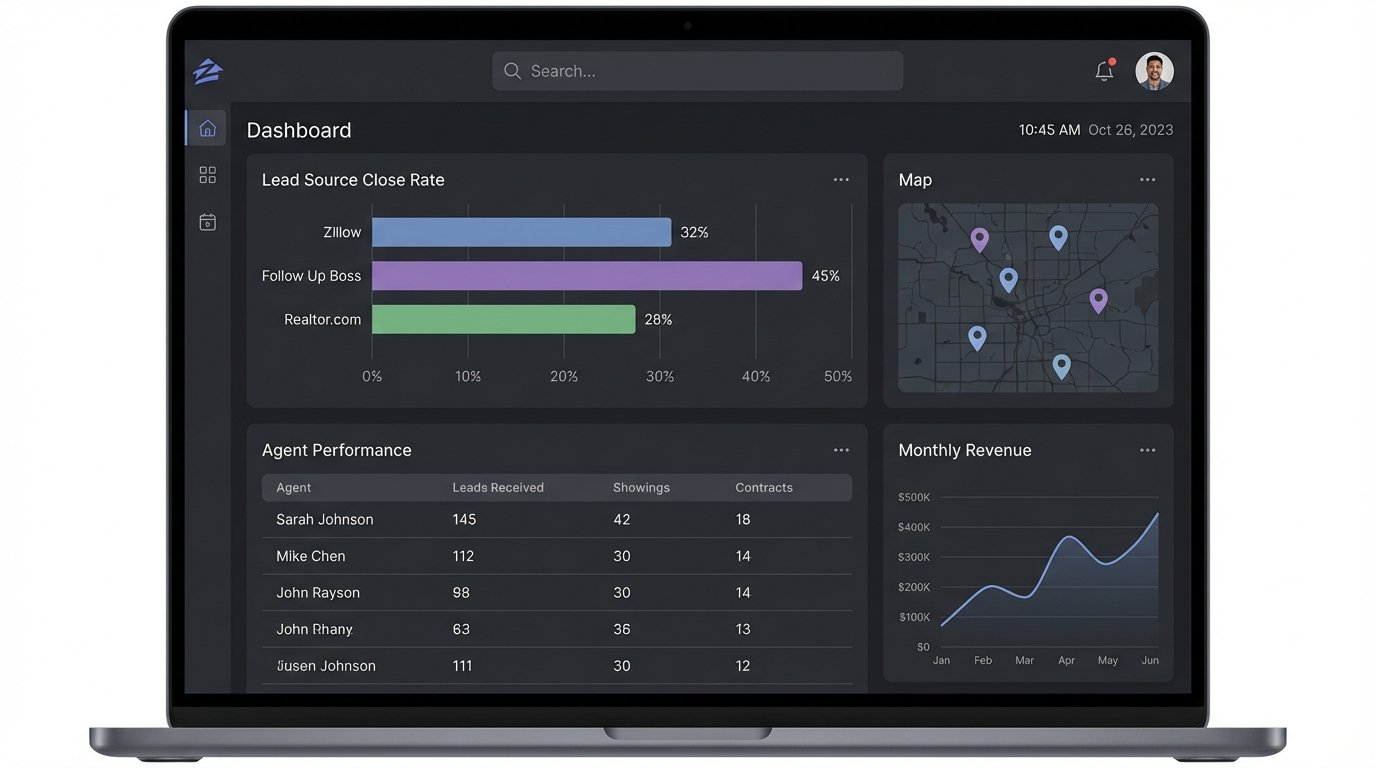
This is where we see the most success in building custom reporting dashboards. We can pull deal flow data, agent activity logs, and communication history to build external analytics that the native platform doesn’t offer. It lets us answer questions like “which lead source has the highest close rate?” with actual data, not just an agent’s gut feeling.
3. kvCORE
kvCORE presents itself as an all-in-one solution: IDX website, CRM, and marketing automation. This monolithic architecture is both its strength and its biggest integration headache. Getting data *out* of kvCORE is more challenging than getting it in. While they have integrations via Zapier and PieSync, direct API access for deep, custom work can be a maze of support tickets and limited documentation.
The internal automation tools are decent for standard agent workflows, like setting up drip campaigns. The moment a client needs something non-standard, like syncing specific contact segments to a third-party dialer with custom logic, you hit a wall. You end up building fragile workarounds. For instance, we once had to set up a process that exported a CSV on a schedule, uploaded it to an S3 bucket, and then had another process pick it up, transform it, and push it to the target system. It was a Rube Goldberg machine of data transfer.
- Technical Benefit: As a closed system, the data integrity *within* the platform is high. Leads from the IDX website flow cleanly into the CRM because it’s all one database.
- Specific Use Case: Automating lead rotation. A client wanted leads assigned based on performance metrics not supported by the native round-robin system. We built an external service that pulls unassigned leads via their API, runs our custom assignment logic, and then pushes the assignment update back into kvCORE.
- Warning: This is a walled garden. If you can live entirely within their ecosystem, it works. The moment you need to bridge it to another critical system, expect to burn development hours.
4. BoomTown!
BoomTown is another platform that combines an IDX website with a CRM. Their technical approach is more open than some competitors. They offer a public API that provides access to lead and user data. The documentation is passable, though you occasionally find endpoints that behave differently than described. It’s stable enough for production workflows if you build in proper error handling and logging.
A common task is synchronizing contacts between BoomTown and an external database or data warehouse. The API allows for filtering leads by creation date or last update, which makes it possible to run efficient delta syncs instead of pulling the entire database every time. Trying to pull all contacts for a large brokerage at once is a great way to hit your rate limits and get your API key temporarily throttled. It’s the classic problem of shoving a firehose through a needle; you have to manage the flow or the whole pipe backs up.
Their support for webhooks is also a major asset. You can configure BoomTown to send a JSON payload to a specified URL upon a new lead registration or a change in a lead’s status. This is the foundation for any real-time automation. We use this to trigger SMS notifications to agents via Twilio the instant a high-value lead comes in, cutting down the agent’s response time.
5. Mailchimp
Agents see Mailchimp as an email tool. We see it as a contact database with a powerful automation API. Its primary value in a real estate stack is not just for sending newsletters. It is for sophisticated contact segmentation and behavior-triggered campaigns that most real estate CRMs are too clumsy to handle effectively. Their API is one of the best-documented and most stable you will ever work with.
We often set up a one-way sync from the main CRM to Mailchimp. The CRM remains the system of record for deals and agent notes, while Mailchimp becomes the system of action for marketing communication. We use tags extensively. A contact in the CRM tagged as “New Buyer Lead” gets synced to Mailchimp with the same tag, automatically enrolling them in an introductory email sequence. When the CRM tag changes to “Under Contract,” they are automatically moved to a different audience or tagged differently to stop the prospecting emails.
- Technical Benefit: Extremely reliable API and webhook infrastructure. The segmentation and automation engines are far more advanced than what’s built into most CRMs.
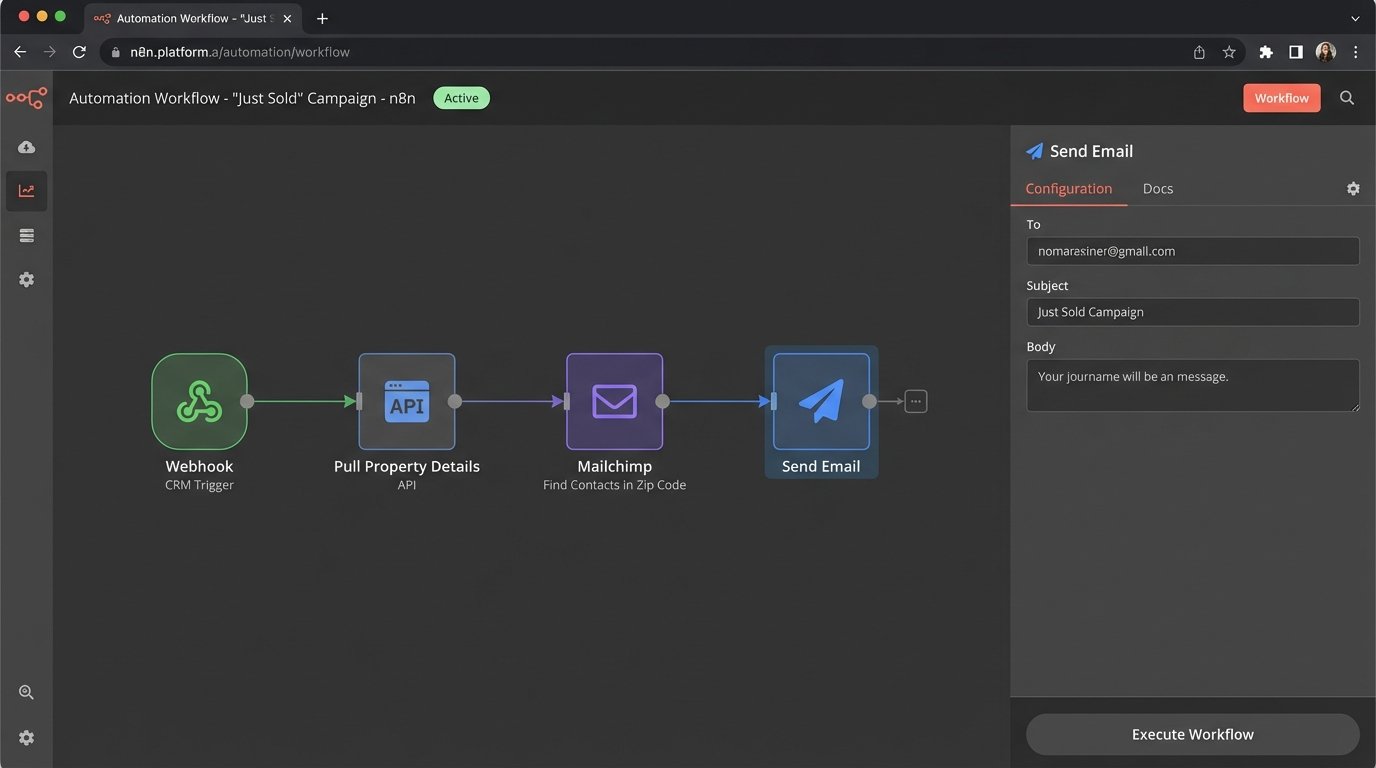
- Specific Use Case: Building a “just sold” campaign. When a property is marked as “Sold” in the CRM, a webhook fires. Our automation script pulls the property details, finds all contacts in Mailchimp tagged with the corresponding zip code, and queues up a targeted email announcing the sale.
- Warning: Maintaining a clean sync between the CRM and Mailchimp is critical. A broken sync can lead to embarrassing mistakes, like sending “first-time homebuyer” emails to someone who just closed on a house.
6. Realtor.com
Much like Zillow, Realtor.com is a lead firehose. The integration story is similar. They provide lead delivery options that push data to a variety of popular CRMs. If your client’s CRM is on their list, the setup is straightforward. If it’s not, you are back to email parsing. Their lead notification emails have their own unique HTML structure, so you cannot reuse the same parser you built for Zillow leads. Each source requires its own dedicated, brittle logic.
This is a perfect example of why centralizing lead intake is so important. We always build a single “lead intake” API endpoint for our clients. No matter the source, Zillow, Realtor.com, or a custom landing page, all leads are formatted into a standard JSON object and sent to this one endpoint. This decouples the lead sources from the CRM. If Realtor.com changes their email format, we only have to update one parser, not every system that consumes the data.
{

  "source": "Realtor.com",

  "lead_id": "12345-ABC",

  "timestamp": "2023-10-27T10:00:00Z",

  "prospect": {

    "first_name": "John",

    "last_name": "Doe",

    "email": "johndoe@example.com",

    "phone": "555-123-4567"

  },

  "property_inquiry": {

    "mls_id": "987654",

    "address": "123 Main St, Anytown, USA"

  }

}
A standardized model like this forces order onto the chaos of multiple lead formats.
7. ShowingTime
ShowingTime automates the logistics of property showings. It’s a specialized tool, but it sits at a critical junction in the transaction pipeline. Integrating with it means you can automate calendars, send reminders, and collect feedback without manual data entry. Their API allows for pulling appointment data and, in some cases, creating or modifying showings. Access to their API is not always a given and may depend on the brokerage’s subscription level.
A key use case is syncing showing data with the agent’s primary calendar, whether it’s Google Calendar or Office 365. The native integrations are often basic. We build custom sync logic to include more context in the calendar event, such as buyer’s agent contact information, property access codes from a secure vault, and a direct link back to the showing details in the CRM. This saves the agent from having to cross-reference three different applications before an appointment.
- Technical Benefit: Provides structured data for a high-value, time-sensitive agent activity.
- Specific Use Case: Automated feedback requests. We set up a scheduled job that runs daily. It pulls all completed showings from the ShowingTime API, checks if feedback has been submitted, and if not, triggers a polite follow-up email or SMS to the buyer’s agent.
- Warning: API access can be a political and financial hurdle. Confirm that the client’s license includes API access before promising any custom integration work.
8. Propertybase
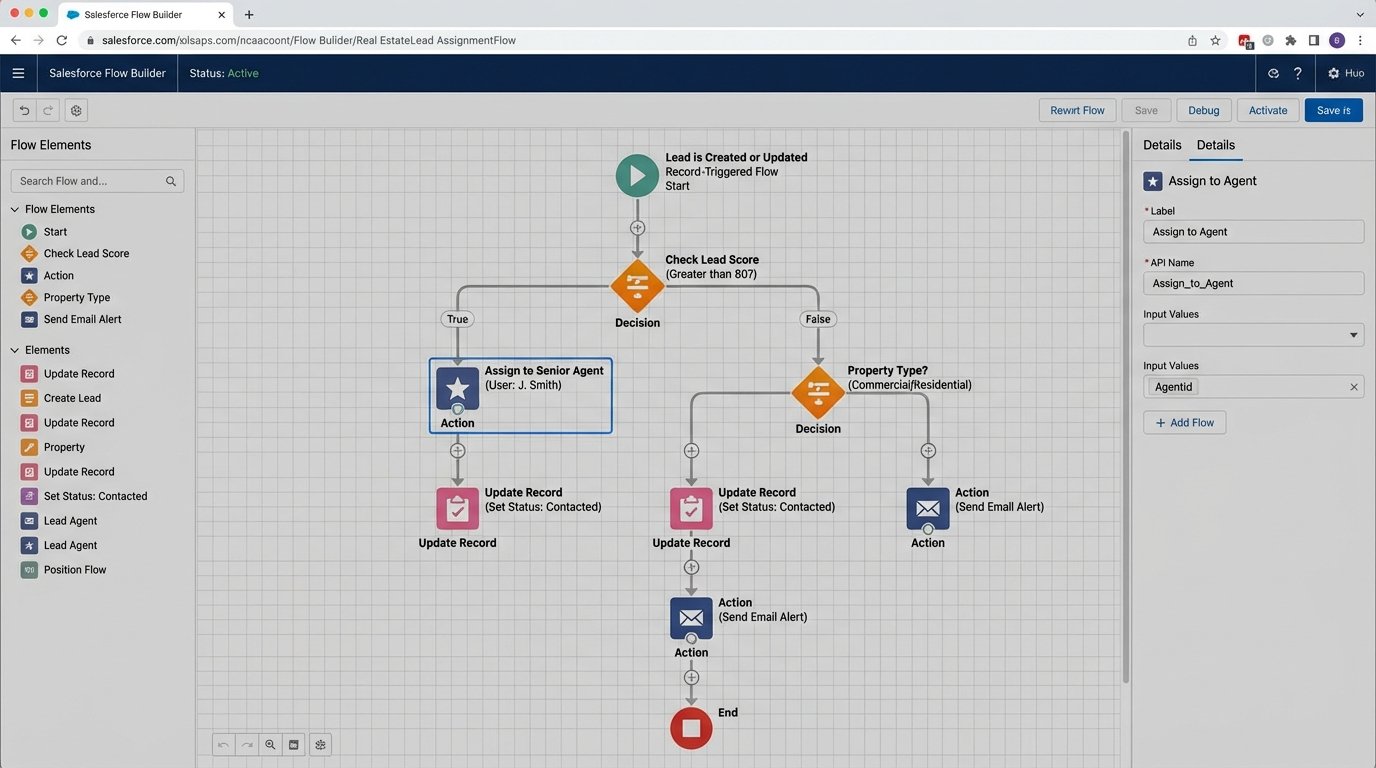
Propertybase is different because it’s built on top of the Salesforce platform. This is a massive advantage from an integration perspective. You are not working with a proprietary, limited API. You are working with the Salesforce API, which is one of the most extensively documented and powerful platforms for enterprise development. You get access to Apex, SOQL, and a universe of existing tools for data loading and manipulation.
The trade-off is complexity. You are no longer just updating a contact. You are managing Salesforce objects, workflows, and permissions. A simple data sync project can quickly balloon in scope if you are not careful. However, the power is immense. You can build complex, automated workflows directly on the platform that react to data changes with a level of sophistication that is impossible in most other real estate CRMs. It is a wallet-drainer, but you get what you pay for: a real application platform, not just a contact manager.
The ultimate goal is to create a single, coherent data flow. Marketing platforms are chosen for their front-end features, but they are kept or discarded based on their back-end sanity. A system with a clean API and reliable webhooks is a valuable asset. A closed box with a clunky export feature is a technical debt that will cost hundreds of hours in manual workarounds and failed automations. The slickest user interface in the world does not matter if the data cannot move.