
8 Ways to Use SMS to Nurture Real Estate Leads
Lead nurturing through email is a broken model for real estate. Open rates hover around 20% on a good day, and click-through rates are abysmal. The lead you paid Zillow a premium for never even sees the property list you sent. SMS inverts this by forcing an interaction; the notification appears directly on the lock screen. The core engineering problem is not getting the message delivered, but managing the state, frequency, and compliance of that delivery without alienating the lead or getting your number blacklisted by carriers.
Most SMS automation platforms are just thin wrappers over a Twilio or Plivo API. The real work is in the orchestration layer you build to bridge your CRM data with the SMS gateway. Without clean data and solid logic, you are just building a very expensive spam cannon.
1. Instantaneous Info Request Follow-up
The speed-to-lead metric is not a marketing myth; it is a direct indicator of conversion probability. When a lead submits a “More Info” request on a portal like Zillow or Realtor.com, a webhook should fire to your endpoint. Your job is to catch this payload, validate its structure, and immediately trigger an SMS back to the lead confirming receipt and providing a direct link to the property they asked about. The delay should be under 60 seconds.
The technical challenge is handling the inconsistent data payloads from different lead sources. You need to build a data normalization function that strips the incoming JSON or XML, maps fields like `lead_phone` or `contact_number` to a standardized `phone_mobile` field in your system, and then queues the SMS job. This initial text is critical. It must contain the property address from the payload to establish context immediately.
Failure to do this means the agent is manually texting ten minutes later, by which time the lead has already talked to two other agents.
2. Property Alert Drip Campaigns
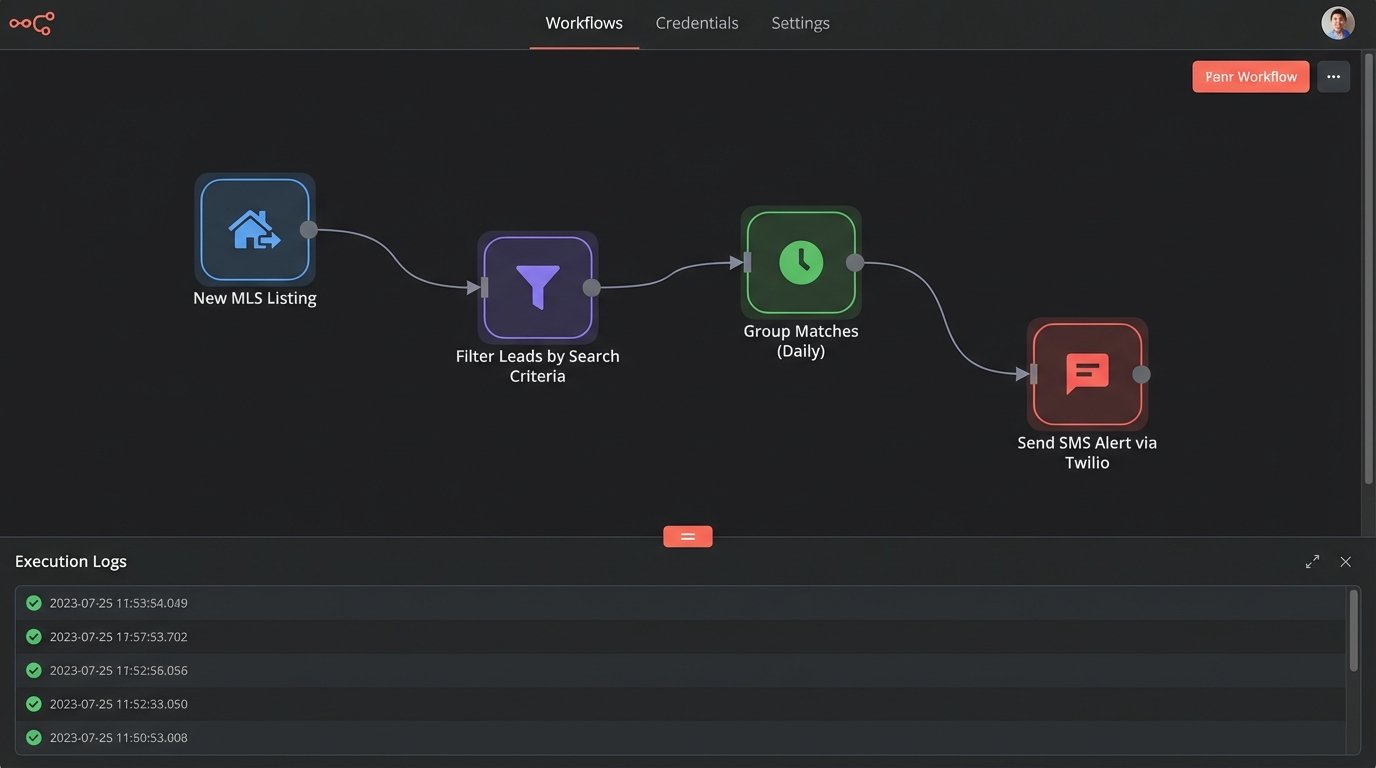
Generic “new listing” emails are digital trash. An effective SMS alert system requires tapping directly into the lead’s saved search criteria within your CRM or IDX website. The automation trigger is a new listing hitting the MLS that matches the lead’s parameters: bedrooms, price range, and geographic area. The system must then poll the MLS feed, find a match, and construct a targeted SMS.
The message should be concise: “New 3bd/2ba listing in North Austin matching your search just hit the market: [short_link_to_property]”. You need a robust link shortening service with tracking enabled to monitor engagement. The logic must also include a frequency cap. Sending five alerts in one morning for a hot market is a guaranteed way to get an opt-out. We typically implement a rule to batch new matches and send a single summary SMS once per day unless the lead explicitly requests instant alerts.
This approach requires tight integration with an MLS data feed API. Attempting to parse raw MLS RETS feeds without a proper schema is like trying to assemble furniture using instructions written in a dead language. It’s painful and the end result is always unstable.
3. Appointment Confirmation and Reminders
No-shows for property viewings are a logistical drain. Automating appointment logistics via SMS plugs this hole. When a lead books a showing through a tool like Calendly, its API fires a webhook. Your automation platform catches this, parses the event details, and schedules a sequence of SMS messages. The first is an immediate confirmation: “Confirmed: Your showing for 123 Main St is set for Tuesday at 4 PM.”
The critical part is the reminder sequence. We schedule two more messages. One is sent 24 hours before the appointment, and the final one is sent 1-2 hours prior. The final message should also include a Google Maps link to the property address to reduce friction. You must also build logic to handle cancellations and reschedules. If the Calendly event is cancelled, the webhook needs to trigger a stop command for any pending SMS messages in the queue for that lead.
Timezone management is the most common failure point. Always store timestamps in UTC and convert to the lead’s local timezone just before sending. Assuming everyone is in your agent’s timezone will cause chaos.
4. Segmented Open House Broadcasts
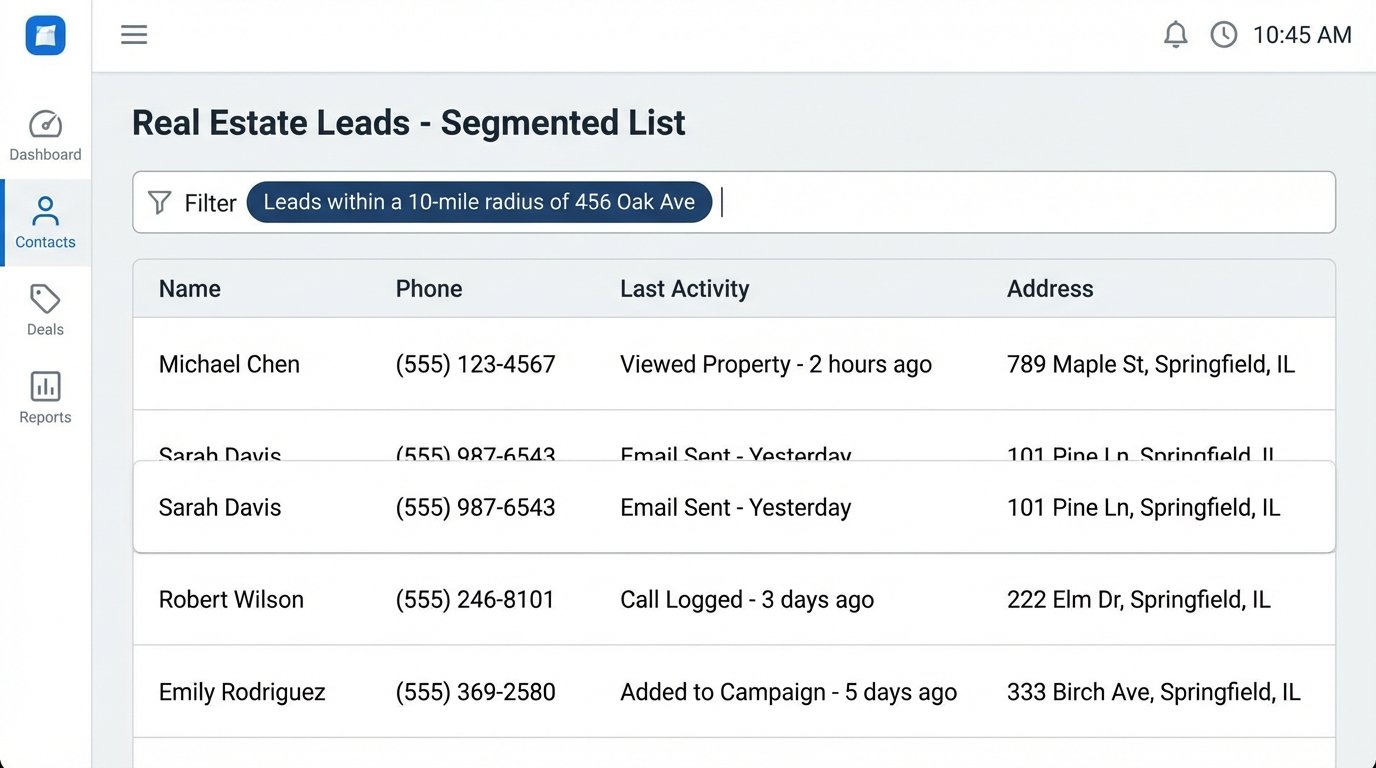
Blasting your entire lead database about an open house is lazy and ineffective. A smarter approach uses geographic segmentation. The prerequisite is clean address data for your leads in the CRM. You can enrich this data using a third-party service if needed. The automation logic runs a query against your CRM for all leads within a specific radius, say 10 miles, of the open house property address.
Once you have this segmented list, you send a targeted broadcast. The message feels personal: “Heads up: We’re holding an open house this Saturday from 1-3 PM at 456 Oak Ave, right in your area. Stop by if you’re free.” This feels like a neighborhood update, not a mass advertisement. The conversion rate from these geo-targeted messages is significantly higher than a database-wide blast.
The wallet-drainer here is list size. SMS broadcast costs are non-trivial. Running this play on a poorly segmented or dirty list of 10,000 leads is just burning money.
5. Post-Showing Feedback Collection
Getting feedback after a showing is often a manual, inconsistent process. An automation can systematize this. You set a trigger to fire a few hours after a scheduled showing has passed. The system sends an SMS asking for a simple, structured response: “Thanks for viewing 123 Main St today. On a scale of 1-5 (5 being a perfect fit), how would you rate it for your needs?”
The next step is parsing the reply. Your automation needs to be configured to listen for inbound webhooks from your SMS gateway. The logic checks if the reply is a single digit between 1 and 5. If it is, the automation updates a custom field in the CRM for that lead and property, such as `property_rating`. If the response is anything else, it can be flagged for the agent to review manually. This provides structured data for follow-up.
An agent can now filter their leads to see who rated a property a 4 or 5 and focus their energy there, instead of chasing leads who thought the house was a 1.
6. Automated Local Market Data Snippets
Agents are supposed to be market experts. This automation proves it. The system connects to a real estate data API to pull key statistics for a lead’s specific zip code of interest. This could be the median home price, average days on market, or the number of new listings in the past 7 days. The automation runs on a schedule, perhaps monthly, and sends a concise data snapshot.
Here is a simplified look at what a payload you might send to a templating engine before the SMS is constructed would look like. You would fetch this from your data provider’s API.
{

  "lead_id": "789123",

  "phone_mobile": "+15551234567",

  "zip_code": "90210",

  "market_data": {

    "median_price": "2,150,000",

    "avg_dom": 45,

    "new_listings_7_days": 12,

    "price_change_30_days": "-1.5%"

  }

}
The resulting SMS would be something like: “Quick market update for 90210: Median price is now $2.15M. Avg. days on market is 45. Let me know if you want a detailed report.” This positions the agent as a data-driven authority and keeps them top of mind without a hard sales pitch. It requires a subscription to a market data API, which is an added operational cost.
7. Re-engagement Sequence for Cold Leads
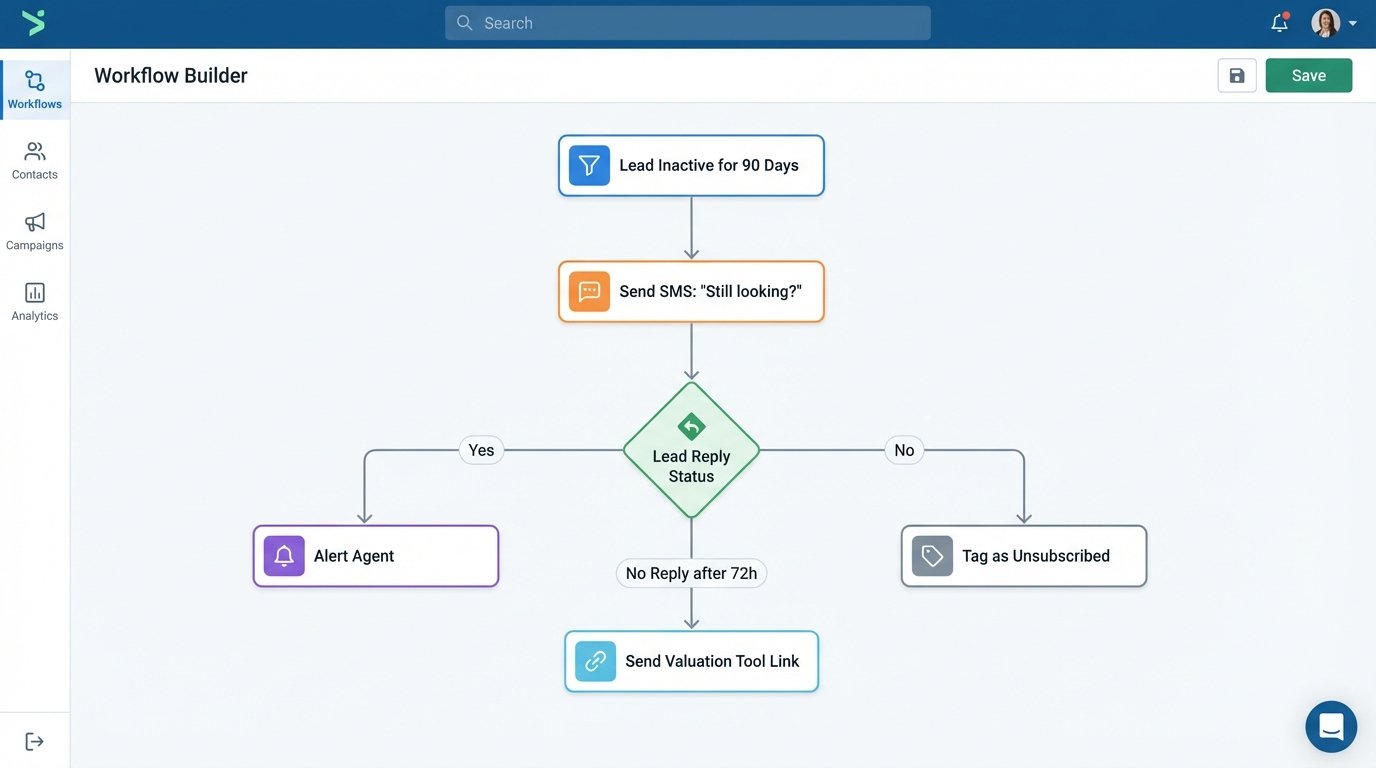
Every CRM has a graveyard of leads that went cold months ago. An SMS re-engagement sequence can attempt to revive them. This is a delicate operation. You cannot just pick up where you left off. The automation should target leads with no activity for 90+ days. The sequence starts with a low-friction message.
The first message could be: “Hi [FirstName]. Are you still looking for a home in the Austin area?” The logic then waits for a reply. A positive reply (“yes”) can route the lead back to an agent. A negative reply (“no,” “stop”) should automatically tag them for archival and opt them out. No reply after 72 hours could trigger a second, different message, perhaps offering a free home valuation tool link. The key is to test different hooks to see what generates a response.
Be warned: sending unsolicited messages to old leads has the highest risk of being marked as spam. This can damage your number’s reputation with carriers. Proceed with a small batch first and monitor the error rates from your SMS provider’s logs.
8. Closing Process Milestone Updates
Once a lead is under contract, the communication needs shift from sales to logistics. Manually updating a client about every step of the closing process is repetitive. This can be automated by integrating your transaction management software (like DocuSign Rooms or SkySlope) with your SMS platform. These platforms have APIs that fire events for key milestones.
You can set up automations for triggers like `inspection_scheduled`, `appraisal_ordered`, `loan_approved`, and `final_walkthrough_confirmed`. When the event fires, the system sends a pre-defined SMS update to the client. “Good news: The appraisal for 123 Main St has been completed and came in at value. We’re on track for your closing date.”
This keeps the client informed, reduces their anxiety, and frees up the agent from sending the same status updates over and over. The main dependency is the quality of the transaction management software’s API. Some are well-documented and reliable; others are a complete mess that requires constant maintenance.