
The industry is obsessed with a fantasy. It’s the dream of the “touchless” appointment system, a self-contained engine that ingests leads and spits out calendar events without any human input. This pursuit is not just misguided; it’s a direct path to building fragile, client-repellent systems that shatter the moment they encounter a non-standard request. The goal was never to eliminate the human, but to give them leverage.
A purely automated scheduler is an exercise in ignoring reality. It operates on the flawed assumption that every client interaction fits neatly into a predefined workflow. This assumption is expensive. The real work is in architecting a system that knows when to stop and hand off the controls to a person who can think.
The Brittle Reality of Pure Automation
A scheduler built entirely on chained API calls is a ticking time bomb. Its failures are not loud explosions but silent data corruption and lost opportunities. The most common point of failure is API drift. The Google Calendar API you integrated with last year suddenly requires a new scope in its OAuth flow, but the documentation was never updated. Your system doesn’t throw a fatal error; it just starts failing to create events for a subset of users, and you won’t know until a client asks why they never received an invitation.
This is a slow, insidious poison for your operations.
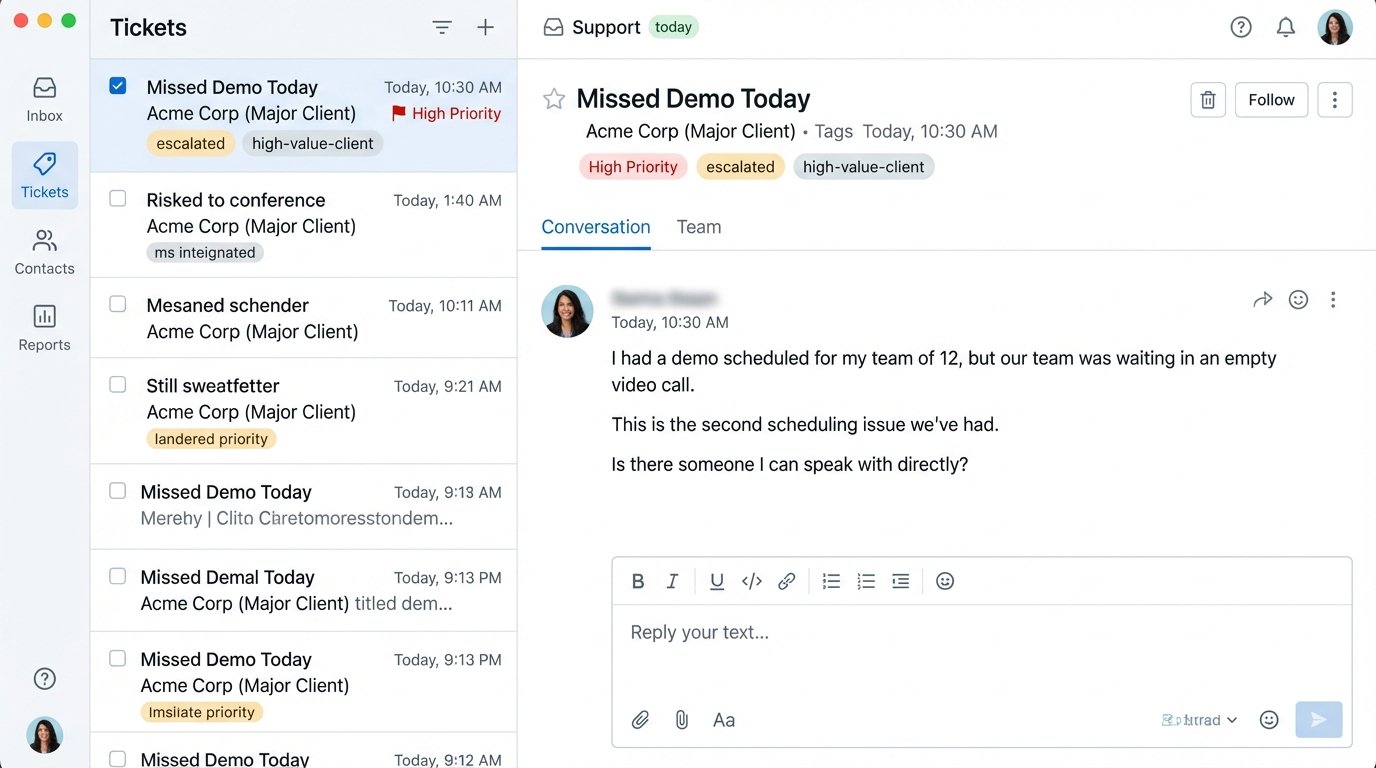
Then there’s the unavoidable mess of timezones. A developer implements logic to handle offsets from UTC, but fails to properly account for regions that do not observe Daylight Saving Time. A client in Arizona books a meeting for 2 PM with a sales rep in New York. The system, incorrectly applying DST, books the slot for 3 PM on the rep’s calendar. The client shows up to an empty video call, and the trust is immediately broken.
A simple off-the-shelf tool cannot be logic-checked to handle these edge cases. It’s a black box. You are trusting a third-party vendor with the most critical entry point to your business: the first scheduled conversation. It’s a massive, unmitigated risk.
The most significant failure, however, is strategic. A fully automated system treats your most valuable client prospect with the exact same priority as an automated web scraper filling out your form. It cannot distinguish intent. A request from a Fortune 500 company with the note “Need to book a demo for our team of 12” is processed by the same rigid logic as a solo user asking a basic question. This is operational malpractice.
Surgical Automation: Isolate and Execute
The objective is not to automate the entire scheduling conversation. The objective is to automate the repetitive, high-volume tasks that require no critical thought. We need to apply automation with surgical precision, not as a blunt instrument. This means identifying the specific parts of the workflow that are deterministic and self-contained.
The first target is availability checking. The machine is perfectly suited to query multiple data sources, a sales rep’s primary calendar, a shared team calendar, a resource calendar for a conference room, and consolidate the results. It strips out all conflicting events and presents a clean list of available slots. This is a data filtering problem, not a cognitive one.
Another target is the communication sequence for confirmations and reminders. Once a time is locked, the system should be responsible for sending the initial confirmation email and a follow-up SMS 24 hours prior. These are templated, predictable communications. A workflow engine or a serverless function triggered by a cron job can handle this without error and at scale. It’s grunt work.
Finally, the initial calendar event creation is a prime candidate. After the client selects a time, the system’s job is to execute a single, atomic `POST` request to the appropriate calendar API. It populates the invitee list, sets the meeting title, and attaches the video conferencing link. For 80% of standard bookings, the automation’s role should end right here. It has successfully removed the manual back-and-forth of finding a time, and that is a massive win.
The system did its job. Now it needs to get out of the way.
Architecting the Human Escalation Path
A resilient scheduling architecture is defined by its “escape hatches.” These are predefined triggers that halt the automation and escalate the request to a human operator. This human-in-the-loop model acknowledges that exceptions are not failures of the system, but an expected part of the process. The system’s intelligence lies in its ability to recognize these exceptions.
We build this by defining clear trigger conditions. A simple list of high-value client email domains is a start. If a request comes from `@majorclient.com`, the automation stops. It does not attempt to book the meeting. Instead, it creates a high-priority ticket in the CRM and assigns it directly to the account owner. The VIP gets a personal, white-glove response, not a generic booking link.
Designing the Logic Gate
Keyword detection in the booking notes is another critical trigger. The system should parse the notes for terms like “group,” “urgent,” “reschedule,” or “custom request.” The presence of any of these terms bypasses the auto-booking logic and fires a webhook to a dedicated Slack channel. The operations team can see the request in real-time and act on it immediately. Trying to force complex scheduling logic through a simple SaaS tool is like shoving a firehose of real-world exceptions through the needle-eye of its rigid API.
The logic for this is not complex. It’s a simple gatekeeper function that runs before any calendar APIs are called. Here is a stripped-down example of what this looks like in practice:
def process_booking_request(request):

    vip_domains = ['majorclient.com', 'bigcorp.net']

    escalation_keywords = ['group', 'urgent', 'custom', 'reschedule']
client_email = request.get('email')
booking_notes = request.get('notes', '').lower()
# Logic-check for VIP status based on email domain
if any(domain in client_email for domain in vip_domains):
create_crm_ticket(request, reason="VIP Client Request")
return {"status": "escalated_vip"}
# Logic-check for keywords in booking notes
if any(keyword in booking_notes for keyword in escalation_keywords):
post_to_slack(request, reason="Manual Review Required")
return {"status": "escalated_manual_review"}
# If no flags, proceed with automated booking
try:
api_result = auto_create_calendar_event(request)
send_confirmation_email(client_email)
return {"status": "booked_auto", "details": api_result}
except Exception as e:
# Catch any API failures and escalate them for human review
create_crm_ticket(request, reason=f"Automation Failed: {e}")
return {"status": "escalated_on_error"}
This function acts as a sorting mechanism. It routes standard requests to the automation and everything else to a human. It even includes a `try…except` block to catch unexpected API errors, converting a potential silent failure into a tracked support ticket. This is the foundation of a robust, anti-fragile system.

Tooling for Control, Not Convenience
The off-the-shelf scheduling tools sell convenience. They are easy to set up, but this ease comes at the cost of control. You cannot inject the kind of custom escalation logic shown above into a rigid SaaS product. When you need to bypass their workflow for a high-value client, you are forced to work outside the system, defeating the entire purpose. These tools are a good fit for individuals, but they are not a serious solution for a business that needs to manage exceptions.
A proper hybrid system requires a stack you control. The frontend can be a simple web form that posts data to your own backend endpoint. The critical component is the orchestration layer. This is the brain that runs the logic gate. A serverless function on AWS Lambda or Google Cloud Functions is an ideal choice. It’s stateless, scales automatically, and you only pay for execution time.
For communications, you bypass your own email servers and use a dedicated API provider like Twilio for SMS and Postmark or SendGrid for transactional email. Their deliverability is their core business, and they do it better than you ever could. The final piece is direct integration with the Google Calendar and Microsoft Graph APIs. This part is a headache. You will have to wrestle with OAuth 2.0 flows, manage refresh tokens, and request the correct permission scopes. It is tedious, but it gives you granular control over event creation and modification.
The cost is not just in API fees. The primary cost is the engineering time required to build and maintain these direct integrations. This is the trade-off. You sacrifice the convenience of an all-in-one tool for the power and flexibility of a system you own.
Measure What Matters: Beyond Bookings
The success of a scheduling system cannot be measured by a single metric like “number of appointments booked automatically.” This vanity metric encourages the creation of brittle, fully automated systems and ignores the business impact of mishandled exceptions. We need to shift our focus to KPIs that reflect the health of the entire hybrid system, both the automated and human components.
The first critical metric is the Human Intervention Rate. This is the percentage of total booking requests that are escalated for manual handling. The goal is not to drive this number to zero. A healthy rate of 10-15% for a B2B company indicates that the system is successfully identifying complex cases and VIPs. If the rate is too high, your automation is too restrictive. If it’s near zero, your rules are too permissive and you are likely giving VIPs a poor experience.
Next, track the Time-to-Resolution for Escalations. When a request is flagged, how long does it take for a human to respond and resolve it? This measures the efficiency of your human loop. If escalated tickets sit in a queue for 24 hours, the system is failing. The goal is to have a human engage within minutes, demonstrating a level of service that automation cannot match.
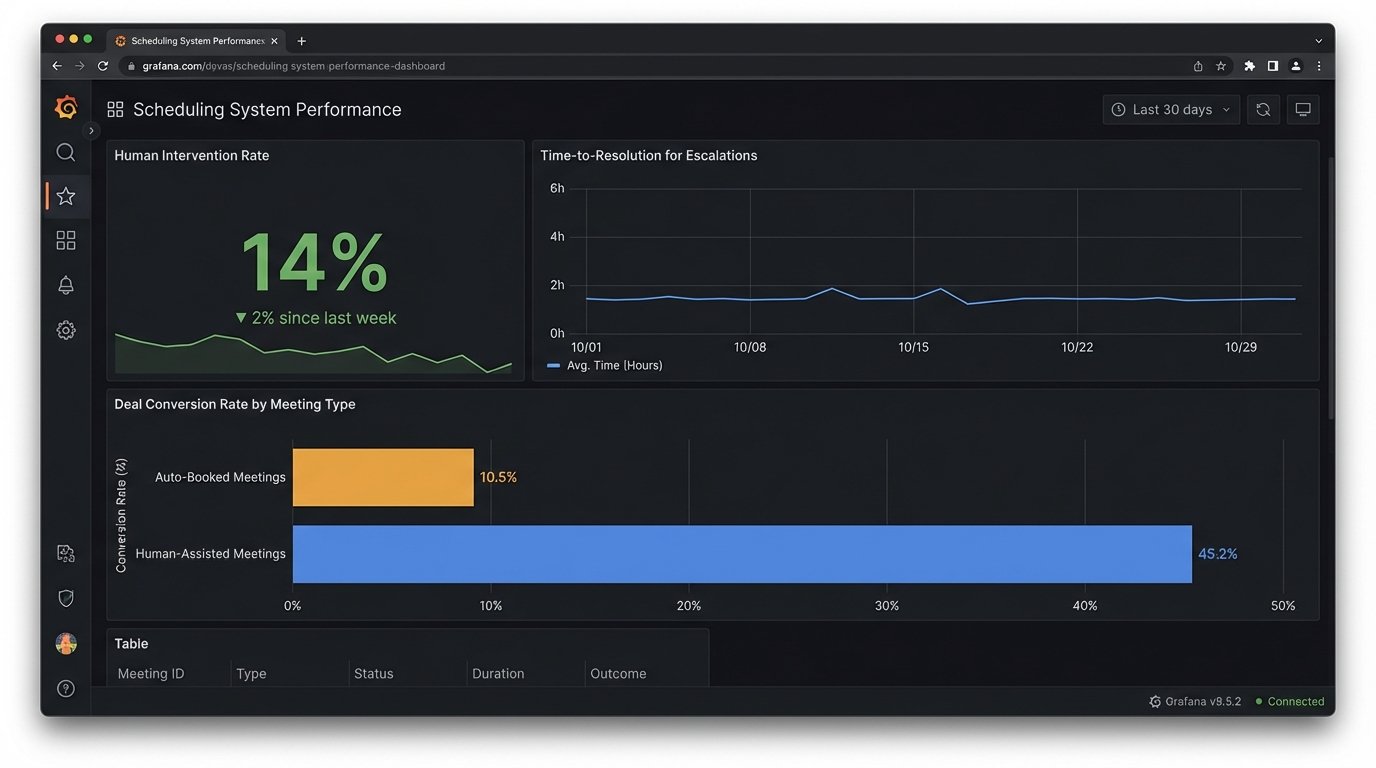
Finally, you must connect the scheduling process to revenue. Compare the no-show rates for standard, auto-booked meetings against the rates for VIPs who received personal handling. The latter will almost always be lower. More importantly, track the conversion rate of escalated high-value requests. When a major prospect gets an immediate, personal response from their account manager to schedule a demo, that deal is more likely to close.
This ties your scheduling architecture directly to financial outcomes. It reframes the discussion from “cost savings through automation” to “revenue generation through intelligent service delivery.” Stop chasing the ghost of a touchless system. Build an operational lever. Architect a hybrid process that uses machines for repetitive tasks and unleashes your people to handle the exceptions, build relationships, and close deals.