
The Anatomy of a Leaky Funnel: Manual Lead Assignment
Manual lead assignment is a ticking time bomb in any agency that thinks it’s ready to scale. At first, it’s a non-issue. The founder gets a lead from the website form, glances at it, and pings a sales rep on Slack. It works for five, maybe ten leads a week. But when you hit 50, 100, or in this client’s case, 500 leads a month, that process doesn’t just break. It shatters.
We were brought in to look at a digital marketing agency’s CRM setup. Their lead-to-opportunity conversion rate had tanked by 40% over two quarters, despite lead volume tripling. The diagnosis was brutally simple. Leads sat in a general queue for hours, sometimes a full day. Sales reps would cherry-pick the ones that looked good, leaving the less obvious wins to rot. The average time-to-first-contact was north of eight hours. They were burning cash and opportunity.
Their first attempt at a fix was the CRM’s native “round-robin” feature. A classic out-of-the-box mistake. It assigned leads evenly, but it was dumb. It gave a high-value e-commerce lead to a B2B SaaS specialist. It assigned a lead from Australia to a rep in New York who was asleep. It was fair, but it was strategically useless.
Gutting the Round-Robin: An Architecture for Intelligent Routing
A simple round-robin treats all leads the same. It’s like a hospital sending every patient to the next available doctor, regardless of whether they need a brain surgeon or a podiatrist. You don’t need fairness. You need intelligent distribution based on context. We ripped out the native functionality and built a dedicated routing engine using n8n as the middleware, bridging their web forms and HubSpot.
The entire architecture hinges on three stages: Ingestion, Enrichment, and Logic-Gated Assignment.
Step 1: Ingestion & Data Normalization
Leads came from multiple sources: website contact forms, webinar sign-ups, and content downloads. The first step was to standardize the incoming data payload. A webhook in n8n catches the raw form submission. The first node’s job is to strip junk characters, normalize country codes, and format email addresses into a clean, predictable JSON object. If the data is garbage coming in, the logic downstream has no chance.
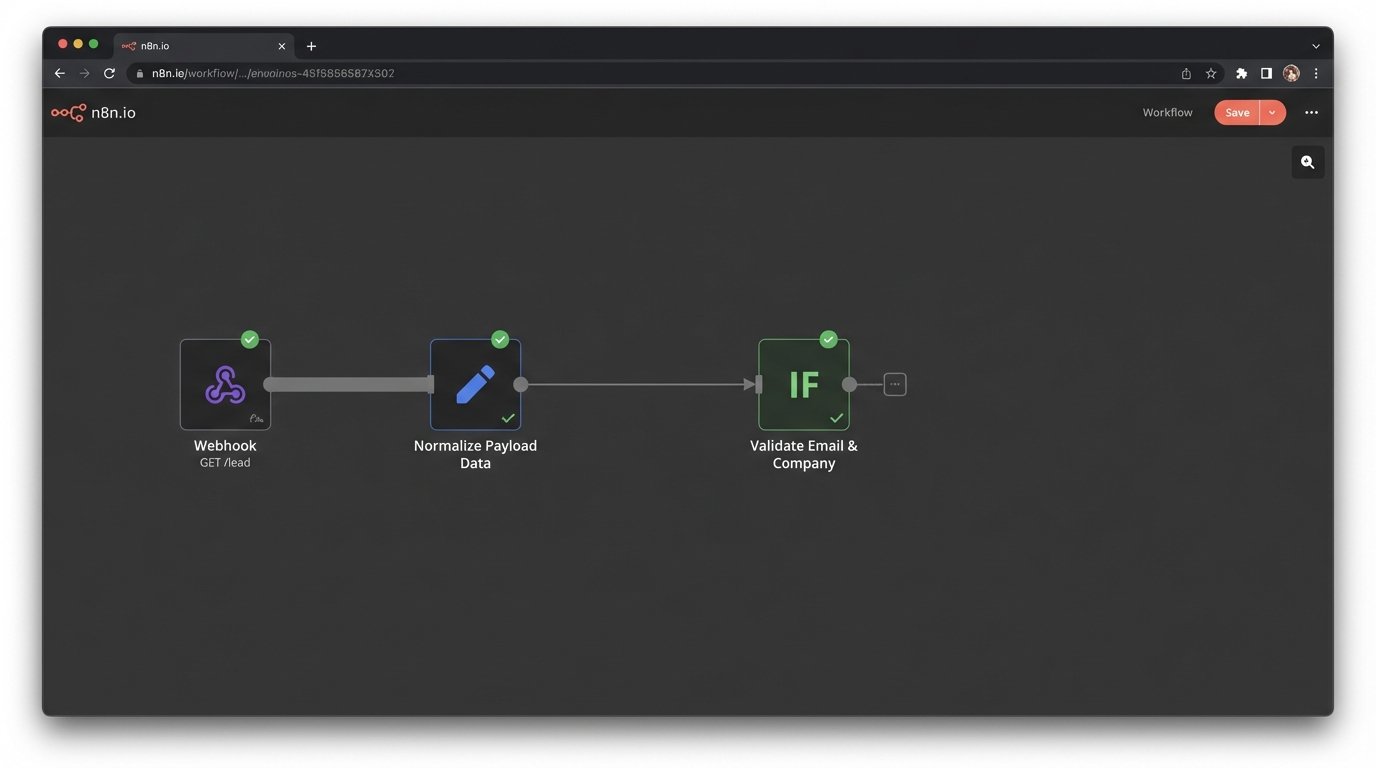
Garbage data is the silent killer of automation. We added a crucial validation step here. If a key field like `email` or `company_name` was missing, the workflow would halt and fire off a Slack alert to the operations channel with the payload, flagging it for manual review. Don’t just let bad data die silently.
Step 2: Enrichment and Context Building
Once we had a clean object, we needed more context than what a user provides on a form. We hammered the HubSpot API to check if the contact or company already existed. This prevents duplicate records and adds historical context if it’s a returning lead. We then used a data enrichment service to pull firmographic data like employee count and industry vertical based on the company domain.
This step turns a simple name and email into a detailed profile. The output is a rich JSON object ready for the routing logic.
{
  "lead_id": "78c54a-b12d-4e8c-9a1b-2f6d7e8b9c0a",
  "contact_info": {
    "name": "Jane Doe",
    "email": "jane.doe@examplecorp.com",
    "phone": "555-123-4567"
  },
  "company_info": {
    "name": "Example Corp",
    "domain": "examplecorp.com",
    "size": "50-200 Employees",
    "industry": "SaaS",
    "country": "USA"
  },
  "source": "Website Form - Demo Request",
  "is_existing_contact": false
}
Step 3: The Multi-Tiered Routing Logic
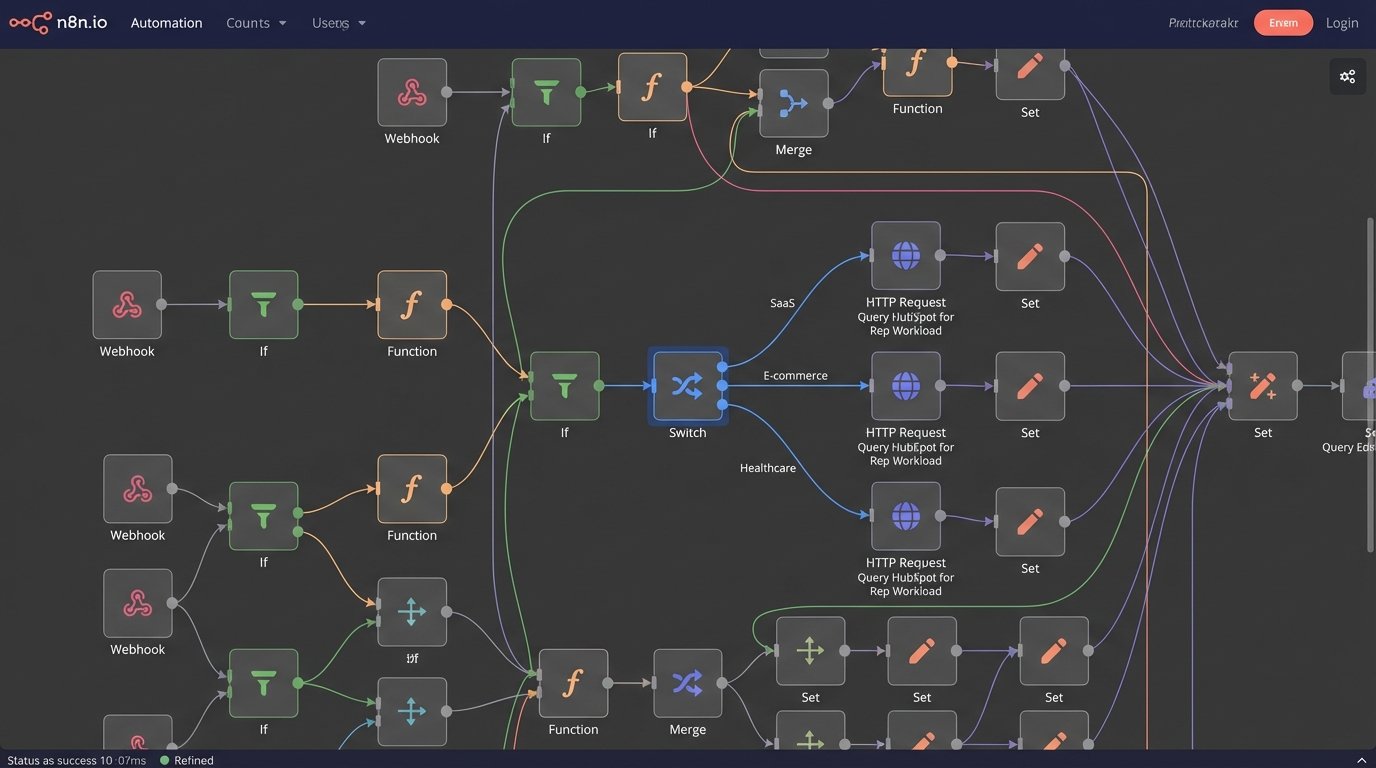
This is where the real work happens. We bypassed the simple round-robin and built a ruleset that prioritizes specialization and availability. The logic runs sequentially, checking conditions at each stage.
- Territory & Language: First, we map the lead based on country. Leads from the DACH region go to our German-speaking reps. Leads from North America are routed to the US team. This is a simple but non-negotiable first filter.
- Specialization: Within each territory, we route based on industry. The agency had pods of reps specializing in ‘SaaS’, ‘E-commerce’, and ‘Healthcare’. A simple Switch node in n8n handles this beautifully. You can maintain this logic in a central JSON object so you aren’t hardcoding it into the workflow itself.
{
  "routing_rules": {
    "SaaS": ["rep_A_id", "rep_B_id"],
    "E-commerce": ["rep_C_id", "rep_D_id"],
    "Healthcare": ["rep_E_id"],
    "default": ["rep_F_id"]
  }
}- Workload Balancing: This is the final and most critical filter. Instead of just picking the next person in the list, the workflow makes a real-time API call back to HubSpot. It queries the number of *active, open deals* assigned to each eligible rep from the specialization pool. The lead is assigned to the rep with the lowest current workload. This prevents one superstar rep from getting overloaded while another sits idle.
The logic isn’t complex, but it requires clean API access and a willingness to step outside the CRM’s built-in tools. Sending this much conditional logic through a single-step workflow is like trying to shove a firehose through a needle. You need middleware to orchestrate it.
Validation and The Results of Not Trusting Your Own Code
Building it is one thing. Trusting it is another. We implemented a dual-pronged validation system. First, every successful assignment posts a summary message to a dedicated Slack channel, giving the sales manager real-time visibility. It includes the lead’s name, company, the assigned rep, and the specific rule that triggered the assignment (e.g., “Matched Rule: E-commerce, Assigned to Rep C based on workload”).
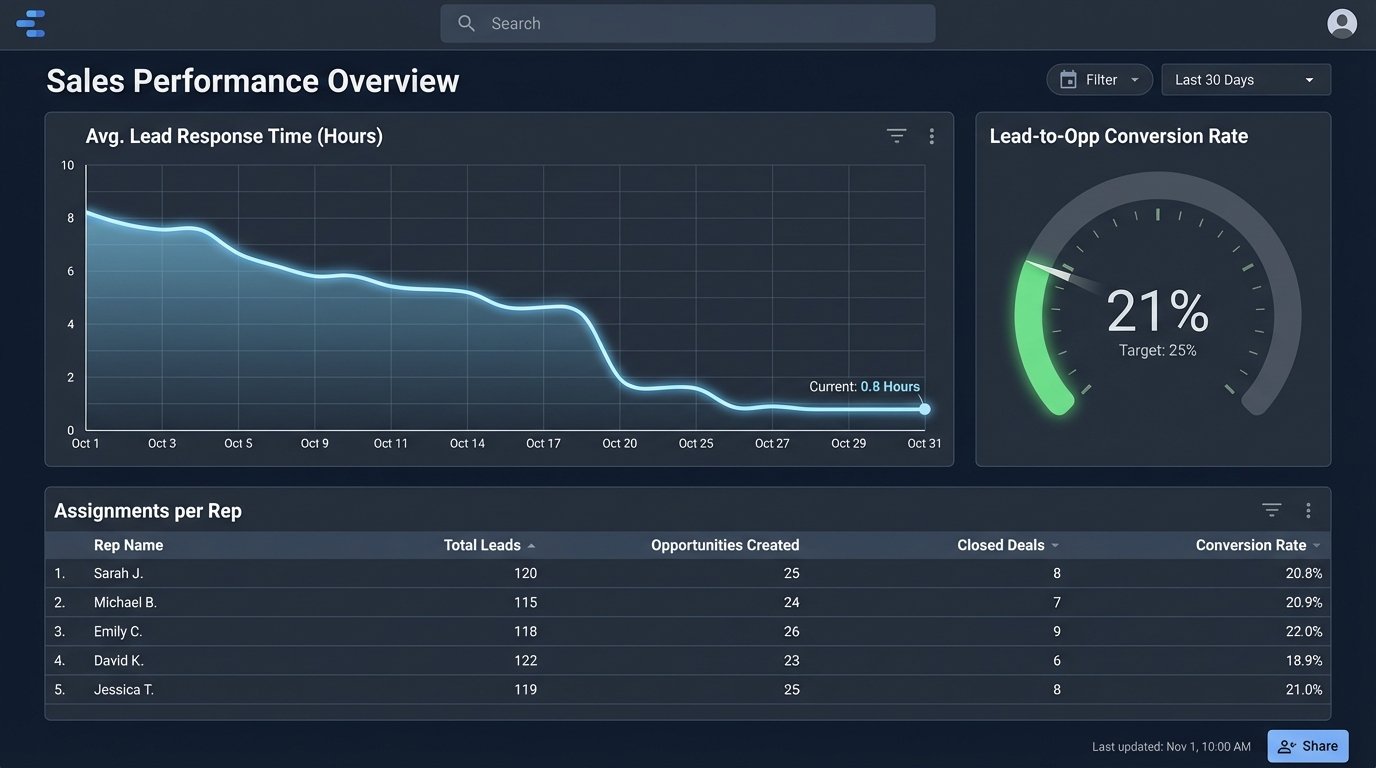
Second, we built a simple monitoring dashboard in Google Data Studio that pulled from the HubSpot API. It tracked assignments per rep, average time-to-assignment, and the distribution across different specializations. This allowed us to spot imbalances and tweak the routing logic over time.
A manual override is not optional. We built a Slack command (`/reassign-lead`) for managers to fix the inevitable edge cases without having to bug an engineer.
The Bottom-Line Impact
The results were immediate and quantifiable. Within the first month, the numbers spoke for themselves.
- Lead Response Time: Dropped from an average of 8 hours to under 15 minutes. For high-intent “Demo Request” leads, it was under 5 minutes.
- Lead-to-Opportunity Conversion: Increased from a dismal 12% to a healthy 21%. Getting the right lead to the right rep, fast, has a massive impact.
- Sales Team Morale: An unquantifiable but critical metric. The “cherry-picking” culture evaporated. Reps trusted the system was sending them qualified leads they were best equipped to handle.
This wasn’t a cheap solution. Building and maintaining this kind of external routing engine is a wallet-drainer compared to a checkbox in the CRM settings. But the ROI from plugging the 40% conversion leak paid for the project in the first quarter.
The core lesson is this: scaling isn’t about doing the same things faster. It’s about fundamentally changing the process. You can’t cross a chasm with a thousand small steps. You need to build a bridge. In this case, the bridge was a piece of middleware that applied intelligent logic, something the native CRM tools were never designed to do.
If your system just spins a wheel to assign leads, you’re not automating. You’re just officiating a lottery with your revenue.