
Stop Buying inflexible Real Estate Software
Off-the-shelf real estate platforms are rigid, overpriced data silos. They dictate your workflow and lock you into an ecosystem designed for the lowest common denominator. The only way to gain a real operational edge is to build your own automation stack, driven by direct API access. This gives you control over the data, the logic, and the destination. We aren’t building a simple Zapier connection. We’re architecting a data pipeline that pulls from a source of truth, enriches the information, and injects it precisely where your team needs it.
The goal is to construct a system that automatically fetches new property listings, normalizes the chaotic data, appends critical context like school ratings or commute times, and then pushes a clean, actionable record into a CRM or database. This is about owning your data flow, not renting it.
Phase 1: Architecture and API Reconnaissance
Before writing a single line of code, you have to map the battlefield. Your entire system’s reliability hinges on the APIs you select. Choosing the wrong provider means you’re building on sand. You need to evaluate them on data access, reliability, and cost, because they will excel at exactly one of those three things.
Selecting the Core Data Source: MLS APIs
Your primary data feed will be a Multiple Listing Service. You have two fundamental routes here. The first is connecting directly to a RESO Web API endpoint provided by a specific MLS board. This gives you raw, unfiltered access but chains you to their specific authentication, field names, and update schedules. The second route is using a data aggregator like ATTOM or CoreLogic, which normalizes data from hundreds of MLS boards into a single, consistent API. This saves immense development time but introduces a middleman, an extra point of failure, and a significant price tag.
Aggregators are a wallet-drainer, but they solve the normalization headache for you. Direct RESO access is cheap but forces you to become an expert in data mapping.
Ancillary APIs: The Enrichment Layer
A property listing is just a starting point. The real value comes from layering on external data to build a complete profile. Your minimum viable stack should include:
- Geocoding and Mapping: Google Maps API or Mapbox. You need this to validate addresses, get precise latitude and longitude, and calculate drive times to points of interest. Its geocoding accuracy is high, but the billing structure can get complicated with multiple SKU types.
- Property Data Enrichment: Services like Estated or DataTree. These provide information the MLS omits, like parcel numbers, owner history, tax assessments, and last sale date. This data is often pulled from slow-moving county records.
- Destination API: Your CRM or database. Whether it’s Salesforce, HubSpot, or a PostgreSQL database with a PostgREST wrapper, you need a documented, stable endpoint to send the final, processed data. Check its rate limits first.
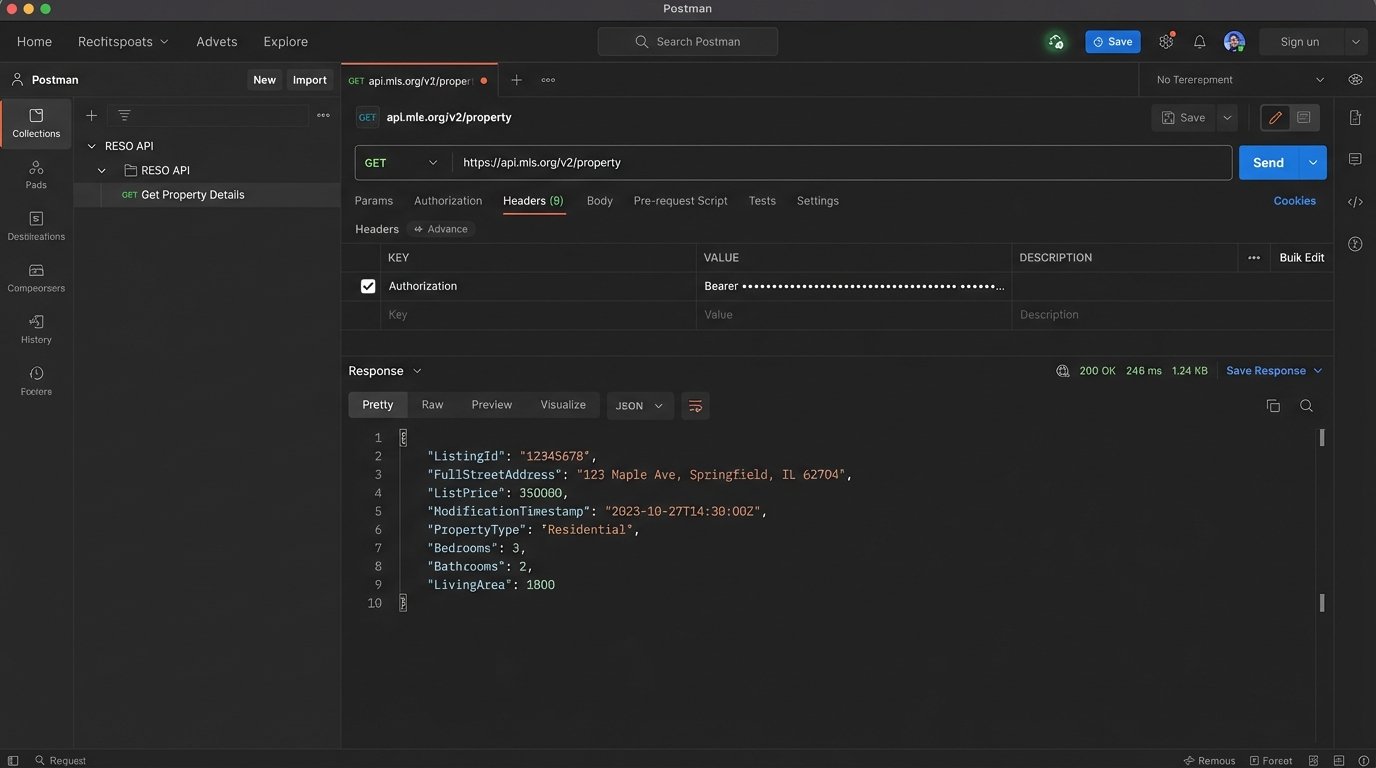
API documentation is frequently outdated. Always run a test call in Postman to validate the actual response structure before you start coding against it.
Phase 2: Building the Data Pipeline Logic
A successful pipeline is more than a sequence of API calls. It’s a stateful, fault-tolerant process. It needs to handle network failures, API rate limiting, and malformed data without manual intervention. We will structure this as an Extract, Transform, Load (ETL) process, a classic pattern for a reason.
Step 1: Extraction – Pulling Raw Data
The first component is the extractor. Its only job is to query the source MLS API for new or updated listings. Most RESO-compliant APIs support OData filtering, allowing you to query based on a timestamp. Your script should store the timestamp of its last successful run, then query for any listings with a `ModificationTimestamp` greater than that value on its next execution. This prevents you from re-processing thousands of records every time the job runs.
Authentication will likely be OAuth 2.0, requiring you to manage a client ID, client secret, and a bearer token with a short expiration. Build your token refresh logic to be resilient. Assume it will fail.
Step 2: Transformation and Normalization
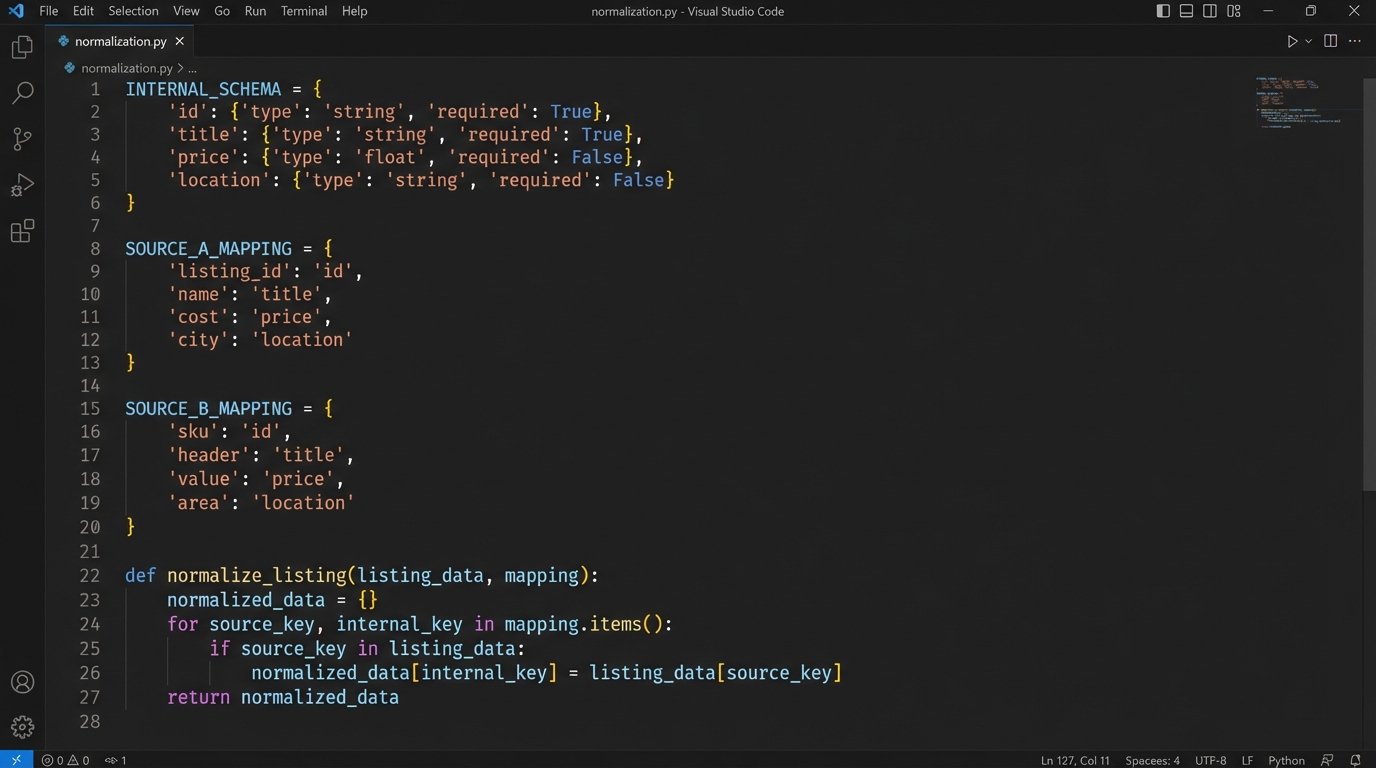
Raw MLS data is a mess. One board uses `ListPrice`, another uses `listing_price`, and a third might use `Price`. The transformation stage is where you fix this. You define a strict, internal schema for what a “property” object looks like in your system and then map the incoming raw data to that schema. This is the most critical and tedious part of the project. Treating raw MLS data from different boards as uniform is like assuming every country uses the same power outlet. You need a specific adapter for each one, or you’ll fry the system.
This stage also includes enrichment. After normalizing the core MLS data, you make subsequent calls to your ancillary APIs. Get the lat/long from Google Maps. Get the school district rating. Append this information to your internal property object. Crucially, your logic must handle a failure in an enrichment step. If the school data API is down, the pipeline should still proceed with the rest of the data, perhaps flagging the record for a later retry.
A practical Python example for normalization:
Let’s say we have two different raw inputs. We want to force them into our standard format. We define a mapping configuration to handle the inconsistencies.
    # Our desired internal schema

    INTERNAL_SCHEMA = {

        'mls_id': None,

        'address': None,

        'price': 0,

        'status': 'Unknown'

    }
# Mappings for two different MLS sources
SOURCE_A_MAPPING = {
'ListingId': 'mls_id',
'FullStreetAddress': 'address',
'ListPrice': 'price',
'ListingStatus': 'status'
}
SOURCE_B_MAPPING = {
'MLSNumber': 'mls_id',
'address_line_1': 'address',
'current_price': 'price',
'property_status': 'status'
}
def normalize_listing(raw_data, mapping):
normalized_record = INTERNAL_SCHEMA.copy()
for source_key, internal_key in mapping.items():
if source_key in raw_data:
normalized_record[internal_key] = raw_data[source_key]
# Basic data type coercion
try:
normalized_record['price'] = int(normalized_record['price'])
except (ValueError, TypeError):
normalized_record['price'] = 0 # Default on failure
return normalized_record
# --- Usage ---
raw_listing_from_A = {'ListingId': '12345', 'FullStreetAddress': '123 Main St', 'ListPrice': '500000', 'ListingStatus': 'Active'}
clean_listing = normalize_listing(raw_listing_from_A, SOURCE_A_MAPPING)
# clean_listing is now {'mls_id': '12345', 'address': '123 Main St', 'price': 500000, 'status': 'Active'}
This mapping logic separates the mess from your core application logic. When a new data source is added, you just create a new mapping dictionary, not rewrite your entire codebase.
Step 3: Loading – Injecting into the Destination
The final step is to push the clean, enriched data object into your target system. This is usually a POST or PUT request to a CRM or database API. The most important concept here is idempotency. You must prevent the creation of duplicate records. Before creating a new property record, your script must first query the destination system to see if a record with the same `mls_id` already exists. If it does, you perform an update (PUT). If it does not, you perform a create (POST). Skipping this logic-check guarantees a corrupted CRM within weeks.
Your load script must also handle API errors from the destination. If the CRM is down or returns a `500` error, the script should not discard the data. It should log the error and queue the data for a retry. A simple way to do this is to write the failed payload to a file or a dedicated queue table for a separate retry process to handle.
Phase 3: Deployment, Monitoring, and Reality
Code sitting on your laptop is useless. Getting this pipeline into a production environment that can run reliably 24/7 is where the real engineering begins. Your deployment choice impacts cost, scalability, and maintainability.
Choosing a Hosting Environment
You have a spectrum of options, from simple to complex.
- Cron Job on a VM: The classic approach. A Python script scheduled to run every 5 minutes on a cheap Linux server (like an AWS EC2 t3.micro). It’s simple to set up and debug, but you are responsible for patching the OS, managing security, and ensuring the machine stays running.
- Serverless Functions: AWS Lambda or Google Cloud Functions. You upload your code, and the cloud provider handles the execution environment. You can trigger it on a schedule (e.g., via CloudWatch Events). This is highly scalable and cost-effective for intermittent tasks, but debugging can be a pain and there are execution time limits. Lambda is cheap until your logic gets stuck in a retry loop and you get a four-figure bill.
- Containerized Services: Dockerizing your application and running it on a service like AWS Fargate or Google Cloud Run. This offers a great balance of control and managed infrastructure. It’s more complex to set up than serverless but gives you more flexibility for long-running processes or custom dependencies.
Start with the simplest option that meets your requirements. A cron job is fine for a low-volume proof of concept.
Monitoring and Alerting are Non-Negotiable
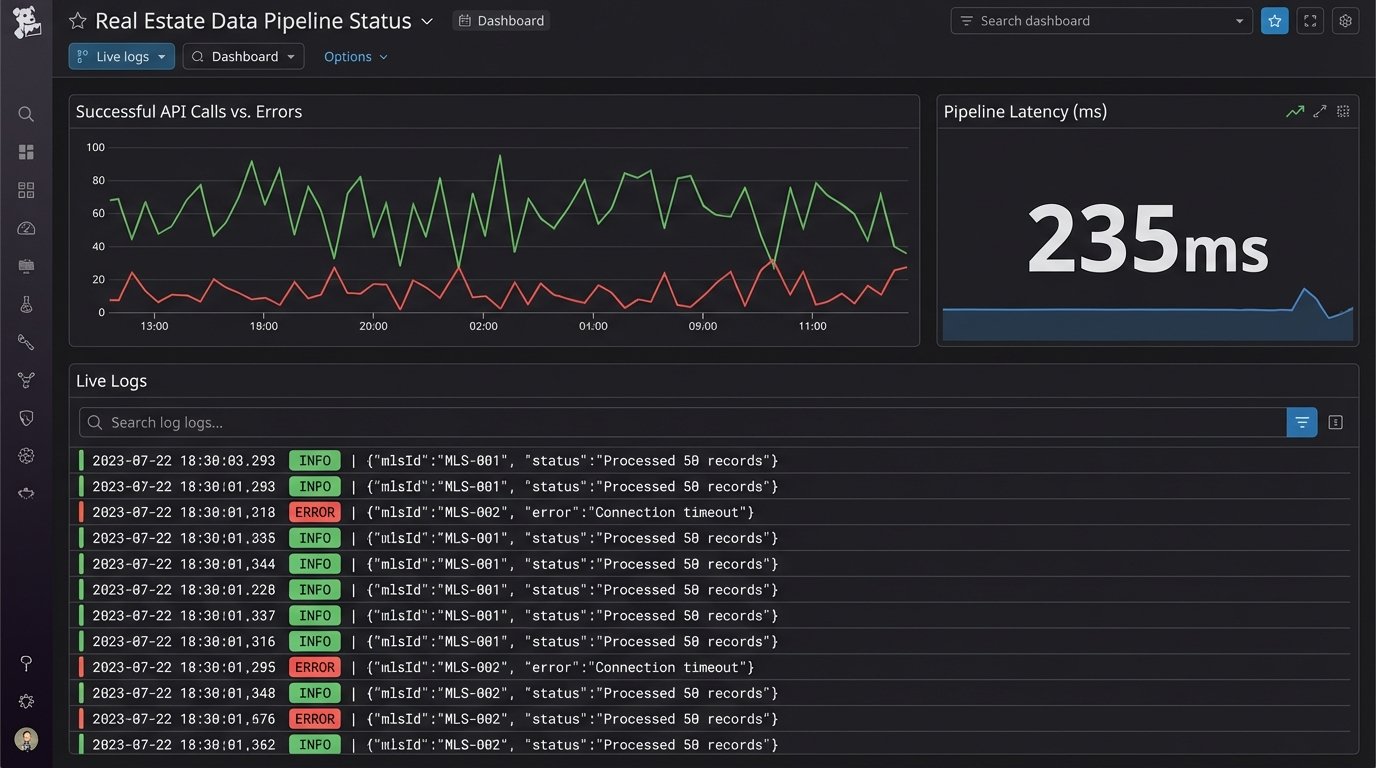
Your automation will fail. An API will change a data field without warning. A token will expire. You need to know when this happens, preferably before your users do. Instrument your code with structured logging. Instead of printing plain text strings, log JSON objects containing the timestamp, severity, and relevant context like the `mls_id` being processed. Ship these logs to a centralized service like Datadog, New Relic, or a self-hosted ELK stack. Configure alerts to fire when the error rate spikes or when the job hasn’t reported a successful run in a certain amount of time.
A silent failure is the most dangerous kind.
This setup is not about finding an easy button. It is about building a strategic asset. Off-the-shelf software sells you a locked room with their furniture in it. This process gives you the architectural drawings and the keys to the entire building. The control is worth the complexity.