Guide to Creating Personalized Automated Email Templates for Clients
Most automated emails are garbage. They substitute a first name into a generic template and call it “personalization.” This approach ignores the terabytes of behavioral data we collect, failing to bridge the gap between a user’s actions and the communication they receive. The goal is not just to insert a name. The goal is to build an email that is contextually aware, triggered by a specific event, and populated with data relevant to that trigger. Anything less is just sophisticated spam.
The entire operation hinges on the quality and accessibility of your data. Without a clean, structured data source, your personalization efforts are dead on arrival. You’re not just pulling from a single database table. You need to orchestrate data from a CRM, a product analytics platform, and possibly a backend database, merging it into a single, coherent payload for each client communication. This is the unglamorous 90% of the work.
Prerequisites: The Data Foundation
Before writing a single line of template code, you must audit your data sources. Identify the primary keys that link a user across different systems. This is typically an email address or a unique user ID. If your systems can’t agree on who a user is, you can’t personalize anything. The architecture must map user actions, like `product_viewed` or `cart_abandoned`, to a specific user profile.
Your data needs to be structured, preferably in JSON format, for easy consumption by a templating engine. A flat structure is insufficient. You need nested objects that represent the user’s state and recent activities. Trying to force personalization with bad data is like trying to build a precision engine with rusty bolts. The core components are compromised before you even start.
A typical data payload for an abandoned cart email should look structured. It requires a root user object and a nested array of cart items. Flat key-value pairs will not scale when you need to iterate over multiple products.
{

  "user": {

    "userId": "usr_12345abc",

    "firstName": "John",

    "lastLogin": "2023-10-26T10:00:00Z",

    "segment": "high_value"

  },

  "cart": {

    "cartId": "cart_67890def",

    "abandonedAt": "2023-10-27T14:30:00Z",

    "items": [

      {

        "productId": "prod_a",

        "name": "Widget Pro",

        "price": 99.99,

        "imageUrl": "https://example.com/widget-pro.jpg"

      },

      {

        "productId": "prod_b",

        "name": "Standard Widget",

        "price": 49.99,

        "imageUrl": "https://example.com/widget-std.jpg"

      }

    ],

    "totalValue": 149.98

  }

}
This structure is non-negotiable. It allows the template to access `user.firstName` directly while also looping through `cart.items` to display each product. Get the data architecture wrong, and you will spend weeks debugging broken templates.
Selecting a Templating Engine
The templating engine is the logic layer that merges your data payload with your HTML structure. There are several options, but most modern systems rely on engines like Liquid, Handlebars, or Nunjucks. The syntax differences are minor. The real decision criteria are performance, security, and the ecosystem of the email service provider (ESP) you are forced to work with.
Liquid, originally from Shopify, is common and well-supported. Its syntax for variables (`{{ user.firstName }}`) and logic (`{% if user.segment == ‘high_value’ %}`) is straightforward. Handlebars is similar but often considered slightly faster in server-side rendering environments, which might matter if you are generating thousands of emails in a batch process. Nunjucks, from Mozilla, offers more advanced features like template inheritance, which can be a lifesaver for managing complex email suites with shared headers and footers.
Your ESP will likely dictate this choice. Salesforce Marketing Cloud uses a proprietary language called AMPscript, which is powerful but a nightmare to debug. HubSpot uses HubL, which is a wrapper around Jinja2. Do not fight the platform. Use the native engine to avoid unpredictable rendering issues and to access platform-specific helper functions. Trying to bolt on your own engine is asking for trouble.
Building the Template Structure
Start with the static HTML. Build a bulletproof, responsive email template that renders correctly across the unholy trinity of email clients: Outlook, Gmail, and Apple Mail. Use a tool like Litmus or Email on Acid to test your base template before you inject a single variable. A broken layout will kill engagement faster than a missing first name.
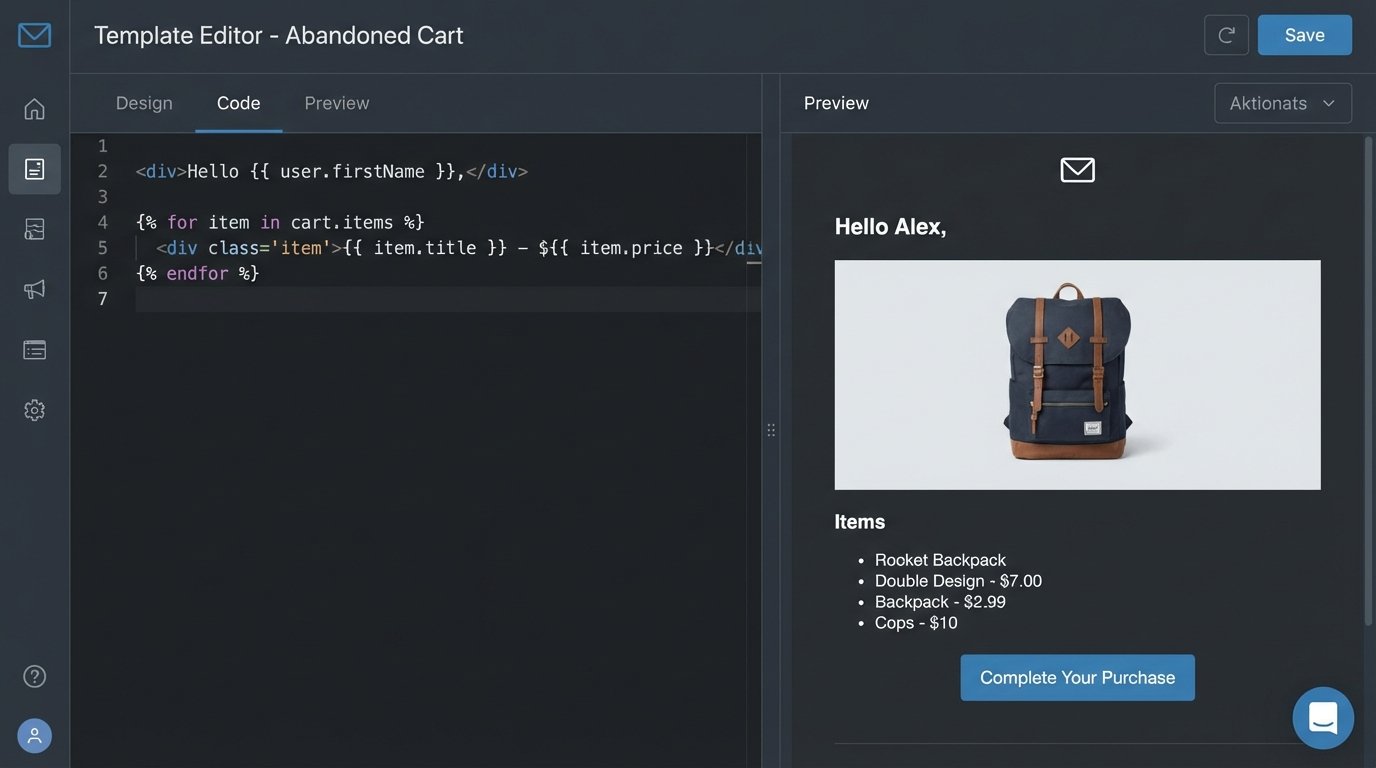
Once the static shell is stable, you can begin injecting dynamic placeholders. These are the direct mappings to your JSON payload. The key is to keep the template as dumb as possible. The heavy lifting and data manipulation should happen before the data is sent to the renderer. Your template should only be responsible for presentation logic, not business logic.
A basic abandoned cart template body using Liquid syntax would look like this:
<p>Hi {{ user.firstName }},</p>

<p>Looks like you left some items in your cart. Ready to complete your order?</p>
<h3>Your Cart:</h3>
<table>
{% for item in cart.items %}
<tr>
<td><img src="{{ item.imageUrl }}" width="50"></td>
<td>{{ item.name }}</td>
<td>${{ item.price }}</td>
</tr>
{% endfor %}
</table>
<p>Total: ${{ cart.totalValue }}</p>
<p><a href="https://example.com/cart/{{ cart.cartId }}">Complete Your Purchase</a></p>
This code directly accesses `user.firstName`, loops through the `cart.items` array, and populates a table with product details. It is clean, readable, and devoid of complex logic. That’s the target.
Injecting Conditional Logic
Simple variable substitution is table stakes. True personalization requires conditional logic within the template. You might want to show a special offer to high-value customers or display different messaging based on the user’s location or past purchase history. This is handled with `if/else` blocks.
The logic must remain simple. Nesting more than two levels of `if` statements in an email template is a code smell. It makes the template brittle and nearly impossible for another developer to maintain. If your logic requires complex branching, pre-calculate the outcome and pass a simple boolean flag in your data payload, such as `show_discount: true`.
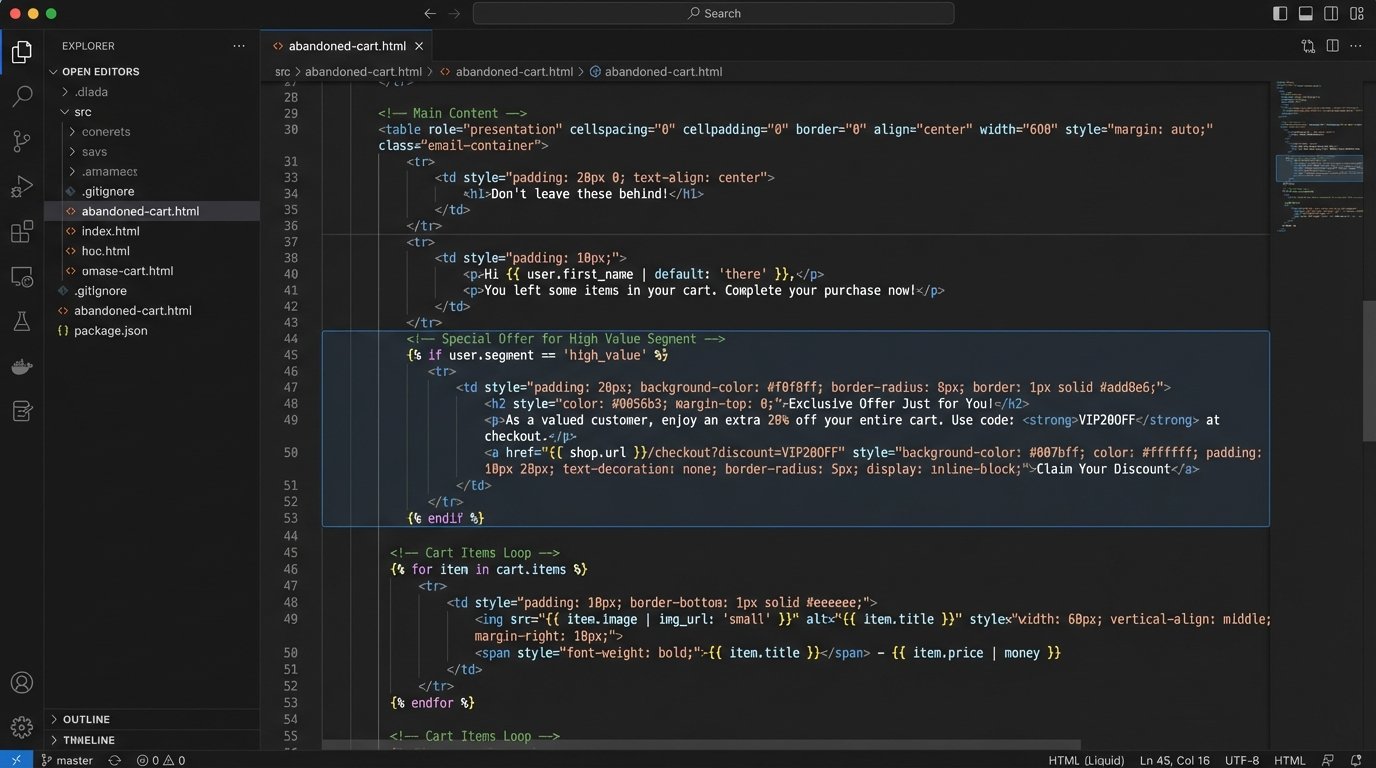
Here is an example of adding a conditional discount banner for users in the ‘high_value’ segment:
<p>Hi {{ user.firstName }},</p>
{% if user.segment == 'high_value' %}
<div style="background-color: #f0ad4e; color: white; padding: 10px; text-align: center;">
As a valued customer, use code VIP15 for 15% off your order!
</div>
{% endif %}
<p>Looks like you left some items in your cart...</p>
This block checks a single field from the user object and conditionally renders an entire HTML block. This is the correct way to handle variations. Do not attempt to build complex strings or manipulate data inside the template. The template displays what it’s told. Nothing more.
Your team must agree on a strict separation of concerns. The backend service prepares the data. The template renders the data. Blurring this line creates a system that is impossible to debug when an email renders incorrectly at 3 AM. Was it bad data from the API, or a typo in a complex `if` condition inside the template?
Connecting Data Source to Trigger
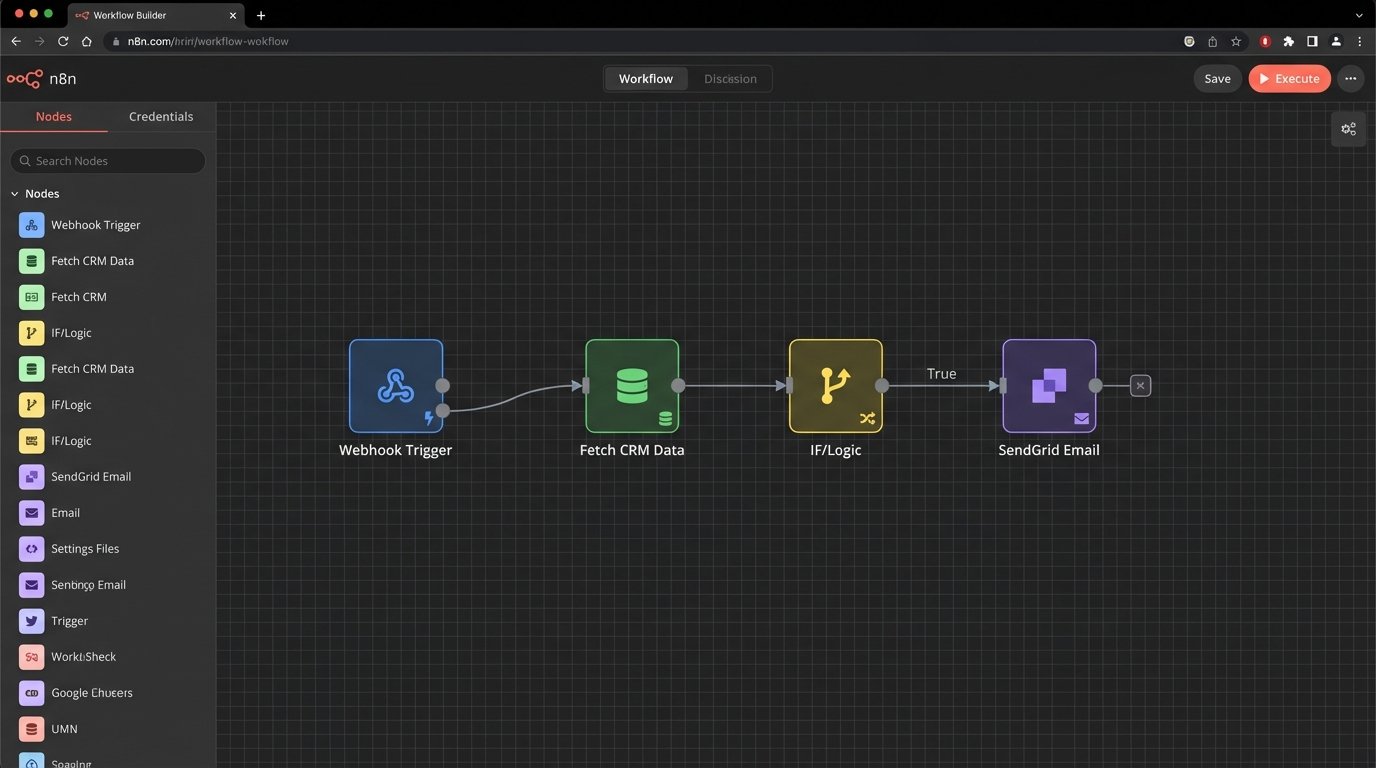
The automation pipeline is what invokes the template rendering. This is typically done via webhooks or scheduled API calls. A webhook provides real-time triggering. When a user abandons a cart, the backend system immediately fires a webhook to your email automation platform with the JSON payload. This is fast but can be fragile. If your endpoint is down, the event is lost unless you have a robust retry mechanism.
Scheduled jobs are more resilient but introduce latency. A script could run every hour, query the database for all carts abandoned in the last 60 minutes, and send the data to the email platform in a batch. This is less taxing on your systems and can handle API downtime gracefully. The downside is that the user’s “instant” reminder might arrive an hour after they’ve already bought from a competitor. The choice between them depends on the urgency of the communication.
Connecting this is not trivial. It requires authenticating with the ESP’s API, formatting the payload correctly, and handling API rate limits. Sending 100,000 personalized emails requires a system that can throttle its API calls to avoid being blocked. This is where you separate the pros from the amateurs who just write a simple `for` loop.
Validation and Fallbacks
Data is never perfect. A user might not have a first name in the database. A product image URL might be broken. Your template must anticipate these failures and handle them gracefully. Every single dynamic field needs a fallback value.
Templating engines provide filters or helpers for this. In Liquid, you can use the `default` filter:
Hi {{ user.firstName | default: "there" }},
This simple addition prevents the email from rendering as “Hi ,” which looks unprofessional and signals a broken system. You should define a fallback strategy for every piece of dynamic content, from text to images. For a missing product image, you might show a placeholder image instead of a broken image icon.
Extensive validation is also critical on the data-providing end. Before your backend service sends the payload to the email renderer, it should logic-check the data. Does the cart total match the sum of the item prices? Is the user’s email address valid? Catching these errors before the API call is far cheaper than debugging a failed email send.
You must also have a “kill switch.” If a data feed is corrupted or an API change causes widespread errors, you need a way to immediately halt the automation. Without one, you risk sending thousands of broken, embarrassing emails to clients. This switch should be a simple configuration flag that the automation checks before processing any job.
Maintenance and Version Control
An email template is code. It must be stored in a version control system like Git. Making changes directly in the ESP’s web editor is a recipe for disaster. It offers no history, no code review, and no way to roll back a bad deployment. Every change to a template should go through a pull request and be reviewed by another engineer.
The deployment process should be automated. A CI/CD pipeline can take the template from your Git repository, run linting checks, and push it to the ESP’s API. This enforces consistency and prevents manual errors. It also provides a clear audit trail of who changed what, and when.
Finally, monitor everything. Track API error rates, email render times, and open/click rates segmented by template version. A sudden drop in engagement after a template change is a red flag. Without monitoring, you are flying blind, assuming your complex system of data pipelines, renderers, and APIs is working perfectly. It never is.