
How to Evaluate the Latest Proptech Tools for Your Agency
Stop reading the marketing slicks. The glossy PDF promising seamless integration is a fantasy designed to get a signature. The real evaluation of any proptech tool happens in the command line, by interrogating its API and stress-testing its data model before it ever touches your production environment. Most agencies get this backward. They commit to a wallet-draining annual contract based on a sales demo, then spend the next six months fighting an integration that was never built to scale.
This is not a guide for project managers. This is a technical teardown for the people who will actually have to connect the plumbing and keep it from leaking. We will strip these tools down to their core components: the API, the data schema, and their failure states. Your job isn’t to be sold. Your job is to find the breaking points before you buy.
Phase 1: API Interrogation Before the First Call
Before you even speak to a sales engineer, find their developer documentation. If you cannot find it with a simple web search, that is your first and most significant red flag. It signals a closed ecosystem, one that views technical access as a privilege instead of a prerequisite. Assuming you find the docs, your first task is to logic-check their claims against the cold reality of their endpoints.
Look for the basics. Is it a RESTful API, or are they using GraphQL? GraphQL gives you more control over the data you request, but it also places more load on their servers and can be harder to debug if their schema is a mess. A standard REST API is often more predictable. Check the authentication method. If they are still using basic API keys in the header without OAuth 2.0, they are behind the curve on security. That’s not a dealbreaker, but it shows their development priorities.
Rate limiting is the next checkpoint. The documentation should clearly state the number of requests allowed per second or minute. If these limits are low, you cannot use the tool for any bulk processing or real-time synchronization. A limit of 60 requests per minute sounds fine for a single user clicking a button, but it is useless for a nightly script that needs to sync 5,000 property records.
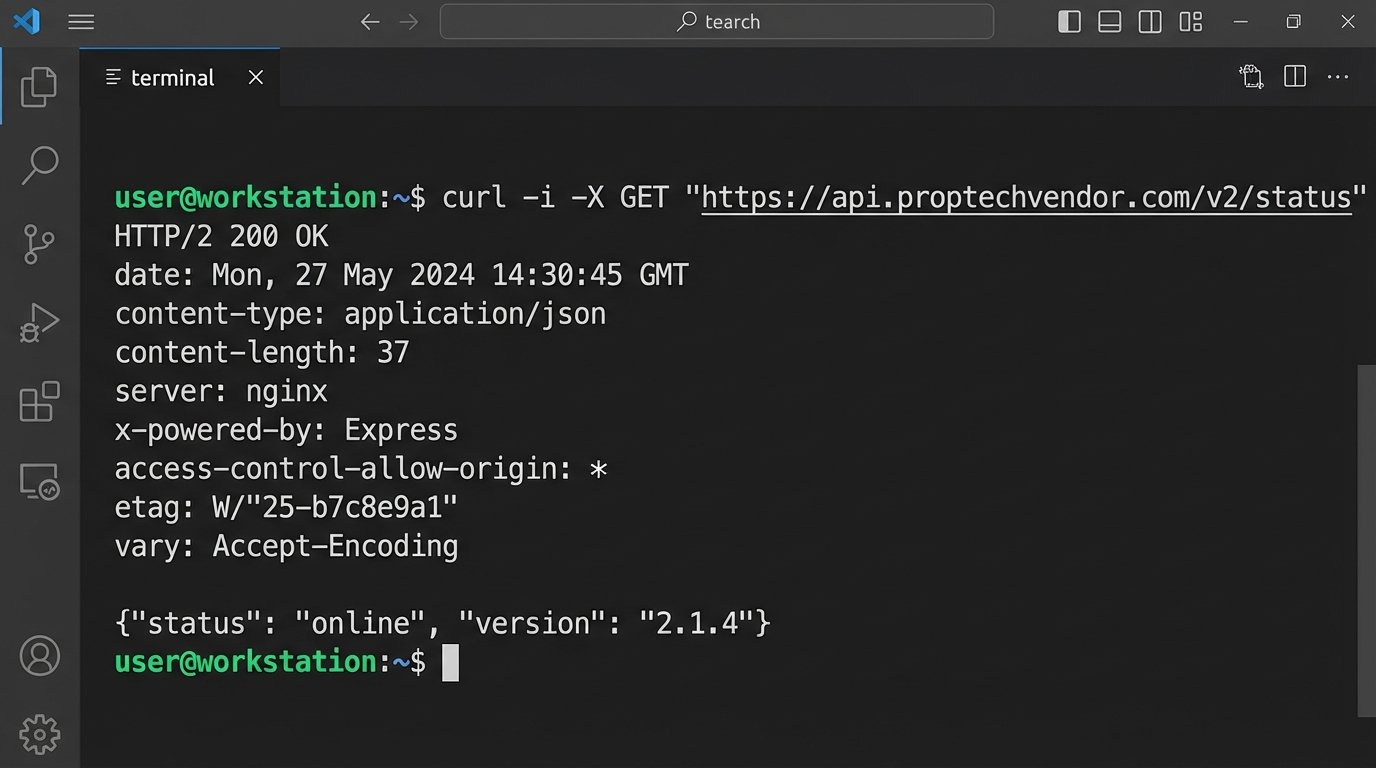
Your first direct interaction should be a simple curl request to a public or health-check endpoint. You are not testing functionality yet. You are inspecting the headers and the structure of the response.
curl -i -X GET "https://api.proptechvendor.com/v2/status"
Scrutinize the output. Are they returning standard HTTP status codes? A `200 OK` is good, but what happens when you query a non-existent resource? You should get a `404 Not Found`, not a `200 OK` with an empty body or a generic `500` error. Look at the response headers. Do they include a `Content-Type` of `application/json`? Is there a `Date` header? These small details expose the engineering discipline, or lack thereof, behind the product.
Phase 2: Deconstructing the Data Schema
An API is just a pipe. The real value, or liability, is the data that flows through it. This is where most integrations fail. The vendor’s concept of a “property” will not match your MLS or CRM’s concept of a “property.” The conflict is inevitable, and your job is to quantify the pain of bridging that gap. Get a sample JSON payload for their primary objects, like listings, contacts, and transactions.
Print it out if you have to. Map every single field in their object to a corresponding field in your system. You will immediately find mismatches in data types. They might store “price” as a string with a currency symbol, while your system requires a decimal type. They might have a single “address” field, while you have it broken down into `street_address`, `city`, `state`, and `zip_code`. Each of these mismatches is a custom transformation function you will have to write, test, and maintain.
A vendor’s sandbox environment is a cleanroom. Your production environment is a mud pit after a flash flood. The data is dirty, inconsistent, and full of edge cases that the vendor’s perfect test data never accounts for.
Pay close attention to required fields versus optional fields. If their system requires a `property_type_id` that does not exist in your data, how will you generate it? Can you set a default, or does the API reject the entire record? This is a critical failure point for bulk data imports. You need a strategy for handling these data impedance mismatches before you start writing code. Here is a simplified example of the logic you will have to build to transform their data into something your system can digest.
function transformVendorListing(vendorListing) {
// Logic-check for core data integrity
if (!vendorListing.location || !vendorListing.location.full_address) {
throw new Error('Vendor address data is missing.');
}
const ourListing = {
listing_id: `vendor-${vendorListing.id}`,
price: parseFloat(vendorListing.price.replace(/[^0-9.]/g, '')), // Strip currency symbols and force to float
address_line_1: vendorListing.location.full_address.split(',')[0],
city: vendorListing.location.city,
state: vendorListing.location.state_code,
zip: vendorListing.location.postal_code,
status: mapStatus(vendorListing.status), // Custom function to map their status names to ours
is_active: vendorListing.active === true
};
return ourListing;
}
This small function already reveals multiple points of failure. The `parseFloat` can fail if the price format changes. The `split` on the address assumes a comma separator that might not always be present. The `mapStatus` function needs to be constantly updated if they add new status types. This is the hidden maintenance cost the sales team never mentions.
Phase 3: The Sandbox Gauntlet
The vendor will give you access to a sandbox environment. Do not treat it as a playground for happy-path testing. Treat it as a laboratory for breaking things. Your goal is to simulate the chaotic reality of your production data and user behavior. The sandbox is where you find out if the application is resilient or brittle.
Start with malformed requests. Send a JSON payload with missing required fields. Send one with incorrect data types, like a string where an integer is expected. A well-built API will respond with a `400 Bad Request` status code and a clear error message indicating which field was wrong. A fragile API will return a generic `500 Internal Server Error` or, even worse, accept the bad data and corrupt the record.
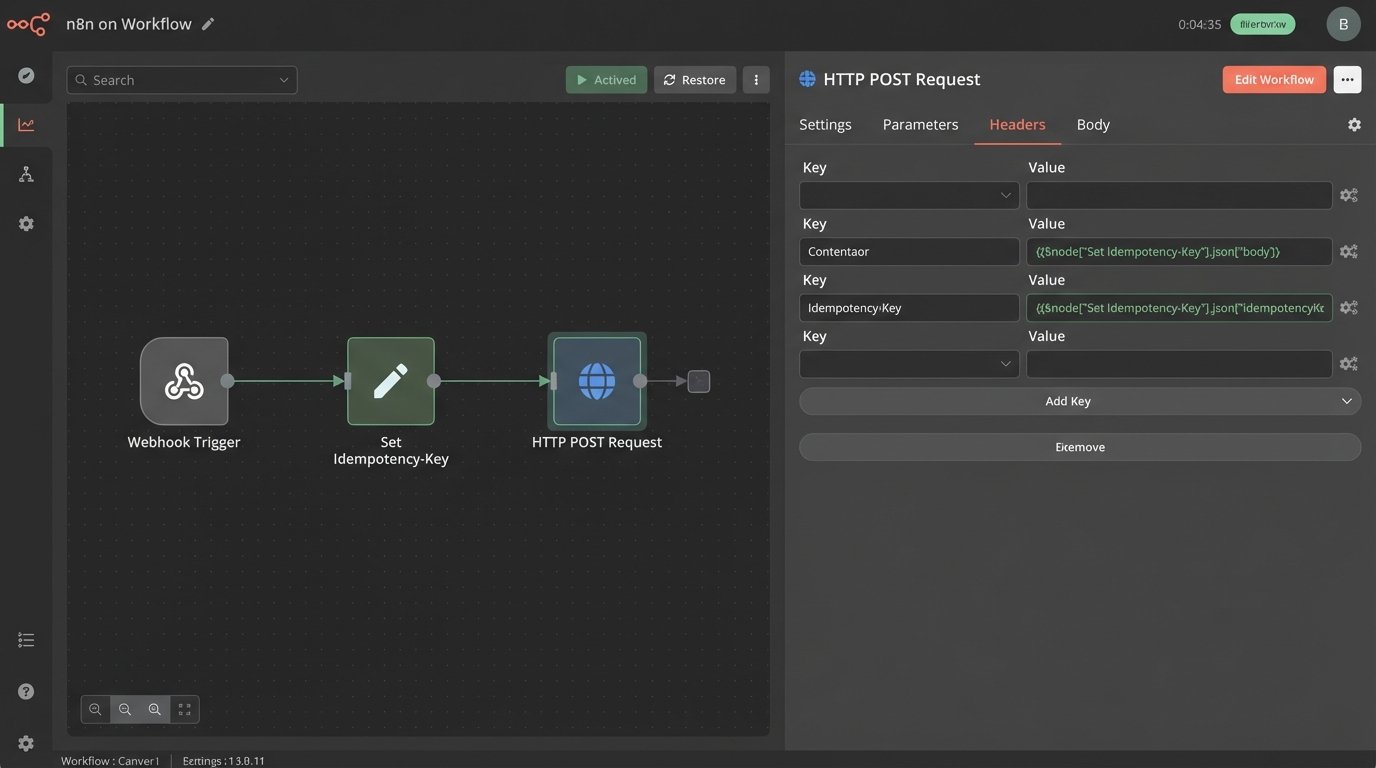
Next, test for idempotency. This is a critical concept for any process that might be retried, like a webhook handler that fails due to a temporary network blip. You need to know if sending the exact same `POST` or `PUT` request twice will create two duplicate records or just update the existing one correctly. The API should use an idempotency key that you provide in the header. If it does not, you will be forced to build complex de-duplication logic on your end to prevent data corruption.
Webhooks require special scrutiny. They are essentially a promise from the vendor to call your system when an event occurs. That promise is only as good as their retry logic. Shut down your test endpoint for five minutes and trigger an event in their sandbox. Do the webhooks queue up and get delivered once your endpoint is back online? Or are they lost forever? The documentation should specify the retry schedule, for example, retrying after 1, 5, and 15 minutes before giving up. If it doesn’t, assume there is no retry logic.
You are not just testing their code. You are testing their infrastructure and operational maturity.
Phase 4: Probing for Latency and Scale
A tool that responds instantly with 10 records might become sluggish and unusable with 10,000. Scalability is not a feature you can add later. It must be built into the architecture from day one. Your job is to find the performance ceiling before it impacts your agents and clients.
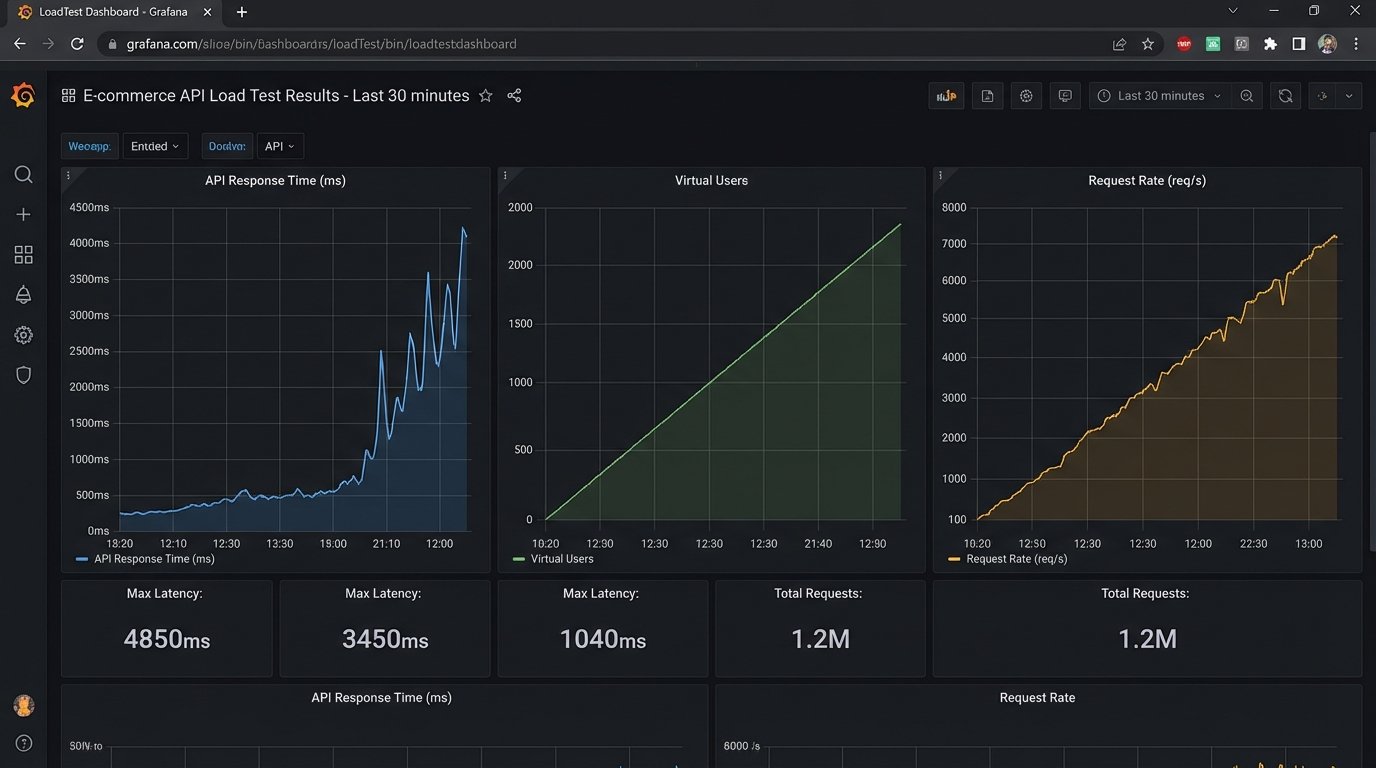
Get permission from the vendor to run a small-scale load test against their staging or sandbox environment. Using a tool like `k6` or `JMeter`, simulate a realistic load. Do not just hit a single endpoint. Your script should mimic a real user workflow, like searching for listings, then fetching details for ten of them, then retrieving agent contact info. This multi-request pattern reveals bottlenecks that single-endpoint tests will miss.
Monitor the average response times as you gradually increase the concurrent users. At what point does the latency start to climb? Is it a gradual increase or a sudden spike? A sudden spike indicates a hard limit is being hit, like a saturated database connection pool or an exhausted worker thread pool. This is a major red flag for future growth.
Trying to sync a large dataset through a slow, unoptimized API is like shoving a firehose through a needle. The pressure builds up, and eventually, the process either fails completely or takes so long it becomes useless.
Check their pagination strategy. A good API uses cursor-based pagination for large datasets, which is more efficient than traditional offset-based pagination. If they require you to request “page 2” and then “page 3,” the database performance will degrade as you get deeper into the results. Inspect the API responses for caching headers like `ETag` and `Cache-Control`. The presence of these headers shows that they have thought about performance and are trying to reduce unnecessary load on their servers.
Phase 5: The Final Technical Veto
The last check is not about performance but about long-term stability. You are not just buying a tool. You are creating a dependency. The stability of your system will now be tied to the stability of theirs. Ask hard questions about their deployment practices and API versioning.
How do they handle API changes? A mature provider will use API versioning in the URL, like `/v2/listings`, allowing you to upgrade on your own schedule. A reckless provider will push breaking changes to the same endpoint, forcing you to scramble and fix your integration at a moment’s notice. Ask for their deprecation policy. How much notice do they provide before retiring an old version of the API? The answer should be months, not weeks.
This final diligence step separates a reliable technical partner from a future liability. A tool can have every feature you want, but if it is built on a crumbling technical foundation, it is not worth the integration cost. Rejecting a tool on technical grounds is not a failure. It is a success in risk management. It is your job to protect the agency’s core systems from the downstream chaos of a poorly built third-party dependency.