
Scrap the Email Campaign. SMS Blasts for Open Houses Work If You Don’t Screw It Up.
Most agents think an SMS blast is just a bulk text. They dump a CSV into some cheap platform, hit send, and then wonder why their open house is empty and their number is flagged as spam. The root problem is treating a direct, interruptive channel like a passive one. An SMS hits a user’s lock screen. It demands immediate cognitive load. Get it wrong, and you’ve just paid to alienate your most qualified leads.
The goal isn’t to just send messages. The goal is to trigger a specific action, an RSVP or a calendar add, from a pre-qualified segment of your database. This requires a technical process, not a marketing one. We are building a delivery mechanism that respects data integrity, carrier limitations, and, most importantly, the user’s patience.
Prerequisites: Sanitizing the Data and Understanding Compliance
Before writing a single line of code or configuring a platform, you need two things squared away: a clean contact list and a non-negotiable understanding of the Telephone Consumer Protection Act (TCPA). Most CRMs are a dumpster fire of incomplete records, stale data, and unformatted phone numbers. Sending a blast to this raw data is the equivalent of trying to push gravel through a fuel injector. It will clog, fail, and cause damage.
Your first task is data extraction and sanitation. You need to pull contacts that meet specific criteria. A lead who viewed a similar property online in the last 30 days is a good target. Someone you haven’t spoken to in three years is not. The query to your CRM should be ruthless, filtering for recent activity and, crucially, explicit opt-in for SMS communication. Without that opt-in, you are exposed to litigation that will make the cost of any SMS platform look like pocket change.
The sanitation script should perform three core functions:
- Normalization: Convert all phone numbers to E.164 format (+15551234567). This is the global standard and the only format you should be passing to any serious SMS API. It eliminates ambiguity and routing errors.
- Validation: Use a service like Twilio Lookup or a similar API to check if a number is valid and if it’s a mobile line. Sending texts to landlines is a complete waste of money and API calls.
- De-duplication: Your CRM almost certainly has duplicate contacts. Hitting the same person with the same message from two different records is a great way to guarantee an opt-out.
Failing to do this prep work means your send-failure rate will be catastrophic. You’ll pay for messages that never get delivered, and your sending reputation with carriers will degrade, leading to future messages getting silently filtered.
Step 1: Aggressive List Segmentation
A single, monolithic list is useless. Your database contains different tiers of leads with different contexts. A high-intent lead who just submitted a “Contact Us” form requires a different message and timing than a cold lead from six months ago. We segment to match the message’s urgency to the lead’s temperature.
Create at least three distinct segments for any open house event:
- The Hot List: Leads who have engaged (viewed, saved, inquired about) with the specific property or a nearly identical one in the last 7-14 days. This is your primary target. The message to them can be direct and assume they have context.
- The Warm List: Leads in your CRM who are active but haven’t engaged with this specific property. They might have a saved search that matches the property’s criteria (e.g., 3-bed, 2-bath in a specific zip code). The message here needs to provide more context.
- The Sphere List: Past clients or contacts in the immediate geographic vicinity of the open house. This is less about finding a buyer and more about leveraging their local network. The message is informational, not a hard sell.
Segmenting isn’t just a marketing task. It’s a technical query. You are hitting your database with precise logic. A bad query pulls in the wrong people. A good query isolates the exact users who will perceive your message as a valuable notification, not spam. This initial filtering is where most of the ROI is generated.
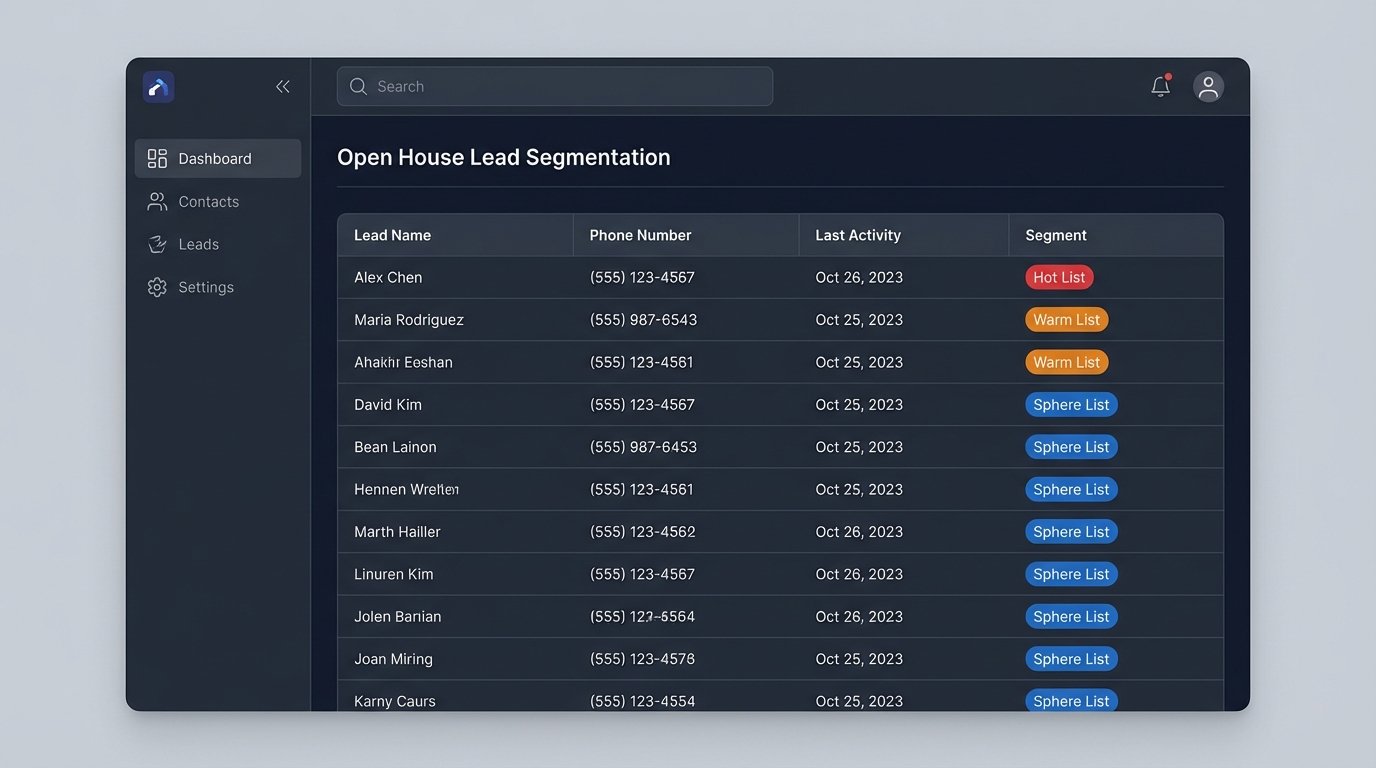
Building these lists is like sorting a pile of random nuts and bolts before starting a project. You can’t just grab and assemble. You must first verify every thread, check every size, and discard the stripped ones. Sending a blast to unsorted data is just creating more work and guaranteed failure down the line.
Step 2: Platform and API Configuration
Forget the all-in-one marketing suites with bloated interfaces. For this job, you want direct access to an SMS gateway via an API. Twilio is the 800-pound gorilla here for a reason: their documentation is usually accurate and their delivery infrastructure is solid. Plivo and Sinch are other options, but Twilio’s developer ecosystem is hard to beat.
The first step is to get your API keys and select a phone number. Your choice of number matters. You can get a standard 10-digit long code (10DLC), a toll-free number, or a short code. Short codes have the best delivery rates but are a wallet-drainer and involve a painful carrier approval process. For most open house scenarios, a 10DLC number that has been properly registered for A2P (Application-to-Person) messaging is the correct path. Failure to register your campaign will result in carriers aggressively filtering your messages.
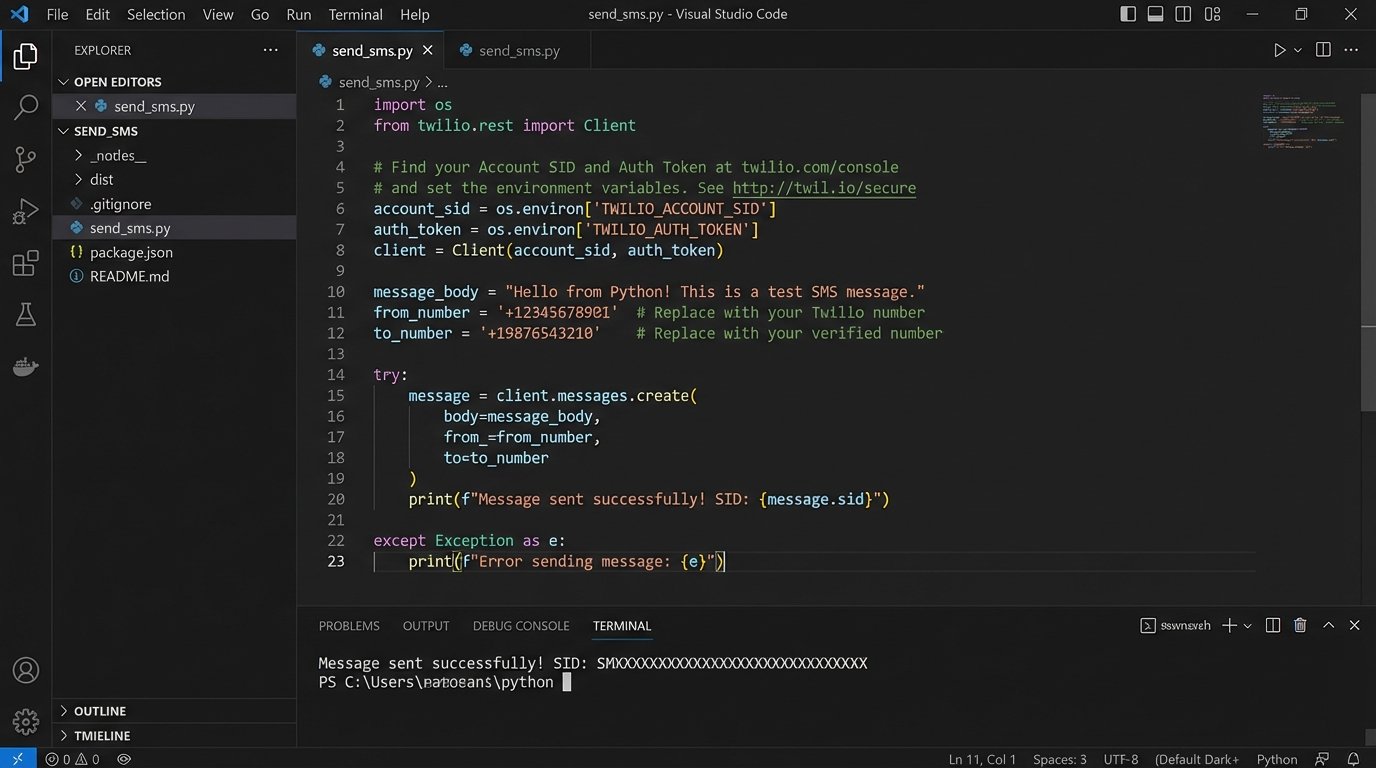
Your interaction with the API will be straightforward. You’ll make an HTTP POST request to a messages endpoint. The request body will contain the `To` number, the `From` number (your provisioned Twilio number), and the `Body` of the message. Here’s a barebones example using Python and the Twilio helper library, which abstracts the raw HTTP calls.
# Requires the Twilio Python helper library: pip install twilio
from twilio.rest import Client
import os
# Your Account SID and Auth Token from console.twilio.com
account_sid = os.environ.get("TWILIO_ACCOUNT_SID")
auth_token = os.environ.get("TWILIO_AUTH_TOKEN")
client = Client(account_sid, auth_token)
# The target number must be in E.164 format
target_number = "+15558675309"
# This must be a Twilio number you've purchased
twilio_number = "+15017122661"
message_body = "Open House Alert: 123 Main St, Anytown. This Sat 1-3PM. 3 bed/2 bath with new kitchen. See photos: https://bit.ly/xyz-photos. Reply STOP to unsubscribe."
try:
message = client.messages.create(
to=target_number,
from_=twilio_number,
body=message_body
)
print(f"Message sent. SID: {message.sid}")
except Exception as e:
print(f"Error sending message: {e}")
This script is simple, but it’s the core engine. You would wrap this logic in a loop that iterates through your segmented list, injecting the correct phone number for each API call. You also need to build in robust error handling. What happens if the API returns a 429 “Too Many Requests” error? You need to implement an exponential backoff strategy, not just crash the script.
Step 3: Engineering the Message Body
The content of the SMS is not creative writing. It’s a structured data payload with three objectives: inform, call to action, and comply. Every character counts because you’re constrained by the 160-character limit of a standard SMS segment. Going over that limit concatenates messages, which costs you more money.
A high-performance message body contains these elements, in order:
- The Hook: Immediately state the purpose. “Open House Alert:” or “New Listing Tour:”. No warm-up.
- The Critical Data: The address, day, and time. “123 Main St, this Sat 2-4PM.” Be unambiguous.
- The Value Prop: One compelling detail. “Recently remodeled kitchen.” or “Large backyard.” Pick one. Don’t write a novel.
- The Link: A shortened URL (using a service like Bitly or Rebrandly) to the property listing. This link MUST have UTM parameters appended to it (`?utm_source=sms&utm_campaign=openhouse_123main&utm_medium=blast`) so you can track click-throughs in your analytics platform. Not tracking this is operational malpractice.
- The Opt-Out: Non-negotiable. End every single initial message with “Reply STOP to unsubscribe.” This is a TCPA requirement and also prevents you from wasting money on annoyed leads.
Personalization is the next level. If your database has the lead’s first name, use it. A message that starts with “Hi John,” has a measurably higher engagement rate. You can achieve this by using f-strings in Python or whatever string interpolation method your language supports to inject the name into the message body template.
Just don’t get fancy. Emojis can cause rendering issues on older devices and may increase the likelihood of your message being flagged by carrier spam filters. Stick to plain text.
Step 4: Automation, Scheduling, and Rate Limiting
Sending 1,000 texts instantly is a terrible idea. Not only does it look like spam to carriers, but you also create an operational bottleneck for yourself if even 5% of those people reply with questions. The send process must be throttled and intelligently timed.
The optimal send window is typically mid-morning to early afternoon, Tuesday through Thursday. This is when people are in a work mindset but not so overwhelmed that they ignore notifications. Sending on a Monday morning is pointless. Sending on a Saturday morning is too late; they’ve already made plans.
Your automation script should not be a simple `for` loop. It needs a timing mechanism. A basic `time.sleep(1)` between each API call is a crude but effective rate limiter for small lists. For larger lists, you need a more sophisticated approach, like a task queue system (Celery with RabbitMQ or Redis). This allows you to feed all the messages into a queue, and have worker processes pull them off and send them at a controlled rate, for example, 10 messages per minute.
This architecture also provides resilience. If your script crashes halfway through a simple loop, how do you know who received the message and who didn’t? A task queue tracks the state of each job. You can easily see which tasks succeeded, which failed, and retry the failures without accidentally spamming the successful recipients.
Step 5: Architecting for Responses
The conversation doesn’t end at the send. People will reply. Most will be “STOP” requests, which your system must handle automatically. Others will be questions (“Does it have a garage?”) or RSVPs (“See you there!”). You cannot manage this manually at scale.
This is where webhooks come in. In your Twilio console, you configure the “A MESSAGE COMES IN” webhook for your number to point to an endpoint you control. This is a simple web server (built with Flask or Express, for example) that listens for POST requests from Twilio. When someone texts your number, Twilio hits your endpoint with a payload containing the sender’s number and their message.
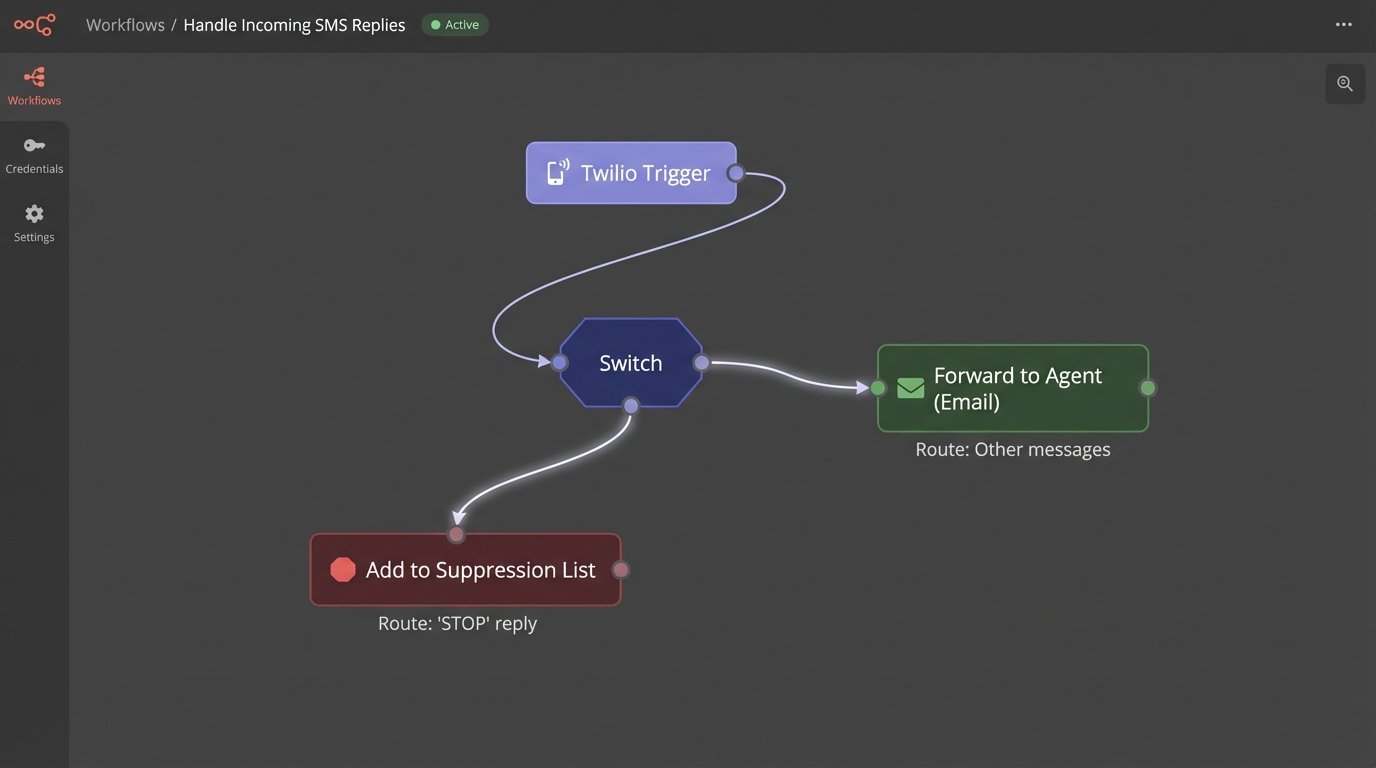
Your webhook logic needs to parse the message body and route it:
- Opt-Outs: If the message body is “STOP”, “UNSUBSCRIBE”, or a similar keyword, your code must immediately add that number to a suppression list in your database. You must never text that number again from this system. Automate this. No exceptions.
- Keywords: You can set up simple keywords. If someone replies “INFO”, you can trigger an auto-response with a more detailed property link.
- Fallbacks: If the message doesn’t match any keywords, forward it. The simplest way is to convert the SMS into an email and send it to the agent responsible for the listing. Include the sender’s number so the agent can reply directly.
This creates a closed-loop system. The blast goes out, and all inbound replies are automatically processed, logged, and routed without requiring you to stare at a phone screen. It turns a manual process into a defined, automated workflow.