Mistakes to Avoid When Automating Your Agent Calendar
Your automation just double-booked the company’s top agent for two different enterprise demos at the exact same time. One prospect is in London, the other in San Francisco. The agent is in Chicago. The system sent confirmations to both. This is not a theoretical exercise. It’s the predictable outcome of calendar automation built on happy-path assumptions instead of production-grade defensive logic.
Automating an agent’s calendar seems simple. You poll an API, map some fields, and create an event. The reality is a minefield of race conditions, faulty time zone conversions, and APIs that lie. Getting it wrong doesn’t just cause scheduling conflicts. It torches sales pipelines and erodes client trust before the first conversation even happens.
1. Relying on a Single Source of Truth That Isn’t True
Most scheduling systems operate on a simple premise: the agent’s primary calendar, usually Google Calendar or Outlook 365, is the definitive source of availability. Your automation reads free/busy blocks from it and presents open slots through a booking tool. The problem arises when a third or fourth system gets involved, like a CRM that can also book meetings or a marketing automation platform that schedules demos from a web form. Suddenly you have multiple systems writing events, often without talking to each other directly.
The result is a state management nightmare. A cancellation in the CRM might not propagate to the booking tool, leaving a slot open that is actually occupied by a rescheduled internal meeting. You must architect a clear hierarchy. Pick one system as the immutable ledger, the absolute source of truth. All other systems must perform a read-check against this master calendar before committing any write operation. Any attempt to bypass this check must fail loudly and trigger an alert.
Without this discipline, your calendars become a corrupted database.
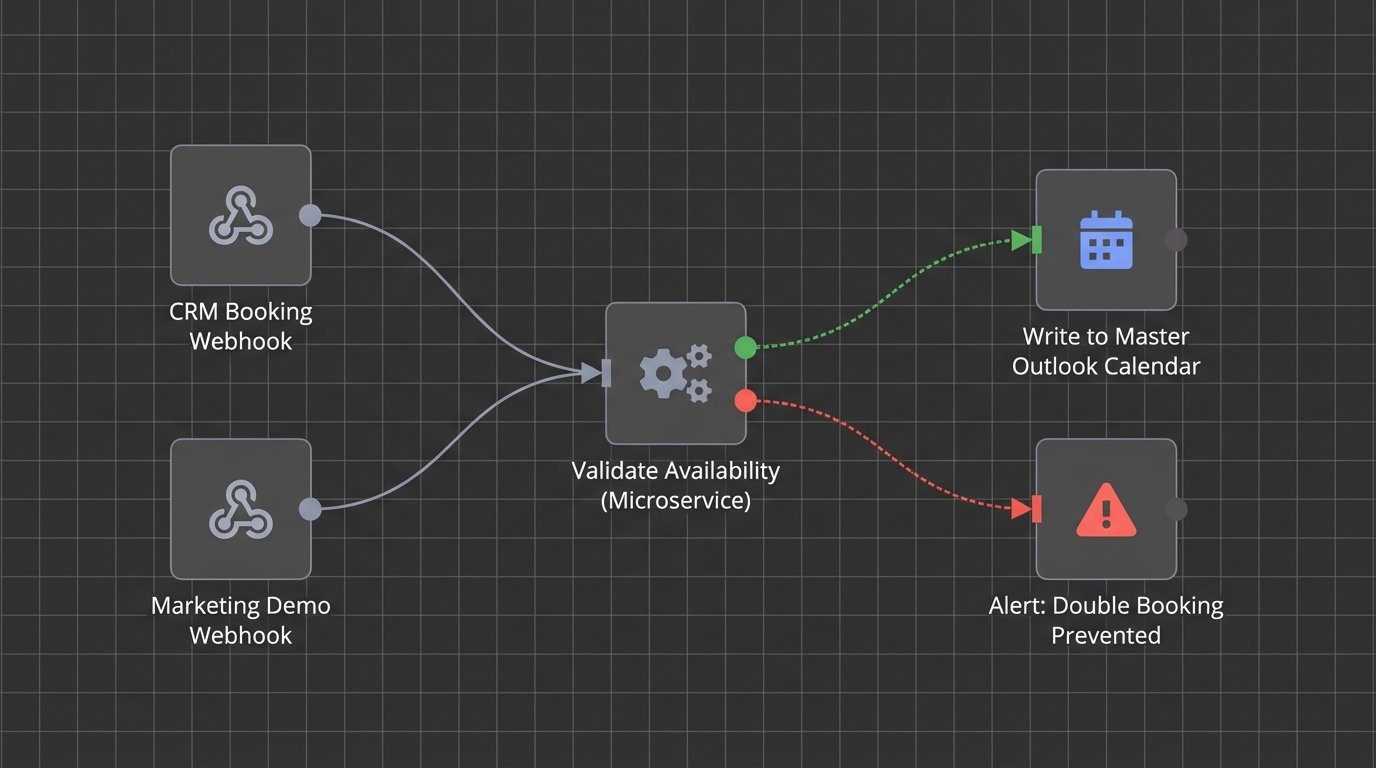
We once had a system where the CRM, the booking tool, and the agent’s personal calendar were all fighting for control. It was like watching three drivers grab a single steering wheel. The solution was to demote the CRM and booking tool to read-only status for availability checks. They could only propose an event. A separate, dedicated microservice was responsible for validating the slot against the master calendar (Outlook) and then performing the final write. This isolated the commit logic and stopped the data corruption cold.
2. Ignoring Time Zone Hell
Time zones are the number one killer of calendar integrity. The rookie mistake is to store event times in the local time zone of the agent or the client. A slightly more advanced mistake is to handle the conversion incorrectly, forgetting about the fun of Daylight Saving Time shifts that occur on different dates worldwide. An event scheduled for 9 AM GMT in March might suddenly shift to 8 AM GMT in April if the logic isn’t airtight.
There is only one sane way to handle this. Your backend logic, your database, and your APIs must operate exclusively in Coordinated Universal Time (UTC). All event times are received, processed, and stored as UTC timestamps. The conversion to a local time zone is a presentation-layer problem only. It happens at the last possible moment in the frontend UI, based on the user’s browser settings or explicitly stated preference. Any logic that touches a `DateTime` object must first strip its local context and force it into UTC.
Treating every timestamp as anything other than UTC is just asking for a 3 AM debugging session.
We encountered a bug where appointments in the first week of November were off by exactly one hour for all US-based clients. The European developer had hardcoded a conversion that didn’t account for the US ending DST a week after Europe. The system was correctly storing UTC, but a rogue function was applying a static offset before displaying it to the user. The fix was to gut that function and make the browser entirely responsible for rendering the UTC timestamp in the user’s local format. Never trust the server to know the user’s local time.
3. Building Monolithic Sync Jobs
A common architectural flaw is a single, massive cron job that runs every five minutes to “sync everything.” This job fetches all appointments, checks for changes, looks for new leads, processes cancellations, and sends reminders. When it works, it’s fine. When it fails, debugging is impossible. A single API error from one system can halt the entire process, leaving hundreds of records in a stale state. You have no idea if the failure happened during cancellation processing or new appointment creation.
This design is brittle. You need to break the logic down into smaller, independent, and idempotent functions. Create separate jobs for distinct operations.
- A `NewAppointmentSync` job that only looks for new events.
- A `CancellationSync` job that only processes cancellations or deletions.
- An `UpdateSync` job that only handles modifications to existing events, like time or attendee changes.
This decouples the operations. A failure in the update job doesn’t stop new appointments from being booked and synced correctly. It makes logs cleaner, alerts more specific, and recovery much faster. This approach is like building a ship with multiple watertight compartments instead of one giant hull. A breach in one section doesn’t sink the entire vessel.
It also allows you to set different polling frequencies. New appointments might need to sync every minute, while updates could be processed every ten minutes, reducing unnecessary API calls.
4. Blindly Trusting API Contracts and Ignoring Rate Limits
API documentation is often a work of fiction written years ago. You can’t assume an endpoint will behave as advertised, especially regarding error codes or payload structures. A `200 OK` status can still contain an error message in the response body. A field documented as a required integer might suddenly arrive as a null or a string. Your code must be deeply cynical and defensive.
Every API call should be wrapped in robust error handling that checks not just the HTTP status but also the structure of the returned data. If a critical key like `event_id` is missing from the payload, the operation must fail and be retried or escalated. Furthermore, every external service has a rate limit. A naive sync loop that hammers an API a thousand times a minute will get your IP address blocked. You must implement exponential backoff with jitter for retries. This strategy gracefully backs off when an API is unavailable or throttling requests, preventing a death spiral of failed calls.

Here is a bare-bones Python example of a retry decorator. It’s not production-ready, but it illustrates the core concept of waiting longer after each failure.
import time

import random
def retry_with_backoff(retries=5, backoff_in_seconds=1):
def rwb(f):
def wrapper(*args, **kwargs):
attempts = 0
while attempts < retries:
try:
return f(*args, **kwargs)
except Exception as e:
print(f"Attempt {attempts + 1} failed: {e}")
attempts += 1
sleep_time = (backoff_in_seconds * 2 ** attempts +
random.uniform(0, 1))
time.sleep(sleep_time)
raise Exception(f"All {retries} attempts failed.")
return rwb
@retry_with_backoff(retries=3, backoff_in_seconds=2)
def get_calendar_events(api_client):
# This function would contain the actual API call
print("Attempting to fetch data...")
# Simulate a potential failure
if random.choice([True, False]):
raise ConnectionError("API endpoint unavailable")
return {"status": "success", "data": []}
# Example usage
try:
events = get_calendar_events(None)
print(events)
except Exception as e:
print(e)
This simple logic prevents your automation from behaving like a denial-of-service attack against your own vendors.
5. Forgetting Idempotency with Webhooks
Using webhooks instead of polling is more efficient, but it introduces a different set of problems. A core principle of distributed systems is that a webhook can and will be delivered more than once. Network timeouts, server acknowledgments, and retry logic on the sending service can result in your endpoint receiving the same `event.created` payload two or three times in quick succession. If your code simply inserts a new record into the database every time it receives a POST request, you will create duplicate appointments.
Your webhook handler must be idempotent. This means that processing the same request multiple times has the same effect as processing it just once. The standard method is to check for the existence of a record before creating it. When you receive a webhook for a new appointment, use the unique `event_id` from the source system to query your database. If an appointment with that external ID already exists, your code should return a `200 OK` success response without performing any action. This acknowledges receipt of the webhook and prevents the sender from retrying, but it protects your data from duplication.
Assuming "at-most-once" delivery for a webhook is a recipe for data corruption.
6. Mismanaging Lock Contention on Shared Resources
Lock contention is a subtle but destructive problem in high-volume scheduling. Imagine two potential clients trying to book the last available slot with a popular agent at the same millisecond. Process A reads the slot as "available." Simultaneously, Process B reads the same slot as "available." Process A writes the booking and confirms. One millisecond later, Process B, unaware of Process A's action, also writes the booking. You now have a double-booked agent because of a classic race condition.
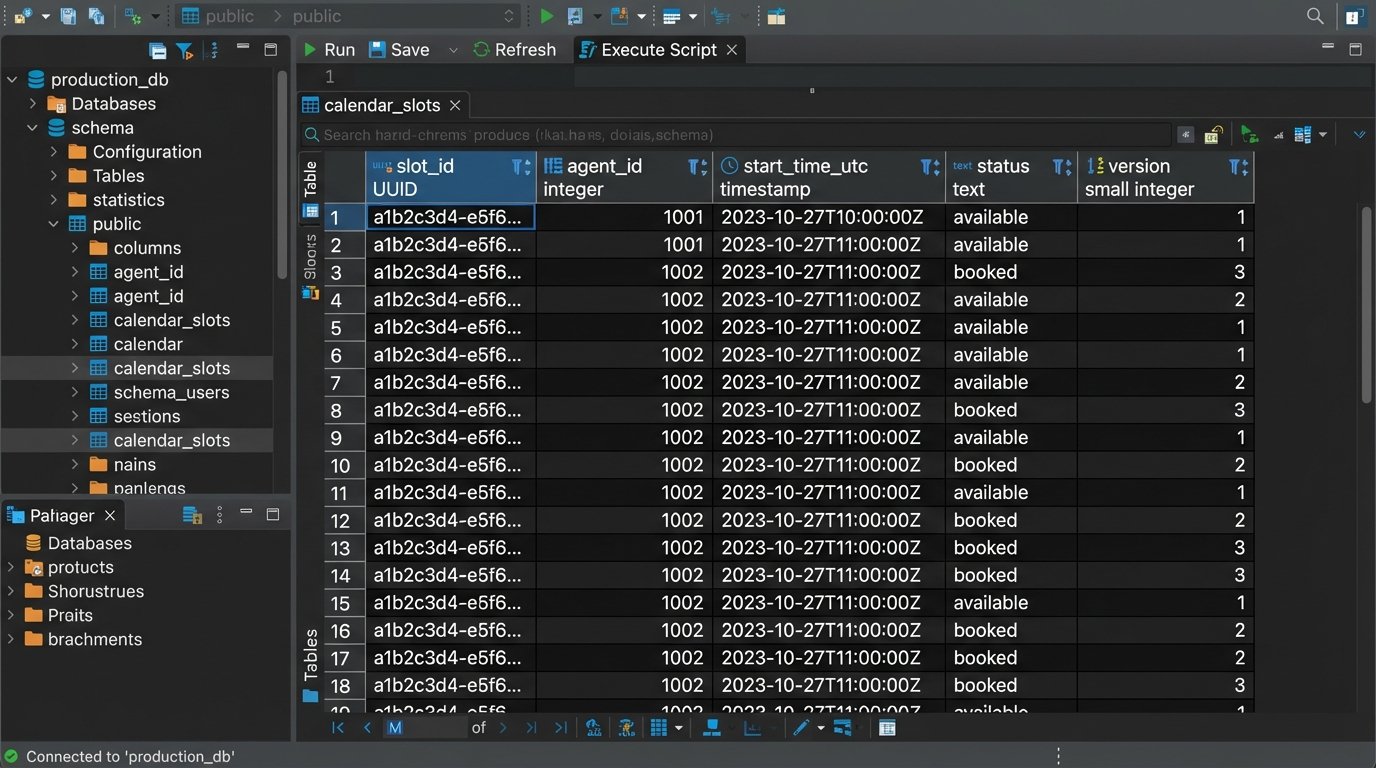
This requires a locking mechanism. You can use pessimistic locking, where you lock the calendar slot record in the database the moment a user starts the booking process. No other process can write to that record until the first transaction is complete or times out. This is safe but can be slow and lead to poor user experience if a user abandons the booking process without releasing the lock. A better approach is often optimistic locking. Each calendar slot record has a version number. When a process reads the slot, it also reads the version number. When it attempts to write the booking, the `UPDATE` query includes a `WHERE` clause checking if the version number is unchanged. If another process has modified the record in the meantime, its version number will have been incremented, causing the second process's `UPDATE` to fail. The application can then catch this failure, inform the second user that the slot was just taken, and force them to refresh and pick a new time.
Ignoring this is like letting two people edit a document without any version control. You are guaranteed to overwrite someone's work.