The Revenue Leak: Last-Minute Gaps in Your Schedule
Every late cancellation punches a hole in the day’s revenue. An empty 2 PM slot for a service provider isn’t just a break, it’s a permanent loss of billable time. Manual rescheduling is a joke. It involves frantic phone calls and email chains that rarely fill the gap before it’s passed. The core operational failure is latency between the cancellation event and the notification to a potential replacement.
The problem isn’t the cancellation itself. People get sick, projects get delayed. The problem is the information lag. We have the technology to shrink that lag from hours to milliseconds, yet most businesses still rely on a receptionist manually checking a spreadsheet. This is an automation problem, not a personnel problem.
Architecture of the Fix: Webhooks, Logic, and Action
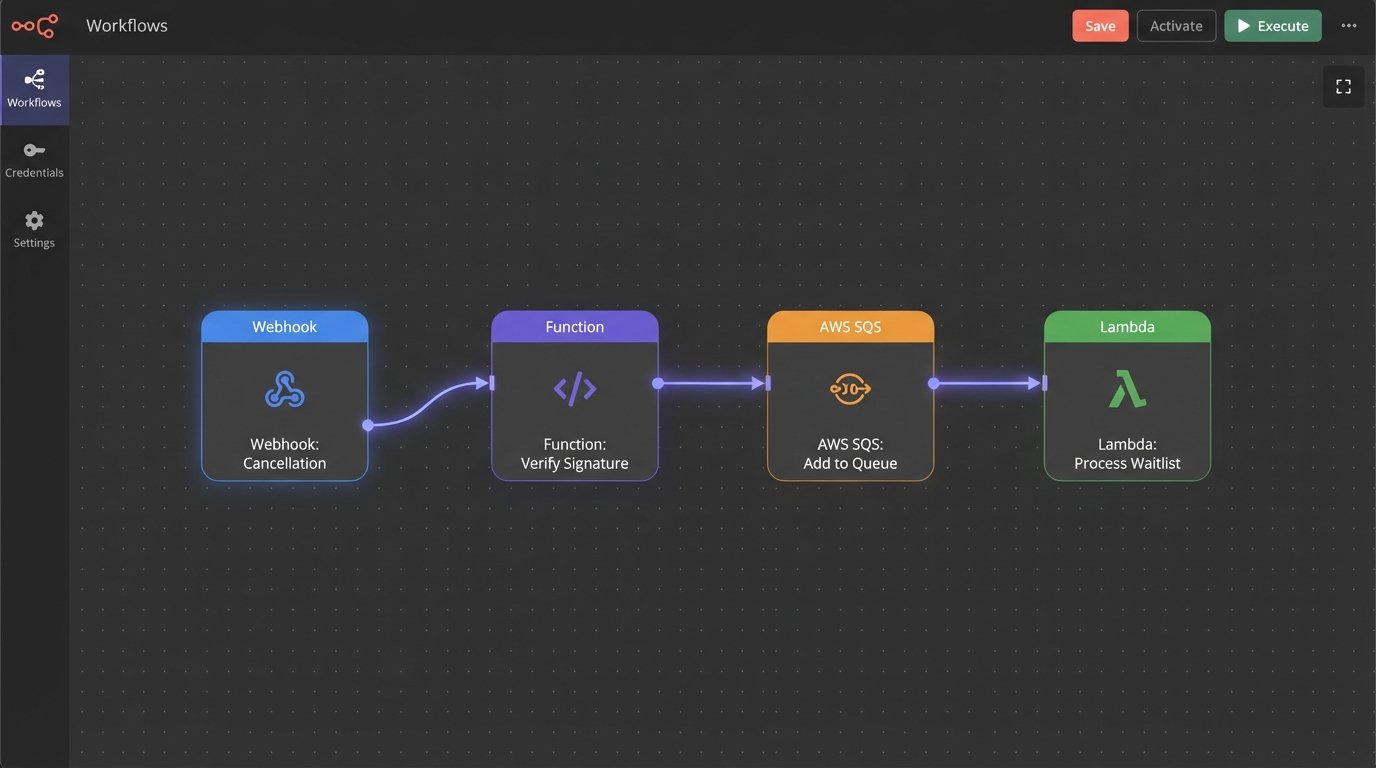
A functional automated waitlist system is not a single piece of software. It’s a chain of discrete services forced to talk to each other. You need three core components: an event trigger, a logic processor, and a notification dispatcher. The scheduling platform (like Acuity or Calendly) fires a webhook on cancellation. A serverless function or a small service ingests this payload, queries a dedicated waitlist datastore, and then instructs a communication API to contact the next eligible person.
This isn’t a plug-and-play appliance. You build it, you own it, and you fix it when it breaks at 10 PM on a Friday.
The entire process must be idempotent. If your webhook receiver fires twice due to a network hiccup from the source, your logic must be smart enough not to offer the same slot to two different people. State management is non-negotiable. You need to know if an offer has been sent, if it has been viewed, and if it has been accepted or ignored.
Forget thinking about this as a single script. Treating each waitlist notification as a discrete job in a queue is critical. Trying to process the entire waitlist in one monolithic transaction is like trying to inspect a jet engine by listening to it from a mile away. You need granular control and status tracking for each step.
Step 1: The Trigger Mechanism and Webhook Ingestion
The entire sequence starts with the scheduling platform’s webhook. When an appointment is cancelled, it fires an HTTP POST request to an endpoint you control. This payload is your source of truth. It contains the appointment ID, the cancelled timestamp, the service type, and the practitioner or resource that is now free. Your first job is to build a small, ruthlessly efficient API endpoint to catch this data.
Security is the first checkpoint. Any public endpoint will be scanned and probed. Verify the webhook’s signature. Most reputable services (like Stripe, GitHub, and decent scheduling platforms) sign their webhook payloads, usually with an HMAC-SHA256 signature passed in the headers. You use a shared secret to compute your own signature from the raw body and logic-check if it matches theirs. If it doesn’t match, you drop the request with a 403 Forbidden. No exceptions.
Once validated, your endpoint should do two things immediately: shove the raw, validated payload into a queue (like AWS SQS or RabbitMQ) and return a 200 OK response to the scheduling platform. Do not perform any heavy processing synchronously. The webhook provider has a short timeout, and if you make it wait while you query databases and send emails, it will assume your endpoint is dead and retry, creating duplicate events you now have to de-duplicate.
Here is a stripped-down example of a cancellation payload. The exact structure will vary, but the core data points are always there.
{
  "event_type": "appointment.cancelled",
  "event_timestamp": "2023-10-27T14:30:00Z",
  "data": {
    "appointment_id": "appt_12345xyz",
    "calendar_id": "cal_provider_A",
    "service_id": "serv_consult_60min",
    "start_time": "2023-10-28T10:00:00Z",
    "end_time": "2023-10-28T11:00:00Z"
  }
}
This JSON blob is all your downstream logic needs to identify the open slot and find a replacement.
Step 2: The Logic Core and Waitlist Datastore
The message from the queue is picked up by your core logic processor, which is ideally a serverless function (AWS Lambda, Google Cloud Function) to avoid paying for idle servers. This processor is the brain. Its job is to take the cancelled slot information and find the best candidate from the waitlist.
This requires a datastore for the waitlist itself. You have two primary options: a relational database like PostgreSQL or a key-value store like Redis. A SQL table is simple, reliable, and persistent. You can easily query for users wanting a “serv_consult_60min” with “cal_provider_A” and order them by the date they joined the waitlist (FIFO). The downside is speed. It’s not slow, but it’s not instant.
Redis is the high-performance option. Using a sorted set, you can store waitlist entries with their join timestamp as the score. This makes pulling the next person in line a single, sub-millisecond `ZPOPMAX` or `ZRANGE` operation. The risk with Redis is data persistence if not configured correctly. It’s a wallet-drainer if you need a fully managed, replicated instance, but for this use case, the speed can be worth the cost and complexity.

The logic must handle the most common failure mode: a race condition. What if you offer the slot to Person A, but before they can accept, your system decides to offer it to Person B? You must implement a locking mechanism. When you offer a slot, you write a record to the database or a key in Redis like `offer_lock:appt_12345xyz` with a short TTL (Time to Live), say 10 minutes. Your logic must always check for this lock before making a new offer for the same slot.
A simple Python function stub for this logic might look something like this:
def find_and_notify_candidate(cancelled_slot_info):
    slot_id = cancelled_slot_info['data']['appointment_id']

    # Check for an existing lock to prevent double-booking
    if redis_client.exists(f"offer_lock:{slot_id}"):
        print(f"Slot {slot_id} is already offered. Aborting.")
        return False

    # Find the next eligible person from the waitlist (FIFO)
    # This assumes a sorted set in Redis named 'waitlist:serv_consult_60min'
    service_id = cancelled_slot_info['data']['service_id']
    waitlist_key = f"waitlist:{service_id}"
    candidate = redis_client.zrange(waitlist_key, 0, 0) # Get the oldest entry

    if not candidate:
        print("Waitlist is empty. Nothing to do.")
        return False

    candidate_id = candidate[0].decode('utf-8')

    # Send notification via Twilio/SendGrid (not shown)
    # ... send_sms(candidate_id, "A slot is open!") ...

    # Set the lock with a 10-minute expiry
    redis_client.set(f"offer_lock:{slot_id}", candidate_id, ex=600)
    print(f"Offered slot {slot_id} to {candidate_id}. Lock acquired.")

    return True
This code is simplified. A production version needs far more robust error handling, but it demonstrates the core “check-lock-offer” sequence.
Step 3: The Action and Confirmation Loop
Sending the notification is not the end of the process. It’s the beginning of a new one. You need to provide the user with a simple, one-click way to accept the slot. This means generating a unique, secure URL that embeds the necessary information (like the slot ID and the user ID). When the user clicks this link, it hits another endpoint you control.
This confirmation endpoint’s job is to:
- Validate the token in the URL to prevent abuse.
- Check the lock again. Did someone else beat them to it? Has the 10-minute offer expired?
- If the lock is valid and held for this user, use the scheduling platform’s API to book the appointment.
- On a successful booking, delete the lock and remove the user from the waitlist.
- Send a final confirmation message.
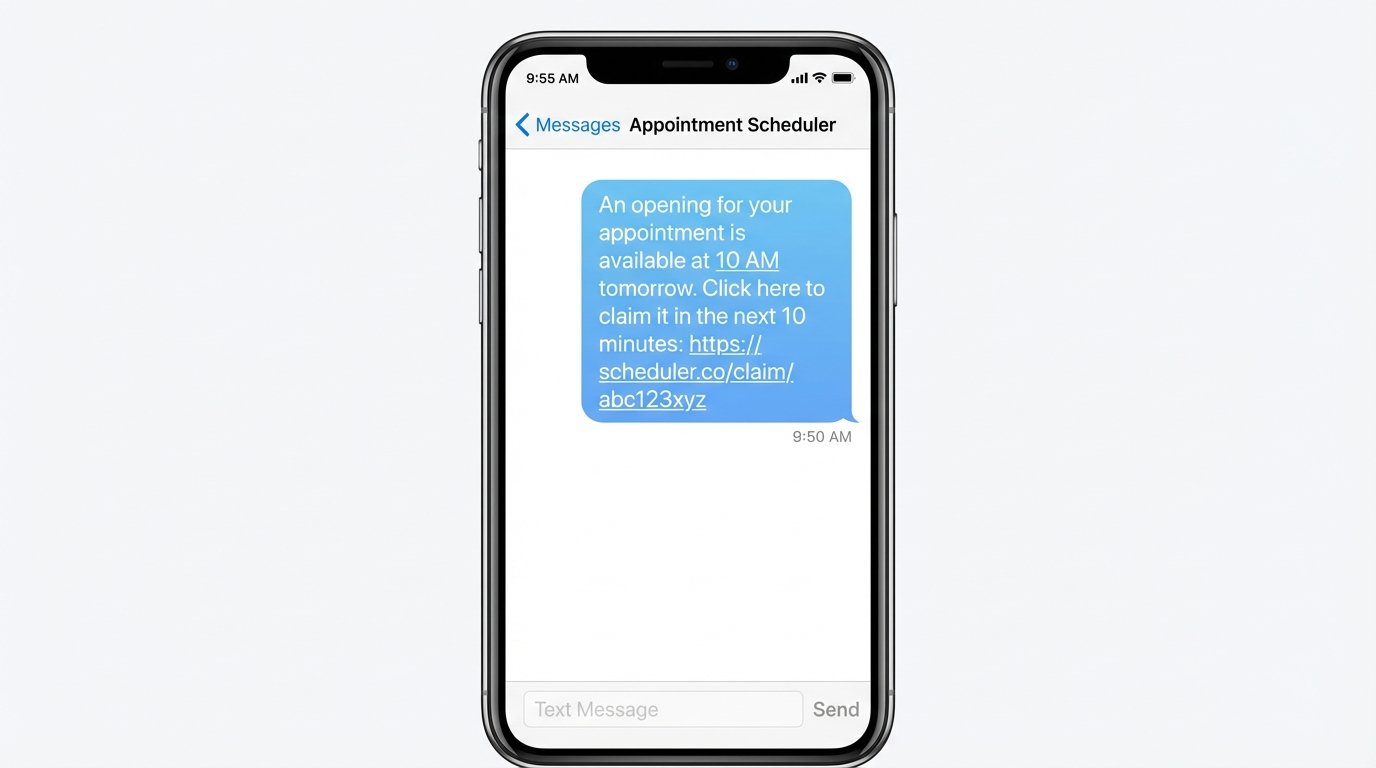
Communication should be direct and fast. SMS via an API like Twilio is superior to email for this. An email might sit in an inbox for an hour. An SMS notification creates urgency. The message should be brutally simple: “An opening for your appointment is available at 10 AM tomorrow. Click here to claim it in the next 10 minutes: [unique_url]”.
What if the user ignores the message? The Redis key’s TTL handles this automatically. After 10 minutes, the lock expires. You need a separate cleanup process or a cron job that checks for expired offers. When it finds one, it triggers the main logic function again to offer the slot to the next person on the list. This creates a cascading notification chain until the slot is filled or the waitlist is exhausted.
Reality Check: Costs and Failure Points
This system is not free. Every component has a cost. API calls to Twilio cost fractions of a cent per SMS. Serverless function invocations are cheap but add up. A managed Redis instance can be surprisingly expensive. You are trading a manual, unpredictable process for a predictable, automated operational expense. For a business with high-value appointments, the ROI is obvious. For a low-margin operation, the cost might be prohibitive.
You also have to monitor the system. You need dashboards and alerts. What happens if your scheduling platform changes its API or webhook payload structure without telling you? Your system breaks. What happens if your notification provider’s API goes down? Your offers never get sent. An automated system requires automated monitoring. If you build this and don’t watch it, it will eventually fail silently, leaving you with the same empty slots you started with.