
Problem: Your Support Queue is a Graveyard of Repetitive Tickets
The promise of chatbots was a world free from answering “How do I reset my password?” ten thousand times a day. The reality is a support queue still clogged with these exact questions, but now with an added layer of user frustration. Your bot, designed to be a shield, has become a colander. It catches the easy stuff and lets the slightly-more-complex, yet still repetitive, queries flood your human agents. This is not an operational failure. It is an architectural one.
Most commercial bot platforms are built on rigid intent-matching systems that are fundamentally brittle. They rely on exact keyword matches or simple pattern recognition that shatters the moment a user misspells a word or uses an unexpected synonym. You end up with a bot that can only answer a question if it’s phrased in one of the five ways you painstakingly programmed it to understand. The result is a high deflection rate for the first week, followed by a plateau of mediocrity as the system fails to adapt to how real people actually talk.
The logs tell the story. A sea of “I’m sorry, I don’t understand” followed by an immediate escalation to a human agent who then types out the one-sentence answer that was sitting in the knowledge base the entire time. This is more than inefficient. It’s a resource drain that actively burns out your support team and generates a dataset of failure logs that is almost completely useless for retraining your static intent model.
Deconstructing the Failure: Brittle Intents and Static Knowledge
The core of the problem lies in two areas: how the bot understands the question and where it gets the answer. The standard approach uses a fixed set of intents. You define an `intent_PasswordReset` and feed it a dozen example phrases. This system is a house of cards. It has no concept of semantic meaning. To this kind of bot, “password help” and “login trouble” are two entirely different universes unless you explicitly bridge them.
This forces your team into a constant, unwinnable battle of adding more and more example phrases to each intent, bloating the model until it starts misclassifying queries due to overlapping keywords. You are manually mapping a tiny fraction of a vast linguistic landscape. It’s a sluggish, manual process that will always be three steps behind your users.

The second failure point is the static knowledge source. Most bots are wired up to a simple FAQ list or a set of hardcoded responses. When information changes, an engineer has to go into the bot’s backend and manually update the text. This creates a dangerous lag between the source of truth (your actual documentation or knowledge base) and the information your bot provides. You end up with a bot confidently giving out-of-date instructions to already-annoyed users.
This architecture is fundamentally flawed because it treats conversation as a predictable, linear path. It’s not. It’s chaotic. A proper solution stops trying to script the chaos and instead builds a system to interpret it in real time.
The Fix: An Architecture for Dynamic Query Interpretation and Retrieval
Stop thinking about building a “chatbot.” Start thinking about building a deflection engine. The goal is not to mimic human conversation. The goal is to accurately classify a user’s intent and retrieve a correct answer from a dynamic source of truth. If it cannot, it must escalate cleanly with full context. This requires a different set of components.
This model moves the bot from being a static library of canned responses to a lean interpreter that sits between the user and your live knowledge systems. It doesn’t need to know the answer to every question. It just needs to know how to find it.
Component 1: Intent Classification via Semantic Search
Throw out your keyword-based intent model. The only way to handle the sheer variance of human language is to operate on meaning, not on specific words. This means using sentence embeddings. Models like Sentence-BERT or Universal Sentence Encoder convert a user’s query into a high-dimensional vector, a numerical representation of its semantic meaning. You do the same for every title or summary of your knowledge base articles.
When a query comes in, the engine converts it to a vector. Then, instead of looking for keyword matches, it performs a vector search (calculating cosine similarity) against your pre-computed knowledge base vectors. The top result is your most likely answer. This approach finds that “login trouble” is semantically very close to your “Password Reset Guide” article, even though they share zero keywords.
This completely bypasses the need to manually define hundreds of training phrases for every single intent. Your knowledge base *is* your training data.
Here is a dead-simple Python example using the `sentence-transformers` library to show the principle. This is not production code. This is the logic you need to build on.
from sentence_transformers import SentenceTransformer, util
# Load a pre-trained model. This happens once on startup.
model = SentenceTransformer('all-MiniLM-L6-v2')
# Your KB articles. In reality, you'd pull these from an API and cache them.
knowledge_base = [
"How to reset your account password.",
"Updating your billing information.",
"Tracking the status of your shipment.",
"Our company's return policy."
]
# Pre-compute embeddings for your KB. This should also be cached.
kb_embeddings = model.encode(knowledge_base, convert_to_tensor=True)
# A new user query arrives.
user_query = "where is my package"
query_embedding = model.encode(user_query, convert_to_tensor=True)
# Compute cosine similarity between the query and all KB articles.
cosine_scores = util.cos_sim(query_embedding, kb_embeddings)
# Find the best match.
best_match_index = cosine_scores.argmax()
best_score = cosine_scores[0][best_match_index]
best_answer = knowledge_base[best_match_index]
print(f"Best match found: '{best_answer}' with a score of {best_score:.4f}")
This logic-checks the user’s need against your actual documentation. The bot’s intelligence is now directly tied to the quality of your KB, not the patience of your developers.
Component 2: A Headless Knowledge Base
Your knowledge base can no longer be a fire-and-forget content dump. It must function as an API. The deflection engine needs a clean, reliable endpoint to query for content. This means your Confluence, Zendesk Guide, or custom CMS needs to be able to serve structured content on demand. Connecting a bot directly to a messy, undocumented internal database is like trying to hydrate yourself by drinking directly from a fire hydrant. You get a lot of water, but most of it hits you in the face and none of it goes where you want.
The bot should query this API with the ID of the best-matched article from the vector search. The API should return a structured JSON object containing the answer, maybe with separate fields for a title, a summary, and a full-body response. This decouples the bot’s presentation layer from the content source. When a support agent updates an article, the change is live for the bot instantly. No developer intervention. No deployment cycle.
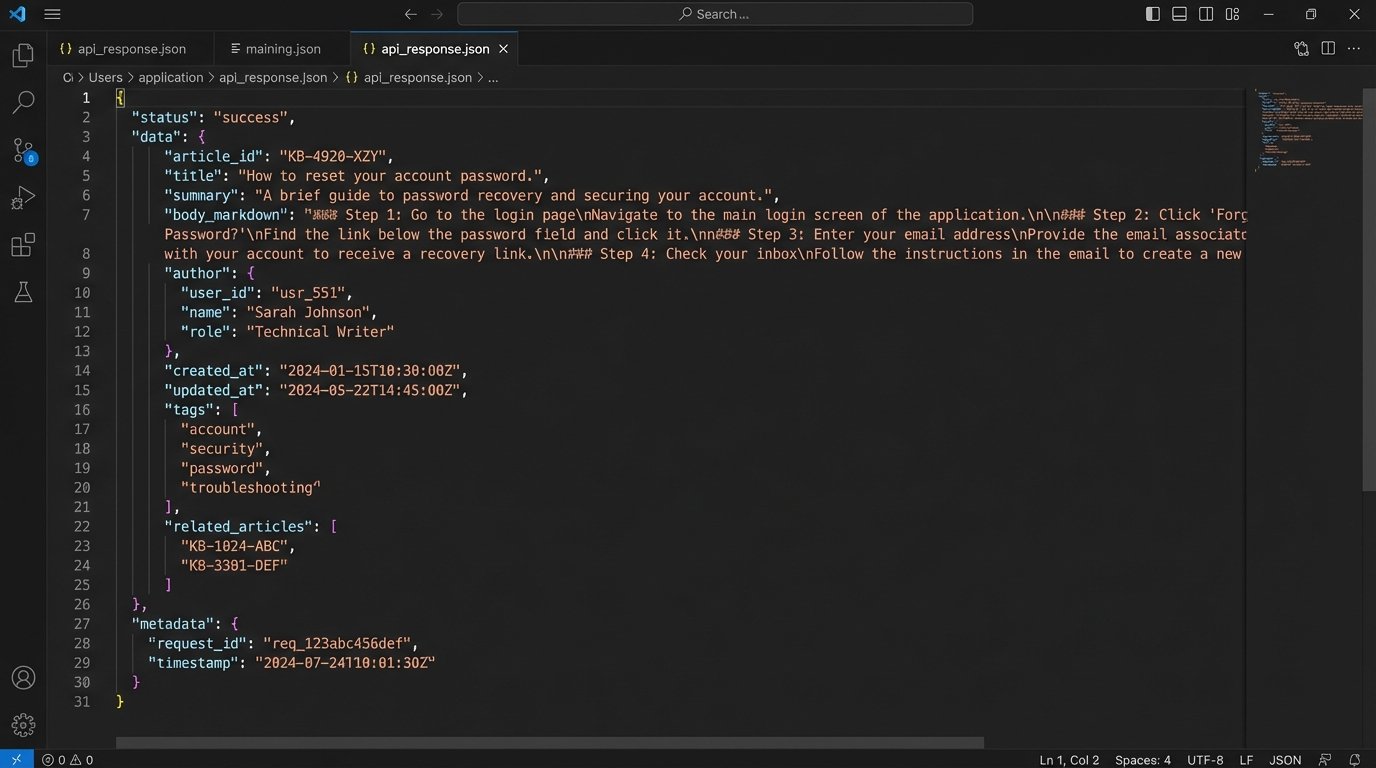
This approach introduces a new dependency. The KB is now a production system. Its API latency directly impacts the user’s chat experience. You need monitoring, caching strategies, and an agreement with the content team that they can’t just change the API schema on a whim. The upside is a system that stays current. The downside is more system integration work upfront.
Component 3: The Logic-Gated Escalation
No automated system is perfect. The key is to fail gracefully. In our architecture, the vector search returns a similarity score between 0 and 1. You must define a confidence threshold. If the top-scoring article has a similarity score below, for example, 0.80, the bot should not attempt to answer. An incorrect answer is far more damaging than no answer.
Below this threshold, the system must trigger an escalation. But it should not be a “dumb” escalation. The payload passed to the human agent’s platform (like LiveChat or Intercom) must be rich with context. It should be a JSON object containing:
- The full conversation history.
- The user’s original query that failed the threshold.
- The top 3 potential KB matches and their low confidence scores.
- Any available user metadata (e.g., user ID, account type).
This arms the human agent with immediate context. They don’t start with “Hello, how can I help?”. They start with “I see you were asking about your package. Let me pull up the tracking details for you.” This transforms the escalation from a complete failure into a slightly bumpy but still informed handoff.
Component 4: A Feedback Loop That Actually Works
The final, and most critical, component is the feedback loop. This is what prevents the system from stagnating. When an agent takes over an escalated chat, they solve the user’s problem. Your support platform needs a mechanism to capture the correct resolution.
This could be a simple dropdown menu in the agent’s interface where they select the correct KB article that answered the user’s question. This piece of data, the pairing of the user’s original query with the agent-confirmed correct KB article, is gold. It is the perfect training data for improving your system.
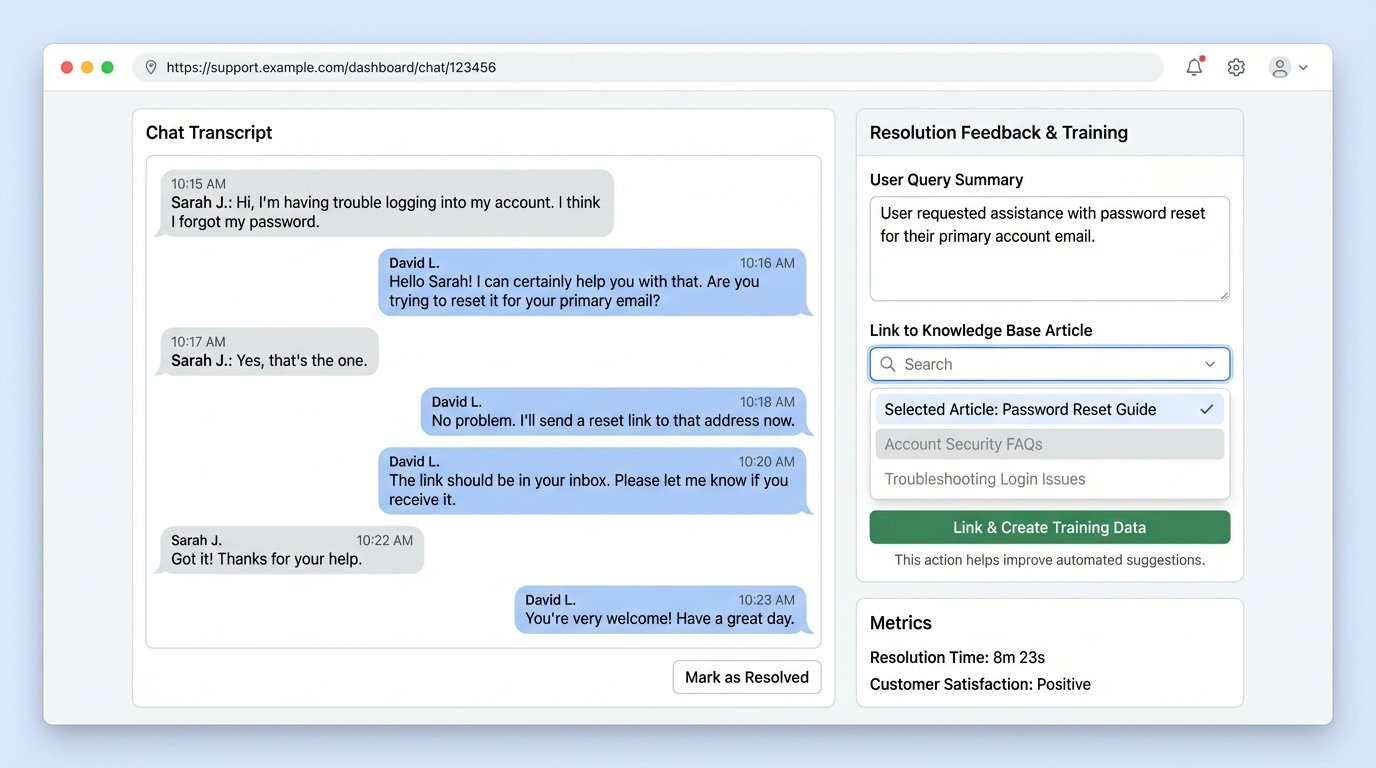
These confirmed pairs should be piped into a separate database or log stream. Periodically, you can use this data to fine-tune your sentence-embedding model or identify gaps in your knowledge base. If you see dozens of escalations where agents are repeatedly pointing to the same article, that’s a signal. It indicates your model is failing to map certain user phrasing to that article. You can use this data to create a smaller, high-quality dataset for fine-tuning your embedding model to better understand your specific domain’s jargon.
This turns your support team from a simple backstop into an active part of the automation pipeline. They are no longer just fixing the bot’s mistakes. They are generating the exact data needed to prevent those mistakes from happening again.
This architecture is not a simple plug-and-play solution. It requires engineering effort to integrate a vector database, build an API layer for your knowledge base, and instrument your support tools to capture feedback. The payoff is a system that scales with your documentation, adapts to your users, and treats your human agents’ time as the valuable, finite resource it is.