Stop Relying on Off-the-Shelf Schedulers That Leak Revenue
Every missed appointment is a quantifiable loss. The SaaS tools that promise to solve this are black boxes. They offer minimal control over logic, fail silently, and their integration points are often brittle. When they break, you get to submit a support ticket and wait. Building your own reminder system isn’t about reinventing the wheel. It’s about forging a tool you can trust, debug, and scale on your own terms.
The core problem is state management. Most out-of-the-box solutions are glorified alarm clocks. They fire and forget. A real system needs to know if a reminder was sent, if it was delivered, and what the client did next. This requires a persistent, auditable log of every action taken for every appointment. Without that, you’re just creating noise, not value.
The Architectural Blueprint: Source, Logic, and Dispatch
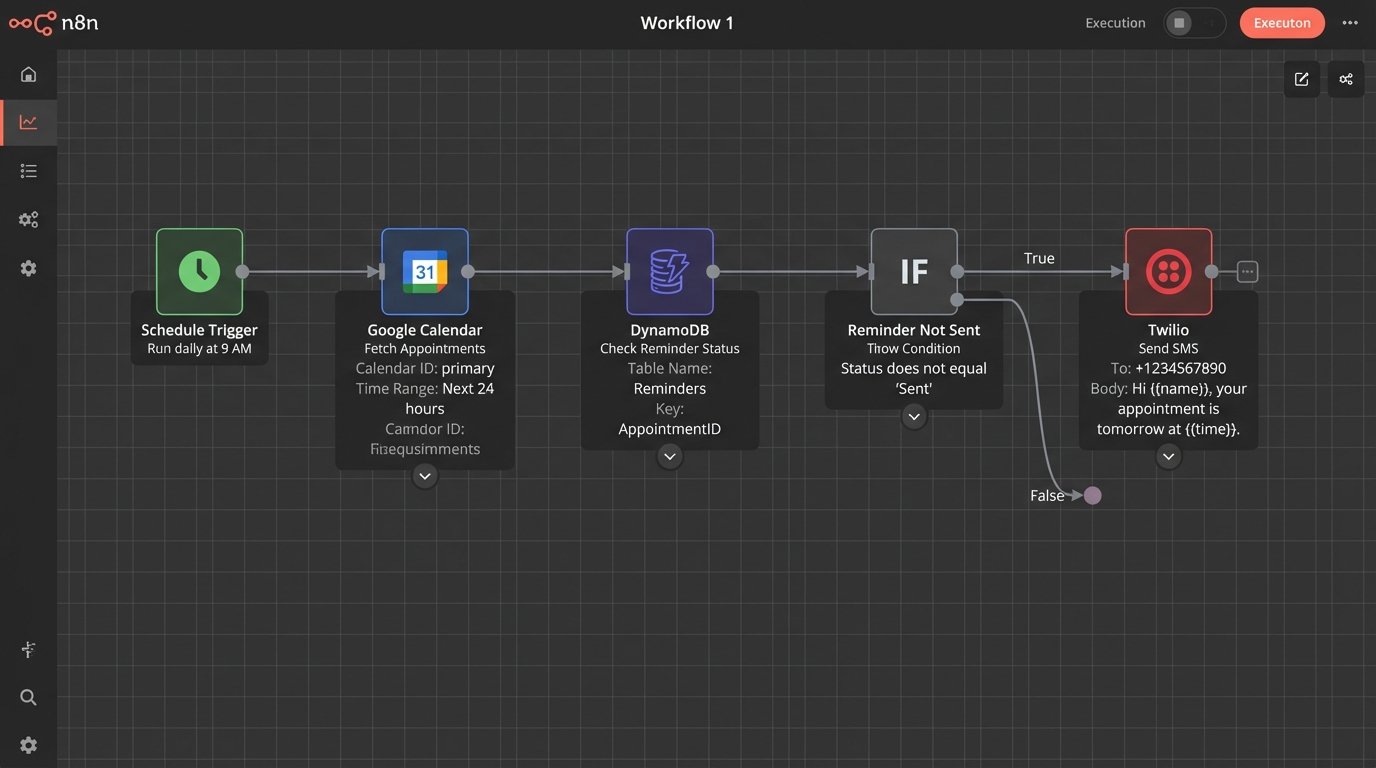
Forget complex diagrams. The system breaks down into three fundamental components. First, a source of truth for appointment data. This is likely a CRM API or a shared calendar like Google Calendar or Outlook. Second, a stateless execution environment to house the core logic. This is where a cloud function (AWS Lambda, Google Cloud Functions) fits perfectly. Third, a dispatch service to handle the actual communication, typically via SMS or email.
We are not building a monolithic application on an EC2 instance. Relying on a single cron job is like balancing your entire production environment on a toothpick. A serverless function triggered by a scheduler (like AWS EventBridge or Google Cloud Scheduler) gives you resilience and eliminates the need to manage infrastructure. The function wakes up, does its job, and goes back to sleep. It’s cheap and durable.
The flow is linear: The scheduler triggers the function. The function queries the data source for appointments within a specific future window. It cross-references these appointments with a state database (like DynamoDB or Firestore) to filter out any for which reminders have already been sent. For the remaining appointments, it formats a message and pushes it to a dispatch service like Twilio. Finally, it records the “sent” status back into the state database.
Prerequisites: The Bill of Materials
Before writing a line of code, you need to provision the right tools and secure the necessary credentials. This isn’t the fun part, but skipping it means you’ll hit a wall later. Get these sorted first.
- Data Source Access: You need API keys for your source of truth. If it’s Google Calendar, this means setting up a service account in GCP, enabling the Calendar API, and exporting the JSON credentials. For a CRM like Salesforce, you’ll need to create a connected app to get your OAuth credentials.
- Communication Gateway: Sign up for an account with a programmable communications provider. Twilio is the standard for SMS for a reason. Get your Account SID, Auth Token, and provision a phone number. For email, SendGrid or Mailgun are solid choices.
- Execution Environment: A cloud account with AWS, GCP, or Azure. We will focus on a serverless model, so you need permissions to create functions, schedulers, and a simple key-value database.
- State Database: A NoSQL database is ideal for this. AWS DynamoDB or Google Firestore are built for this exact use case. You need a simple table to store an appointment ID and the status of reminders sent for it. This prevents double-sending when the function inevitably runs more than once.
Step 1: Ingesting Appointment Data
Your reminder system is only as good as its data source. The first technical challenge is extracting appointment information reliably. You have two primary patterns for this: polling or webhooks. Polling involves querying the API on a schedule, for example, “give me all appointments for tomorrow.” It’s simple to implement but inefficient. You risk hitting API rate limits and your system’s freshness is limited by your polling interval.
Webhooks are superior. The source system sends you a payload of data in real-time whenever an appointment is created or updated. This is event-driven and far more efficient. The downside is that it requires you to expose a public HTTP endpoint to receive the webhook, which brings security and uptime responsibilities. For this guide, we’ll stick to polling because it’s a universal starting point, even if it’s less elegant.
Here is a raw example of how you might strip event data from the Google Calendar API using Python. This is not production code. It lacks proper error handling, but it shows the core mechanics of authenticating with a service account and pulling events within a time window.
from google.oauth2 import service_account

from googleapiclient.discovery import build

import datetime
# --- Configuration ---
SERVICE_ACCOUNT_FILE = 'path/to/your/credentials.json'
SCOPES = ['https://www.googleapis.com/auth/calendar.readonly']
CALENDAR_ID = 'your-calendar-id@group.calendar.google.com'
# --- Authentication ---
creds = service_account.Credentials.from_service_account_file(
SERVICE_ACCOUNT_FILE, scopes=SCOPES)
service = build('calendar', 'v3', credentials=creds)
# --- Fetching Events ---
now = datetime.datetime.utcnow().isoformat() + 'Z' # 'Z' indicates UTC time
events_result = service.events().list(
calendarId=CALENDAR_ID,
timeMin=now,
maxResults=50,
singleEvents=True,
orderBy='startTime'
).execute()
events = events_result.get('items', [])
if not events:
print('No upcoming events found.')
for event in events:
start = event['start'].get('dateTime', event['start'].get('date'))
summary = event['summary']
# You would extract attendee phone numbers from the description or extended properties
print(f"{start} - {summary}")
The critical part is parsing the data you get back. You need the event start time, a unique event ID, and the client’s contact information. Often, that contact info is buried in a description field, which means you’ll have to write some brittle regex to extract it. This is a common point of failure.
Step 2: The Logic Core and State Machine
The heart of this system is a function that decides *if* and *what* to send. This function should be idempotent, meaning running it multiple times with the same input produces the same result. This is why a state database is not optional. Before processing an appointment, the function must first query your DynamoDB or Firestore table: “Have I already sent a 24-hour reminder for appointment ID `evt-12345`?” If the answer is yes, it skips that event entirely.
Treating each reminder as a stateless transaction is a trap. You need a state machine, a persistent memory, otherwise you’re just an alarm clock that occasionally yells the wrong time into the void. Your state table might be brutally simple: a primary key of `appointment_id` and attributes like `sent_24hr_reminder_timestamp` and `sent_1hr_reminder_timestamp`.
The logic inside your cloud function would follow this sequence:
- Fetch all appointments in the next 25 hours.
- For each appointment, calculate the time until the event.
- Logic Check 1 (24-hour reminder): If time is between 23 and 24 hours, query the state table for `appointment_id`.
- If no 24-hour reminder has been sent, construct the message payload and add it to a dispatch queue.
- Upon successful queuing, write `sent_24hr_reminder_timestamp: NOW()` to the state table for that `appointment_id`.
- Logic Check 2 (1-hour reminder): Repeat the process for appointments between 55 and 65 minutes away.
This prevents the classic failure case where a function timeout or minor bug causes it to re-run and spam a client with duplicate reminders. The state table is your single source of truth for communication actions.

Step 3: Templating and Dispatching the Message
Hard-coding message strings inside your function logic is a direct path to maintenance headaches. When marketing wants to change the wording from “Your appointment is confirmed” to “We look forward to seeing you,” you shouldn’t have to redeploy code. Abstract your message content into simple templates.
The function’s job is to populate the template with dynamic data: client name, appointment time, location. Then, it constructs an API request to your chosen gateway. For Twilio, sending an SMS is a straightforward POST request. You provide your credentials, the sender number, the recipient number, and the message body.
A sample payload to the Twilio API looks like this. It’s just a simple HTTP POST with a few key parameters.
import os

from twilio.rest import Client
# --- Twilio Credentials (loaded from environment variables) ---
account_sid = os.environ.get('TWILIO_ACCOUNT_SID')
auth_token = os.environ.get('TWILIO_AUTH_TOKEN')
twilio_phone_number = os.environ.get('TWILIO_PHONE_NUMBER')
client = Client(account_sid, auth_token)
def send_sms_reminder(recipient_phone_number, message_body):
try:
message = client.messages.create(
to=recipient_phone_number,
from_=twilio_phone_number,
body=message_body
)
print(f"Message sent. SID: {message.sid}")
return True, message.sid
except Exception as e:
print(f"Error sending SMS: {e}")
return False, str(e)
# --- Example Usage in your main function ---
# send_sms_reminder("+15558675309", "Hi Jenny, this is a reminder for your showing at 123 Main St tomorrow at 2:00 PM.")
A critical detail is error handling. The `try…except` block is not optional. The Twilio API could be down, the phone number could be invalid, or your credentials might have expired. Your function must catch these failures, log them aggressively, and ideally push the failed job to a dead-letter queue for later inspection. A failed reminder should be a high-priority alert.
Step 4: Closing the Loop with Inbound Responses
Sending a one-way blast of reminders is an amateur system. A professional one handles replies. When a client responds with “CONFIRM,” “CANCEL,” or “RESCHEDULE,” your system should be able to process that input and take action. This transforms your tool from a simple notifier into a genuine automation workflow.
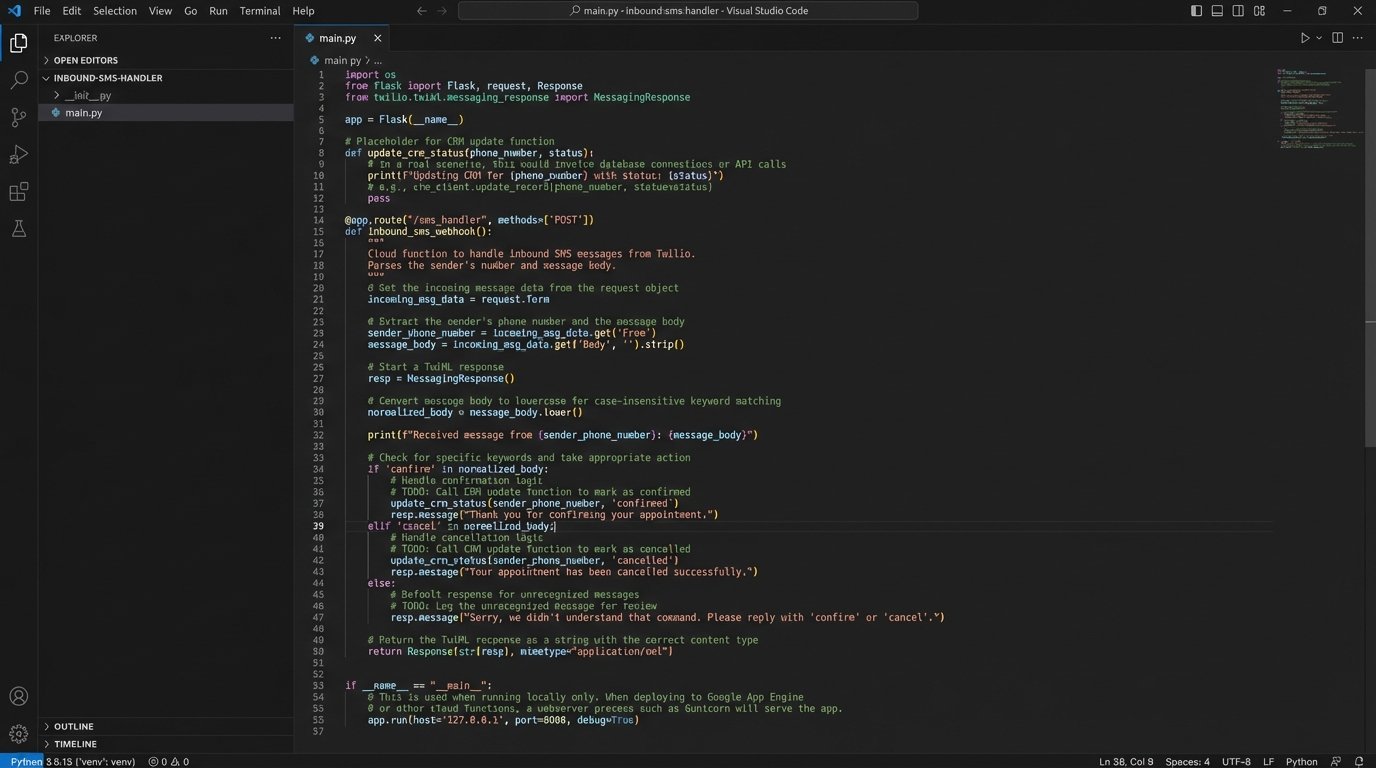
This requires configuring a webhook in your communications gateway. In Twilio, you can point a phone number’s “When a message comes in” setting to your own public API endpoint. This endpoint, likely another cloud function, will receive a payload from Twilio every time someone texts your number. The payload contains the sender’s number and the message body.
Parsing inbound SMS replies without strict pattern matching is like trying to catch specific fish with a giant net. You’ll get what you want, but you’ll also get a lot of boots, seaweed, and angry crabs you have to sort through. Your inbound processing logic needs to be defensive. Look for simple keywords. Sanitize the input by converting it to lowercase and stripping punctuation. “cancel” and “Cancel.” should be treated identically.
Once you’ve identified intent, you need to map the client’s phone number back to an active appointment and then update the source of truth. This could mean calling the CRM API to change the appointment status to “Canceled” or adding a note that says “Client confirmed via SMS.” This is the most complex part of the system, but it delivers the highest value.
The final architecture is a durable, event-driven system that you fully control. It’s more work upfront than paying for a SaaS subscription, but it doesn’t have mysterious outages or arbitrary limits. You can log every decision it makes, handle failures gracefully, and extend its logic to meet any new business requirement without waiting for a feature request to be approved. It’s a system built for the operational realities of the job.