A high-end legal consultancy came to us with a balance sheet problem disguised as a scheduling issue. Their client no-show rate was hovering at 22%. For a firm charging four figures per session, this was a catastrophic revenue leak. Their existing process was a joke, relying on a junior paralegal making manual confirmation calls from a shared Google Sheet. The calls mostly went to voicemail, and the sheet was a swamp of inconsistent data entry.
The core failure wasn’t laziness. It was a broken, human-dependent workflow fighting a battle of attrition it couldn’t win. Emails were ignored, landing in spam folders or lost in the noise of a busy executive’s inbox. Voicemails were a relic of a bygone era. The operational drag was significant, with hours wasted each week chasing ghosts. We needed to inject a layer of automation that was direct, impossible to ignore, and required minimal client effort.
The Initial Diagnosis and Technical Stack
The firm used a popular, off-the-shelf booking platform. Its primary weakness was a rigid, one-way notification system. It sent a single confirmation email upon booking, and that was it. No reminders, no mechanism for a client to confirm their attendance, nothing. The first step was to crack open its API documentation to see what data we could pull and, more importantly, how often.
We selected a straightforward stack. A Python script running on a small AWS EC2 instance would act as the logic core. We chose Twilio for the SMS gateway due to its reliable delivery and clean API. The entire system was designed to be lean, avoiding the overhead of a heavy framework. The goal was to build a purpose-built bridge between their booking system and their clients’ pockets.
Wrestling with a Deficient API
The booking platform’s API was clearly an afterthought. The documentation was sparse and outdated. Crucially, it lacked webhooks. This meant we couldn’t get real-time notifications for new or modified appointments. We were forced to build a polling mechanism, a brute-force approach that queried their API every five minutes for changes. Polling their API for updates was like checking a mailbox every five minutes for a letter you know is coming sometime today. It’s inefficient, state-management is a headache, and you’re just burning cycles waiting.
This introduced immediate complexity. We had to build a local state management system, likely using a simple SQLite database, to track which appointments had already been processed. Each poll would pull the appointment list for the next 48 hours, diff it against our local database, and identify new entries to inject into the notification sequence. This is a fragile architecture, entirely dependent on the uptime and performance of a third-party API we didn’t control.

Data sanitation was the next fight. Phone numbers were a mess. We received formats like `(555)-123-4567`, `555.123.4567`, and sometimes just `1234567` for local numbers. We wrote a stripping function to remove all non-numeric characters and then applied logic to prepend the country code based on client records. Without this aggressive data cleaning, a significant percentage of our API calls to Twilio would have failed outright.
Building the Multi-Touch SMS Sequence
A single reminder is just a single point of failure. We designed a three-stage sequence to confirm client intent. Each stage had a specific purpose, moving the client from passive awareness to active confirmation. The entire system pivots on getting a direct response.
Stage 1: Immediate Booking Confirmation
The moment our polling script detects a new appointment, it triggers the first SMS. This message is simple and informational. It serves to instantly validate the booking and set the expectation for future communication via this channel. The message format was rigid to prevent confusion.
"Confirmation from [Firm Name]: Your consultation is scheduled for [Date] at [Time]. You will receive a reminder 24 hours prior."
This small step conditions the client to recognize and trust messages from our number. It’s a digital handshake.
Stage 2: The 24-Hour Confirmation Request
This is the most critical message in the sequence. Twenty-four hours before the scheduled time, a second SMS is sent. This one is different. It demands a response, converting a passive notification into an active engagement. The client must signal their intent.
"Reminder from [Firm Name]: Your appointment is tomorrow at [Time]. Please reply C to confirm or call our office at [Number] to reschedule."
We deliberately chose not to automate the rescheduling part. Building a back-and-forth rescheduling bot is a complex project in itself. Forcing a phone call for rescheduling creates a small amount of friction, discouraging frivolous changes while ensuring high-intent clients get the help they need from a human operator. The goal is efficiency, not a fully autonomous front desk.
Stage 3: The 1-Hour Final Nudge
For clients who replied ‘C’ to the 24-hour reminder, a final message is sent 60 minutes before their appointment. This message acts as a last-minute buffer against simple forgetfulness, traffic, or other day-of distractions. It reduces the chance of a confirmed client becoming an accidental no-show.
"See you soon. Your appointment with [Firm Name] is in one hour at our offices."
This message is not sent to unconfirmed clients. Sending it would be noise and could create a false sense of confirmation. The logic must be strict: only confirmed appointments get the final nudge.
The Technical Glue: Processing Inbound Replies
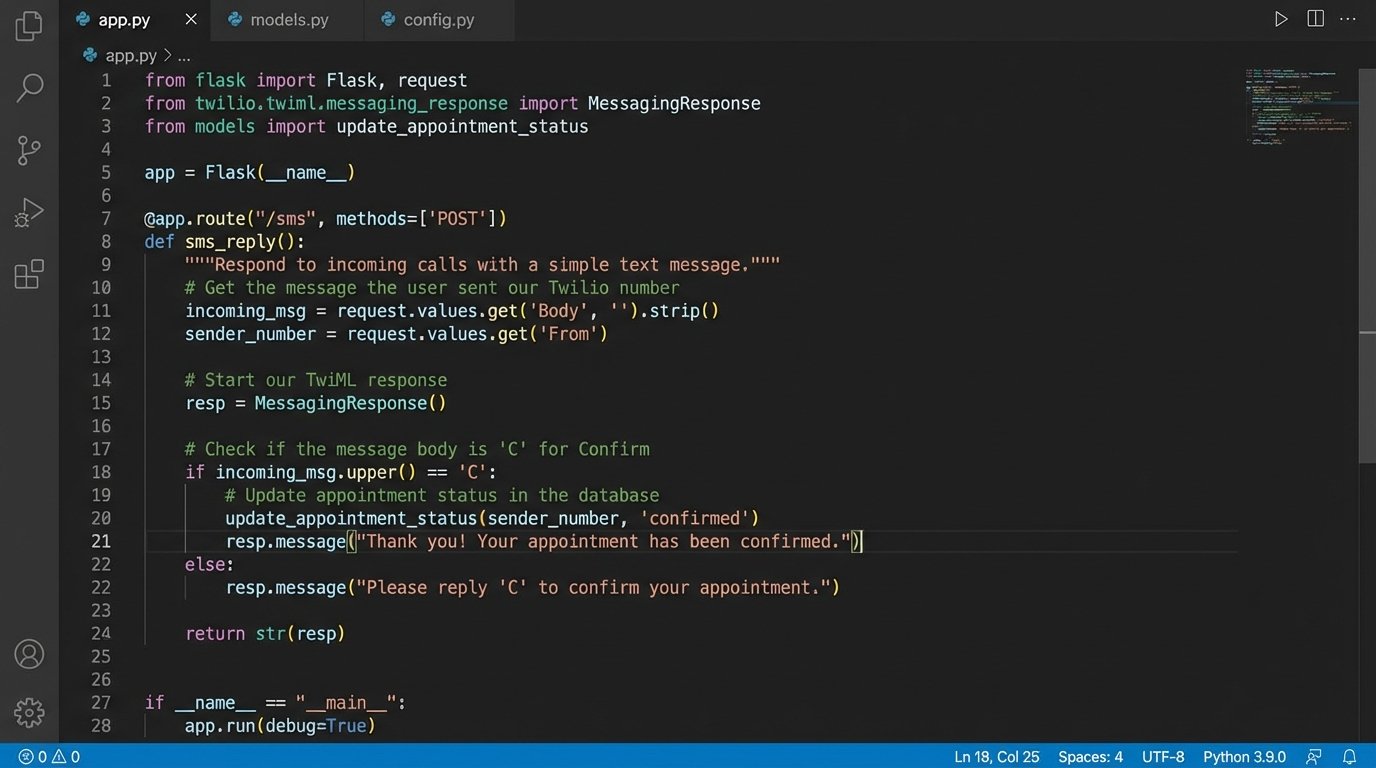
Sending messages is the easy part. The real work is in processing the replies. We configured a webhook in Twilio to point to a specific endpoint on our EC2 instance. We used a lightweight Python web framework like Flask to listen for incoming POST requests from Twilio. Every time a client replied, Twilio would hit our endpoint with a payload containing the sender’s number and their message body.
The script would then execute a simple logic check. It would strip the message of whitespace, convert it to uppercase, and check if it was ‘C’. If it was, the script would use the booking platform’s API to update a custom field on the appointment record, tagging it as ‘Confirmed’. This tag was visible to the front desk staff, giving them a real-time view of the day’s schedule. Any other reply triggered a notification in a dedicated Slack channel for manual review.
Here is a simplified Python snippet showing the core Flask route that handles the incoming webhook from Twilio.
from flask import Flask, request

from twilio.twiml.messaging_response import MessagingResponse

import re
# This is a conceptual example. Production code requires error handling,
# authentication, and a proper database lookup.
app = Flask(__name__)
def update_appointment_status(phone_number, status):
# Pseudo-code for your database/API update logic
# 1. Find the appointment associated with this phone_number.
# 2. Call the booking system's API to update the status.
print(f"Updating status for {phone_number} to {status}")
# In reality, this would be an API call, e.g.,
# booking_api.update_appointment(phone_number, {'status': status})
return True
@app.route("/sms", methods=['POST'])
def sms_reply():
"""Processes incoming SMS replies from clients."""
inbound_msg = request.values.get('Body', '').strip().upper()
phone_number = request.values.get('From', '')
# Sanitize the phone number to a standard format
clean_number = re.sub(r'\D', '', phone_number)
response = MessagingResponse()
if inbound_msg == 'C':
# The user confirmed their appointment.
update_appointment_status(clean_number, 'Confirmed')
response.message("Thank you for confirming. We look forward to seeing you.")
else:
# For any other response, trigger a manual review.
# This could be a Slack message, email, etc.
# Here we just send a generic response.
response.message("If you need to reschedule, please call our office directly.")
return str(response)
if __name__ == "__main__":
app.run(debug=True)
This code is the brain of the two-way communication. It’s simple, but it’s what separates a basic notification system from a true confirmation loop. The lack of a complex chatbot was a feature, not a bug. It kept the system predictable and forced complex issues to a human who could solve them.
Results, Revenue, and Painful Lessons
The results were immediate and severe. Within the first month, the client no-show rate dropped from 22% to 7%. After three months of operation, it stabilized at 4%. This single automation reclaimed 18% of their top-line revenue that was previously being lost to empty chairs. The monthly cost for the EC2 instance and Twilio messaging was trivial, resulting in an ROI that made the firm’s partners extremely happy.
The project recovered an estimated $15,000 in monthly billable hours. The operational savings were also significant. The paralegal assigned to confirmation calls was re-tasked to more valuable work, freeing up nearly 10 hours of paid time per week. Client feedback was positive, with many commenting on the convenience of the text-based system.

It was not a flawless deployment. In the first week, a timezone bug in our script caused a batch of 24-hour reminders to be sent at 2 AM. This was a fast and embarrassing fix. We also ran into an issue where a major mobile carrier began filtering our messages as spam. We had to switch from a standard long-code number to a dedicated short code, which had a higher monthly cost but guaranteed deliverability. These are the real-world frictions that never show up in the sales pitch for an automation platform.
The system works because it respects the user’s context. People see and react to texts. By injecting a simple, automated confirmation loop directly into that channel, we fixed a massive revenue leak with a few hundred lines of code and a robust API gateway. It’s a reminder that the most effective automation is often the simplest and most direct.