The Scheduling Black Hole in Real Estate
A typical real estate agent’s calendar is a warzone. The primary revenue-generating activities, showing properties and closing deals, are constantly interrupted by low-value, high-volume requests for scheduling. Every lead from Zillow, their own website, or a referral kicks off a tedious back-and-forth of emails and text messages to find a time. The average agent was losing over ten hours a week to this manual churn. This wasn’t an inconvenience. It was a direct bleed on commission.
The core problem is latency. A lead that has to wait four hours for a reply has likely already contacted three other agents. The first agent to get a viewing on the calendar usually gets the client. The brokerage we worked with identified a direct correlation between response time and lead conversion. Their internal data showed a 40% drop-off in engagement if a lead wasn’t contacted within the first hour. This was the fire we were hired to put out.
Initial State: A Failing System of Manual Triage
The existing process was a joke. Leads would fill out a web form. This action would trigger an email notification to a general inbox. A rotating-shift administrative assistant was supposed to monitor this inbox, manually check the relevant agent’s calendar, and then initiate contact with the lead. The entire system was brittle, dependent on human availability, and slow. The average time from lead submission to first human contact was 3.5 hours on a good day.
This setup created massive data silos. The lead information sat in an email server. The agent’s availability was locked inside a Google or Outlook calendar. The conversation history was fragmented across SMS and email threads. There was no central state, no audit trail, and zero automation. It was a perfect recipe for dropping leads and burning out staff. We weren’t just fixing a process. We had to build a centralized nervous system from scratch.
Architecture of the Solution: Beyond a Simple Chatbot
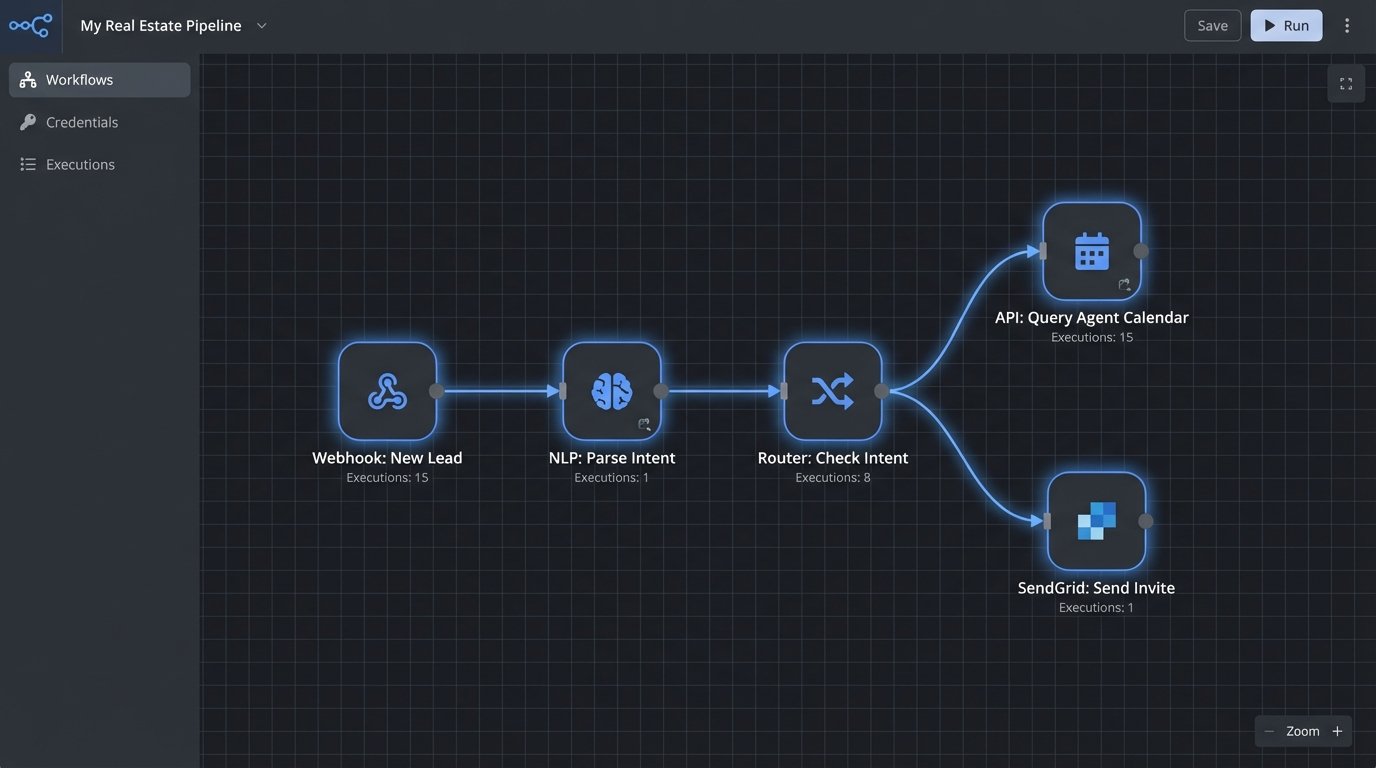
Plugging in a generic, off-the-shelf chatbot was never going to work. Those things are glorified FAQ machines. We needed a system that could handle intent, manage state across multiple channels, and directly manipulate external systems like calendars and CRMs. Our solution was a multi-component pipeline designed to intercept, process, and act on leads in under 60 seconds.
The system was built on a foundation of event-driven services. It wasn’t one monolithic application. It was a collection of specialized functions that handed off tasks to one another. This design choice was deliberate. It allowed us to swap out components, like the NLP engine or the SMS provider, without having to refactor the entire codebase. It also meant we could scale individual parts of the system that were under heavy load, like the lead ingestion endpoint, without touching the calendar sync logic.
Component 1: The Ingestion Engine
First, we had to unify the lead sources. We built a single API endpoint to serve as the front door for all incoming leads. We then configured webhooks from the various real estate portals and the agency’s own contact forms to post a JSON payload to this endpoint. This immediately decoupled the lead sources from our processing logic. If Zillow changed their payload format tomorrow, we’d only have to update one adapter, not the entire system.
This initial payload contained the raw text from the user, like “I’d like to see 123 Main St sometime this week,” along with contact information. The ingestion engine’s only job was to validate the data, assign a unique session ID, and push the message into a processing queue. Using a queue like RabbitMQ or AWS SQS here was critical. It prevents lead loss during traffic spikes and allows the downstream services to process messages at their own pace. Trying to process everything synchronously would have been a disaster.
Component 2: NLP and Intent Parsing
Once a message hit the queue, a worker pulled it and fed it to the Natural Language Processing layer. This is where the machine intelligence lives. We used a pre-trained model fine-tuned on real estate-specific language. Its job was to perform two key functions: intent classification and entity extraction. The model had to determine if the user wanted to schedule a viewing, ask a question about a property, or was just sending junk.
If the intent was “schedule_viewing,” the model then had to extract entities. It would strip out key data points like the property address, requested dates (“tomorrow,” “Friday”), and times (“after 5 pm,” “around noon”). This is far more complex than simple keyword matching. The system has to understand that “next Tuesday evening” is a specific block of time. This component converted unstructured human language into a structured JSON object that the rest of the system could use. This is the part of the system that feels like magic to outsiders but is really just a series of matrix multiplications. Trying to do this with regex would be like performing surgery with a sledgehammer.
Component 3: The Calendar Abstraction Layer
This was the biggest headache. The brokerage had agents using Google Calendar, and the corporate office was on Microsoft 365. These two services do not play well together. We had to build an abstraction layer that provided a single, unified interface for checking availability and booking appointments, regardless of the underlying calendar provider. This layer handled the OAuth 2.0 authentication flows and the management of refresh tokens for each agent. It was a mess of API calls, error handling, and timezone conversions.
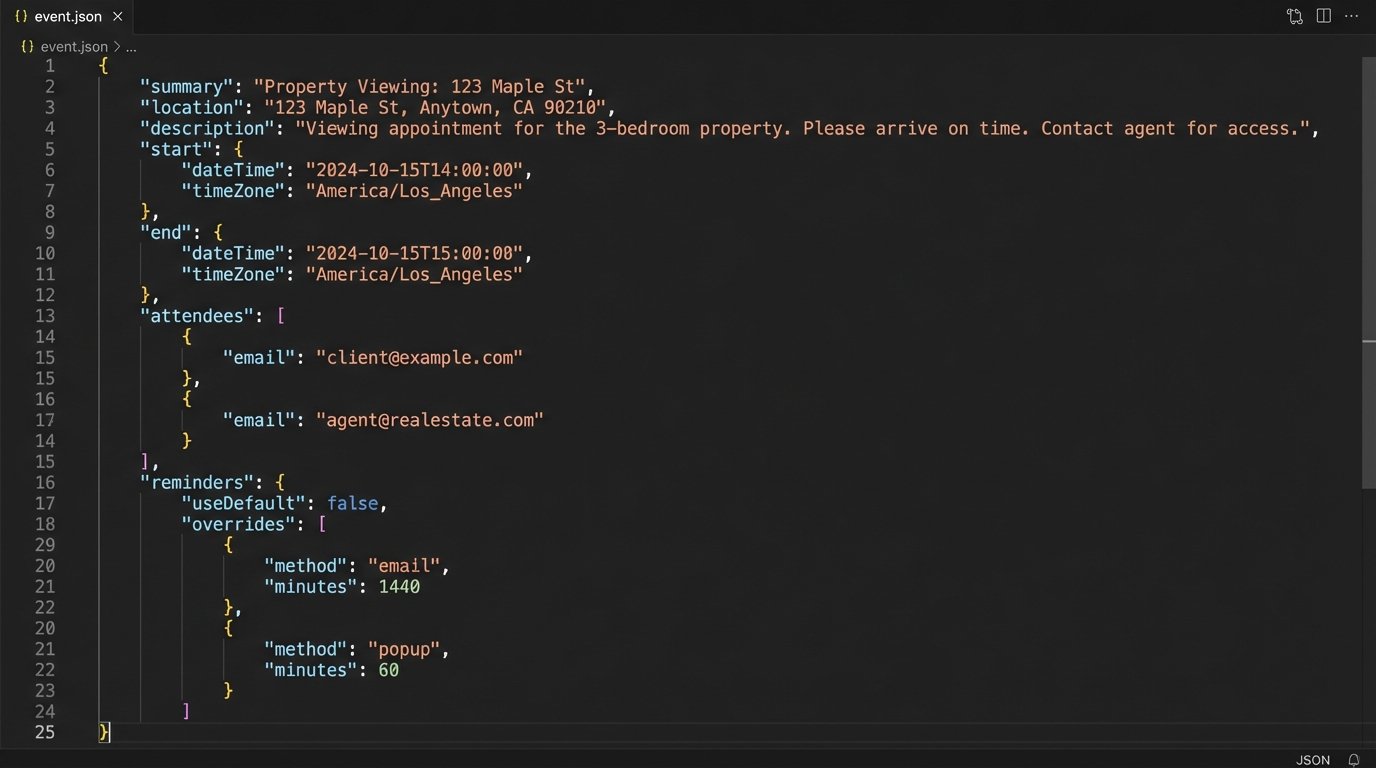
The logic was straightforward but tedious to implement. Given a desired time block from the NLP component, the service would query the target agent’s calendar API for free/busy information. It would then find the first available 30-minute slot that fit the criteria, present it to the user for confirmation, and upon receiving a positive response, create the event on the agent’s calendar. We also built in logic to add buffer time between appointments automatically. The code to interact with the Google Calendar API looks something like this conceptually, though the actual implementation requires more error handling.
{

  "summary": "Property Viewing: 123 Main St",

  "location": "123 Main St, Anytown, USA",

  "description": "Viewing for lead: John Doe (john.doe@email.com).",

  "start": {

    "dateTime": "2023-10-27T14:00:00-05:00",

    "timeZone": "America/Chicago"

  },

  "end": {

    "dateTime": "2023-10-27T14:30:00-05:00",

    "timeZone": "America/Chicago"

  },

  "attendees": [

    {"email": "agent@realestate.com"},

    {"email": "john.doe@email.com"}

  ],

  "reminders": {

    "useDefault": false,

    "overrides": [

      {"method": "email", "minutes": 24 * 60},

      {"method": "popup", "minutes": 30}

    ]

  }

}
This JSON payload is what gets sent to the API to create the event. Notice how it structures every necessary detail, from attendees to reminders. Getting this part right is what makes the automation feel seamless to the agent and the client.
Component 4: State Management and Communication
An automation assistant is useless if it has no memory. The system needed to track the state of each conversation. Is the user in the middle of scheduling? Have we asked for their phone number yet? Did they reject the first time slot we offered? We used a Redis cache to store a simple state object for each session ID. This key-value store is incredibly fast and allowed the system to pick up a conversation exactly where it left off, even if different server instances handled subsequent messages.
Once a time was confirmed, the final component would trigger the outbound communication. It sent a calendar invitation to the lead via email using the SendGrid API. It also sent an SMS confirmation and a 24-hour reminder using the Twilio API. Simultaneously, it would call the CRM’s API to create a new contact or update an existing one, logging the upcoming appointment as a task for the agent. This closed the loop, ensuring the agent had a complete record of the interaction in the system they use every day.
The Results: Measurable Impact on the Bottom Line
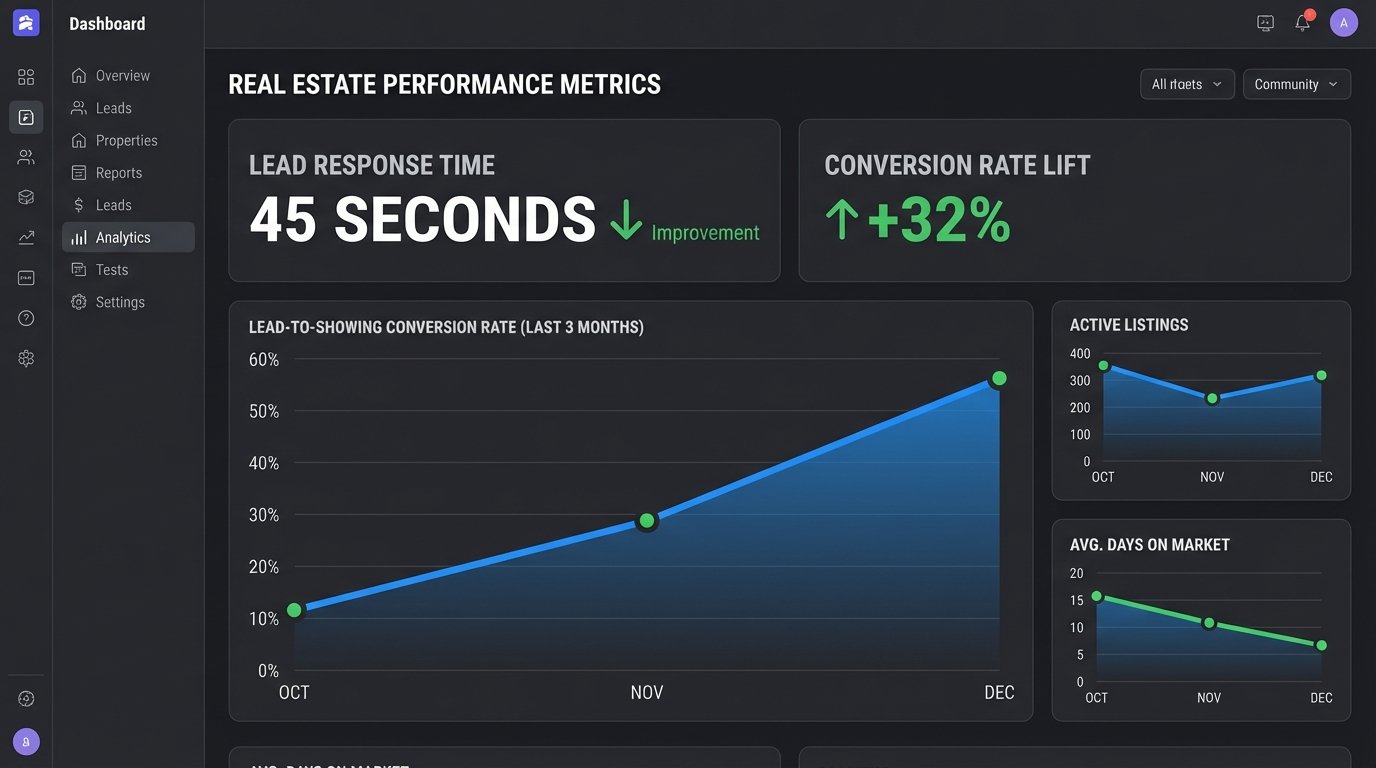
The project was judged on three key performance indicators: agent time saved, lead response speed, and lead-to-showing conversion rate. We instrumented the system to log metrics for each stage of the process, and the results after three months of operation were stark. The data provided a clear picture of the system’s effectiveness. We didn’t need to guess about its impact.
The numbers were not subtle. Agents got back, on average, eight hours per week. This was time they could re-invest in client relationships and negotiations instead of playing email tag. The brokerage treated this as the equivalent of hiring a part-time administrative assistant for every single agent on their roster, but without the associated overhead. This metric alone justified the entire project budget.
Hard Metrics: Speed and Conversion
The average lead response time dropped from 3.5 hours to 45 seconds. This was the most dramatic improvement. Leads were now engaged instantly, at the peak of their interest. The assistant could answer basic questions and get a showing on the calendar before a competitor’s admin even saw the email notification. This speed had a direct and immediate effect on the conversion rate.
The percentage of new leads that resulted in a scheduled property viewing increased by 32%. This is the metric that made the executives pay attention. It was a direct injection of qualified opportunities into the sales pipeline. The system wasn’t just saving time; it was actively generating more revenue-producing appointments from the same marketing spend. It proved that the biggest leak in their sales funnel wasn’t the quality of the leads, but the speed of the follow-up.
Lessons Learned: The Cost of Integration
The project was not without its problems. The initial version of the calendar abstraction layer was brittle. It made too many assumptions about the structure of agents’ calendars and would fail if an agent had a slightly non-standard setup. We had to refactor it to be more defensive, with more robust error checking and fallback logic. We also hit API rate limits with Google’s Calendar API during peak hours, forcing us to implement a queue with exponential backoff for calendar write operations.
We also learned that user onboarding is critical. Agents had to be trained to trust the system. They had to learn to block out personal time correctly on their calendars so the assistant wouldn’t schedule viewings during their kid’s soccer game. Getting this buy-in required clear communication and demonstrating the system’s reliability over time. The technology was only half the battle. The other half was changing human behavior.