
The entire premise of finding the “best automated CRM” for a new real estate agent is a trap. It presupposes the tool is the solution. New agents get sold on feature lists designed for ten-person teams, paying a premium for forecasting modules and team-based analytics they will not touch for years. The CRM becomes a wallet-drainer before the first commission check is cashed.
The core failure is confusing a data repository with an automation engine. A new agent’s actual needs are brutally simple. Ingest leads from multiple sources without manual entry. Trigger an immediate, consistent response. Create a follow-up task. That’s it. Anything else is noise that distracts from the two activities that generate revenue: prospecting and closing.
Deconstructing the “Automation” Lie
Most CRMs market their “automation” as a key feature. In reality, it is often a rigid, pre-canned workflow builder. You get a handful of triggers, typically “on new contact created,” and a few actions, like “send email template” or “add to list.” This is not automation. It’s a glorified mail merge that operates within the confines of a single platform.
True automation has to bridge systems. A lead doesn’t just appear in the CRM. It originates from a Zillow API call, a Facebook Lead Ad webhook, a submitted form on a WordPress site, or a manual entry from a phone call. The CRM’s internal workflow engine cannot touch these external sources. This forces the agent into manual data entry, the very thing they paid to avoid.
The Hub-and-Spoke Architecture
A better model is to treat the CRM as a dumb hub. Its sole purpose is to be the canonical source of truth for contact data. It should have a clean, reliable API and do little else. The intelligence, the logic, the “automation,” all resides in the spokes. This separates the data store from the action engine, giving you total control over process flow.
The hub can be anything with an API. Airtable. Google Sheets. A small PostgreSQL database. It just needs to store contacts, properties, and interactions programmatically. The spokes are external services or scripts that execute the business logic. This could be a workflow tool like Zapier or Make, or for more control, a set of simple serverless functions.
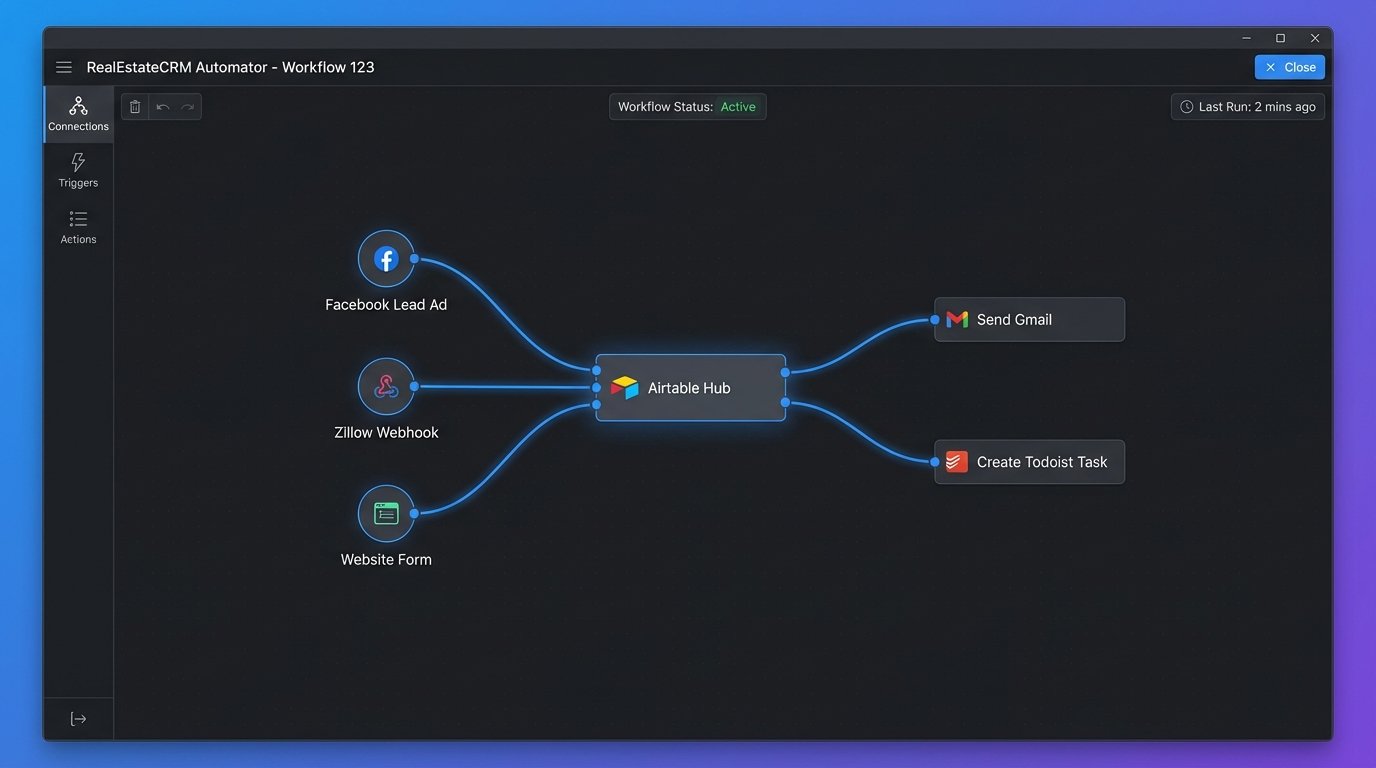
This approach inverts the standard model. Instead of being locked into one vendor’s ecosystem, you build a flexible data processing pipeline. You can swap out the CRM hub with minimal disruption to your lead funnels. If you find a better tool for sending SMS alerts, you just change that one spoke, you don’t migrate your entire operational history.
Building the Ingestion Spoke
Lead ingestion is the first point of failure for most agents. Manually copying contact info from an email notification is slow and prone to error. Every lead source needs its own automated ingestion spoke that pipes data directly into the central CRM hub.
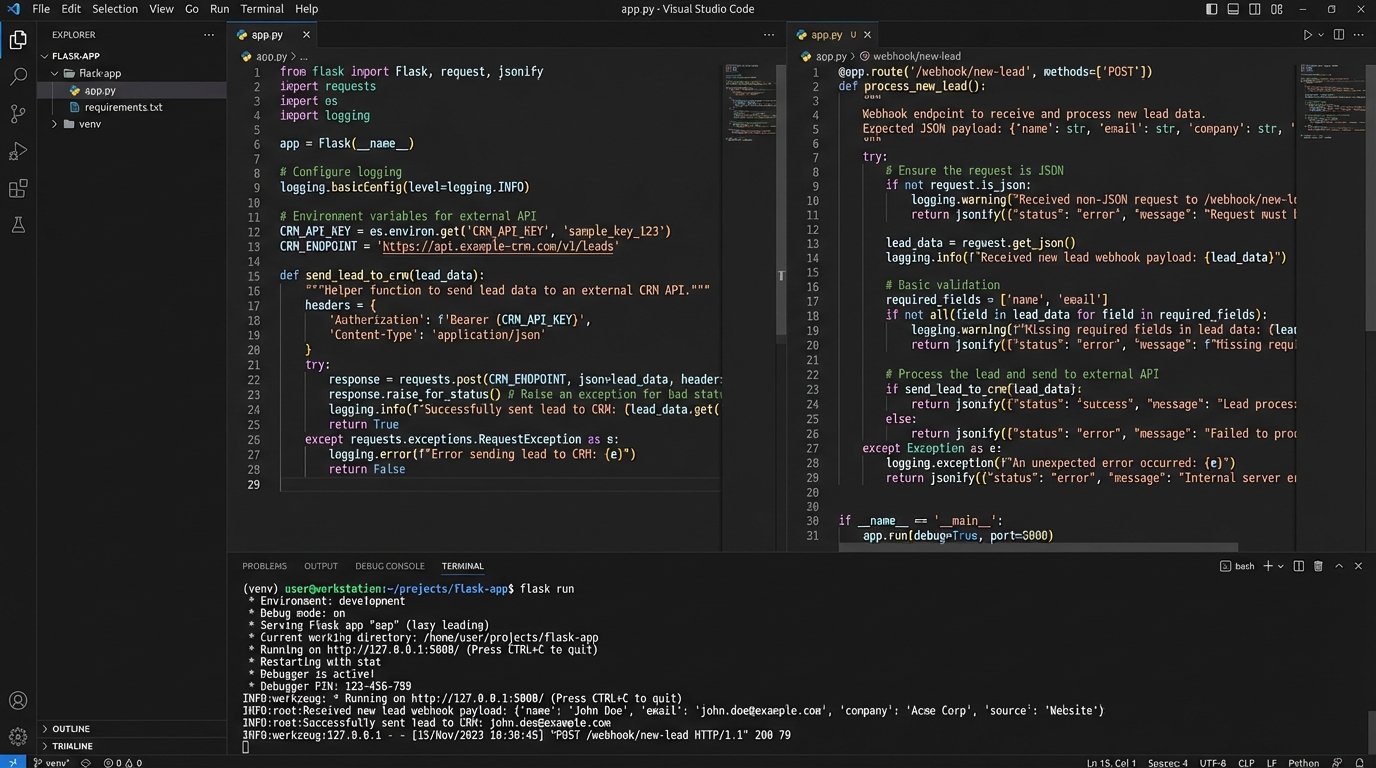
Most modern lead sources offer webhooks. A webhook is just an HTTP POST request sent to a URL you specify whenever a new event occurs, like a new lead being captured. We can build a simple endpoint to catch this data, process it, and then push it to our hub. A basic Flask application in Python can serve as a universal webhook receiver.
Consider this Python code using the Flask framework. It creates a single endpoint `/webhook/new-lead`. When a lead provider sends data to this URL, the script grabs the JSON payload, strips out the essential fields, and then calls the function `push_to_crm`. This `push_to_crm` function would contain the logic to make an API call to your chosen hub, like Airtable or Google Sheets.
from flask import Flask, request, jsonify

import requests

import os
app = Flask(__name__)
# Assume API key and endpoint are stored as environment variables
CRM_API_KEY = os.environ.get('CRM_API_KEY')
CRM_ENDPOINT_URL = os.environ.get('CRM_ENDPOINT_URL')
def push_to_crm(lead_data):
"""
Pushes structured lead data to the central CRM hub.
This is a placeholder for a real API call.
"""
headers = {
'Authorization': f'Bearer {CRM_API_KEY}',
'Content-Type': 'application/json'
}
# Structure the payload for the target CRM's API
payload = {
'fields': {
'Name': lead_data.get('name'),
'Email': lead_data.get('email'),
'Phone': lead_data.get('phone'),
'Source': lead_data.get('source', 'Unknown'),
'Inquiry': lead_data.get('message'),
'Status': 'New'
}
}
try:
response = requests.post(CRM_ENDPOINT_URL, json=payload, headers=headers)
response.raise_for_status() # Raises an HTTPError for bad responses (4xx or 5xx)
print(f"Successfully pushed lead {lead_data.get('email')} to CRM.")
return True
except requests.exceptions.RequestException as e:
print(f"Error pushing lead to CRM: {e}")
return False
@app.route('/webhook/new-lead', methods=['POST'])
def new_lead_webhook():
"""
Receives lead data from an external source (e.g., website form, Zillow).
"""
if not request.is_json:
return jsonify({"error": "Request must be JSON"}), 400
data = request.get_json()
# Basic validation to ensure key fields are present
required_fields = ['name', 'email', 'phone']
if not all(field in data for field in required_fields):
return jsonify({"error": "Missing required fields"}), 400
# Sanitize and structure the data
lead_details = {
'name': data.get('name').strip(),
'email': data.get('email').strip().lower(),
'phone': data.get('phone'),
'source': data.get('source', 'Website Form'), # Default source if not provided
'message': data.get('message', '')
}
# Pass the cleaned data to the CRM push function
success = push_to_crm(lead_details)
if success:
return jsonify({"status": "success", "message": "Lead processed"}), 200
else:
return jsonify({"status": "error", "message": "Failed to update CRM"}), 500
if __name__ == '__main__':
# For development only. Use a production WSGI server like Gunicorn in production.
app.run(debug=True, port=5001)
This single script can now handle leads from any source capable of sending a JSON payload. You just give the provider this URL. The logic is centralized, maintainable, and completely decoupled from the CRM itself.
Task Generation and Follow-up Logic
Once a lead is in the hub, the next step is generating an action. Again, we don’t rely on the CRM for this. The ingestion spoke itself, or another listening service, should trigger the next event. A new agent’s life is managed by a calendar and a to-do list, not a CRM dashboard. The automation should inject tasks directly into those systems.
After the `push_to_crm` function in our script successfully executes, it could make a second API call. This one goes to an external task manager like Todoist or Asana, creating a new task: “Call new lead John Doe – 555-123-4567.” This puts the action item directly into the agent’s daily workflow. The agent doesn’t need to log into the CRM to know what to do next.
This architecture forces a separation of concerns that is incredibly healthy for operations. The CRM stores data. The automation layer processes data and triggers actions. The task manager tracks actions. Each component does one thing well. This is vastly superior to a monolithic system that does all three things poorly.
The Hidden Costs and Necessary Headaches
This model is not a magical fix. It trades a high monthly software bill for an upfront investment in setup and a low, ongoing maintenance cost. You are building a system, not buying one. This approach introduces its own set of problems you need to be prepared for.
First, there is technical overhead. Someone has to write the script, host it, and connect the APIs. This is not a no-code solution, although platforms like Zapier can lower the barrier to entry by replacing the Python script with a visual workflow builder. Even then, you need to understand how to debug a failed API call and how to correctly map data fields between systems.
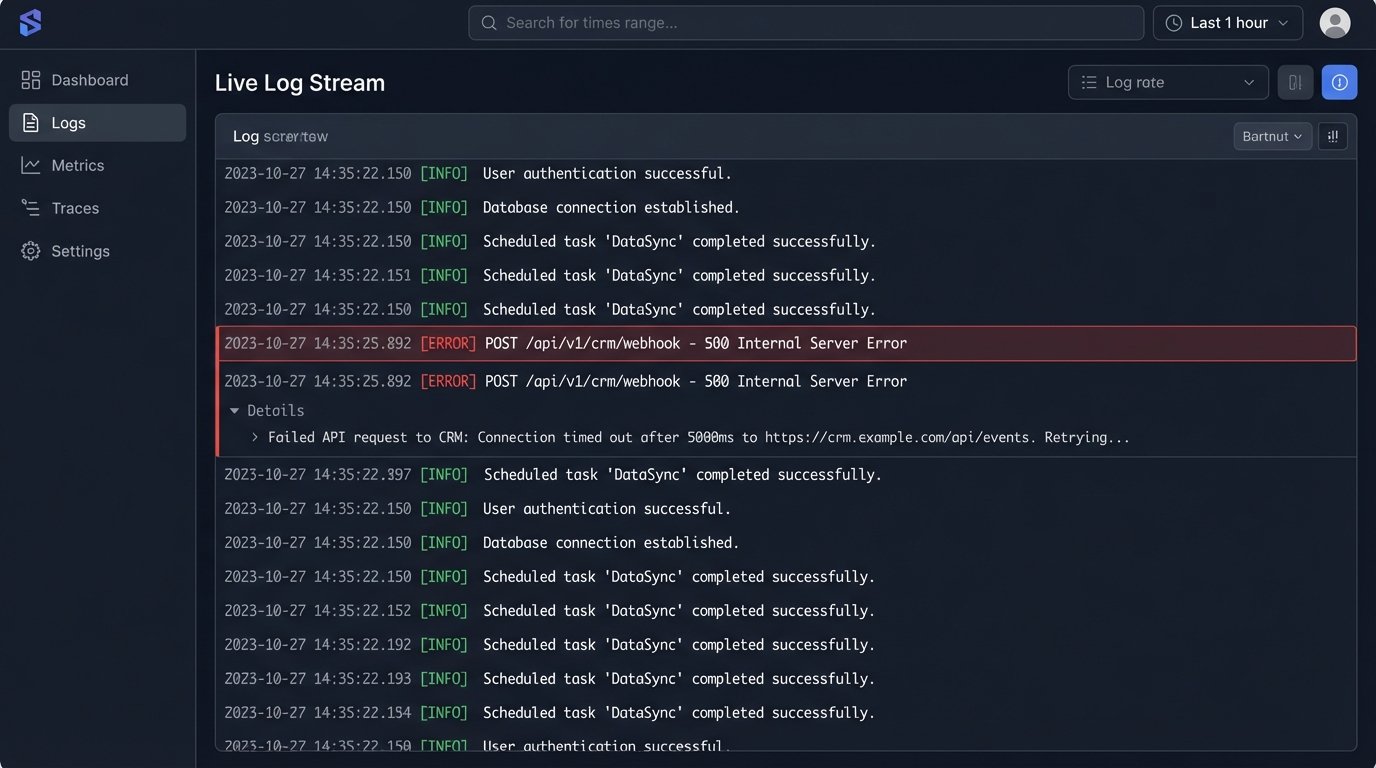
Second, you own the reliability. When a webhook from Zillow fails at 2 AM, there is no support team to call. It is your responsibility to implement logging and monitoring. You need to know when a job fails and have a process for re-running it. Trying to push data through multiple APIs is like shoving a firehose through a needle; you need to anticipate and handle the pressure points where things will inevitably break.
Finally, data integrity is your problem. With leads flowing in from multiple sources, you must sanitize and standardize the data before it hits your hub. One form might have a `firstName` field, another might have `full_name`. Your ingestion spoke must contain the logic to normalize this data into a consistent format. A failure to do so results in a garbage data store, rendering your CRM useless.
This approach isn’t for everyone. It requires a technical mindset. But for a new agent looking to build a lean, scalable operation, it is far more powerful and cost-effective than buying a bloated, off-the-shelf system. You build the automation you actually need, and you retain full control over your data and your processes.