
Stop Copying and Pasting Calendar Invites
The core failure in venue management automation is treating it like a notification problem. A new lead comes in, an email fires, and someone manually creates a calendar event. This entire workflow is a liability. The real task is state management across disconnected systems, each with its own API limits and peculiar data structures. Your job is not to connect apps. It is to force a common state identifier across platforms that were never designed to speak to each other.
This process is brittle by nature. The goal is not a perfect, unbreakable system. The goal is a system that logs its own failures coherently so you know exactly which booking to fix manually at 2 AM.
Choose Your Poison: Webhooks vs. Aggressive Polling
Getting data out of a scheduling tool like Calendly or Acuity is the first step. You have two primary mechanisms. A webhook gives you instant data payload delivery when an event occurs, like a new booking. This is fast. It also requires a publicly accessible endpoint on your end to receive the data, which means you are now responsible for uptime, security, and handling retries if your endpoint is down when the webhook fires.
Your service better be ready for that POST request.
Polling is the brute-force alternative. You write a script that hammers their API every sixty seconds asking, “Anything new? Anything new? Anything new?”. This is simpler to implement and doesn’t require a public endpoint. It is also slow, inefficient, and a fantastic way to hit your API rate limit before lunch. Many platforms will throttle or temporarily ban an API key that polls too aggressively.
Choose webhooks if you need real-time updates. Choose polling if your system can tolerate a five-minute delay and you enjoy explaining to the platform’s support team why your API key was suspended again.
Building a Basic Webhook Receiver
A webhook receiver is not complex. It is a simple web application that listens for incoming HTTP POST requests at a specific URL. The challenge is what you do with the data once it arrives. The payload must be parsed, validated, and then used to trigger other actions. A failure at any point in that chain can result in a lost booking with no error log.
Here is a dead-simple example using Python and Flask to catch a webhook. This does nothing but log the incoming data. In a real system, the # Logic goes here part would involve database writes and API calls to other services.
from flask import Flask, request, abort

import json
app = Flask(__name__)
# This is a weak security measure, but better than nothing.
# In production, use a more secure signature verification method.
SECRET_TOKEN = 'your_super_secret_token'
@app.route('/webhook-receiver', methods=['POST'])
def webhook_receiver():
# Authenticate the request
auth_header = request.headers.get('Authorization')
if not auth_header or auth_header != f'Bearer {SECRET_TOKEN}':
abort(403) # Forbidden
# Get the JSON payload
if request.is_json:
data = request.get_json()
print("Received webhook data:")
print(json.dumps(data, indent=2))
# --- Logic goes here ---
# 1. Validate the payload schema.
# 2. Extract key info: event_type, customer_email, event_time.
# 3. Create a unique ID for this transaction to prevent duplicates.
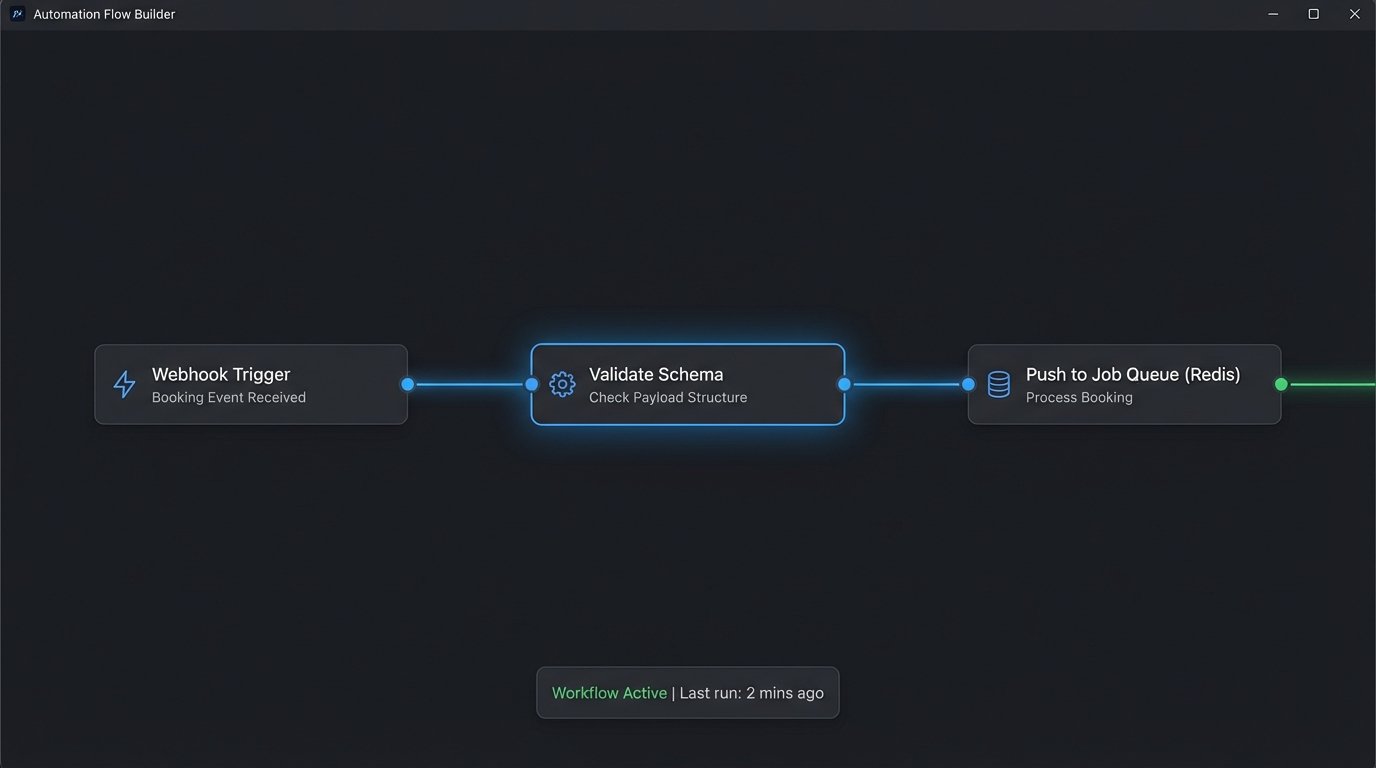
# 4. Push to a job queue (like Redis Queue or Celery) for processing.
# -------------------------
return 'Success', 200
else:
return 'Unsupported Media Type', 415
if __name__ == '__main__':
app.run(debug=True, port=5000)
Notice the recommendation to push to a job queue. Never process complex logic directly in the webhook receiver. The receiver’s only job is to acknowledge the request instantly and hand off the payload. This prevents timeouts and allows you to retry failed jobs independently.
State Management is Not a Feature, It is the Entire System
A booking is not a single, static event. It is an object with a lifecycle. It can be PENDING, CONFIRMED, CANCELLED, or RESCHEDULED. Your automation must track this state. Storing the state in the calendar event’s title is amateur hour. You need a dedicated field in your CRM or a simple database table that acts as the single source of truth for a booking’s current status.
When a cancellation webhook arrives, your code should not just delete a calendar event. It must first query its own database to confirm the event exists and is in a CONFIRMED state. Then, it executes the deletion via the calendar API, and only upon a successful API response does it update its internal state to CANCELLED.
This prevents race conditions where a reschedule and a cancellation request for the same event arrive seconds apart.
The Cross-System Identifier
How do you link a lead in your CRM, an event in Google Calendar, and a customer in your email platform? You need a common ID. When a booking is first created, generate a unique identifier. This could be a UUID or a sufficiently random string. This ID must be stored in a custom field in every system your automation touches.
When a webhook for a reschedule arrives, it contains the scheduling platform’s internal ID. Your first step is to look up that ID in your database to find your own internal, cross-system identifier. From that point on, you use your ID to update all other connected systems. Without this bridge, you are just guessing which records to update.
Building this system feels like trying to route plumbing through a house that’s already built. You spend more time drilling through existing walls and patching holes than laying new pipe.
Open House Coordination Requires Capacity Logic
Automating a single reservation is a state-tracking problem. Automating an open house RSVP list is a resource allocation problem. You have a fixed number of slots. The core task is to prevent overbooking while providing a near-real-time count of available slots on the registration page.
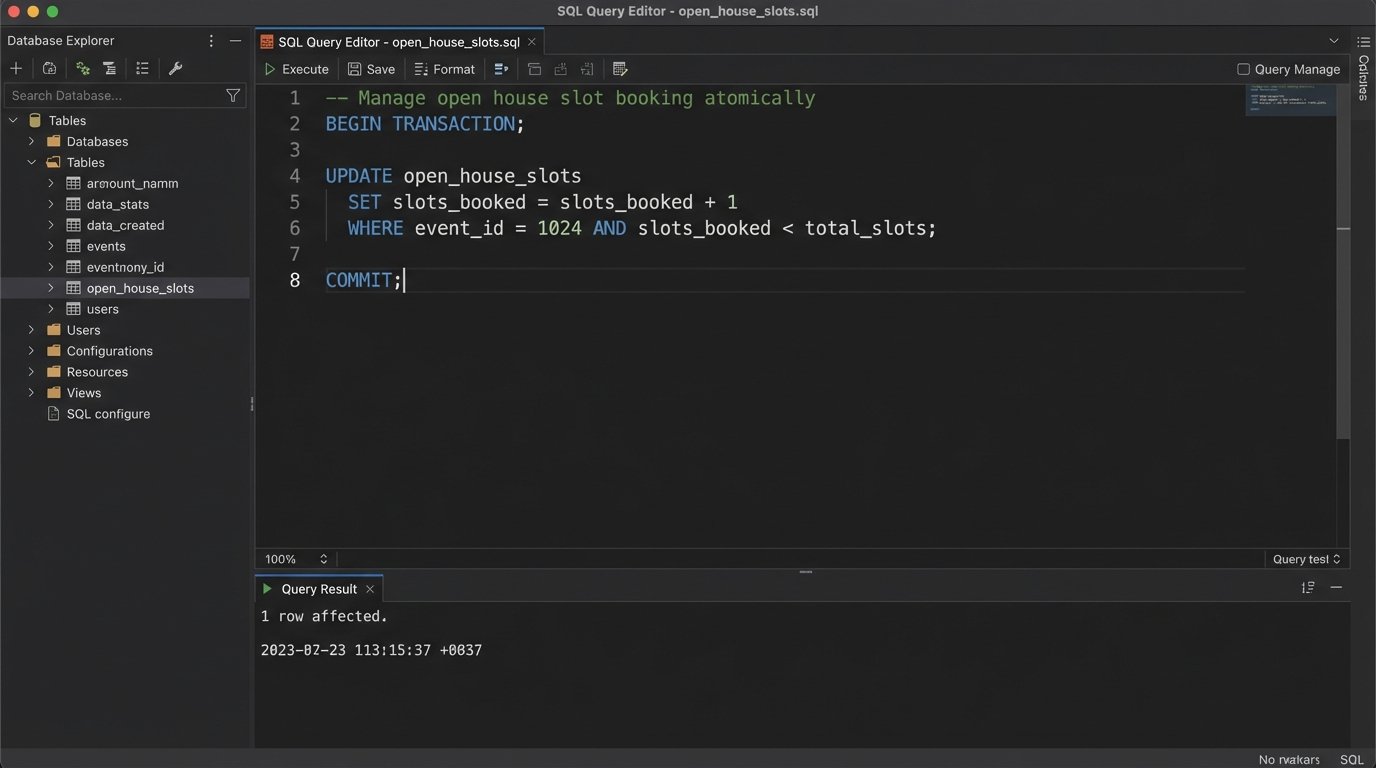
The naive approach is to decrement a counter in a database every time a successful registration occurs. This works until two people register at the exact same time. You need to use database transactions to ensure that the read, check, and decrement operations are atomic. This means they happen as a single, indivisible step, preventing a race condition where you sell slot #50 twice.
Updating the Frontend
Showing “48 slots left” on a landing page is the next challenge. You cannot have every page visitor query your production database directly. That is a recipe for crashing your server. Instead, run a scheduled job every five minutes that queries the available slot count and writes that integer to a simple text file or a cache key in something like Redis.
Your website’s frontend code then fetches this value from the cache. This decouples your marketing site’s traffic from your core application’s database load. The number might be a few minutes out of date, but that is a small price to pay for system stability.
Follow-up Sequences Must be State-Aware
A generic “thanks for booking” email sequence is useless. Effective follow-up automation must be driven by the booking’s state and the user’s behavior. This requires a tight integration between your scheduling system, your CRM, and your marketing automation platform.
For example, the initial confirmation email should contain a unique link to a pre-tour questionnaire. If your system detects the user has visited that link (via a tracking pixel or a redirect), it should move them out of the “remind them to fill out the form” sequence and into a “tour preparation” sequence.
- State: PENDING CONFIRMATION – Sequence Goal: Get them to confirm. Send one reminder. If no action after 24 hours, tag a sales rep to call them.
- State: CONFIRMED – Sequence Goal: Prepare them for the tour. Send directions, parking info, and the questionnaire link.
- State: CANCELLED – Sequence Goal: Understand why. Send a single email asking for feedback or offering to rebook.
- State: TOUR COMPLETE – Sequence Goal: Get a review or feedback. Send a follow-up asking about their experience and linking to review sites.
This is not a simple “if this, then that” workflow. It is a state machine that reacts to incoming data from multiple sources. A broken link in this chain can result in a newly-cancelled client getting an email reminding them about their upcoming tour.
Idempotency: Your Defense Against Duplicate Events
Some webhook systems, especially unreliable ones, will send the same event more than once. This is called a “retry”. If your system is not designed to handle this, you will create two or three calendar events for the same booking. The client will be confused, and the venue manager will be furious.
The solution is to make your event creation process idempotent. This means that running the same operation multiple times produces the same result as running it once. When a webhook payload arrives, the first thing your code should do is check if an event with that payload’s unique transaction ID has already been processed.
Create a simple database table with one column: processed_transaction_ids. Before creating a calendar event, check if the incoming ID is in that table. If it is, stop processing and return a 200 OK status. If it is not, add the ID to the table, and then proceed with creating the event.
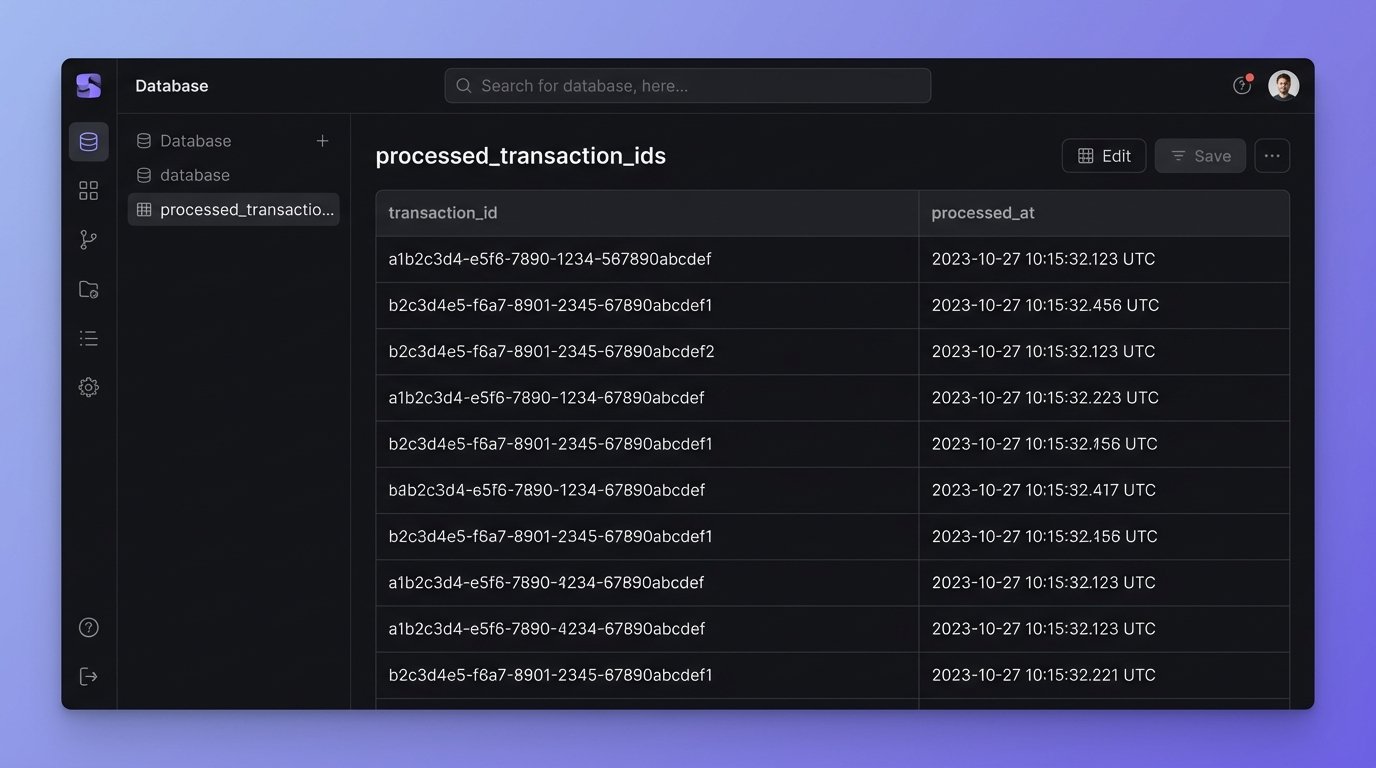
This simple check prevents a huge category of embarrassing, hard-to-debug problems. It is the digital equivalent of asking “Have I heard this one before?” before acting on a request.
Error Handling and Logging is Not an Afterthought
The automation will fail. An API will go down. A token will expire. A data format will change without warning. The difference between a professional system and a toy project is how it behaves when things break. Every single API call should be wrapped in a try-catch block.
Do not just log “An error occurred.” Log the full API response, the payload you sent, and a timestamp. Send these logs to a dedicated service like Sentry, Datadog, or even a structured text file that is easy to parse. When a client calls saying their booking disappeared, your first action should be to check the logs for their email address, not to start debugging the live code.
A system without detailed, structured logging is a black box. You have no idea what is happening inside it, and you will spend your nights guessing instead of fixing.