
Stop Manually Downloading CSVs. It’s an Embarrassment.
The end of the month means another cycle of logging into five different brokerage portals, fighting with two-factor authentication, and downloading a collection of poorly formatted transaction histories. You then spend hours stitching this data together in a spreadsheet, a process so fragile a single misplaced comma can corrupt your entire performance calculation. This manual reconciliation is a time bomb of human error waiting to detonate during a review.
Automating this isn’t about convenience. It is about forcing consistency and creating a single source of truth that doesn’t depend on your morning coffee intake.
Tip 1: Interrogate the API Before You Commit
Your first job is to find a stable data ingress point. Most major brokerages offer a customer-facing API, but their quality varies wildly. Scrutinize the documentation for signs of neglect. Check the last updated date, look for clear explanations of the authentication flow, and verify the rate limits. An undocumented, aggressive rate limit will shut down your automation without warning, leaving you with partial data.
Assume the documentation is at least two versions behind reality.
Authentication is the first filter. If you see OAuth 2.0, you have a fighting chance. It implies a structured, secure process for obtaining and refreshing access tokens. Anything less, like static API keys with no expiration, is a security risk and a sign of a legacy system. Scraping HTML is the absolute last resort. It’s a brittle, high-maintenance hack that breaks the moment a front-end developer changes a CSS class name. You are tying your core financial reporting to the whims of a UI refresh.
Web scraping for this is a career-limiting move.
Securely storing your credentials requires a dedicated secret management tool like HashiCorp Vault or AWS Secrets Manager. Hardcoding tokens into your script or sticking them in an environment file is amateur hour. You need a system that handles credential rotation, access control, and audit logging. This isn’t optional overhead. It’s the minimum requirement for handling sensitive financial data without ending up on a security breach report.
Get this part wrong and the rest doesn’t matter.
Tip 2: Build a Ruthless Normalization Layer
No two brokerages will give you data in the same format. One will return a clean JSON payload with ISO 8601 timestamps. The next will email you a CSV file where currency is represented as a string with a dollar sign prefix. Your automation must account for this chaos by immediately forcing all incoming data through a strict normalization process. This layer’s only job is to ingest garbage and output a predictable, uniform data structure.
Your script’s internal logic should never have to guess the format of incoming data.
This means defining a canonical schema for your transactions. Every transaction, regardless of source, should be mapped to this master object. This includes standardizing date formats, stripping currency symbols, and casting data types correctly. Never, ever use floating-point numbers for currency. The inherent precision errors will accumulate and wreck your calculations. Use a decimal type or handle currency as integers representing the smallest unit, like cents.
Floating-point math for money is a classic rookie mistake.
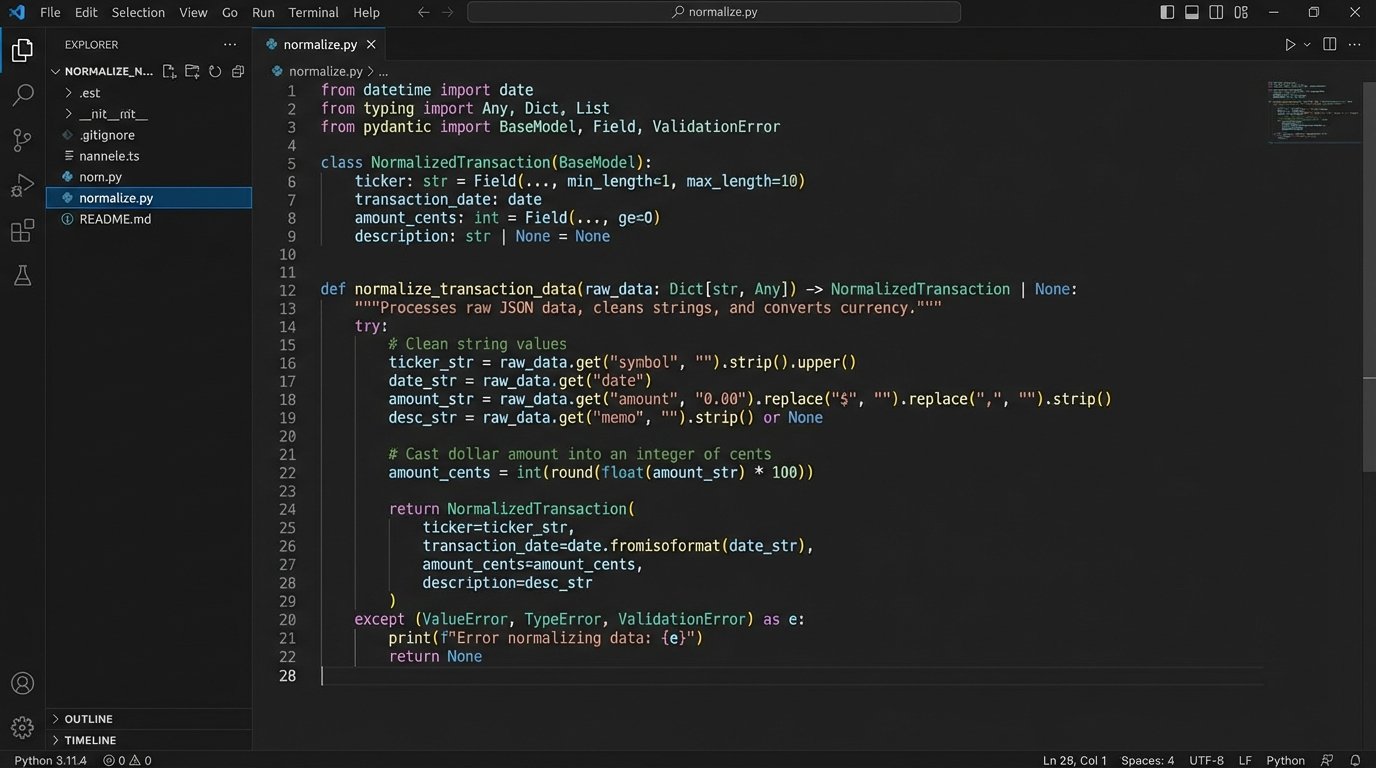
The normalization layer is also your first line of defense for data validation. Does the transaction have a date? A ticker symbol? An amount? If a record is missing critical information, it gets rejected and logged immediately. Do not pass malformed data downstream. Polluting your clean data set with garbage from one faulty source will poison every subsequent calculation and report. The goal is to fail fast and loud at the earliest possible stage.
Letting bad data slip past this gate is how you spend a weekend hunting for a phantom penny.
Tip 3: Ditch the Linear Script, Build a State Machine
A simple script that runs from top to bottom is guaranteed to fail. Network connections drop. APIs return 503 errors. Your automation must be built to withstand transient failures. This means thinking of the process not as a straight line but as a state machine: `pending`, `fetching`, `fetched`, `processing`, `failed`, `completed`. The script needs to be able to stop and restart without creating data duplication or losing its place.
Hope is not an error-handling strategy.
The key to this is idempotency. Your script must be designed so that running it multiple times for the same period produces the exact same result as running it once. If you fetch transactions for January, you need a mechanism to check if those transactions already exist in your target database before inserting them. A common method is to create a unique hash or key for each transaction based on its core attributes (account, date, ticker, amount, type) and use that to prevent duplicates.
Without idempotency, every retry is a data corruption event.
Retry logic is non-negotiable for any step involving a network call. A simple `for` loop is not enough. You need to implement exponential backoff with jitter. This strategy involves increasing the delay between retries after each failure and adding a small, random amount of time to the delay. This prevents your script and other services from hammering a struggling API in a synchronized, repeating pattern, which can prolong an outage.
Here’s a conceptual Python-like snippet to illustrate the logic, not a copy-paste solution.
import time
import random

def fetch_with_retries(api_endpoint, max_retries=5, initial_delay=1):
    retries = 0
    delay = initial_delay
    while retries < max_retries:
        try:
            response = call_api(api_endpoint)
            if response.status_code == 200:
                return response.json()
            # Handle other specific non-retryable errors here
        except ConnectionError as e:
            # This is a transient error, so we retry
            print(f"Connection error: {e}. Retrying in {delay} seconds...")
            time.sleep(delay + random.uniform(0, 1))
            retries += 1
            delay *= 2  # Exponential backoff
    raise Exception("API fetch failed after multiple retries.")
This pattern isolates failure and gives the system a chance to recover from temporary glitches.
Tip 4: Logic-Check Everything. Trust Nothing.
Once you have normalized, de-duplicated data, the job is still not done. The data might be well-formed but logically incorrect. You must build a separate validation stage to perform sanity checks against the data set as a whole. Do not blindly trust the numbers the brokerage API gives you. APIs can have bugs, and data can be corrupted in transit or during processing.
The source data is guilty until proven innocent.
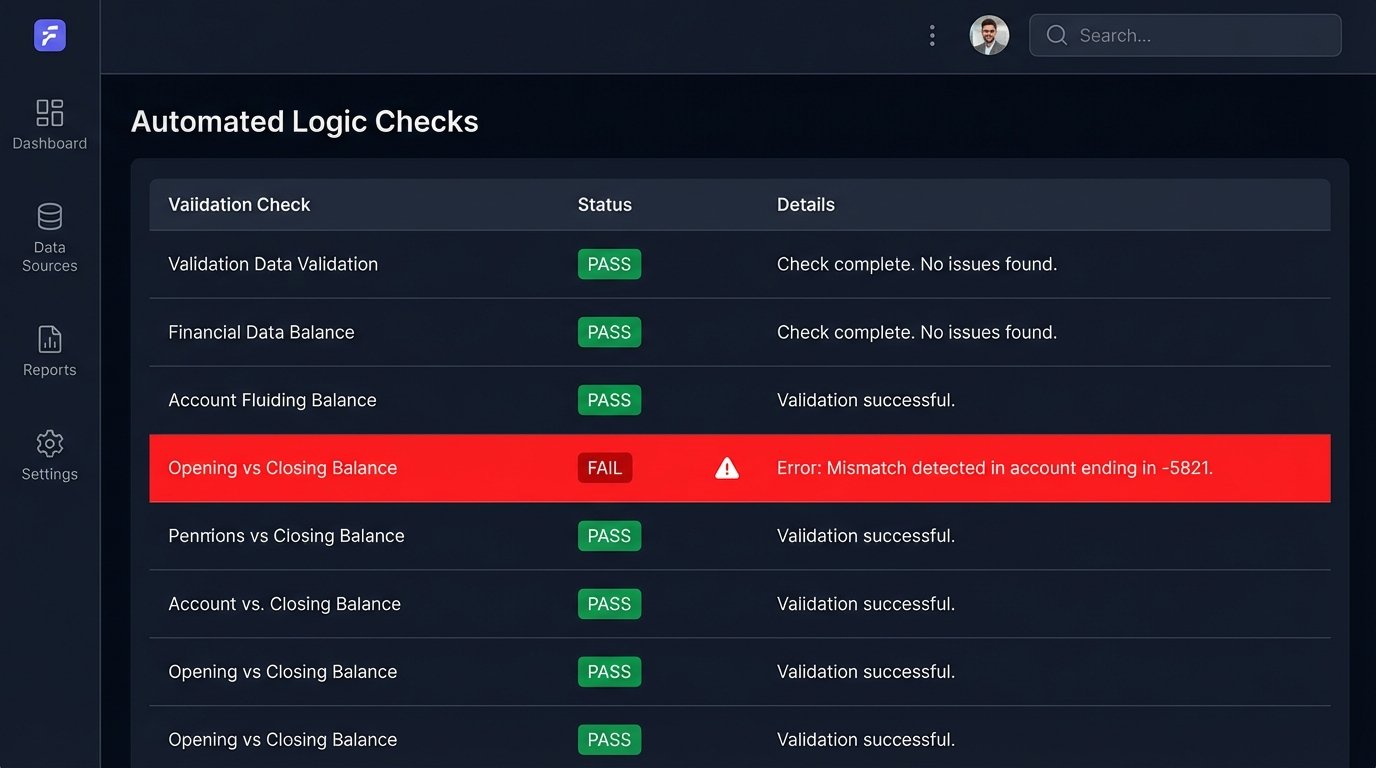
This validation stage should perform cross-checks. A fundamental check is comparing the previous month's closing balance with the current month's opening balance for each account. They must match. If they do not, it signifies a gap in the data, a missed transaction, or a corporate action that was not processed correctly. You also need to verify internal consistency. For a given period, the sum of all cash debits and credits plus the starting cash balance should equal the ending cash balance.
Trying to validate financial data without these checksums is like shipping sensitive hardware without the packing foam. It might arrive intact, but you are counting on luck.
Implement anomaly detection. Are there transactions with dates in the future? Is there a trade for a quantity of zero or a negative amount? Is a stock's price reported as drastically different from its last known closing price? These checks catch the bizarre edge cases that simple schema validation will miss. When a logic check fails, the process must halt and send a high-priority alert. This is not a warning. It is a hard stop that requires human investigation.
A silent failure is a lie that grows over time.
Tip 5: Decouple Reporting from Data Ingestion
The process of fetching and cleaning data should be entirely separate from the process of generating a report. Lumping these two distinct responsibilities into a single monolithic script is a recipe for unmaintainable code. The data ingestion pipeline's job ends when clean, validated, normalized data is safely stored in a database or data warehouse. That is its only job.
A separate service or script should then query this clean data store to build the report.
This separation provides immense flexibility. You can change the report's format, add new calculations, or build an entirely new dashboard without ever touching the sensitive data ingestion code. The reporting layer can focus on its own concerns: aggregations, performance calculations like IRR or TWR, and formatting the output into a PDF, a spreadsheet, or a series of API endpoints for a front-end application. It reads from the source of truth, but it never writes to it.
This architecture prevents a bug in your PDF generation logic from corrupting your raw financial records.
Tip 6: Your Automation is a Production Service. Treat It That Way.
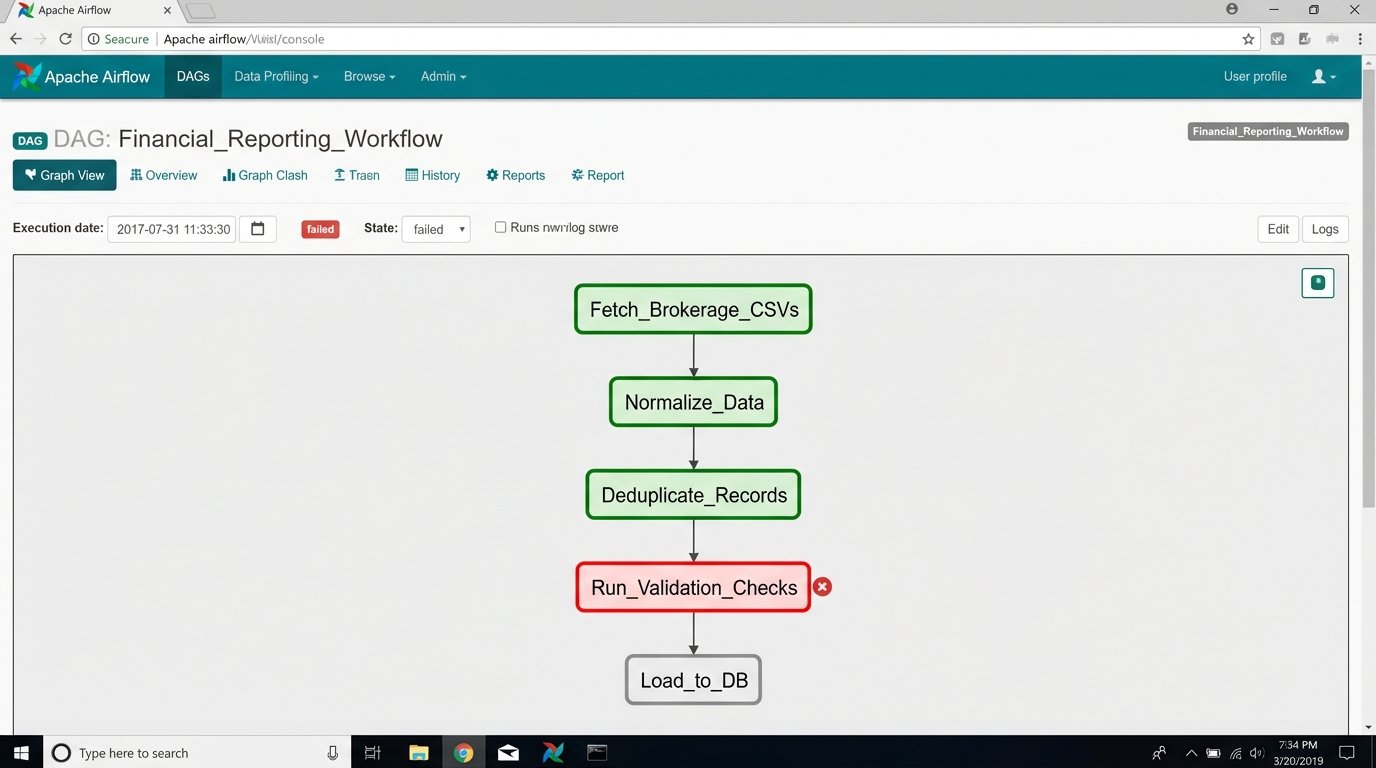
A script running on a monthly cron job is not a durable solution. For any process this critical, you need a proper workflow orchestrator like Apache Airflow or Prefect. These tools provide dependency management, automatic retries, robust logging, and a visual interface to monitor the status of your jobs. They turn your collection of scripts into a managed, observable workflow.
A cron job that sends an email on failure is not monitoring.
Logging cannot be an afterthought. Your automation must produce structured logs, preferably in JSON format. Each log entry should contain context like the job ID, the stage of the process, and any relevant entity IDs. These logs should be shipped to a centralized logging platform like Datadog, Grafana Loki, or an ELK stack. This allows you to search, filter, and create dashboards and alerts based on log patterns.
When something breaks, you need to be able to query the logs, not grep a 500MB text file on a server.
Finally, alerting must be intelligent. Do not just alert on a simple pass or fail. Create specific alerts for key failure modes. An alert should fire if the data validation stage fails. Another should fire if the script runs for an unusually long or short amount of time. A job that finishes in 2 seconds when it normally takes 5 minutes likely means the API returned an empty payload, a critical failure that a simple success check would miss. Your alerts should be specific enough that the person on call immediately knows where to start looking.
The goal of an alert is to provide a diagnosis, not just to announce a death.