
Nobody gets hired to write documentation. You’re paid to build automations that connect brittle systems and move data. The docs are an afterthought, a tax you pay at the end of a project when the budget is gone and the next fire is already burning. We treat it as clerical work, but it’s actually the most critical fail-safe for any complex workflow.
Poor documentation is a time bomb. It sits dormant until a critical API dependency changes its schema without notice, and suddenly a core business process is failing silently. The original engineer is long gone, and you’re left reverse-engineering minified JavaScript at 2 AM, trying to figure out why customer records are being injected with null values. This isn’t about being a good corporate citizen. It’s about raw, professional survival.
1. Document the “Why,” Not Just the “How”
A list of steps is worthless. “Step 1: Get data from API X. Step 2: Transform field Y. Step 3: Post to system Z.” This tells me nothing. The real value is in the business context and the technical constraints that forced your hand. Why are you stripping non-ASCII characters from that one specific address field? What undocumented rate limit on the reporting endpoint are you building a delay queue to bypass?
This is the institutional knowledge that evaporates the second someone changes teams. It’s the logic that prevents the next engineer from “optimizing” your code and accidentally re-introducing a bug you spent a week debugging. Your documentation must explain the compromises you were forced to make. The system you’re building is a product of its flawed environment, so document the flaws.
Without the “why,” your documentation is just a sterile, unhelpful instruction manual.
2. Force Documentation into Your Git Workflow
If your documentation lives in Confluence, SharePoint, or some forgotten Word document on a shared drive, it is already dead. The only way to keep docs current is to chain them to the code itself. Store your documentation as Markdown files (`README.md`, `/docs`) inside the same repository as the automation’s source code. This isn’t a suggestion. It’s a requirement for a sane development cycle.
This approach forces documentation to become part of the pull request. A code change that alters a workflow’s logic must be submitted alongside an update to the corresponding document. It makes documentation a first-class citizen in the code review process. Now, your peers can logic-check your explanation against your implementation, catching discrepancies before they merge to the main branch and poison the production environment.
It also gives you `git blame` for your documentation. You can see who wrote a specific line, when, and in which commit. This is how you build a living history of the system, not a digital museum piece.
3. Map the API Battleground
Official API documentation is often a work of optimistic fiction. It describes how the API should behave in a perfect world, not how it actually behaves under load or when presented with unexpected inputs. Your internal documentation needs to be the ground truth, a field guide to the endpoint’s actual personality quirks. What status codes does it *really* return on a timeout, versus what the spec claims? Which fields are documented as required but are actually optional?
Create a section for each external dependency that details these idiosyncrasies. Note the observed rate limits, not just the published ones. Document any specific headers required for caching to work correctly or authentication tokens to be accepted. This is the intel that separates a four-hour debugging session from a ten-minute fix.
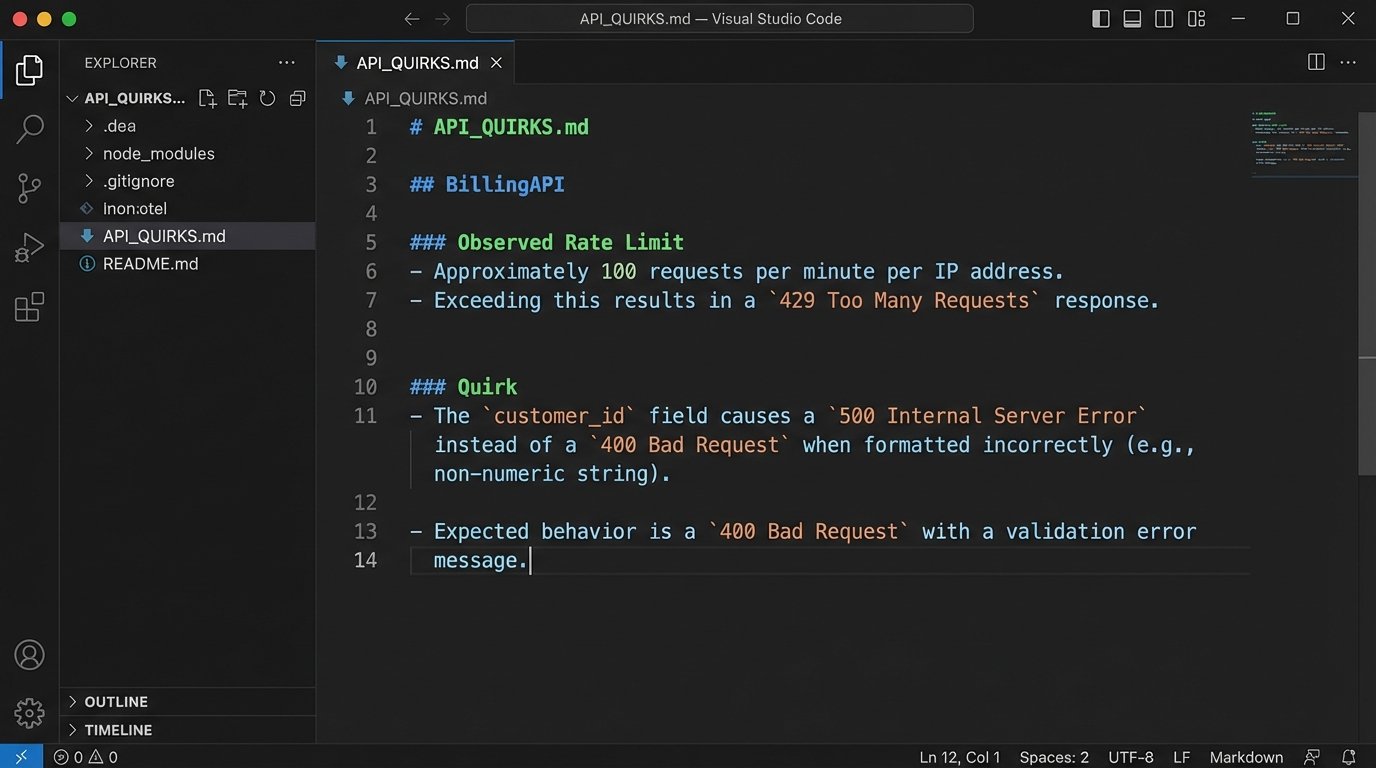
A simple text file listing these gotchas is infinitely more valuable than a link to the official swagger docs. For example:
External Service: `BillingAPI`
- Endpoint: `POST /api/v2/invoices`
- Stated Rate Limit: 100 requests/minute.
- Observed Rate Limit: ~80-85 requests/minute before it starts throwing `429 Too Many Requests`. The server seems to have a burst buffer that gets exhausted quickly.
- Quirk: The `customer_id` field expects a string, but the error message for a missing ID returns a `500 Internal Server Error` instead of a `400 Bad Request`. The support team has been notified, with no ETA for a fix.
- Workaround: Our code must pre-validate that `customer_id` exists and is a string before making the call to avoid unhandled server errors.
This is not slander. It’s survival.
4. Build Explicit Data Transformation Maps
Data rarely flows from a source to a destination without being manipulated. Fields are renamed, data types are coerced, strings are concatenated, and values are enriched. This transformation logic is often the most complex and brittle part of any integration workflow. Leaving it undocumented is like asking someone to re-wire a server rack in the dark. They will eventually get it working, but they’re going to get shocked a few times first.
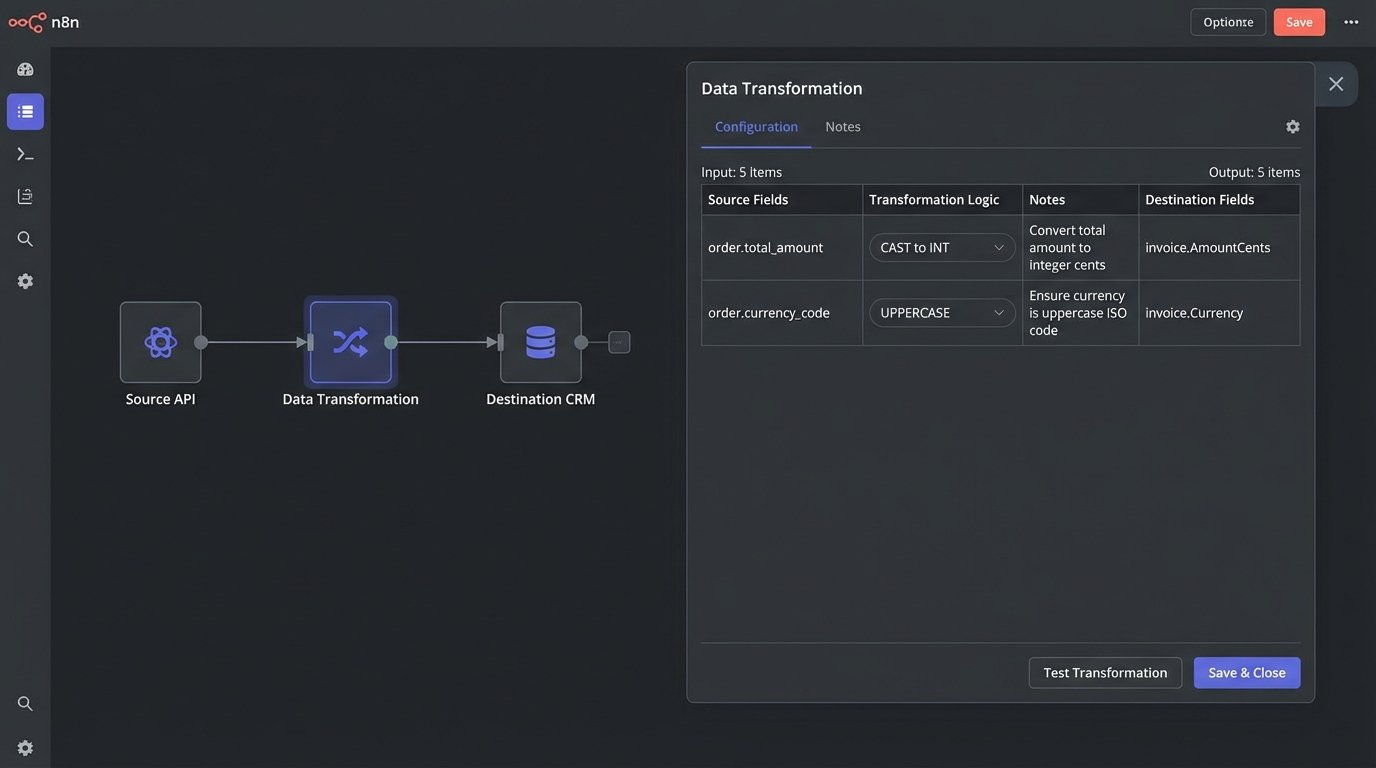
A data map is a simple, visual table that bridges the gap. It explicitly shows how data from a source system is manipulated before being loaded into a destination system. This can be a Markdown table, a MermaidJS diagram checked into the repo, or even a simple spreadsheet. The format matters less than its existence and accuracy.
A solid data map looks something like this:
| Source Field (System A) | Logic Applied                       | Destination Field (System B) | Notes                                                              |

|-------------------------|-------------------------------------|------------------------------|--------------------------------------------------------------------|

| `user.firstName`        | `CONCAT(user.firstName, " ", user.lastName)` | `contact.FullName`           | Destination system has no separate fields for first/last name.     |

| `order.total_amount`    | `CAST(order.total_amount AS INT)`   | `invoice.AmountCents`        | Source sends a decimal string ("19.99"), destination wants an integer (1999). |

| `event.timestamp`       | `TO_UNIX_EPOCH(event.timestamp)`    | `log.entry_time`             | Convert from ISO 8601 to a Unix timestamp.                         |
When a downstream system suddenly starts rejecting records, this map is the first place you look. It immediately tells you the rules governing the data’s shape, letting you pinpoint if the source schema changed or if the destination system’s validation rules were updated.
5. Write a Runbook for Failure
Automations break. It’s not a possibility. It is an inevitability. Your documentation must account for this reality. A “happy path” document is fine, but the real value comes from a runbook: a tactical guide for what to do when things go wrong. This is for the on-call engineer who gets paged at 3 AM because a workflow has been failing for an hour.
This runbook should be brutally prescriptive. It needs to include:
- Known Failure Modes: What are the top 3-5 reasons this automation fails? (e.g., “Upstream API timeout,” “Invalid credentials,” “Malformed payload from source”).
- Triage Steps: A checklist for initial diagnosis. “1. Check the monitoring dashboard for error spikes. 2. Query the logs for the transaction ID. 3. Look for error messages containing ‘401 Unauthorized’ or ‘503 Service Unavailable’.”
- Recovery Procedures: Explicit instructions for remediation. “If error is a `401`, rotate the API key in Vault and update the environment variable. If it’s a `503`, check the external service’s status page. If they report an outage, pause the workflow’s trigger and wait.”
- Escalation Path: Who to contact if the problem can’t be fixed in 15 minutes. Name the team, the on-call rotation, or the specific subject matter expert.
A good runbook assumes the reader is tired, stressed, and has zero prior context on the system. It replaces panic with a procedure.
6. Expose All Configuration and Environment Variables
Nothing grinds a new developer’s progress to a halt faster than trying to run a project locally and being blocked by a dozen missing environment variables. Every single variable required to run the automation must be documented. The best practice is to include an `.env.example` file in the repository’s root, which serves as a template.
This file should not contain secrets. It should contain placeholders. For each variable, the core documentation should explain what it does, its expected format, and where to obtain its value. This prevents the classic “it works on my machine” scenario, which is usually code for “my machine has a magic environment variable that I forgot to tell anyone about.”
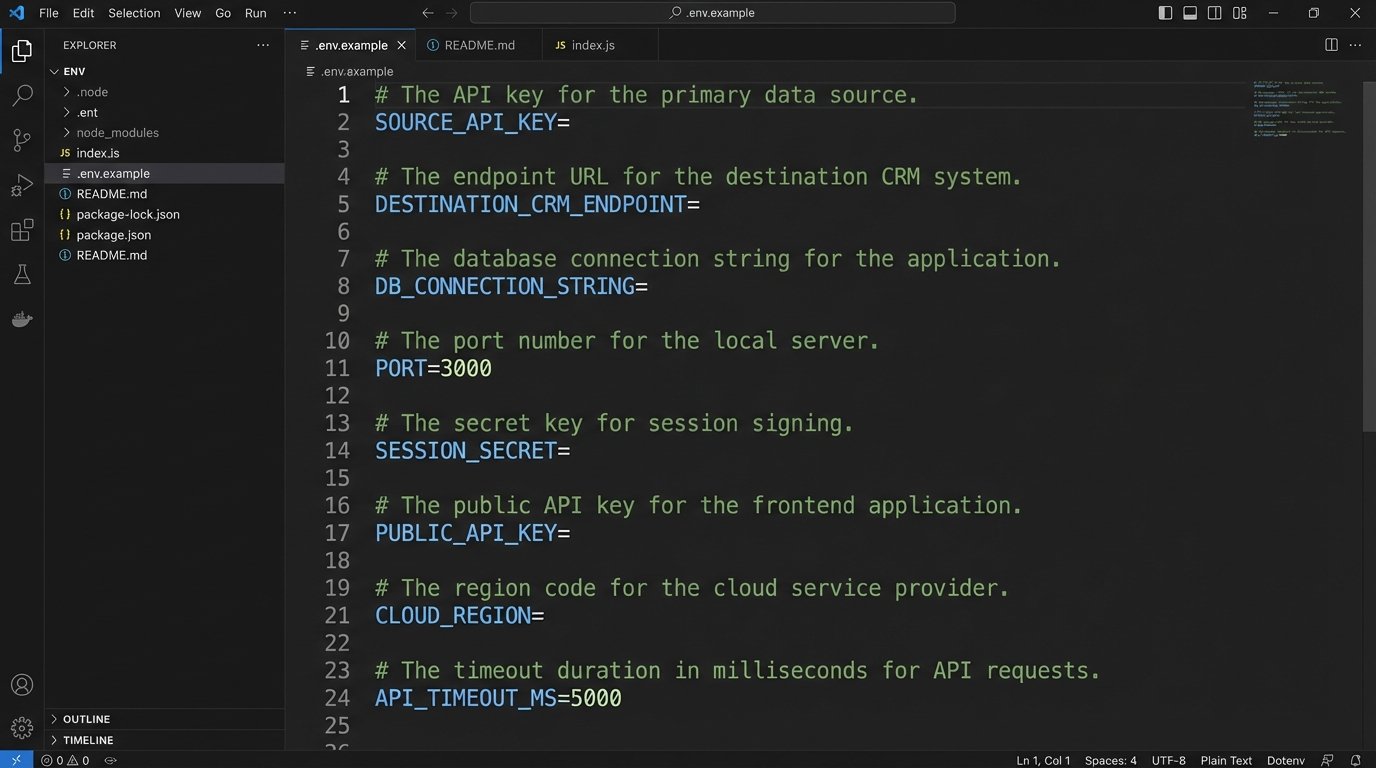
Your `.env.example` should look like this:
# The API key for the primary data source. Get this from the Project X dashboard.

SOURCE_API_KEY=
# The endpoint URL for the destination CRM.
DESTINATION_CRM_ENDPOINT=https://api.example.com/v1/data
# Controls the logging level. Options: DEBUG, INFO, WARN, ERROR.
LOG_LEVEL=INFO
# Timeout in milliseconds for API requests. Default is 5000.
REQUEST_TIMEOUT=5000
This small file is a massive accelerator for onboarding and local debugging. It makes the system’s configuration explicit and discoverable.
7. Maintain a Dependency Manifest
Your automation does not live in a vacuum. It relies on a stack of external systems, third-party libraries, and internal APIs. Each of these is a potential point of failure. Your documentation must contain a manifest of these dependencies, including their version numbers and points of contact.
This includes:
- External APIs: The service name, a link to its documentation, and the contact person or support channel.
- Software Libraries: Key libraries or packages (e.g., Python’s `requests` library, Node.js’s `axios`). Specify the exact version number, because a minor version bump in a dependency can introduce breaking changes.
- Internal Systems: Databases, message queues, or other microservices it connects to. Name the system and the team that owns it.
When the workflow breaks, this manifest tells you which external factors to investigate first. If the automation starts failing after a new deployment, you can check if any of the library versions were changed. It’s a structured way to analyze the system’s attack surface.
Ultimately, documentation is not about writing. It’s about engineering a system that is transparent and maintainable. It’s a defensive strategy against future chaos. Do it for yourself, because no one else will.