Your Collaboration Tool Is a Misconfigured Database with a Chat Interface
The marketing deck sold you on “seamless integration” and “frictionless communication.” The reality is you’ve bolted a public-facing application with a convoluted permission model onto your internal network. Every channel is a potential data leak. Every user is a potential misconfiguration. Every third-party app is an unvetted dependency. The primary job is not to make communication efficient. It’s to stop the entire platform from becoming a liability that bleeds credentials and intellectual property.
Forget the user-friendly UI. We are talking about the backend architecture, the API endpoints, and the audit logs nobody looks at until there is a breach. Efficiency is a byproduct of a locked-down, predictable system. Security is the foundation. Get the foundation wrong, and the rest is just noise before a catastrophic failure.
Stop Pretending Default Roles Are Sufficient
Identity and Access Management (IAM) in most collaboration tools is a joke. They give you “Admin,” “Member,” and maybe a “Guest” role. These roles are designed for small teams with high trust, not for enterprises where hundreds of people, contractors, and service accounts need access. Relying on these defaults is pure negligence. You are granting excessive permissions from day one.
The first step is to map your actual organizational roles to custom permission sets. A finance user does not need the same access to channels and integrations as a DevOps engineer. You must force the tool to conform to your security model, not the other way around. This means you need to get granular, defining access on a per-channel, per-integration, or even per-API-method basis if the platform allows it. It is tedious work that requires interfacing with every department lead.
Most don’t do it because it is hard.
The Service Account God Complex
Service accounts are the worst offenders. They are created for a single automation task, given broad permissions “just to get it working,” and then forgotten. Six months later, that account has API keys with full administrative rights sitting in a CI/VARS file, accessible to a dozen developers. These accounts must be subjected to the principle of least privilege, aggressively.
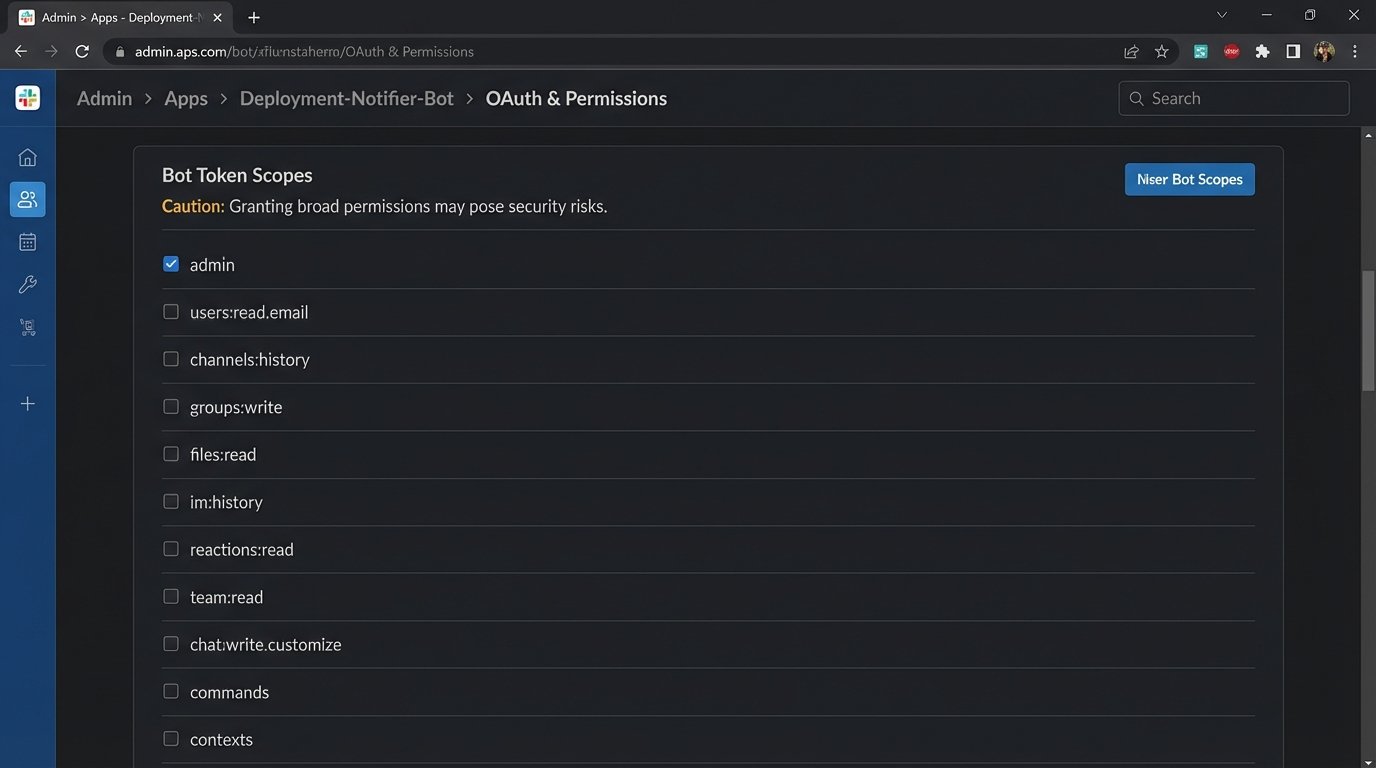
A service account that posts deployment notifications does not need permission to read private channel history or manage users. It needs one permission: `chat:write` to a specific channel. Nothing more. Scoping these permissions requires reading the API documentation, which is often outdated or intentionally vague. You will have to run tests with restricted scopes to find the bare minimum required for the function to execute. Expect it to fail several times.
This is the digital equivalent of giving a janitor the master key to the entire building just so they can clean one office. It is an operational failure waiting to be exploited.
Automated Access Reviews Are Non-Negotiable
Manual access reviews are a lie. Nobody fills out the spreadsheet correctly, and the approvals are rubber-stamped. You need an automated process that queries the collaboration tool’s user API and cross-references it with your central identity provider (IdP), like Okta or Azure AD. The script’s logic is simple: find the delta.
The goal is to answer three questions on a recurring schedule, perhaps weekly:
- Who has access to the tool but is disabled or terminated in the IdP?
- Which users are assigned to roles that do not match their group membership in the IdP?
- Which accounts have been inactive for more than 90 days?
This script should not ask for permission. It should generate a report of discrepancies and, for critical cases like terminated employees, directly call the API to force-deactivate the account. This is not about creating tickets. This is about automated remediation.
The API: Your Primary Attack Vector
The UI is for humans. The API is for machines, and it is where the real damage happens. A compromised API key is far more dangerous than a compromised user password. It provides direct, programmatic access to data, often bypassing MFA and other user-facing controls. Treating API keys like simple passwords is a critical error.
API keys must have a defined lifecycle. They are created, assigned a specific scope, rotated on a schedule, and then destroyed. Hardcoding keys into source code is malpractice. Use a proper secrets management system like HashiCorp Vault or AWS Secrets Manager. The application should fetch the key at runtime, use it, and the key itself should be short-lived.
Anything less is just leaving the door unlocked.
Scan Your Own House for Leaks
Before an attacker does it for you, you should be continuously scanning your own code repositories and internal systems for exposed credentials. Tools like `truffleHog` or `gitleaks` can be integrated directly into your CI/CD pipeline. A commit containing anything that matches a high-entropy string pattern or a specific format like `xoxp-` for Slack should break the build. Instantly.
Here is a dead-simple pre-commit hook concept to block commits that contain something resembling a Slack bot token. This is not a production-ready solution, but it illustrates the logic gate you need to build. It is a crude pattern match, not a foolproof validation, but it is better than nothing.
#!/bin/sh

# Simple pre-commit hook to check for Slack token patterns
STAGED_FILES=$(git diff --cached --name-only --diff-filter=ACM)
TOKEN_PATTERN='xoxb-[0-9]{10,13}-[0-9]{10,13}-[a-zA-Z0-9]{24}'
for FILE in $STAGED_FILES; do
if grep -qE $TOKEN_PATTERN "$FILE"; then
echo "ERROR: Found a potential Slack Bot Token in $FILE."
echo "Committing secrets to the repository is forbidden."
exit 1
fi
done
exit 0
This script forces a developer to confront the problem before the secret ever leaves their machine. It shifts the security responsibility left, where it is cheaper and faster to fix.

Data Is a Liability, Not an Asset
The idea of retaining all communication forever is an operational nightmare. It bloats your instance, slows down search, and creates a massive discovery surface for legal and security incidents. Your collaboration tool is not a system of record. It is a transient communication platform. Treat the data accordingly.
You need to define and enforce a data retention policy. For most channels, 90 or 180 days is more than enough. Critical project channels might get a year. The policy should be automated. The platform should be configured to automatically purge messages and files older than the specified limit. This isn’t just a security practice. it is good system hygiene.
Trying to manage terabytes of chat logs from five years ago during a security incident is like trying to find a specific grain of sand on a beach, while the tide is coming in.
Wipe the Metadata Clean
Beyond the messages themselves, the metadata is a huge source of risk. Think about file uploads. A user uploads a PDF. Does that PDF have embedded metadata revealing the author’s username, machine name, and the original file path on their system? Often, yes. Most tools just store the binary blob as is.
A proper security posture requires stripping this metadata upon upload. This is rarely a built-in feature. You might need to proxy uploads through a small service that uses a tool like `exiftool` to scrub the file before it lands in the platform’s storage. It adds a point of failure and latency, but it removes a class of information leakage that is almost impossible to track after the fact.
You can choose speed, or you can choose not to leak internal network paths to the public. You cannot have both.
Third-Party Apps: The Trojan Horse in Your Slack Channel
Every “Add to Slack” or “Integrate with Teams” button is a request to perform an OAuth grant. A user clicks “Allow,” and suddenly a third-party application, running on servers you do not control, has a token that allows it to read channel messages, see the user directory, and post messages on behalf of a user. It is a massive delegation of trust.
This supply chain risk is one of the most overlooked aspects of collaboration security. You need a strict vetting process for which applications can be installed. This involves reviewing the app’s requested permissions, its privacy policy, and its security track record. Most organizations just let users install whatever they want.
This is insane. It is equivalent to letting employees plug in any USB drive they find in the parking lot.

The OAuth Scopes Tell the Story
Do not trust the app’s marketing description. Read the scopes it requests during the authorization flow. An app that just needs to post a GIF does not need `users:read` or `channels:history`. If the permissions it asks for are overly broad, deny the installation. If the vendor cannot justify why they need each scope, they are either incompetent or malicious. It does not matter which.
You also need a periodic audit of all installed applications and their grants. An app installed two years ago for a project that is now defunct should not still have an active token in your environment. Create a script that hits the `apps.permissions.info` endpoint (or its equivalent in your tool) and lists all installed apps and their granted scopes. Any app that has not been used in 60 days should have its token revoked.
Permissions, like data, should not be immortal.
Centralize and Log Everything
The native audit logging in these tools is usually weak. It is designed for a UI, not for serious analysis. You must pull these logs out and ship them to a central Security Information and Event Management (SIEM) system like Splunk or an ELK stack. This gets the data into a format you can actually query, correlate, and alert on.
You should be logging all authentications, permission changes, app installations, and key API access events. In your SIEM, you build the dashboards and alerts that matter. For example, alert on a user account logging in from two different countries within an hour. Alert on an administrator disabling MFA for another account. Alert when a new application is installed with administrative scopes.
The raw logs on the platform are useless if no one is watching them. Shipping them to a SIEM forces a level of visibility and accountability that the tool itself will never provide. It is the only way to build a real-time picture of what is actually happening inside your system, instead of just cleaning up the mess afterward.