
Stop Manually Onboarding Clients
Every new buyer or seller triggers a cascade of repetitive communication. You explain the same inspection process, the same staging advice, the same closing timeline. This manual work is a vector for errors, inconsistency, and wasted cycles. The fix is not a better checklist. The fix is a deterministic, event-driven automation that treats client education as a state machine, not a series of ad-hoc conversations.
This is not about blasting marketing spam. It is about delivering precise, contextually relevant information triggered by a specific state change in your primary data source, usually a CRM. Get the data model and the trigger right, and the system works. Get them wrong, and you have built a very efficient machine for annoying your entire client base.
Prerequisites: The Non-Negotiable Foundation
Before writing a single line of automation logic, you must sanitize your data source. Most automation projects fail right here, killed by inconsistent CRM fields and a lack of a single source of truth. Your CRM is the foundation. If the concrete is bad, the building collapses.
Your primary object, whether it is a Contact, Lead, or Opportunity, must contain specific, structured data fields. Vague text blobs in a “Notes” field are useless. You need discrete fields for:
- Client Type: A dropdown or option set, not a text field. (e.g., ‘Buyer’, ‘Seller’, ‘Buyer/Seller’)
- Lifecycle Stage: The exact step in the process. (e.g., ‘New Lead’, ‘Actively Searching’, ‘Under Contract’, ‘Pre-Listing’)
- Key Dates: Timestamps for critical events like ‘Contract Signed Date’ or ‘Closing Date’. Null values are unacceptable.
- Specific Attributes: For buyers, this means ‘Min Price’, ‘Max Price’, ‘Target Area’. For sellers, ‘Property Type’, ‘Listing Price’.
Without this structure, you cannot build reliable logic branches. The automation will be brittle and incapable of differentiating between a luxury condo seller and a first-time home buyer looking for a starter home. They do not need the same information.
The Core Architecture: Trigger, Process, and Execute
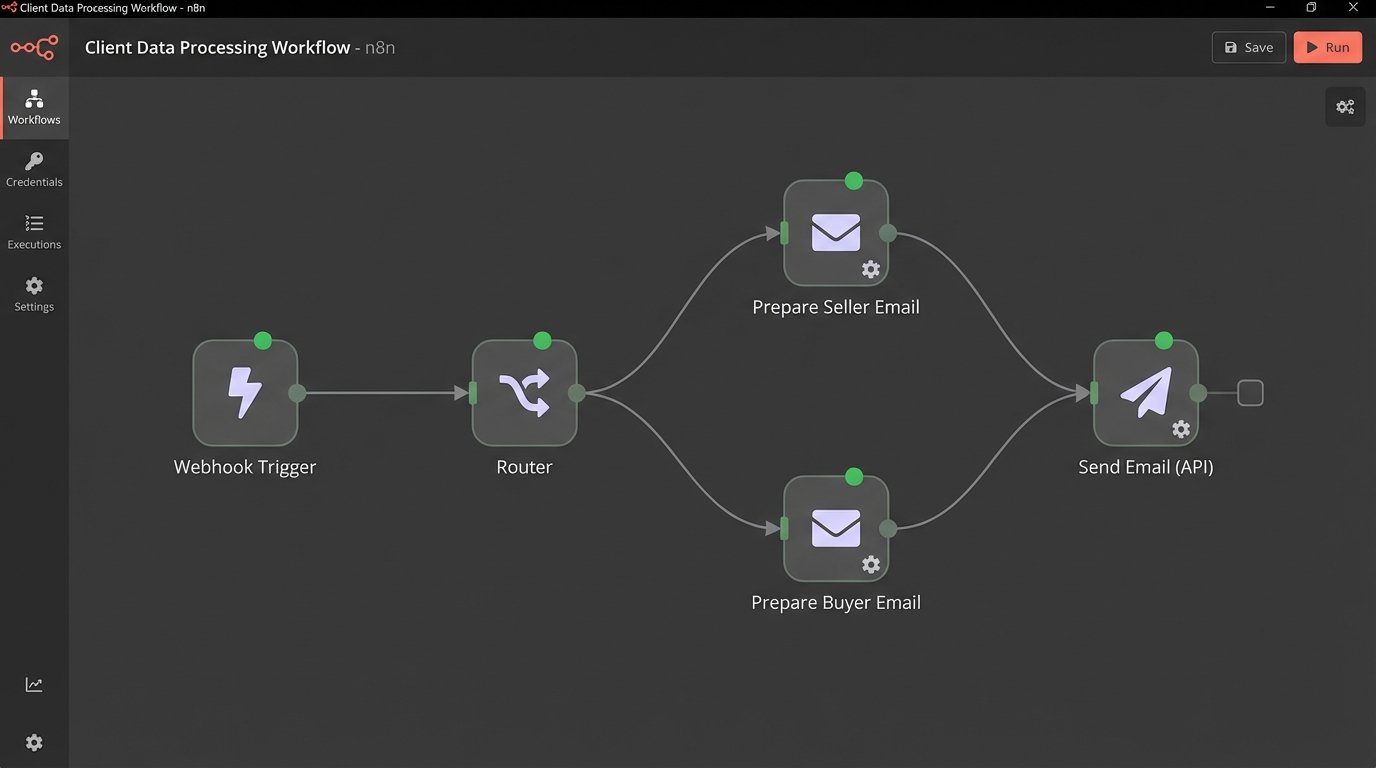
The system is composed of three parts. First, the trigger mechanism that watches for state changes. Second, a processing layer that ingests the trigger data, hydrates it with more context if needed, and applies conditional logic. Third, the execution layer that dispatches the emails or SMS messages through an API.
A webhook is the superior trigger. It is a push notification from your CRM to your automation endpoint the moment a record is updated. The alternative, polling, involves repeatedly calling the CRM API asking “anything new?” This is inefficient, slow to react, and a good way to hit your API rate limits. If your CRM supports webhooks, use them. If it does not, question your choice of CRM.
Your processing layer can be a dedicated platform like Zapier or a custom-built function. For anything beyond trivial logic, a custom function running on a serverless platform like AWS Lambda or Google Cloud Functions gives you complete control over the logic and error handling.
Here is a dead-simple webhook listener using Python and Flask. It just catches the incoming POST request from a CRM and prints the payload. This is the entry point. All logic flows from here.
from flask import Flask, request, jsonify
app = Flask(__name__)
@app.route('/webhook-receiver', methods=['POST'])
def webhook_receiver():
if request.is_json:
data = request.get_json()
# Log the raw payload for debugging
print(f"Received data: {data}")
# Pass the data to a processing function
# process_client_update(data)
return jsonify({"status": "success"}), 200
else:
return jsonify({"error": "Request must be JSON"}), 400
# Placeholder for the real work
# def process_client_update(payload):
# # Logic to check client type, stage, etc. goes here
# pass
if __name__ == '__main__':
app.run(debug=True, port=5000)
This skeleton code does nothing but prove the connection. The real work happens inside the function that processes the payload.
Step 1: Isolate the Trigger Event
The trigger must be a specific, unambiguous event. “Contact Updated” is a terrible trigger. It fires constantly for minor changes, creating noise and potential for re-triggering automations. You need to key off a state change that represents a meaningful step forward in the client’s journey.
Good triggers for a buyer sequence:
- Field Change: `Lead Status` changes from `New` to `Qualified`.
- Field Change: `Loan Status` changes from `Pending` to `Pre-Approved`.
- Record Creation: A `Showing` record associated with the contact is created.
Good triggers for a seller sequence:
- Field Change: `Listing Agreement Status` changes from `Draft` to `Signed`.
- Field Change: `Property Status` changes from `Pre-Market` to `Live`.
- Date Field Populated: The `Staging Date` field is filled.
Define these triggers with your operations team. Make them part of the standard operating procedure. If the team does not consistently update these fields, the automation fails before it starts.
Step 2: Hydrate Data and Branch Logic
The initial webhook payload might be thin. It might only contain the record ID and the changed field. This is a common security and performance measure. The first step in your processing logic should be to take that ID and make a GET request back to the source API to pull the full record. You need all the data to make decisions.
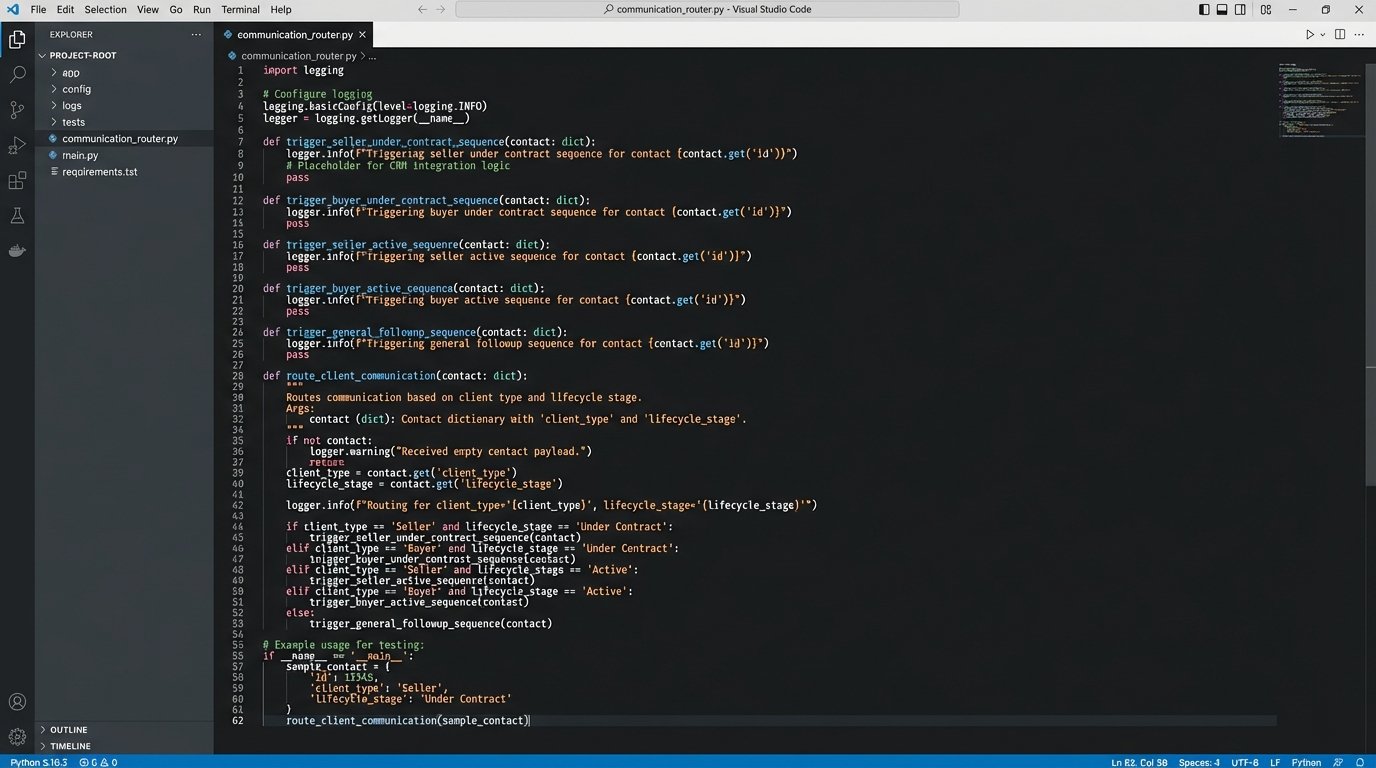
Once you have the full object, you can route the workflow. This is just a series of `if/elif/else` statements. The goal is to funnel the contact into the correct, highly specific communication sequence. Trying to build one master sequence for everyone is an exercise in futility. It produces generic content that resonates with no one.
This is where managing different sequences becomes a problem of scale. Attempting to build a dozen complex, branching paths inside a visual workflow builder is like trying to draw a detailed circuit diagram with a crayon. It gets messy fast. This is the point where you should be managing your logic in code, where it can be version-controlled and tested properly.
Step 3: Dynamic Content Injection
Static emails are worthless. The client knows it is an automated message, and it immediately devalues the information. You must inject context from the CRM object directly into the email body and subject line. This is done with a templating language like Jinja2 or Handlebars.
Your email templates should be littered with variables. The variables act as placeholders that your processing script replaces with actual data from the client’s record before sending the email.
A subject line could be: `Next Steps for Your Property at {{property.address}}`. An email body could include: `Based on your pre-approval for {{contact.preapproval_amount}}, here are three homes in {{contact.target_area}} that fit your criteria.` This is not just personalization. It is proof that you are tracking their specific situation.
This dependency on data means your templates are now coupled to your data model. If someone changes a field name in the CRM from `preapproval_amount` to `loan_amount`, your template breaks. This requires discipline and communication between the team managing the CRM and the team managing the automations.
Step 4: Control the Cadence and Define Exit Conditions
The timing of the communication is as important as the content. A sequence is a series of steps with built-in delays. These delays should not be arbitrary. Use intelligent delays based on the client’s expected timeline.
For a seller sequence after a listing goes live:
- Immediately: Send “Your Listing is Live! What to Expect in the First 48 Hours.”
- Wait 3 Days: Send “Understanding Your First Showing Feedback Report.”
- Wait 7 Days: Send “Weekly Market Activity Summary for Your Area.”
More critically, every sequence needs an exit condition. This is a goal that, when met, immediately removes the contact from this specific automation. If a sequence is designed to get a client to book a meeting, the exit condition is “Meeting Booked”. When the CRM shows a meeting has been scheduled, the automation must stop. There is nothing more amateurish than sending a client three more emails asking them to do something they have already done.
Step 5: Logging and Failure Monitoring
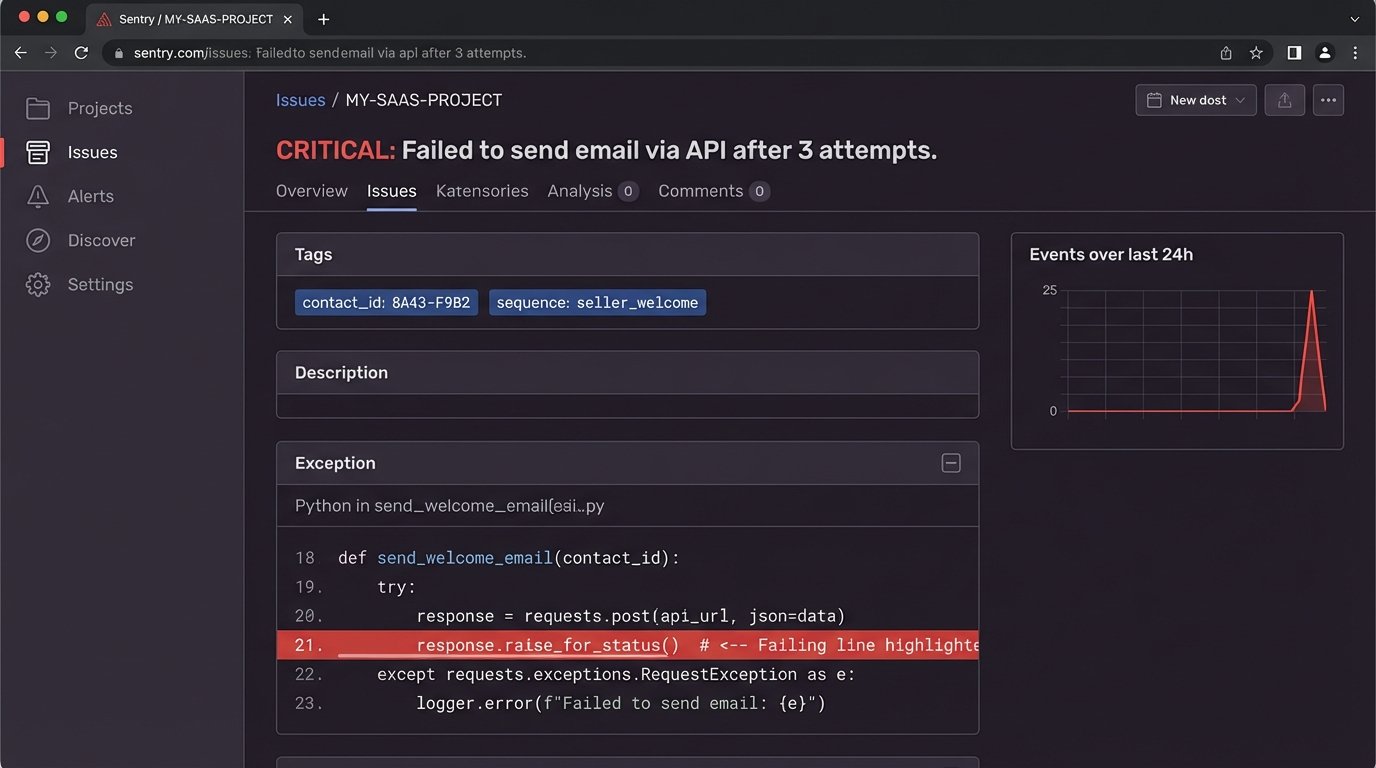
APIs fail. Networks lag. Data arrives malformed. Assuming your automation will run perfectly is naive. You must build robust logging and error handling into your processing script. Every major step should be logged.
Wrap your API calls in `try/except` blocks. If a call to your email provider’s API fails, do not just let the script die. Log the error with the full payload that caused it, and implement a retry mechanism with an exponential backoff. After a few failed retries, send an alert to a dedicated Slack channel or a monitoring service like Sentry. The alert must contain the contact ID and the error message so a human can intervene.
import requests

import time
def send_email_with_retry(api_key, recipient, subject, body, max_retries=3):
url = "https://api.emailprovider.com/v1/send"
headers = {"Authorization": f"Bearer {api_key}"}
payload = {"to": recipient, "subject": subject, "body": body}
for attempt in range(max_retries):
try:
response = requests.post(url, headers=headers, json=payload)
response.raise_for_status() # Raises an HTTPError for bad responses (4xx or 5xx)
print(f"Email sent successfully to {recipient}")
return True
except requests.exceptions.RequestException as e:
print(f"Attempt {attempt + 1} failed: {e}")
if attempt < max_retries - 1:
time.sleep(2 ** attempt) # Exponential backoff
else:
# Send alert to Slack/Sentry etc.
print(f"CRITICAL: Failed to send email to {recipient} after {max_retries} attempts.")
return False
Without this level of monitoring, you are flying blind. You will have "silent failures" where contacts fall out of sequences for unknown reasons, and you will not know it until they complain.
Integrating SMS for High-Urgency Communication
Email is for education. SMS is for action. For time-sensitive events like "A new showing has been requested for 3 PM today. Reply Y to confirm," SMS is the correct channel. The logic is identical to the email sequence, just pointed at a different execution API like Twilio.
The key is to not abuse it. Use SMS sparingly for transactional, high-urgency notifications. If you start sending educational content over SMS, you will get blocklisted quickly. The channel is perceived as more intrusive, and the tolerance for low-value messages is zero.
This also doubles your compliance burden. You need to manage opt-ins and opt-outs for two separate channels. Ensure your data model has distinct boolean fields like `email_opt_in` and `sms_opt_in`.
This Is Not a "Set and Forget" System
The final and most critical point is that these systems require maintenance. The business will change its client process. The CRM administrator will add or rename fields. An email provider will deprecate an API endpoint. These automations are living systems coupled to other living systems.
You need a designated owner and a regular audit schedule. Every quarter, review the sequence logic against the current business process. Check the error logs for recurring failures. This is not a project you finish. It is a system you operate.