
Stop Blaming Agents for Ignoring Your Dashboards
The conversation always starts the same way. A manager pulls you aside, points to a glistening new dashboard, and complains that the front-line agents are not using it. They see this as a failure of adoption, a training issue. The reality is simpler. The dashboard is useless, and the agents know it.
Agents ignore analytics because we, the engineers and architects, keep building the wrong things. We build monolithic, historical reports that are great for a quarterly business review but provide zero value for an agent staring down a queue of 30 angry customers. These dashboards show lagging indicators. An agent needs leading indicators, data that informs their next immediate action, not a summary of last week’s failures.
The core failure is a fundamental disconnect between the data’s presentation and its point of application. An agent needs context injected directly into their workflow, not a separate browser tab they have to remember to check. They don’t have time for data archaeology.
The Anatomy of a Useless Dashboard
Most failed analytics initiatives share the same DNA. They are born from data silos. Marketing owns Google Analytics. Sales owns the CRM. Support owns the ticketing system. Engineering owns the production database. Each team builds a pristine report for its own kingdom, blind to the context held in the others.
This separation forces the agent to do the hard work of data fusion inside their own head. A customer submits a ticket saying a feature is broken. The agent has to ask: What plan are they on? When did they sign up? What was the last page they visited? All of this information exists, but it is scattered across three different systems. The agent toggles between tabs, copying and pasting account IDs, trying to assemble a coherent picture while the customer waits.
It’s like handing a mechanic three separate books, one for the engine, one for the transmission, and one for the electrical system, and expecting them to diagnose a problem in real time. It’s an insane proposition.
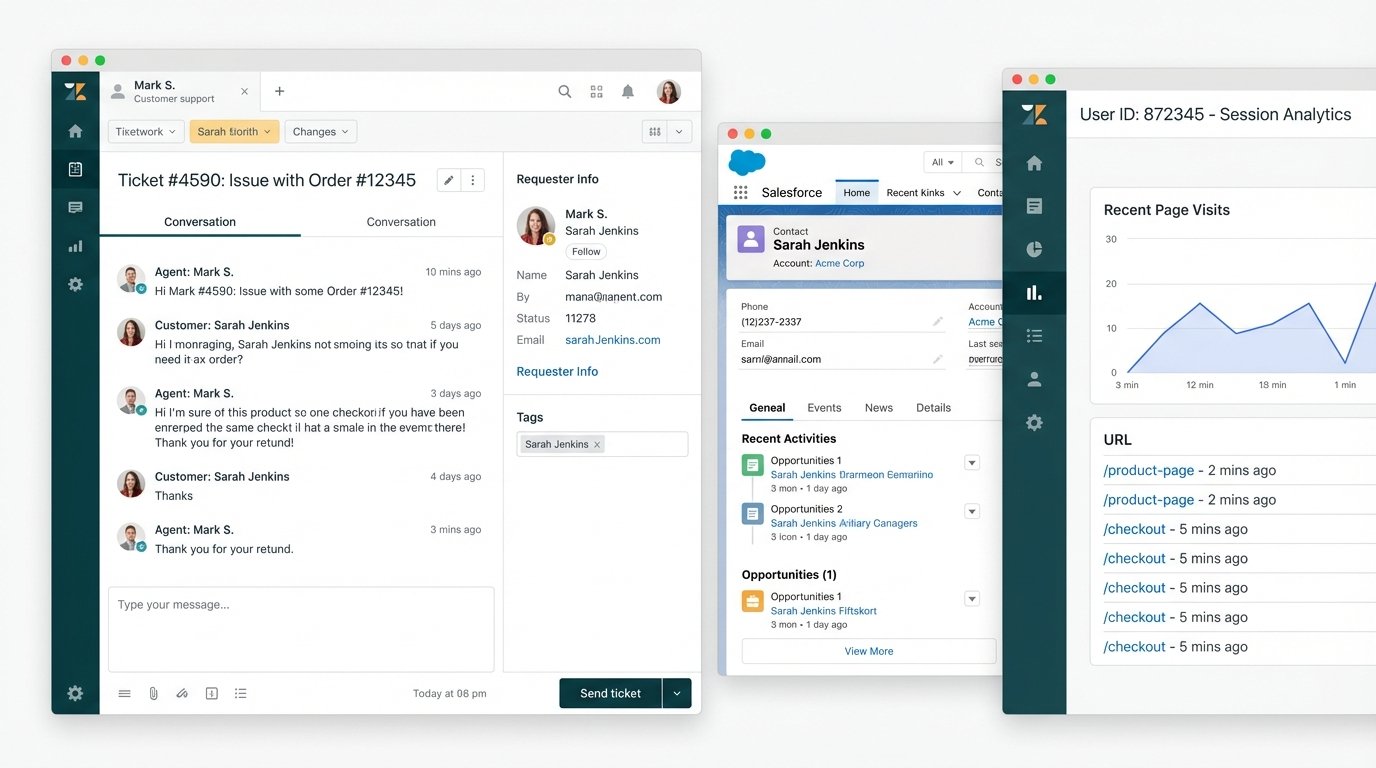
This fragmentation isn’t just inefficient. It’s a direct cause of agent burnout and customer frustration. The solution isn’t a “unified dashboard” that shoves even more charts and graphs onto a single screen. That just centralizes the noise. The solution is to gut the entire reporting-first paradigm and replace it with a workflow-first one.
From Passive Reports to Active Intelligence
The goal is to stop building analytics that someone has to *look at*. We need to build systems that *act*. This means shifting from batch-processed, historical data dumps to event-driven, real-time data enrichment. When an event happens, like a new ticket being created in Zendesk, it should trigger a cascade of automated lookups.
The ticket itself becomes the canvas. We don’t send the agent to the data. We bring the data to the agent. A webhook from the ticketing system fires the moment the ticket is created. This payload hits an integration layer, maybe a cloud function or an iPaaS workflow, which then begins its work.
First, it grabs the user’s email from the ticket data. It uses that email to query the CRM, let’s say Salesforce, to pull their account type, lifetime value, and assigned account manager. Next, it queries your internal product database to get their feature flags and usage metrics. Finally, it might check a marketing automation tool like HubSpot to see if they are in an active onboarding sequence. Within two seconds, all this data is fetched, formatted, and posted back to the original ticket as a private internal note.
The agent opens the ticket and immediately has a complete dossier. No tab-switching. No searching. Just pure, actionable context. This isn’t a report. It’s an operational asset.
The Mechanics of Data Fusion
Building this requires a shift in thinking from data warehousing to API choreography. The automation layer acts as a state machine, orchestrating calls to disparate endpoints and stitching the responses together. The primary challenge is not the API calls themselves, but the logic required to handle the messy reality of production data.
You need to logic-check everything. What if the email from the ticket doesn’t exist in the CRM? What is the fallback? What if the CRM API times out or hits a rate limit? You need retry logic with exponential backoff. You need to map identifiers between systems, a process that is rarely clean. A user ID in your database is not the same as a contact ID in Salesforce or a client ID in Google Analytics.
Here’s a simplified Python example using a serverless function to demonstrate the concept. This function could be triggered by a webhook. It takes a ticket, queries a CRM, and then updates the ticket.
import requests

import json

import os
ZENDESK_API_URL = "https://your_domain.zendesk.com/api/v2/tickets/"
CRM_API_URL = "https://api.yourcrm.com/v1/contacts/"
ZENDESK_API_TOKEN = os.environ.get("ZENDESK_TOKEN")
CRM_API_KEY = os.environ.get("CRM_KEY")
def enrich_ticket(request):
"""
Triggered by a webhook on ticket creation.
Fetches CRM data and adds it as a private comment to the ticket.
"""
request_json = request.get_json(silent=True)
ticket_id = request_json.get('ticket_id')
requester_email = request_json.get('requester_email')
if not ticket_id or not requester_email:
return ('Missing ticket_id or requester_email', 400)
# 1. Fetch data from CRM
crm_headers = {'Authorization': f'Bearer {CRM_API_KEY}'}
crm_params = {'email': requester_email}
try:
crm_response = requests.get(CRM_API_URL, headers=crm_headers, params=crm_params, timeout=5)
crm_response.raise_for_status() # Raise exception for bad status codes
contact_data = crm_response.json().get('data', [{}])[0]
account_type = contact_data.get('account_type', 'N/A')
ltv = contact_data.get('lifetime_value', 0)
except requests.exceptions.RequestException as e:
# If CRM fails, we post a failure notice and exit gracefully
# In production, you'd add this to a retry queue
print(f"CRM API call failed: {e}")
account_type = "CRM lookup failed"
ltv = "N/A"
# 2. Format the data and update the Zendesk ticket
comment_body = f"""
--- CRM CONTEXT ---
Account Type: {account_type}
Lifetime Value: ${ltv}
-------------------
"""
update_payload = {
"ticket": {
"comment": {
"body": comment_body,
"public": False
}
}
}
zendesk_url = f"{ZENDESK_API_URL}{ticket_id}.json"
zendesk_headers = {'Content-Type': 'application/json'}
zendesk_auth = (f"{ZENDESK_API_TOKEN}/token", "api_token_placeholder") # Use your actual token setup
try:
update_response = requests.put(zendesk_url, headers=zendesk_headers, auth=zendesk_auth, data=json.dumps(update_payload), timeout=5)
update_response.raise_for_status()
except requests.exceptions.RequestException as e:
print(f"Zendesk API call failed: {e}")
return ('Failed to update Zendesk ticket', 500)
return ('Ticket enriched successfully', 200)
This is a bare-bones structure. A production system would need more robust error handling, caching to avoid hammering APIs for the same contact repeatedly, and a way to manage API keys securely. But it shows the path. It is a direct, programmatic intervention, not a passive visualization.
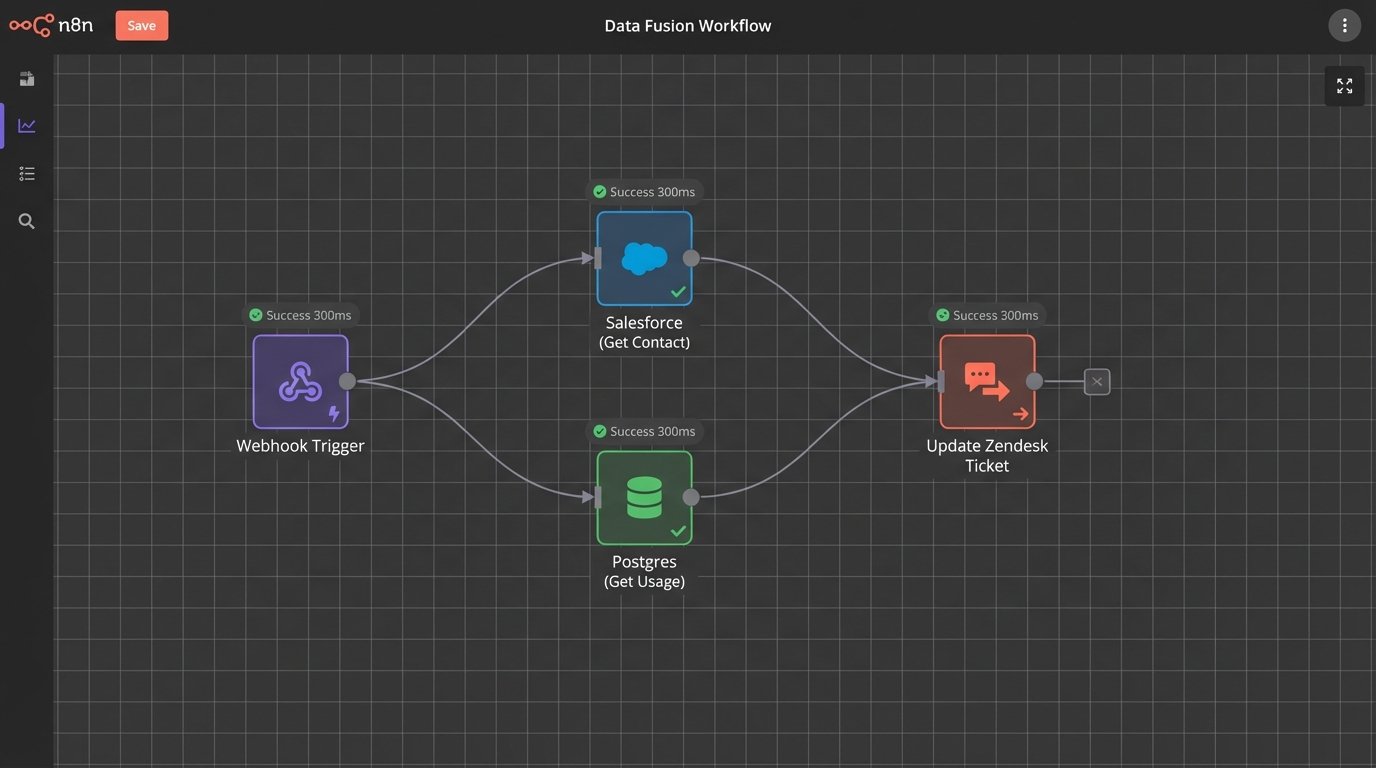
This process is about forcing systems to talk to each other at the point of need. It’s the architectural equivalent of bypassing a translator and creating a direct line of communication. It’s often more complex to build initially than a simple dashboard pulling from a data warehouse. The payoff is a system that actually gets used because it makes an agent’s job fundamentally easier, not harder.
The Real ROI: Speed and Sanity
When you inject context directly into the workflow, several things happen. First, time-to-resolution plummets. Agents are no longer wasting the first three minutes of every interaction asking qualifying questions. They can see the user’s history and get straight to the problem. This isn’t a marginal improvement. It can cut ticket handling time by 20 to 30 percent.
Second, the quality of service improves. An agent who knows a customer is a high-value enterprise client on a premium plan will handle the interaction differently than a freemium user who just signed up. This context allows for intelligent triage and prioritization without manual intervention. It allows the agent to provide proactive advice based on the user’s specific product usage.
The most important benefit is often overlooked. It restores agent sanity. Forcing an agent to navigate a maze of disconnected tools is a recipe for fatigue and burnout. Arming them with immediate, relevant data empowers them. It turns them from information gatherers into problem solvers. You’re removing the most frustrating part of their job.
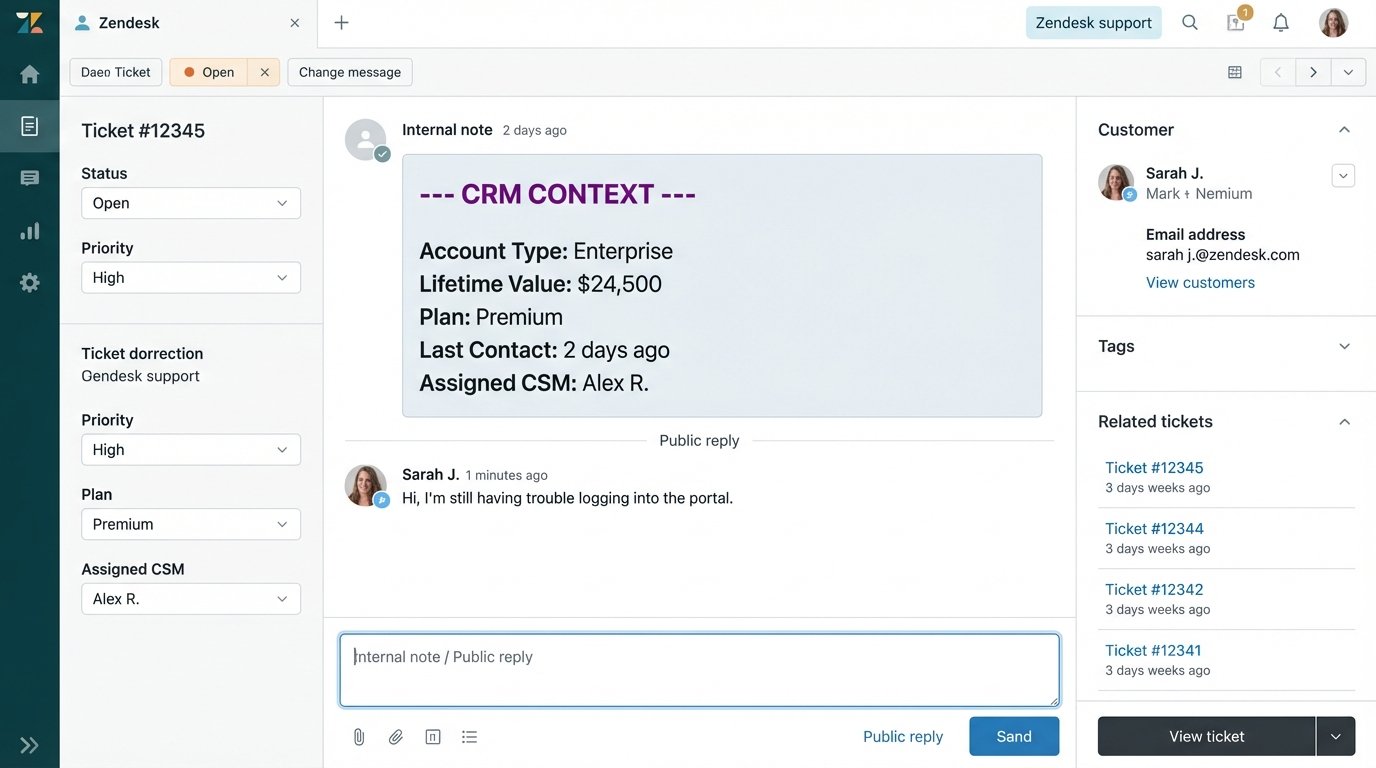
This approach kills the need for many traditional dashboards. You don’t need a chart showing “average time to first reply” when your core automation is designed to make that metric obsolete. The goal shifts from monitoring the problem to engineering its solution. The analytics become an invisible, embedded part of the operational fabric of the business.
Stop investing cycles in building another pretty but ignored dashboard. Invest those resources in the integration glue that bridges your data silos. Build workflows that feed agents the context they need, when they need it, where they already work. They won’t ignore that.